
NetApp SMB Shares Fail After the October 2026 DC Update: The LDAP SPN Check and How to Fix It

If your file shares live on NetApp ONTAP or Azure NetApp Files and users started getting access errors after you patched your domain controllers in October, this is probably why. Starting with the October 13, 2026 Windows security updates, a domain controller only accepts a Kerberos LDAP bind when the service ticket is for the LDAP service name. ONTAP, with its default LDAP session security of none, presents a ticket for the CIFS service instead, so the bind fails with “Invalid credentials” and SMB access breaks. Microsoft documents it in KB5134907 and repeated the warning in Message Center post MC1551001 on November 12.
I don’t have a NetApp box, so I can’t show you the failure on a filer. What I can show is everything on the Windows side, from a Windows Server 2025 domain controller with the November update: how to check the DC is patched, how to check the new setting, why a CIFS ticket was ever accepted for LDAP, how to find unsigned LDAP clients in the event log, and the registry workaround with its undo. The NetApp side is covered from NetApp’s and Microsoft’s own docs and I say clearly where I did not test it.
Quick guide
- Confirm your DCs have the October 13, 2026 update or anything newer.
- On the filer, check
session-security-for-ad-ldap. If it saysnone, you are in the affected group. - Self-managed ONTAP: set it to
signorseal(NetApp’s guidance first). - Azure NetApp Files, or if you can’t change ONTAP yet: set
LdapSPNVerificationLevelto 0 on the DCs as a temporary workaround, then remove it once the filer is fixed. - Turn on LDAP interface logging (event 2889) to find other clients that bind without signing.
What changed and who is affected
From KB5134907: after the update, LDAP authentication needs a valid LDAP service ticket that matches an SPN registered on the domain controller. ONTAP normally authenticates with a ticket for cifs/dc-fqdn. After the hardening the DC only takes a ticket for ldap/dc-fqdn, so the bind is rejected.
- Affected: Azure NetApp Files and NetApp ONTAP configurations that connect to AD LDAP with LDAP client session security set to
none. - DC versions listed: Windows Server 2025, 2022, 2019, 2016, and 2012 and 2012 R2 with ESU.
- Symptoms: SMB share access fails, apps that use those shares break, new SMB volume creation fails with “Invalid credentials”, and LDAP work such as domain discovery, name mapping and user or group lookups fails. The SVM can mark the LDAP server as unusable.
Note what this is not. It is not the LDAP signing requirement and it is not channel binding. On my DC the LDAP signing setting was untouched and Windows clients kept binding fine. It is a separate check on which service the ticket was issued for.
Prerequisites
- Domain Admin, or an account that can read and change the registry on the DCs.
- Windows PowerShell 5.1 on a DC, or on a management machine with RSAT for the AD commands.
- For the filer: ONTAP cluster admin access, or Owner or Contributor on the Azure NetApp Files account.
Step 1. Check that the domain controller has the update
The hardening comes with the October 13, 2026 security update and every cumulative update after it. On my lab DC the newest one was the November update, KB5131080, build 26100.33822.
Get-ItemProperty 'HKLM:\SOFTWARE\Microsoft\Windows NT\CurrentVersion' |
  Format-List ProductName,DisplayVersion,CurrentBuild,UBR
Get-HotFix | Sort-Object InstalledOn -Descending |
  Select-Object -First 3 HotFixID,Description,InstalledOn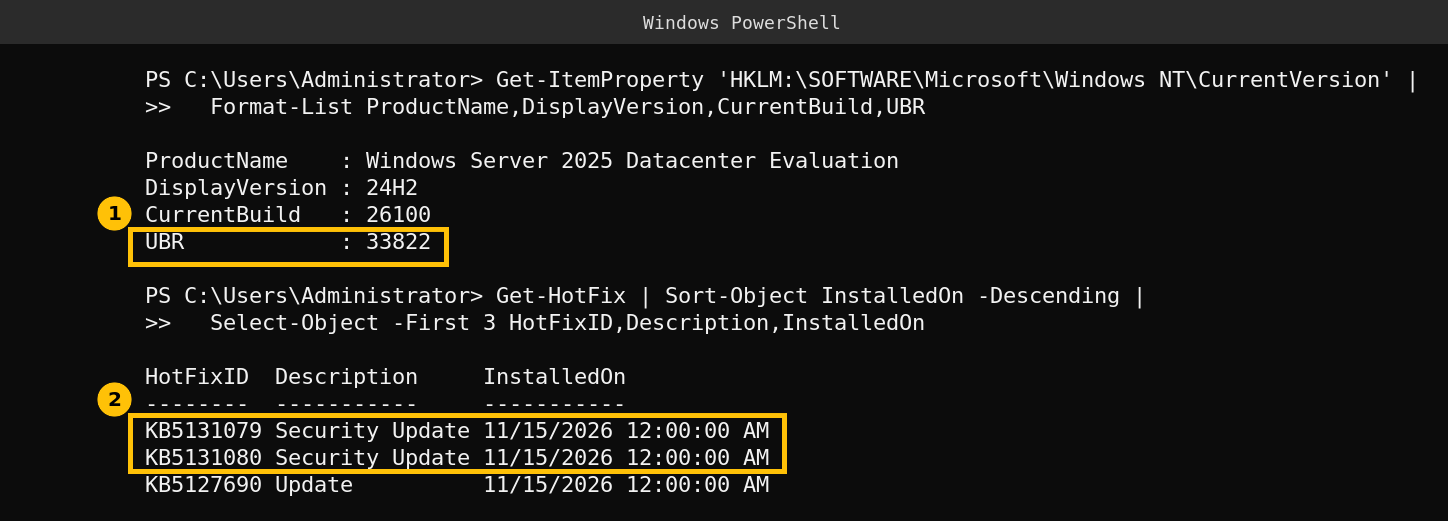
Expected result: an update dated October 13, 2026 or later. If your DCs are older than that, this change isn’t the cause of your NetApp problem.
Step 2. Check the LdapSPNVerificationLevel value
The switch for the new check is a DWORD named LdapSPNVerificationLevel under the NTDS Parameters key. Microsoft says the default is 1, meaning the check is on, and 0 turns it off. On a patched DC the value isn’t there at all unless someone created it, and that means the default applies.
$ntds = 'HKLM:\SYSTEM\CurrentControlSet\Services\NTDS\Parameters'
(Get-ItemProperty $ntds).LdapSPNVerificationLevel -eq $null
Get-ItemProperty $ntds | Format-List LDAPServerIntegrity,LdapEnforceChannelBinding
Expected result: True on a DC nobody has touched. If it returns False, somebody already created the value, so read it before you change anything. I added the second line to show that LDAPServerIntegrity was still 1 and channel binding was not set on this DC. The update didn’t change either of them.
Step 3. Why a CIFS ticket ever worked for LDAP
This part helped me understand the change. A DC doesn’t have a cifs/ SPN of its own. It has HOST/ and ldap/ SPNs, and CIFS is one of the service names that AD treats as an alias of HOST through the sPNMappings attribute. So when ONTAP asks for a ticket to cifs/dc01.contoso.com, the KDC issues it against the DC’s computer account, the same account that holds the ldap/ SPN.
setspn -L DC01 | Select-String -Pattern 'ldap/DC01|HOST/DC01|cifs/'
$cfg = (Get-ADRootDSE).configurationNamingContext
$ds = Get-ADObject "CN=Directory Service,CN=Windows NT,CN=Services,$cfg" `
  -Properties sPNMappings
$aliases = ($ds.sPNMappings -replace '^host=','') -split ','
$aliases.Count
$aliases -contains 'cifs'
$aliases -contains 'ldap'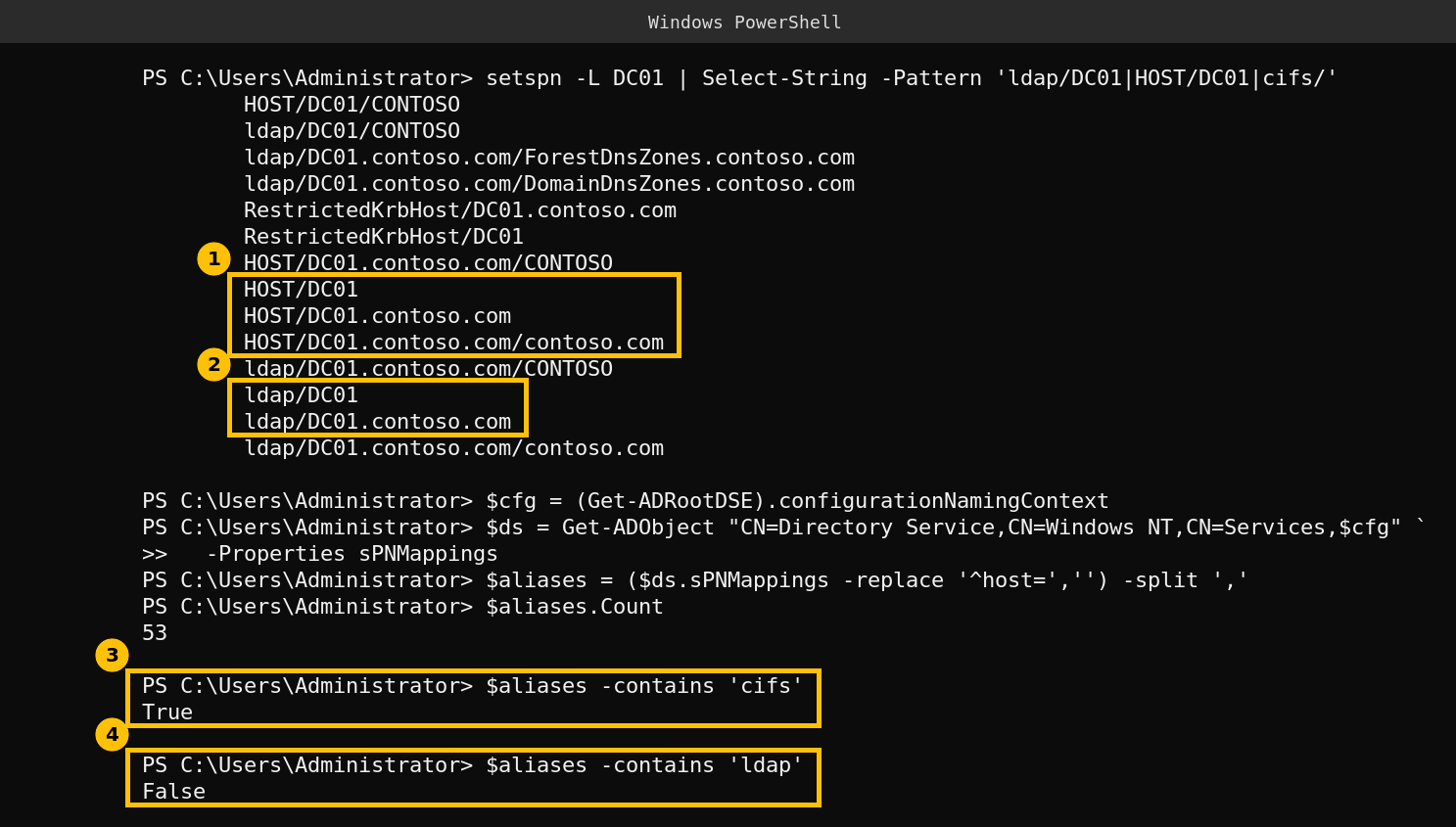
My reading of this: before October the DC could decrypt a CIFS ticket with its own key and accepted it for LDAP too, because the key is the same. The update adds the missing check that the ticket was issued for LDAP. That fits Microsoft’s wording in the KB, but the explanation of the old behavior is mine, not Microsoft’s.
Step 4. Find LDAP clients that bind without signing
NetApp’s fix is to make ONTAP sign or seal its LDAP traffic, because then it asks for an LDAP ticket. That means the affected filers are LDAP clients that don’t sign. The DC already has logging for exactly that. Microsoft’s LDAP signing article says the DC writes a summary event 2887 once every 24 hours, and if you set the 16 LDAP Interface Events diagnostic value to 2, it logs event 2889 for every unsigned bind, with the client IP and the account. More on the diagnostic levels is in Configure AD and LDS diagnostic event logging.
$diag = 'HKLM:\SYSTEM\CurrentControlSet\Services\NTDS\Diagnostics'
Set-ItemProperty $diag -Name '16 LDAP Interface Events' -Value 2 -Type DWord
Get-ItemProperty $diag | Format-List '16 LDAP Interface Events'
Then read the events. I tested this two ways. First I made Negotiate binds from Windows PowerShell with $ldap.SessionOptions.Signing = $false. Windows signed them anyway, the property read True after the bind, and no event was logged. Then I tried a plain simple bind over port 389 with AuthType = 'Basic':
$ldap = New-Object System.DirectoryServices.Protocols.LdapConnection('DC01.contoso.com')
$ldap.AuthType = 'Basic'
$ldap.Bind((Get-Credential).GetNetworkCredential())

Exception calling "Bind" with "1" argument(s): "Strong authentication is required for this operation."
My DC refused it, and this is the event it logged:
Get-WinEvent -LogName 'Directory Service' -FilterXPath '*[System[EventID=2889]]' `
  -MaxEvents 1 | Format-List TimeCreated,Id,Message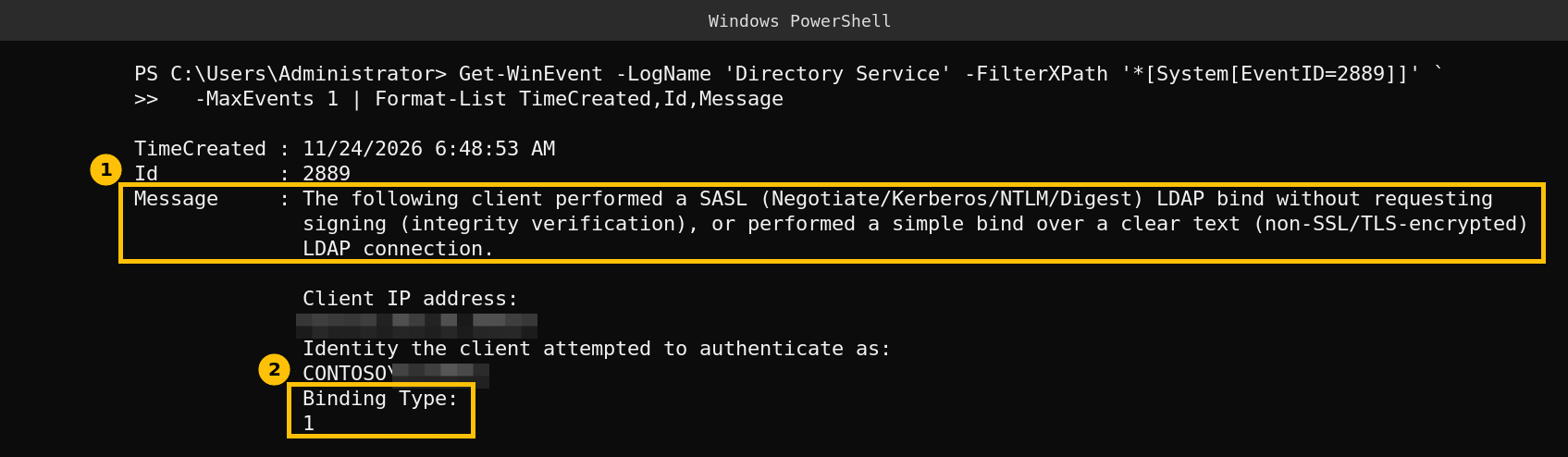
Microsoft’s event reference says Binding Type 0 is a SASL bind without signing and 1 is a simple bind, so this one was my Basic test. An ONTAP SVM with session security none uses Kerberos, so I’d expect it to show up as type 0 with the SVM’s IP and machine account. I couldn’t confirm that without a filer. Run this on each DC the filer can reach, because each DC only logs the binds it received. When you’re done, set the value back to 0 so the log doesn’t fill up.
Step 5. Fix it on the NetApp side
Self-managed ONTAP. Microsoft’s preferred fix in the KB is to set LDAP session security for AD to sign or seal on each affected SVM. NetApp documents the command in its LDAP signing and sealing task and the vserver cifs security modify reference. The default is none. I have not run these myself, so check NetApp’s KB for your ONTAP version first (Microsoft points to NetApp KB CONTAP-821088).
cluster1::> vserver cifs security show -vserver svm1 -fields session-security-for-ad-ldap
cluster1::> vserver cifs security modify -vserver svm1 -session-security-for-ad-ldap sign
NetApp’s task page also says that if the SVM uses the same LDAP server for name mapping or other UNIX lookups, you set the matching -session-security option on vserver services name-service ldap client modify too.
Azure NetApp Files. You can’t run ONTAP commands there. The AD connection has an LDAP Signing option (Create and manage AD connections). It needs an A record and a matching PTR record for every DC the service can use, and Microsoft warns that changing AD connection options can disrupt client access. The KB doesn’t say that turning on LDAP Signing in ANF avoids this issue. For ANF it points to the temporary DC workaround below and says NetApp is working on a fix. If you are on ANF, I’d open a case with Azure support before changing the AD connection.
Step 6. The temporary workaround on the domain controllers
Warning: this turns off a security check on the domain controller for every client, not just the filer. Use it only to get shares back while you fix the filer, and back up the registry first. Microsoft says the change takes effect without a restart and should be set back to the default of 1 when it is safe.
$ntds = 'HKLM:\SYSTEM\CurrentControlSet\Services\NTDS\Parameters'
New-ItemProperty $ntds -Name LdapSPNVerificationLevel -PropertyType DWord -Value 0 |
  Format-List LdapSPNVerificationLevel

# undo, back to the default
Remove-ItemProperty $ntds -Name LdapSPNVerificationLevel
(Get-ItemProperty $ntds).LdapSPNVerificationLevel -eq $null
I removed the value instead of setting it to 1, because it didn’t exist before and the result is the same default. On my DC both commands worked straight away with no restart. I can’t show you the filer recovering, since I don’t have one. You need the value on every DC the SVM can talk to, and that is usually every DC in its AD site. This loop lists the value on each DC. I only have one DC and my test of the loop failed with a double hop error because I ran it from a remote session, so run it from an elevated console on a management machine and treat it as untested:
Get-ADDomainController -Filter * | ForEach-Object {
    Invoke-Command -ComputerName $_.HostName -ScriptBlock {
        $v = (Get-ItemProperty 'HKLM:\SYSTEM\CurrentControlSet\Services\NTDS\Parameters').LdapSPNVerificationLevel
        [pscustomobject]@{ DC = $env:COMPUTERNAME
                           LdapSPNVerificationLevel = $v }
    }
}
Troubleshooting
“Invalid credentials” when creating an SMB volume in Azure NetApp Files
Cause: the AD connection binds to LDAP with a CIFS ticket and a patched DC rejects it. Fix: follow Step 5 for ANF, and use the workaround in Step 6 on the DCs in the AD site of the connection until there is a NetApp fix.
Shares work on some days and fail on others
Cause: the SVM picks a different DC each time and only some DCs are patched, or only some have the workaround. Fix: check the build and the value on every DC with the loop in Step 6. A mixed state is the worst of both.
Event 2889 never shows up
Cause: the diagnostic value is still 0, you are looking at a DC the client didn’t use, or the client signs. Fix: set it to 2 on every DC and wait for the next bind. Windows clients sign by default, so you mostly see appliances, Linux and old apps here. My NTLM signing audit post covers the same kind of hunt for SMB and NTLM.
The workaround fixed shares, but you’re not sure it is safe to remove
Cause: you can’t tell if the filer now signs. Fix: after you change ONTAP to sign, remove the value on one DC, point a test at that DC and watch for errors, then do the rest.
FAQ
Does this affect Windows file servers?
Not according to the KB, which only names NetApp configurations. The Windows binds I made in my lab after the update all kept working.
Do I need to restart the domain controller after the registry change?
No. Microsoft says it takes effect dynamically, and on my DC the value changed straight away.
Is this the same as requiring LDAP signing?
No. LDAP signing is about protecting the traffic, and this check is about which service the Kerberos ticket was issued for. ONTAP’s fix happens to be signing, because turning on signing makes ONTAP ask for an LDAP ticket. If you are tightening Kerberos anyway, my RC4 audit post and the Protected Users test are related reading.
Summary
| Item | What I found or what to do |
|---|---|
| When it started | Windows updates from October 13, 2026 |
| What the DC checks | The LDAP bind ticket must be for the ldap SPN, not cifs |
| Who breaks | ONTAP and Azure NetApp Files with LDAP session security none |
| Setting on the DC | LdapSPNVerificationLevel, default 1, 0 turns the check off |
| Preferred fix | ONTAP session-security-for-ad-ldap sign or seal |
| Temporary fix | LdapSPNVerificationLevel = 0 on the DCs, no restart, undo later |
| Find unsigned clients | 16 LDAP Interface Events = 2, then event 2889 |
What I tested: a Windows Server 2025 domain controller with the November 2026 update (build 26100.33822), the default value check, the SPN and sPNMappings check, LDAP interface logging with event 2889, Negotiate binds from Windows PowerShell, a simple bind refused with “Strong authentication is required”, and the workaround value set and removed. What I did not test: a NetApp ONTAP or Azure NetApp Files system, the ONTAP commands, the ANF LDAP Signing option, and a domain with several DCs. The lab domain shows as contoso.com. Afterwards I set the diagnostic value back to 0 and removed the test account.
Sources
- KB5134907: Access to NetApp SMB shares might fail after installing the October 2026 Windows security update (Microsoft Support)
- KB5131080: November 10, 2026 update for Windows Server 2025 (Microsoft Support)
- How to enable LDAP signing, events 2887 and 2889 (Microsoft Learn)
- Configure AD and LDS diagnostic event logging (Microsoft Learn)
- sPNMappings attribute (Microsoft Learn)
- Create and manage Active Directory connections for Azure NetApp Files (Microsoft Learn)
- Modify Active Directory connections for Azure NetApp Files (Microsoft Learn)
- Enable LDAP signing and sealing on the CIFS server (NetApp docs)
- vserver cifs security modify (NetApp docs)