NTLMv1 Single Sign On Gets Blocked by Default in October 2026: How to Audit BlockNtlmv1SSO Now

Microsoft has said that in October 2026 the default for a new NTLM setting flips from “audit only” to “block”. If your Wi-Fi, wired 802.1X or VPN sign in relies on single sign on with MS-CHAPv2, that flip can quietly turn automatic sign in into a password prompt. The setting is called BlockNtlmv1SSO, and you can find out today whether it will affect you.
Quick guide
- Check which machines run Windows 11 24H2 or Windows Server 2025. These are the versions that carry the new setting.
- On one of them, open PowerShell and check the registry value shown in the first screenshot below. If it prints nothing, nobody has set it, so the new default will apply.
- Open Event Viewer and go to Applications and Services Logs, Microsoft, Windows, NTLM, Operational.
- Look for Event ID 4024 (a warning that means something used NTLMv1 derived credentials for single sign on). Note the process name in each event.
- If you see 4024 events, move that sign in method away from MS-CHAPv2 (for example to certificate based EAP) or fix the app before the default changes.
- If you see none, you are probably fine. You can set the value to 1 yourself now to test enforcement on a pilot machine.

What is actually changing
Microsoft removed the NTLMv1 protocol from Windows 11 24H2 and Windows Server 2025. Some remnants of NTLMv1 cryptography remain in specific cases, for example MS-CHAPv2 in a domain joined environment. To close that gap, Microsoft added a registry value that controls what happens when something asks Windows to generate NTLMv1 derived credentials for a signed in user.
- Registry path:
HKEY_LOCAL_MACHINE\SYSTEM\CurrentControlSet\Control\Lsa\MSV1_0 - Value name and type:
BlockNtlmv1SSO, REG_DWORD - 0 (current default): Audit mode. The request is allowed and a warning is logged.
- 1: Enforce mode. The request is blocked and an error is logged.
Microsoft’s support article for this change (KB5066470) states that in October 2026 the default becomes 1 through a future Windows update, but only on devices where the value has not been deployed. Microsoft also notes that these dates are tentative and subject to change. The rollout began in audit mode on Windows 11 24H2 in late August 2025 and reached Windows Server 2025 from November 2025.
Who is affected and who is not
Microsoft describes the affected scenarios as higher level protocols that use NTLMv1 derived credentials for single sign on. Its examples are Wi-Fi, Ethernet and VPN deployments that use MS-CHAPv2 authentication. In Enforce mode, single sign on for those flows stops working, but typing the credentials manually still works.
Devices with Windows Credential Guard enabled are not affected by this particular change, because Credential Guard already protects NTLMv1 legacy cryptography. Microsoft recommends enabling Credential Guard wherever its requirements are met. The lab machine used for the screenshots had no Credential Guard service running, which is why it would be in scope.
How to audit properly
The two events to know are both written to the Microsoft-Windows-NTLM/Operational log.
- Event ID 4024 (warning, Audit mode): an attempt to use NTLMv1 derived credentials for single sign on was seen and allowed.
- Event ID 4025 (error, Enforce mode): the same attempt was blocked by policy.
Both events list the target server, the user, and the name and process ID of the client process, which tells you exactly which application or network profile needs attention. To pull them with PowerShell:
$filter = @{
    LogName = "Microsoft-Windows-NTLM/Operational"
    Id      = 4024, 4025
}
Get-WinEvent -FilterHashtable $filter -MaxEvents 50 |
  Select-Object TimeCreated, Id, Message
On a fresh lab server the log exists but holds no 4024 or 4025 events, which is what a clean result looks like.
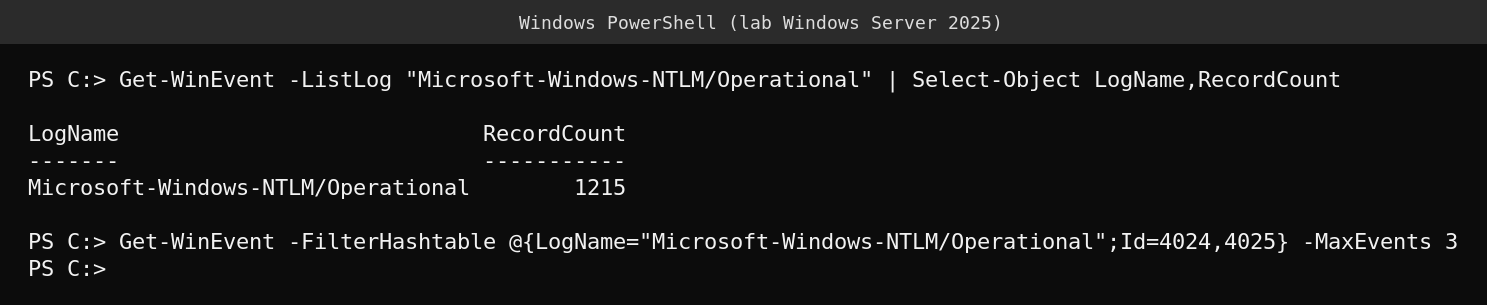
Run the query across a representative sample of laptops and servers, not just one. Roaming laptops on office Wi-Fi are the most likely place to see 4024 events. A tool such as event forwarding or your SIEM makes this practical at scale.
Testing enforcement before the default changes
Pick a pilot group and set the value yourself. A registry change through Group Policy Preferences or your management tool is enough.
New-ItemProperty -Path "HKLM:\SYSTEM\CurrentControlSet\Control\Lsa\MSV1_0" -Name BlockNtlmv1SSO -PropertyType DWord -Value 1 -ForceThen reconnect to your corporate Wi-Fi, wired 802.1X and VPN profiles and watch for 4025 events. Setting the value explicitly also protects you from surprises, because the default flip only applies when the value has not been deployed. Deploying 0 deliberately keeps audit mode, but treat that as a temporary bridge.
What actually goes wrong
The failure will not look like a security event to end users. It will look like Wi-Fi that used to connect on its own now asking for a password, or a VPN client that stops reusing the Windows sign in. Help desks will see a wave of tickets right after the update lands. Finding the MS-CHAPv2 profiles now, and moving them to certificate based authentication or another method that does not depend on NTLMv1 derived credentials, is far cheaper than doing it during an incident.
FAQ
Does this affect NTLMv2 or Kerberos?
No. This setting is specifically about NTLMv1 derived credentials used for single sign on. It is separate from the wider plan to phase out NTLM.
Will typing my password still work in Enforce mode?
According to Microsoft, single sign on for the affected flows stops working, but manually entering credentials continues to work.
Which Windows versions have the setting?
Windows 11 version 24H2 and Windows Server 2025 and later. Check the Microsoft support article for the current dates, since Microsoft marks them as tentative.
Sources
Microsoft Support, “Upcoming changes to NTLMv1 in Windows 11, version 24H2 and Windows Server 2025” (KB5066470).