PowerShell 7.4 and 7.5 Both Lose Support on November 10, 2026: Your Move to 7.6 LTS Checklist

On November 10, 2026, Microsoft ends support for both PowerShell 7.4 LTS and PowerShell 7.5. After that date neither gets security fixes. If your scheduled tasks, CI pipelines or admin jobs still call an older pwsh, you have a clear deadline and one supported destination: PowerShell 7.6 LTS.

Quick guide
- On each server or build agent, open PowerShell and run
$PSVersionTable.PSVersion. Write down the version. - If it starts with 7.4 or 7.5, plan to move it to 7.6. Do not move 7.4 to 7.5, because 7.5 ends on the same day.
- Install 7.6 next to the old version first. On Windows use
winget install --id Microsoft.PowerShelland on Linux use your package manager or Microsoft’s install page. - Run your important scripts under 7.6 in a test environment. Watch for the small list of breaking changes below.
- Update pipeline images, scheduled task actions and shebang lines so they call the new version.
- Remove the old version once nothing depends on it, and record the change.
The dates that matter
Microsoft’s PowerShell support lifecycle page lists these end of support dates.
- PowerShell 7.4 (LTS): released 16 November 2023, support ends 10 November 2026, built on .NET 8.
- PowerShell 7.5: released 23 January 2025, support ends 10 November 2026, built on .NET 9.
- PowerShell 7.6 (LTS): released 18 March 2026, support ends 14 November 2028, built on .NET 10.
At the time of writing the same page named PowerShell 7.6.6 as the current LTS release and 7.4.20 as the previous one. Version numbers move with monthly servicing releases, so check the page for the latest.
Breaking changes to test for
The PowerShell team’s announcement for 7.6 says it includes a small number of breaking changes. The ones listed are:
- The
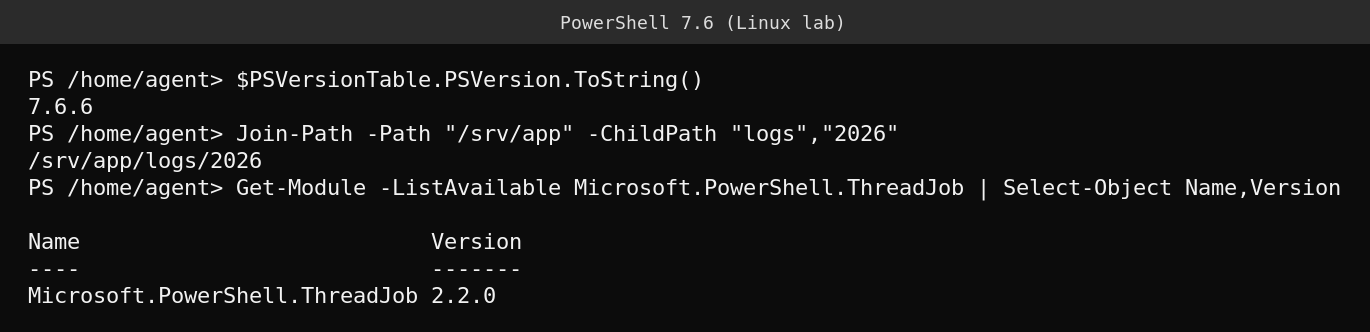
-ChildPathparameter ofJoin-Pathis now astring[]. You can pass several child segments in one call, which the lab output above shows working. WildcardPattern.Escape()now escapes lone backticks correctly.- The trailing space was removed from the
GetHelpCommandtrace source name.
Most scripts will never notice these, but anything that builds paths from arrays or escapes wildcards deserves a quick test. Also note that 7.6 runs on .NET 10, so any binary modules you ship or depend on need to work on the newer runtime.
Finding what still runs the old version
The version on your admin laptop tells you little. The risk is in places where nobody looks.
- Scheduled tasks and cron jobs that call
pwshby full path. - Build pipelines that pin an image or install a specific version.
- Scripts with a
#requires -Versionline or a shebang that names a specific install. - Container images and golden VM templates.
A quick search helps for scripts in a repository.
Get-ChildItem -Recurse -Include *.ps1 |
  Select-String -Pattern '#requires', 'pwsh' |
  Select-Object Path, LineNumber, Line
What actually goes wrong
Nothing breaks on November 10. The runtime keeps working. The problem is that from that day a known flaw in PowerShell or the .NET runtime underneath it will not get a fix, and auditors and vulnerability scanners will start reporting it. Teams that wait until the scan finding often have to test many scripts in a hurry. Moving one environment a week between now and November is much calmer.
FAQ
Can I skip to 7.6 straight from 7.4?
Yes. Microsoft’s own support table shows 7.5 ending on the same day as 7.4, so 7.6 is the sensible single move.
Does this affect Windows PowerShell 5.1?
No. Windows PowerShell 5.1 is a separate product that ships with Windows and follows the Windows lifecycle. This deadline is about the cross platform PowerShell 7 line.
Will 7.6 install over 7.4?
Side by side installs are supported on most platforms, which lets you test before removing the old one. Follow the install instructions for your operating system.
Sources
Microsoft Learn, “PowerShell Support Lifecycle”, and the PowerShell Team blog post “Announcing PowerShell 7.6 (LTS) GA Release”.