Ubuntu 24.04 to 26.04 LTS Upgrade Preflight: Six Checks Before You Run do-release-upgrade

Ubuntu 26.04 LTS is out, and Ubuntu 24.04 systems are the natural upgrade candidates. The upgrade tool will do the work, but most failed upgrades come from the state of the machine before you start, not from Ubuntu itself. This is a short preflight you can run in five minutes on any 24.04 server, with real output from a lab machine so you know what a healthy result looks like.

Quick guide
- Make a backup or a snapshot. An in place release upgrade is not something you can undo.
- Bring 24.04 fully up to date:
sudo apt update && sudo apt full-upgrade, then reboot if/var/run/reboot-requiredexists. - Check free space with
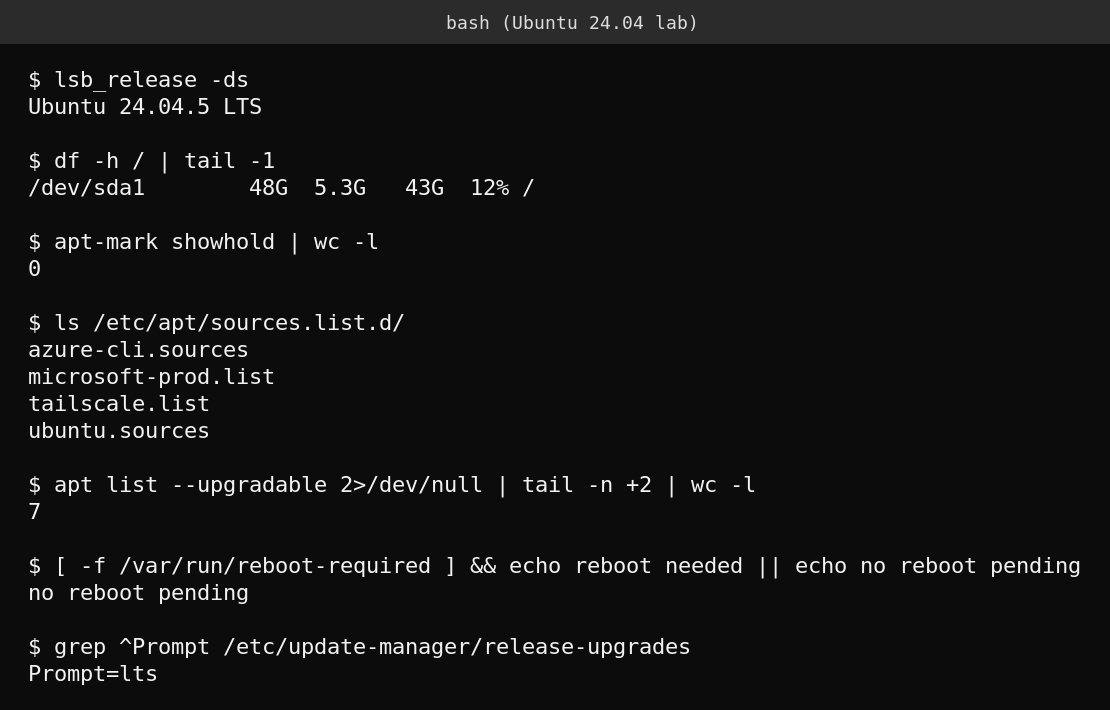
df -h /. Aim for several gigabytes free, and more if/varis a separate small partition. - Look for held packages with
apt-mark showhold. The result should be empty. - List third party repositories with
ls /etc/apt/sources.list.d/and note what you use. The upgrade tool disables them, so you will re add the ones you still need afterwards. - Run
do-release-upgrade -cto ask whether an upgrade is being offered to your machine. Use a terminal that survives disconnects, such as tmux or screen, before you start the real upgrade.
Is the upgrade actually available to you yet?
LTS to LTS upgrades are not offered automatically on the day a release ships. They open after the first point release, and in this cycle Canonical delayed them further. According to reporting on the Ubuntu 26.04.1 announcement, the direct upgrade from 24.04 was held for a few weeks so that fixes for regressions in a recent version of rust-coreutils could land first, and the automatic prompt was expected in early September. The same report notes that you can force the path early with sudo do-release-upgrade -d, but that route is not officially supported until the gate opens, so it is a bad idea for production.
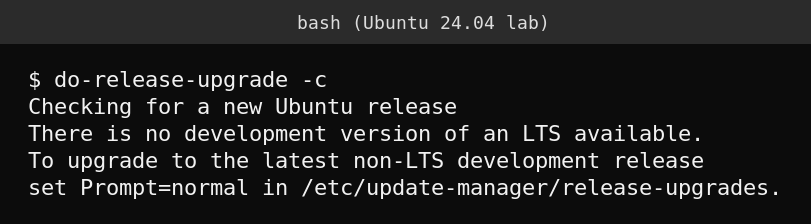
do-release-upgrade -c on the lab machine at the time of writing. The tool did not offer an LTS upgrade to this machine yet. Your result depends on your mirror and the date, so run it yourself.If the check does not offer 26.04, wait rather than reaching for -d. Ubuntu 24.04 LTS keeps getting standard security updates until 2029 and extended coverage until 2034 with Ubuntu Pro, so there is no emergency.
Why each check matters
Free space
An upgrade downloads and unpacks thousands of packages. Running out of space halfway leaves the system half upgraded and hard to recover.
Held packages
A package that is held with apt-mark hold cannot move to the new release, which can block dependency resolution. Release the hold or remove the package first.
Third party repositories
The lab machine shows files for the Azure CLI, Microsoft packages and Tailscale. Any repository that does not yet publish packages for 26.04 will fail to resolve once the tool points apt at the new release. The upgrade tool disables third party sources for that reason, so plan to re enable and check each one afterwards.
Pending updates and reboots
Upgrading from a half updated system is a common cause of trouble. The lab machine had seven pending updates, so it would not pass this step until they were installed.
Remote sessions
If your SSH session drops during the upgrade, the tool starts a backup session, but do not rely on that. Work inside tmux or screen, and keep console access if the server is virtual or hosted.
What actually goes wrong
- Old PPAs or vendor repositories that break dependency resolution.
- Machines that skipped the last kernel update and were never rebooted.
- Scripts that assumed the behaviour of older core tools. The Rust based coreutils in newer Ubuntu releases are worth testing against your scripts, and this site has a separate article on what breaks there.
- Servers with only a few gigabytes free.
FAQ
Should I upgrade in place or reinstall?
A fresh install skips the accumulated package state and is often cleaner, especially for servers you can rebuild from automation. In place upgrades make sense when rebuilding is expensive.
Can I test the upgrade first?
Yes. Clone or snapshot the machine and run the upgrade on the copy. That is the single best way to find repository and script problems safely.
What does Prompt=lts mean?
It is the setting in /etc/update-manager/release-upgrades that tells the tool to offer only LTS releases. The lab machine uses it.
Sources
OMG! Ubuntu, “Why Ubuntu 26.04 upgrades from 24.04 are delayed” (updated 31 August 2026), which reports on the Ubuntu 26.04.1 announcement. Command output comes from the lab machine.