
Protected Users Group in Active Directory: What It Blocks and How to Test It

Protected Users is one of the cheapest security wins in Active Directory. It is a built-in group, it costs nothing, and once an admin account is in it, that account can’t use NTLM, can’t be delegated, and its Kerberos ticket dies after four hours. That makes a stolen hash or a stolen ticket from that account far less useful.
It also has a reputation for locking admins out, so most domains I see leave it empty. I wanted to know exactly what changes for an admin account, so I tested it on my Windows Server 2025 lab domain controller with two fresh test admins, one in the group and one not, and compared them side by side. Here is what broke, what kept working, and how to see it in the logs before your helpdesk does.
Before you start
- Domain functional level Windows Server 2012 R2 or higher. The domain controller side of the protection (no NTLM, no delegation, 4 hour TGT) needs it, per the Protected Users article on Microsoft Learn.
- Accounts that have AES keys. Members can only use Kerberos with AES. An account whose password has not been changed since the domain was on Windows Server 2003 has no AES key and will be locked out. Reset the password first if you are not sure.
- A break-glass account that is NOT in the group, so you can always get back in. Microsoft says plainly in the protected accounts guidance that the restrictions have no workaround and that adding every privileged account at once can lock them all out.
- Never add service accounts or computer accounts. Microsoft says membership gives them no protection, and it will break them. Use a group Managed Service Account for services instead.
About the output below: I replaced my lab domain with contoso.com, the NetBIOS name with CONTOSO, the DC with DC01, the domain SID with a made-up one and the RDP client name with ADMIN-PC. Everything else is the real console output.
Quick guide
- Check the group is empty and the domain level is 2012 R2 or higher.
- Turn on the two Protected Users logs on every DC before you add anyone.
- Add one admin account, keep a break-glass account outside the group.
- Test that admin’s daily work. Anything that uses NTLM (connections by IP address, old appliances) fails with event 100 on the DC.
- If something breaks, remove the account from the group. On my single DC it worked for NTLM again straight away.
Step 1. Look at the group and the domain level
The group already exists in every domain that has ever had a Windows Server 2012 R2 or newer PDC emulator. It sits in the Users container and always has RID 525. Nobody is in it by default.
Get-ADGroup 'Protected Users' | Format-List Name,SID,GroupScope,DistinguishedName
Get-ADGroupMember 'Protected Users' | Measure-Object | Select-Object Count
(Get-ADDomain).DomainMode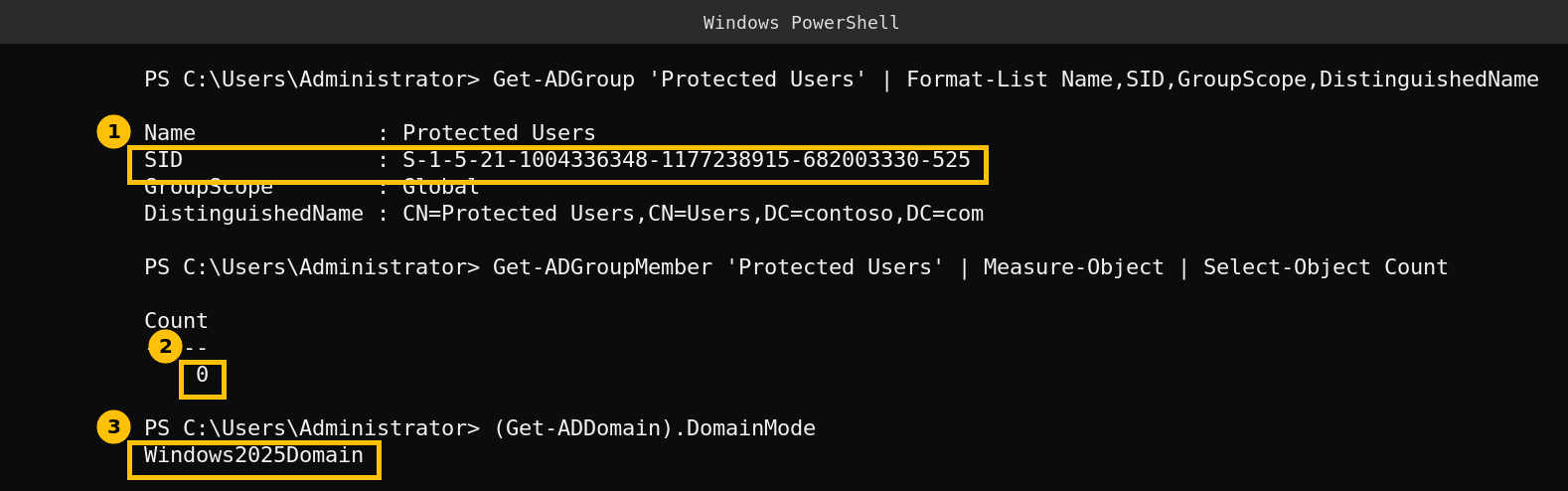
Expected result: a global group with a SID ending in -525 and a count of 0 in a domain that has never used it. If DomainMode shows anything older than Windows2012R2Domain, the DC side of the protection does not apply yet.
Step 2. Add one admin account
For the test I made two new Domain Admins, pu-admin and ref-admin, with the same password and both created on a Windows Server 2025 DC (so both have AES keys). Only pu-admin goes into Protected Users. ref-admin is the control. I used Add-ADGroupMember, which is all you need.
Add-ADGroupMember -Identity 'Protected Users' -Members 'pu-admin'
Get-ADGroupMember 'Protected Users' | Format-Table Name,SamAccountName,objectClass -AutoSize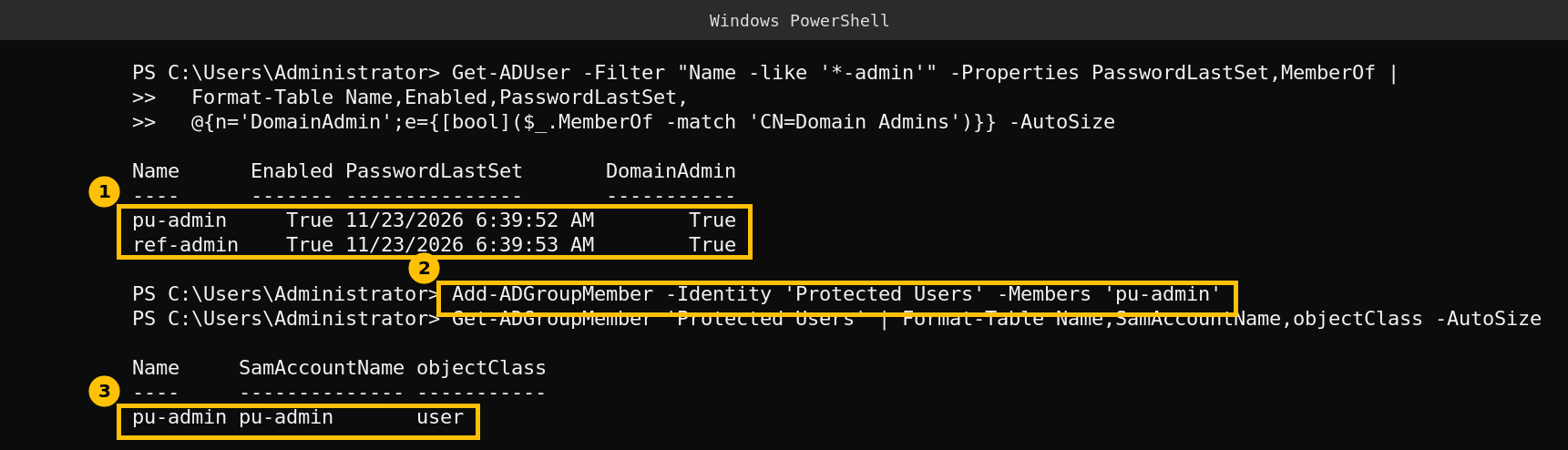
The protection on the client side starts at that user’s next sign-in. Someone who is already signed in keeps their current tickets until they sign out or the tickets expire.
Step 3. Turn on the Protected Users logs on the DC
Do this before you add real accounts. The two domain controller logs are off by default, and without them you only get a generic failed logon in the Security log. I enabled them with wevtutil. You can do the same in Event Viewer under Applications and Services Logs > Microsoft > Windows > Authentication, right-click the log, Enable Log.
wevtutil sl Microsoft-Windows-Authentication/ProtectedUserFailures-DomainController /e:true
wevtutil sl Microsoft-Windows-Authentication/ProtectedUserSuccesses-DomainController /e:true
Get-WinEvent -ListLog '*ProtectedUser*' | Format-Table LogName,IsEnabled,RecordCount -AutoSize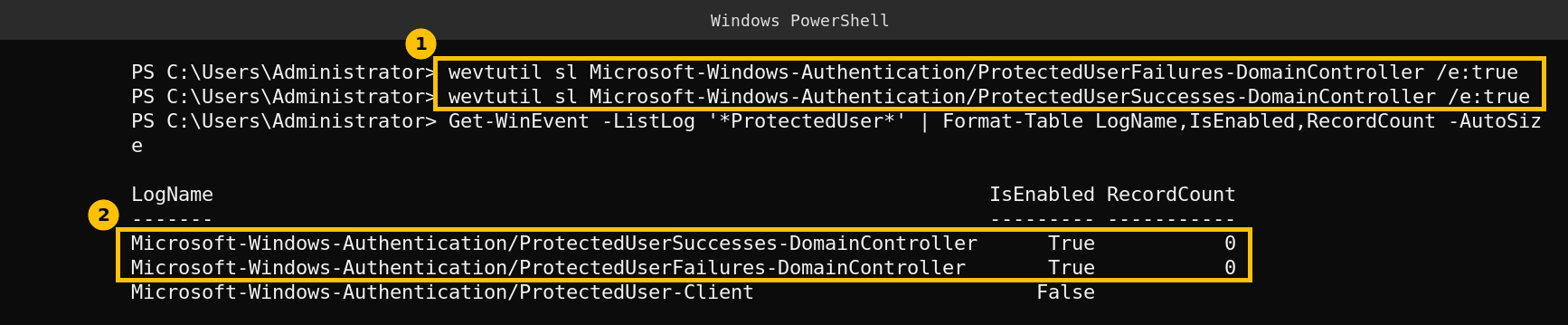
Expected result: True for both -DomainController logs. Run it on every DC, because each DC logs the sign-ins that it handles.
Step 4. Test NTLM: the normal admin works, the protected one fails
This is the change that bites people. Anything that falls back to NTLM stops working for a member. To show it cleanly I did an LDAP bind to the DC and forced the authentication type with the .NET LdapConnection class, which is built into Windows PowerShell. First NTLM for both accounts.
Add-Type -AssemblyName System.DirectoryServices.Protocols
$cred = Get-Credential 'CONTOSO\pu-admin'
$ldap = New-Object System.DirectoryServices.Protocols.LdapConnection('DC01.contoso.com')
$ldap.AuthType = 'Ntlm'
try {
    $ldap.Bind($cred.GetNetworkCredential())
    'NTLM bind OK'
} catch { $_.Exception.InnerException.Message }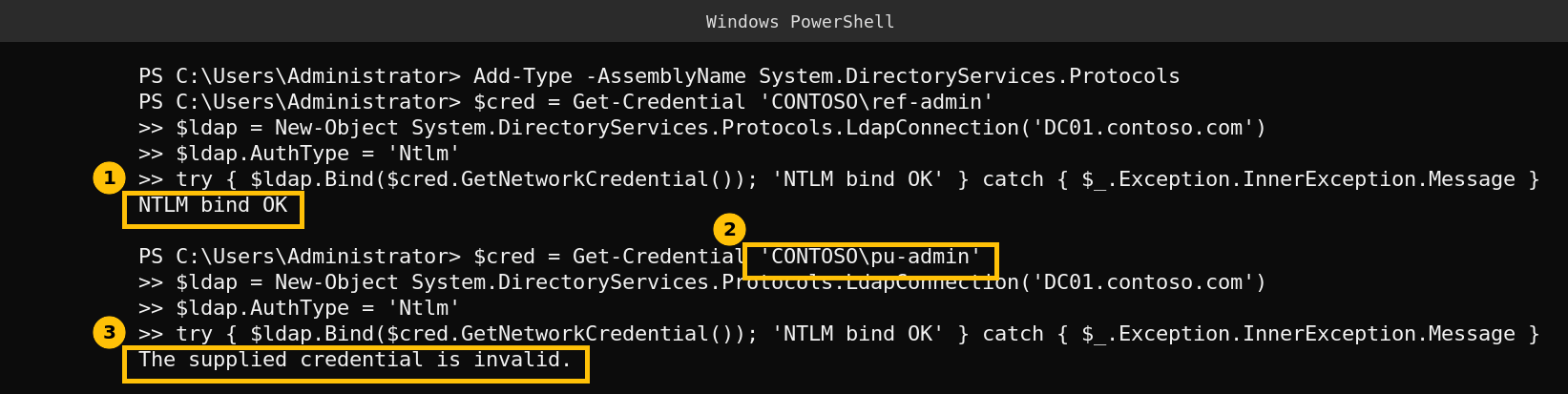
Note the message. It says the credential is invalid, not that the account is blocked. The password was correct. Expect tickets that say “the password is wrong” when it is not.
Step 5. Kerberos still works, and the DC tells you why NTLM failed
Same account, same password, only the authentication type changed to Kerberos. Then I read the newest event from the failures log.
$ldap = New-Object System.DirectoryServices.Protocols.LdapConnection('DC01.contoso.com')
$ldap.AuthType = 'Kerberos'
try {
    $ldap.Bind($cred.GetNetworkCredential())
    'Kerberos bind OK'
} catch { $_.Exception.InnerException.Message }
Get-WinEvent -LogName '*ProtectedUserFailures*' -MaxEvents 1 |
  Format-List TimeCreated,Id,Message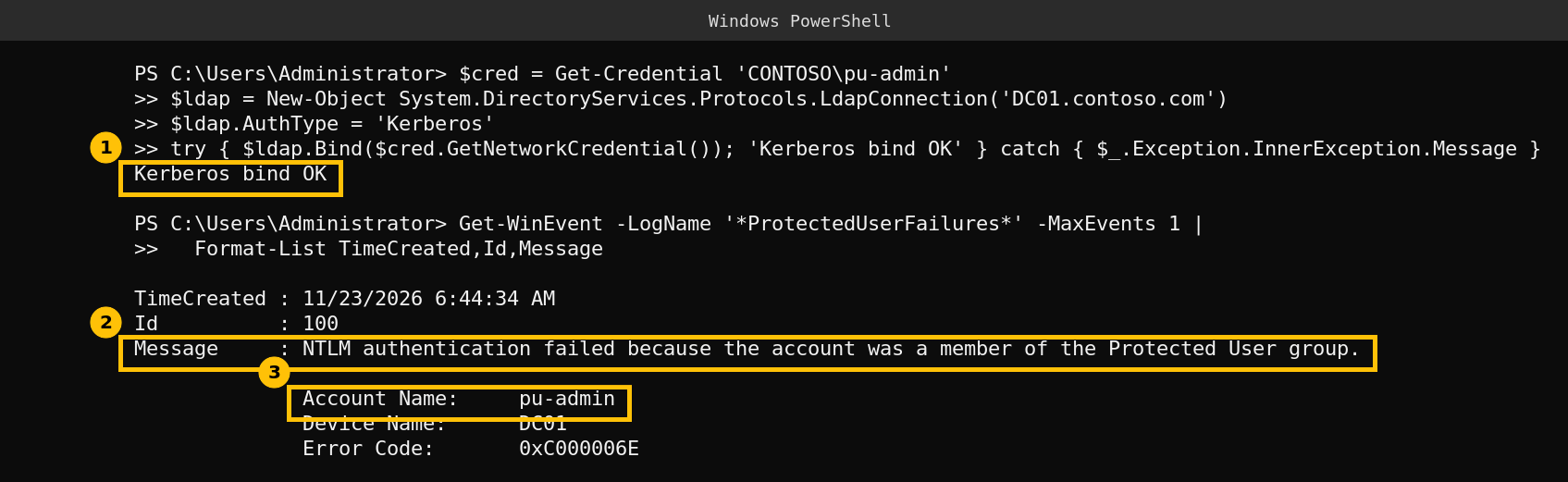
Expected result: event 100, “NTLM authentication failed because the account was a member of the Protected User group”, with error code 0xC000006E. Microsoft’s NTSTATUS list defines that code as STATUS_ACCOUNT_RESTRICTION: the user name and password are valid, but an account restriction stopped the logon. That is the event to search for when a member says “my password stopped working”.
Step 6. The Kerberos ticket only lives 4 hours and cannot be forwarded
The second big change is the ticket-granting ticket (TGT). Microsoft documents that members get a TGT with a fixed 240 minute lifetime and renewal, whatever your domain Kerberos policy says. I wanted to see it in klist, so I ran klist as each account through a scheduled task with a stored password, then read the two output files.
$cred = Get-Credential 'CONTOSO\pu-admin'
$act = New-ScheduledTaskAction -Execute 'cmd.exe' -Argument '/c klist > C:\PUTest\pu-admin.txt'
Register-ScheduledTask -TaskName 'TGT pu-admin' -Action $act -User $cred.UserName `
  -Password $cred.GetNetworkCredential().Password | Out-Null
Start-ScheduledTask -TaskName 'TGT pu-admin'
Get-Content C:\PUTest\pu-admin.txt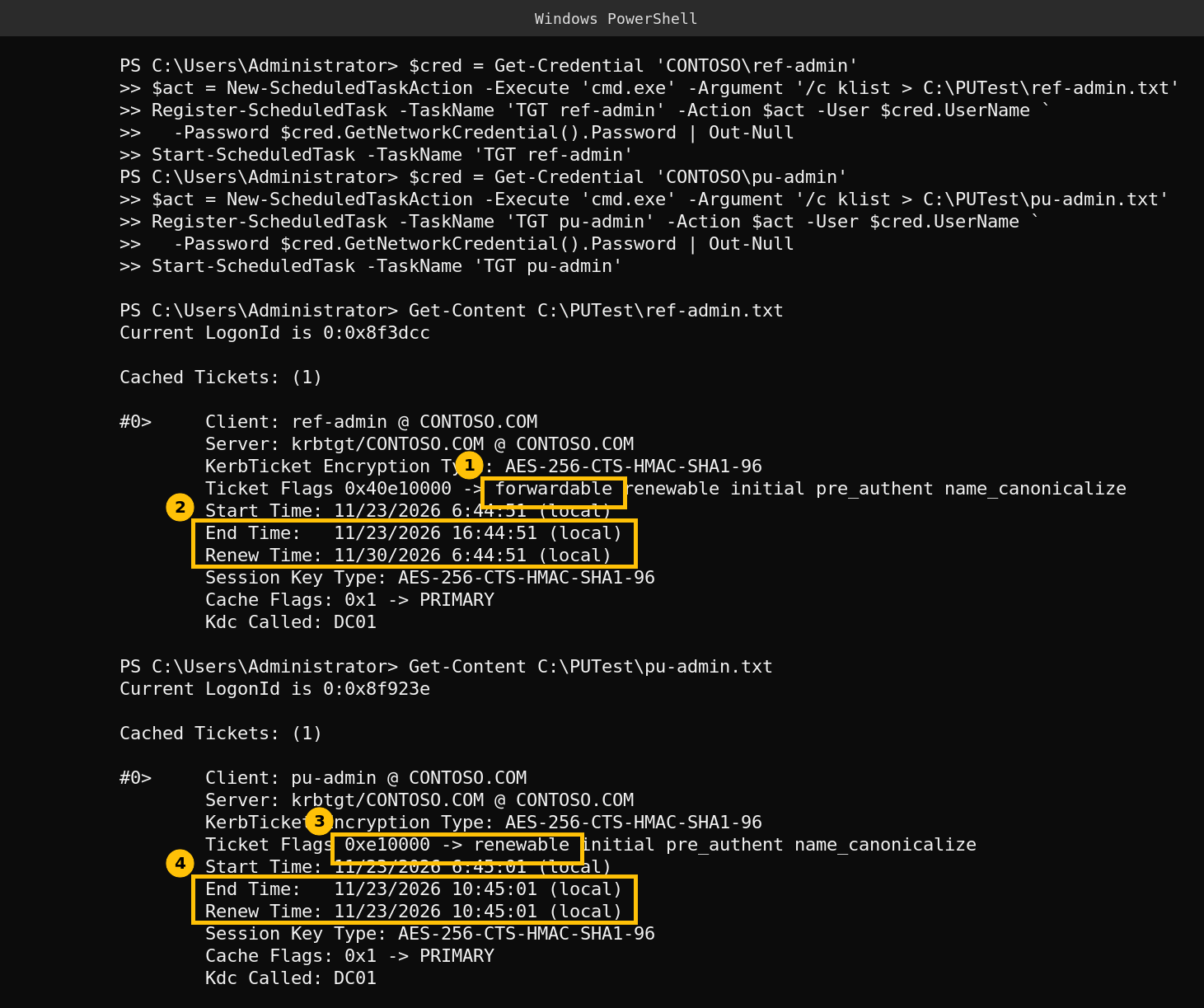
The difference is plain. The normal admin got the domain defaults, a 10 hour ticket that can be renewed for 7 days. The protected admin got a ticket that ends 4 hours after sign-in with Renew Time equal to End Time, so it cannot be renewed at all. Its flags are also missing forwardable, which is why delegation fails for members. If you troubleshoot a Kerberos delegation problem, check this group as well as the “Account is sensitive and cannot be delegated” box, as the protected accounts guidance suggests.
The scheduled task itself ran fine for the protected account (result 0). What I did not test is a task that runs longer than 4 hours. Microsoft says a member’s TGT is taken at sign-in and is not re-acquired automatically, so I would not put long jobs under a member account. That is a job for a gMSA anyway.
Step 7. RDP by IP address fails, by name works
This is the one that will hit your admins first. When you connect to a server by IP address, the client has no Kerberos service name to ask for, so Network Level Authentication falls back to NTLM, and members can’t use NTLM. I tried an RDP connection to the DC by IP address with pu-admin from a separate machine (FreeRDP on Linux in my case, I did not repeat it with mstsc). It failed at the NLA stage, and the DC logged this:
Get-WinEvent -LogName '*ProtectedUserFailures*' -MaxEvents 1 |
  Format-List TimeCreated,Id,Message
Get-WinEvent -LogName '*ProtectedUserSuccesses*' -MaxEvents 3 |
  Format-Table TimeCreated,Id,@{
    n = 'Event'
    e = {($_.Message -split "`r?`n")[0]}
  } -AutoSize -Wrap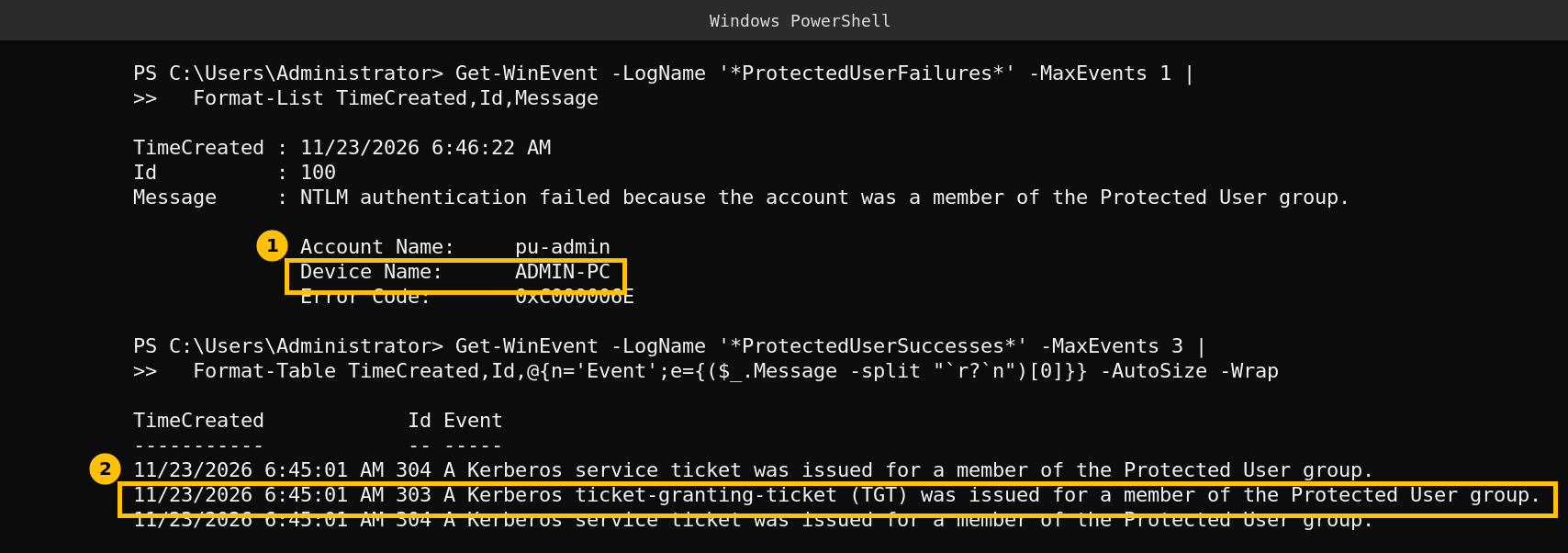
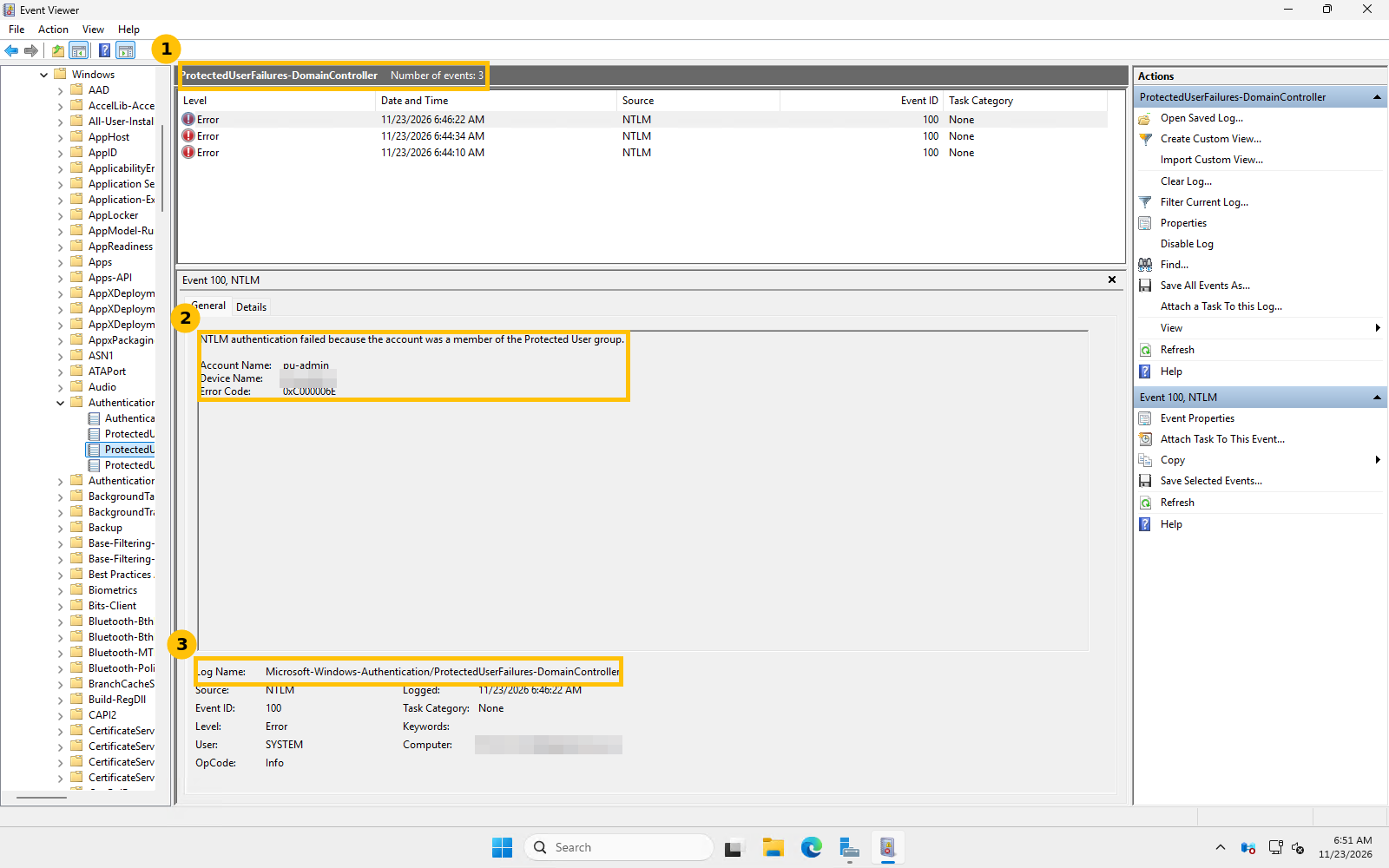
The Security log on the DC had the matching event 4625 with logon type 3, package NTLM and status 0xC000006E. The same RDP test with ref-admin succeeded with NTLM. The fix is simple: connect by the server’s DNS name so Kerberos is used. The successes log is also useful. Event 303 tells you a member got a TGT and event 304 a service ticket, so you can see which members are actually being used.
The same events in Event Viewer, if you prefer the GUI:
Step 8. How to back out
If an account in the group can’t do its job, take it out. I removed pu-admin and ran the same NTLM bind from Step 4 straight away.
Remove-ADGroupMember -Identity 'Protected Users' -Members 'pu-admin' -Confirm:$false
On my single DC the NTLM bind worked on the very next try. In a domain with several DCs the change has to replicate first, and a session that already holds a 4 hour ticket keeps it until it expires or the user signs out again.
Troubleshooting
“The supplied credential is invalid” or “unknown user name or bad password” for a correct password
Cause: the app or the connection used NTLM. Typical cases are connections by IP address, a hosts-file alias with no SPN, old NAS boxes and appliances, and anything that only speaks NTLM. Fix: look for event 100 in the ProtectedUserFailures log on the DC that handled the logon. Connect by DNS name, or keep that task on an account that is not in the group. Older NTLM issues are covered in my NTLMv1 audit post.
Admins get kicked out of a tool after about 4 hours
Cause: the 240 minute TGT cannot be renewed. Fix: sign out and in again. This is by design and cannot be changed while the account is a member. If you need a different lifetime, Microsoft points to authentication policies instead.
Delegation fails for one admin only
Cause: members never get a forwardable ticket, so unconstrained and constrained delegation both fail. Fix: that is the point of the group. Do the delegated task with a different account, or remove the account from the group.
Account locked out right after being added
Cause: no AES key, usually an old account whose password has not changed since the domain was on Windows Server 2003. Fix: reset its password, then sign in again. My Kerberos RC4 audit post shows how to find accounts that still depend on RC4.
Summary
| What I tested | Normal Domain Admin | Protected Users member |
|---|---|---|
| NTLM LDAP bind | Works | Fails, event 100, 0xC000006E |
| Kerberos LDAP bind | Works | Works |
| RDP by IP address (NTLM in NLA) | Works | Fails, event 100 and 4625 |
| TGT lifetime | 10 hours, renew 7 days | 4 hours, no renewal |
| Forwardable TGT (delegation) | Yes | No |
| Scheduled task with stored password | Runs | Runs (short task only tested) |
| Removed from the group | NTLM works again at once on one DC |
What I tested: Windows Server 2025 domain controller at the Windows2025Domain level with November 2026 updates, two new Domain Admin test accounts, Windows PowerShell 5.1, an RDP client connecting by IP address, and the two DC logs. What I did not test: a member signing in to a Windows 11 workstation, cached offline sign-in on a laptop, a task running longer than 4 hours, and multi-DC replication timing. My advice: put your named admin accounts in the group one at a time, keep a break-glass account out of it, and pair it with Windows LAPS so local admin passwords are not the weak spot. The test accounts, tasks and folder were removed afterwards and both logs set back to disabled.
Sources
- Protected Users Security Group (Microsoft Learn)
- Guidance about how to configure protected accounts (Microsoft Learn)
- Add-ADGroupMember (Microsoft Learn)
- wevtutil (Microsoft Learn)
- klist (Microsoft Learn)
- LdapConnection class (Microsoft Learn)
- NTSTATUS values, MS-ERREF (Microsoft Learn)
- Event 4625, an account failed to log on (Microsoft Learn)
Related: I also tested the OSConfig security baseline on a domain controller. Besides LSA protection and NTLM settings, it makes the built-in Administrator lockable from the network, which matters if that account is your break-glass account.