
Kerberos RC4 Is Disabled by Default on Domain Controllers: How to Audit Your Service Accounts Before They Fail

The ticket that worries me with this change is the boring one. A file server, a SQL service account, an old Java app with a keytab someone exported in 2015. They have worked for years and nobody has touched them. Then the domain controllers stop handing out RC4 tickets by default, and one morning that service stops accepting logons. There is no error on the server you patched. The failure shows up on the client, as a generic “encryption type not supported” message, and everybody starts looking at the network.
This is what Microsoft changed and when, how to find the accounts that still depend on RC4 before they break, and what to do about each one. I ran the read-only checks on my lab domain controller, so you can see what a clean result looks like. My lab has no RC4 dependencies, so I can’t show you a failure, and I say that again where it matters.
What changed, and the dates that matter
The change is tied to CVE-2026-20833, a Kerberos information disclosure issue. The attack behind it is old and well known. When a service account only has RC4 keys, anyone who can request a service ticket for it can take that ticket away and crack it offline. That is Kerberoasting, and RC4 tickets are much cheaper to crack than AES ones. Microsoft’s answer is to stop assuming RC4 is allowed when an account does not say what it supports.
The rollout has three phases. I am taking the dates from Microsoft’s support article KB5073381 and from the Message Center item MC1427604, which was published on July 14, 2026:
| Phase | Date | What happens |
|---|---|---|
| Audit | January 13, 2026 | Updates add audit events 201 to 209 in the System log. Nothing changes in behavior yet. |
| Enforcement with rollback | April 14, 2026 | The default for accounts with no explicit encryption types becomes AES-SHA1 only (0x18). The registry value RC4DefaultDisablementPhase still lets you go back to audit mode. |
| Enforcement only | July 2026 | Audit mode and the rollback value are removed. Per MC1427604, environments cannot revert once enforcement is in place. |
One honest caveat. KB5073381 says enforcement is turned on automatically by the April updates and also says audit mode is removed in July. Those two statements do not line up perfectly, and Microsoft does not clear it up in the article. In November 2026 you are past all three dates, so the practical rule is simple: assume enforcement is on for every domain controller that has the July 2026 or later update, and test that assumption instead of trusting a date.
Which accounts are actually at risk
Not every account. According to KB5073381 and the Microsoft Tech Community post on the January update, the accounts affected are the ones where the attribute msDS-SupportedEncryptionTypes is not set, and either the client only supports RC4 or the service account only has RC4 keys. In practice that means:
- Service accounts whose password was set before AES keys existed in your domain and never changed since.
- Accounts used by non-Windows software with an old keytab that contains only RC4 keys.
- Old appliances and third-party clients that only advertise RC4.
- Anything that depended on the default being “RC4 is fine”.
Normal computer accounts and users on current Windows are not the problem. Windows has supported AES in Kerberos since Windows Server 2003, as Microsoft Learn points out, so any account that had a password change on a modern domain has the keys.
Prerequisites
- Domain Admin rights, or equivalent permission to read the Security log on the domain controllers.
- The Active Directory PowerShell module on the machine you run the commands from.
- A list of your domain controllers and a way to reach each of them. The audit events are written on the DC that served the request, so you need to look at all of them.
Step 1: Check what the domain controllers are set to
Start with the state of the domain and the two registry settings Microsoft describes. Open PowerShell as administrator on a domain controller and run:
(Get-ADDomain).DomainModeGet-ItemProperty 'HKLM:\SYSTEM\CurrentControlSet\Services\KDC' |
Select-Object DefaultDomainSupportedEncTypes | Format-ListTest-Path 'HKLM:\SOFTWARE\Microsoft\Windows\CurrentVersion\Policies\System\Kerberos\Parameters'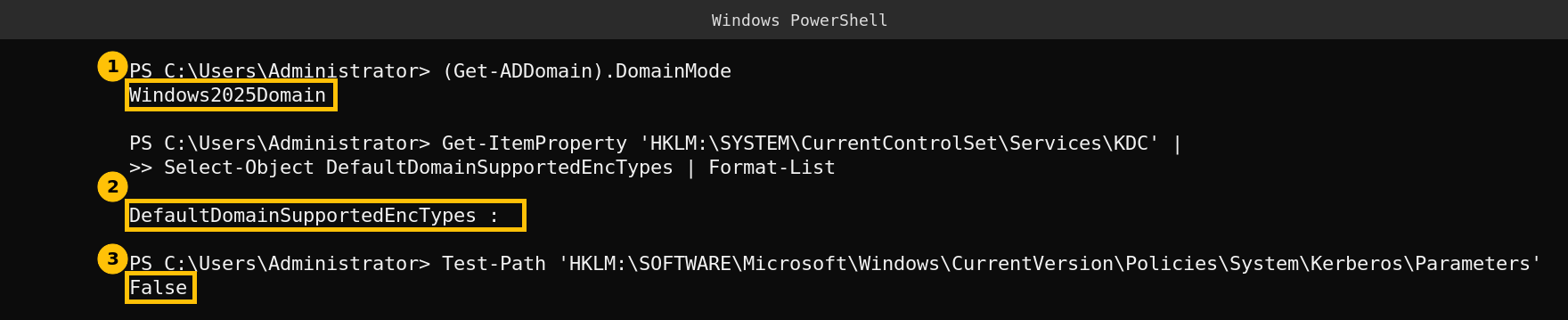
Expected result: nothing is set. That is the good case. The registry paths are the ones Microsoft documents: DefaultDomainSupportedEncTypes under HKLM\System\CurrentControlSet\services\KDC in Learn, and RC4DefaultDisablementPhase under the Kerberos\Parameters policy key in KB5073381. An empty DefaultDomainSupportedEncTypes means the domain controller uses the built-in default, which since April is AES-SHA1 only. The RC4DefaultDisablementPhase value is also not created by default, and after July it is not read at all.
If you do find DefaultDomainSupportedEncTypes set to something that includes RC4, someone put it there on purpose, probably in the audit phase. Find out why. Microsoft says setting 0x24 for the whole domain is a last resort that leaves every account without its own setting open to the vulnerability.
Step 2: Read the audit events on every domain controller
The audit events are numbered 201 to 209 and written to the System log. The ones you care about are in the table below, taken from KB5073381:
| ID | Type | What it means |
|---|---|---|
| 201 | Warning | Client advertises only RC4 and the service has no encryption types set. Becomes error 203 in enforcement. |
| 202 | Warning | The service has no AES keys and no encryption types set. Becomes error 204. |
| 203, 204 | Error | The same as 201 and 202, after enforcement. |
| 205 | Warning | DefaultDomainSupportedEncTypes enables something other than AES-SHA1. Logged once when the KDC service starts. |
| 206, 207 | Warning | The service or DC is restricted to AES-SHA1 but the client only offers RC4 (206), or the service has no AES keys (207). Become 208 and 209. |
| 208, 209 | Error | The same as 206 and 207, after enforcement. |
Events 201, 202, 206 and 207 are not logged when DefaultDomainSupportedEncTypes is explicitly defined, which is one more reason not to define it casually. Count what you have on each controller:
Get-WinEvent -LogName System |
    Where-Object ProviderName -like '*Kerberos-Key*' |
    Group-Object Id | Format-Table Name,Count -AutoSize
Get-WinEvent -LogName Security -MaxEvents 3000 | Where-Object Id -eq 4769 |
Group-Object { ([xml]$_.ToXml()).Event.EventData.Data |
Where-Object Name -eq 'TicketEncryptionType' | ForEach-Object { $_.'#text' } } |
Format-Table Name,Count -AutoSize
What I see on my lab controller is one System event, ID 7, and none between 201 and 209. The screenshot only shows the first command. The second one, the 4769 count, found a single service ticket with encryption type 0x12 (AES256-CTS-HMAC-SHA1-96 in Microsoft’s table) in an earlier run, and returned nothing when I took the screenshot, because that controller handles almost no Kerberos service ticket requests and the sample window moved on. On a busy domain you would expect many tickets and a mix of types. Two more things to be careful about. I matched the provider with a name pattern and not the source name “Kdcsvc” that the KB uses, so on your side check the Source column in Event Viewer if the count looks suspiciously empty. And because my lab has almost no Kerberos traffic, zero events here proves nothing about your domain.
The ticket encryption type values you will see in events 4768 and 4769 are, from Microsoft Learn: 0x11 AES128, 0x12 AES256, 0x17 RC4-HMAC. Look for 0x17. Every service ticket with that type is a place where RC4 is still in use.
Step 3: Look at the accounts, not only the events
Events tell you what happened. The attribute tells you what will happen. List the accounts with a service principal name and the encryption types they declare, and then look at the computer accounts:
Get-ADUser -Filter 'ServicePrincipalName -like "*"' -Properties msDS-SupportedEncryptionTypes |
    Select-Object SamAccountName,msDS-SupportedEncryptionTypes | Format-Table -AutoSize
Get-ADComputer -Filter * -Properties msDS-SupportedEncryptionTypes |
Select-Object msDS-SupportedEncryptionTypes | Format-List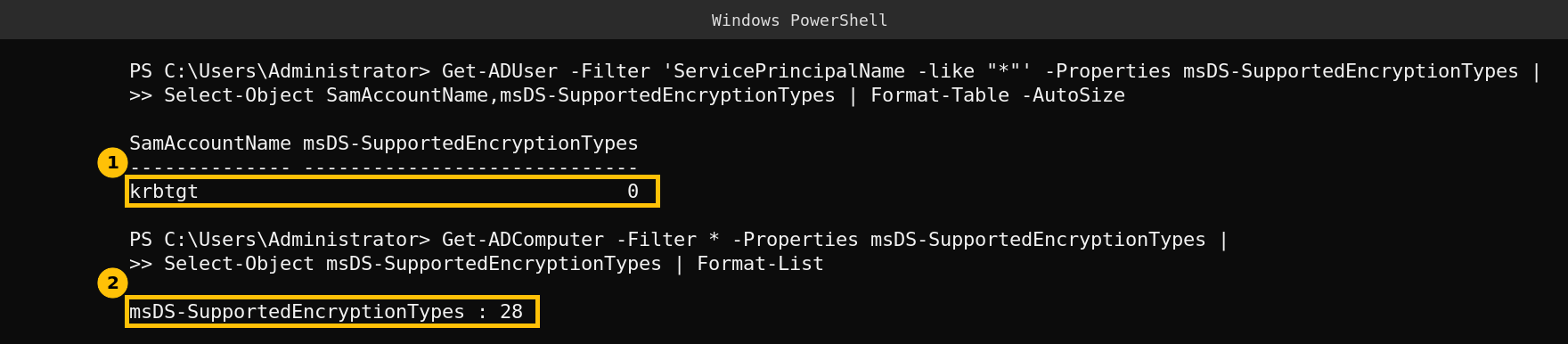
A value of 0 means “not defined”, so the KDC falls back to the domain default. Per Microsoft’s table, 28 is RC4, AES128 and AES256 together, and 24 is AES128 and AES256 only. My lab has no service accounts of its own, so the list is just the built-in krbtgt account. In a real domain this is where your SQL, IIS, backup and monitoring accounts show up, and any of them with 0 or with an RC4-only value is on your to-do list. The krbtgt account is special and Microsoft says to leave it alone.
For the keys themselves, which the attribute does not show, Microsoft published two scripts in the Kerberos-Crypto repository. List-AccountKeys.ps1 reads the Security log and lists which keys each account has. Get-KerbEncryptionUsage.ps1 shows the encryption actually used and can filter with -Encryption RC4. I did not run them against my lab because there is nothing in it to find.
Step 4: Fix what you found
Work through the findings in this order. It is the order Microsoft gives in its Learn and Tech Community articles.
- Account has no AES keys. The password was set before AES keys were generated. Reset the password. The keys are created at the reset, and the account is fine after that. Do this at a quiet time for service accounts, because the service needs the new password too.
- Account has AES keys but the attribute is empty. Set
msDS-SupportedEncryptionTypesto 24 (AES128 and AES256) on the account. Microsoft also mentions 56, which adds the AES session key setting, and says to pick what fits the application. - The client is the problem. If a Linux or third-party client only offers RC4, fix its
krb5.confand regenerate the keytab with AES keys. A keytab exported with only RC4 keys can fail at the service even when the KDC is happy. - Nothing else works and the business needs it today. Set the account to
0x24(RC4 with AES session keys). KB5073381 prefers this per-account setting over the domain-wide one. Write down the exception and put a date on removing it.
Do not set the value to 28 as a quick fix. Microsoft calls that the rollback value and says it is not recommended.
Warning: changing the encryption types on a service account takes effect for new tickets only. Clients that already hold a service ticket keep it until it expires, so test after the ticket lifetime has passed or after the client runs klist purge.
Optional: Block RC4 on purpose with Group Policy
Once the audit is clean, you can go further than the default. Microsoft Learn describes a Group Policy setting: Computer Configuration, Policies, Windows Settings, Security Settings, Local Policies, Security Options, Network security: Configure encryption types allowed for Kerberos. Tick only AES128_HMAC_SHA1 and AES256_HMAC_SHA1 to allow AES and nothing else. Scope it to a test OU first and restart the devices. Learn also notes that Windows Server 2025 domain controllers do not issue RC4 ticket granting tickets at all, so a legacy device that needs RC4 to authenticate cannot use Kerberos against them.
Troubleshooting
A service stops accepting logons after the DC update
Likely cause: the service account has no AES keys or an RC4-only attribute, and the DC now refuses to issue an RC4 ticket for it. Fix: look at events 203, 204, 208 and 209 on the domain controllers, find the account, and use step 4.
Error 0x80090342 or “The encryption type requested is not supported by the KDC”
This is the client side message. Learn shows how to confirm it. On the client run klist get HOST/servername.contoso.com and read the error. Then open event 4769 on the domain controller for the same request and look for the failure code 0xE, which is KDC_ERR_ETYPE_NOTSUPP. A remote PowerShell session can fail with the same code, and Learn shows New-PSSession returning 0x80090342 for an account whose attribute is RC4 only.
The audit events are missing on one domain controller
The events are written on the controller that handled the request. Look at every DC, or forward the System log to a central place. The events also are not written if DefaultDomainSupportedEncTypes is explicitly defined, as noted above.
Summary
| Check | Command or place | Good result |
|---|---|---|
| Domain controller default | DefaultDomainSupportedEncTypes under the KDC service key | Not set, or set to 0x18 |
| Audit events | System log, events 201 to 209, every DC | None, or only for accounts you already know about |
| Tickets in use | Event 4769, Ticket Encryption Type | 0x11 or 0x12, no 0x17 |
| Service accounts | msDS-SupportedEncryptionTypes on every SPN account | 24, or fixed after a password reset |
| Exceptions | Per-account 0x24, written down | Short list with an end date |
What I did and did not test
I ran the read-only commands above on a Windows Server 2025 lab domain controller and nothing else. I did not create an RC4-only account, did not provoke events 203 or 209, and did not change any registry value or Group Policy. The remediation steps, the event meanings and the dates come from Microsoft’s documents linked below. The registry paths and the 0x24 advice are as Microsoft states them, and where Microsoft’s own articles disagree I said so. Check the current Microsoft article before you change a production domain.
Sources
- Microsoft Support, KB5073381: How to manage Kerberos KDC usage of RC4 for service account ticket issuance changes related to CVE-2026-20833
- Message Center MC1427604: Enforcement phase for Kerberos RC4 protections begins with the July 2026 Windows security update
- Microsoft Learn: Detect and Remediate RC4 Usage in Kerberos
- Microsoft Tech Community: What changed in RC4 with the January 2026 Windows update and why
- MSRC: CVE-2026-20833
- GitHub: microsoft/Kerberos-Crypto (List-AccountKeys.ps1 and Get-KerbEncryptionUsage.ps1)
Related: the cleanest way to retire an old RC4 service account is to replace it with a group Managed Service Account (gMSA) set to AES only. That post walks through creating one, fixing Test-ADServiceAccount returning False, and running a scheduled task under it on the same Windows Server 2025 lab.
Related: once your admin accounts are clean of RC4, the next step is the Protected Users group. Members can only use Kerberos with AES, never NTLM, and their tickets expire after 4 hours. I tested what that breaks for a Domain Admin on the same Windows Server 2025 lab.
Related: another Kerberos change on patched DCs is the LDAP SPN check that breaks NetApp SMB. Domain controllers now reject an LDAP bind that uses a ticket issued for the CIFS service, and I show how to check the setting and find unsigned LDAP clients.