
Fine-Grained Password Policies in Active Directory: Create, Apply and Test a PSO

Every domain has exactly one password policy in the Default Domain Policy GPO, and it usually reflects whatever the weakest group of users could live with. Seven characters, 42 days, no lockout. That is fine for a warehouse kiosk account and not fine for the people in Domain Admins.
You do not need a second domain or a password filter to fix that. Fine-grained password policies, stored as Password Settings Objects (PSOs), let you give one group a 15 character minimum and a lockout threshold while everyone else keeps the domain policy. I built two of them on my Windows Server 2025 lab domain controller today and tried to break them on purpose. Three things surprised people I have shown this to, and all three are in the screenshots below: a PSO on an OU is rejected, a PSO on a domain local group is accepted and then silently ignored, and a PSO linked straight to a user beats a group PSO with a better precedence number.
Before you start
- Domain functional level Windows Server 2012 or higher, per the fine-grained password policy article on Microsoft Learn. Mine is Windows2025Domain.
- Domain Admins membership, or delegated rights on the Password Settings Container. By default only Domain Admins can create PSOs and even read their settings.
- The Active Directory module for PowerShell or Active Directory Administrative Center (ADAC). Both are there on a DC. On a workstation install RSAT.
- A global security group for the users who get the stricter policy. I used
SG-PSO-Adminswith a test usersara.adminin it.
One thing to know about the text output below: I replaced my lab domain with contoso.com and the DC with DC01. The screenshots are the real console output with the same replacement, and the domain name is pixelated in the ADAC shots.
Quick guide
- Check the current domain policy with
Get-ADDefaultDomainPasswordPolicy. - Create a PSO with
New-ADFineGrainedPasswordPolicy, give it a precedence and turn on deletion protection. - Link it to a global security group with
Add-ADFineGrainedPasswordPolicySubject. - Confirm with
Get-ADUserResultantPasswordPolicyfor one member. - Test a password reset below the new minimum and watch it fail.
- Keep precedence numbers unique and avoid direct user links unless you mean them.
Step 1. Look at what you have today
Before adding anything, read the domain policy and check that no PSO exists yet. Get-ADDefaultDomainPasswordPolicy reads the values from the domain head, which is what the Default Domain Policy GPO writes there.
Get-ADDefaultDomainPasswordPolicy |
  Format-List MinPasswordLength,PasswordHistoryCount,MaxPasswordAge,ComplexityEnabled,LockoutThreshold
(Get-ADDomain).DomainMode
Get-ADFineGrainedPasswordPolicy -Filter * | Measure-Object | Select-Object Count
Get-ADUserResultantPasswordPolicy -Identity sara.admin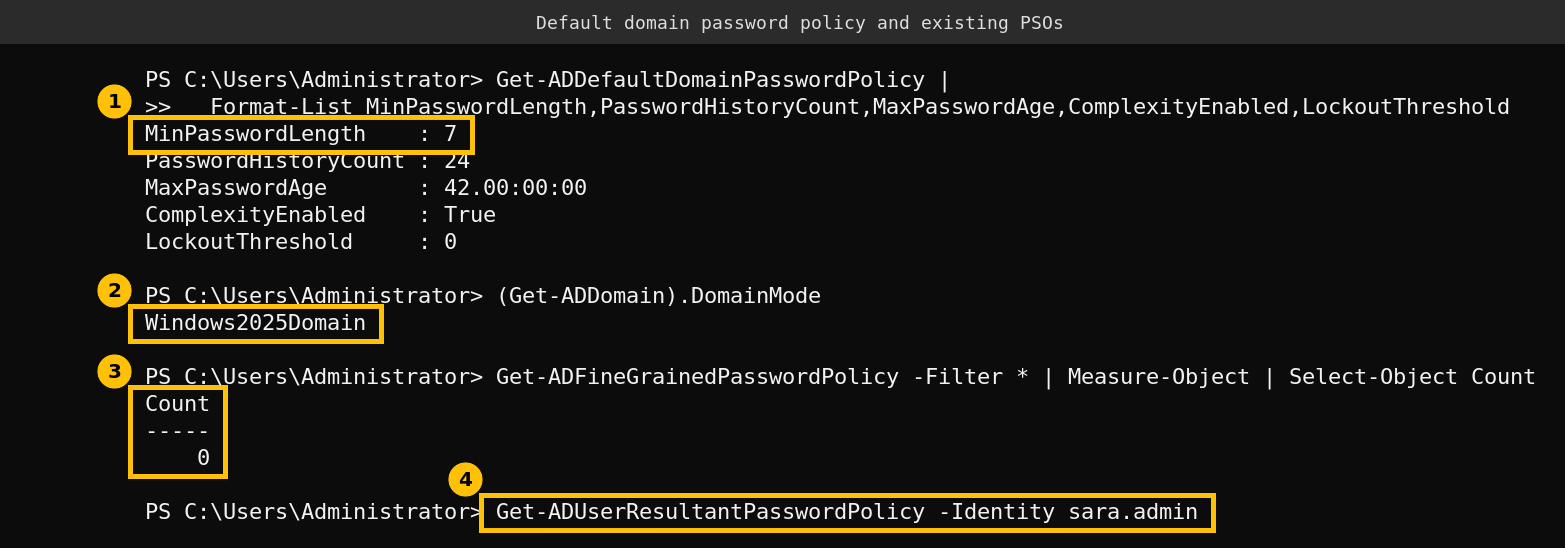
Expected result: a count of 0 and an empty answer from Get-ADUserResultantPasswordPolicy. Empty does not mean the user has no policy. It means no PSO applies, so the Default Domain Policy wins. That empty output confuses people the first time, so remember it.
Step 2. Create the PSO and link it to a global group
A PSO carries its own password and lockout settings, and nothing is inherited from the domain policy or merged with another PSO. I always write every setting out in a splat so I can read the whole policy in one place. The parameters are listed on the New-ADFineGrainedPasswordPolicy page.
$pso = @{
    Name                        = 'PSO-Admins'
    Precedence                  = 10
    MinPasswordLength           = 15
    PasswordHistoryCount        = 24
    ComplexityEnabled           = $true
    ReversibleEncryptionEnabled = $false
    MinPasswordAge              = '1.00:00:00'
    MaxPasswordAge              = '180.00:00:00'
    LockoutThreshold            = 5
    LockoutDuration             = '00:30:00'
    LockoutObservationWindow    = '00:30:00'
    ProtectedFromAccidentalDeletion = $true
}
New-ADFineGrainedPasswordPolicy @pso
Add-ADFineGrainedPasswordPolicySubject -Identity 'PSO-Admins' -Subjects 'SG-PSO-Admins'
Get-ADFineGrainedPasswordPolicy 'PSO-Admins' -Properties ProtectedFromAccidentalDeletion |
  Format-List Name,Precedence,MinPasswordLength,LockoutThreshold,ProtectedFromAccidentalDeletion,AppliesTo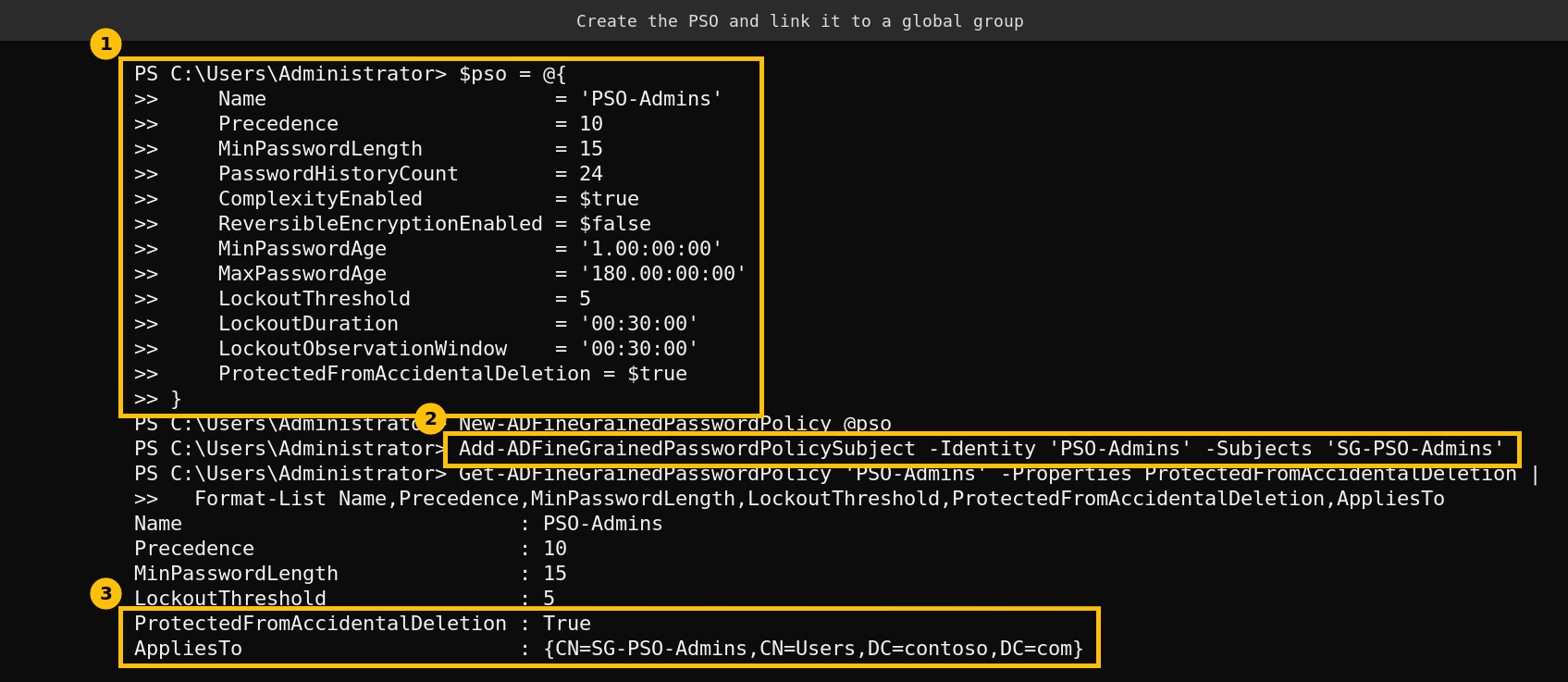
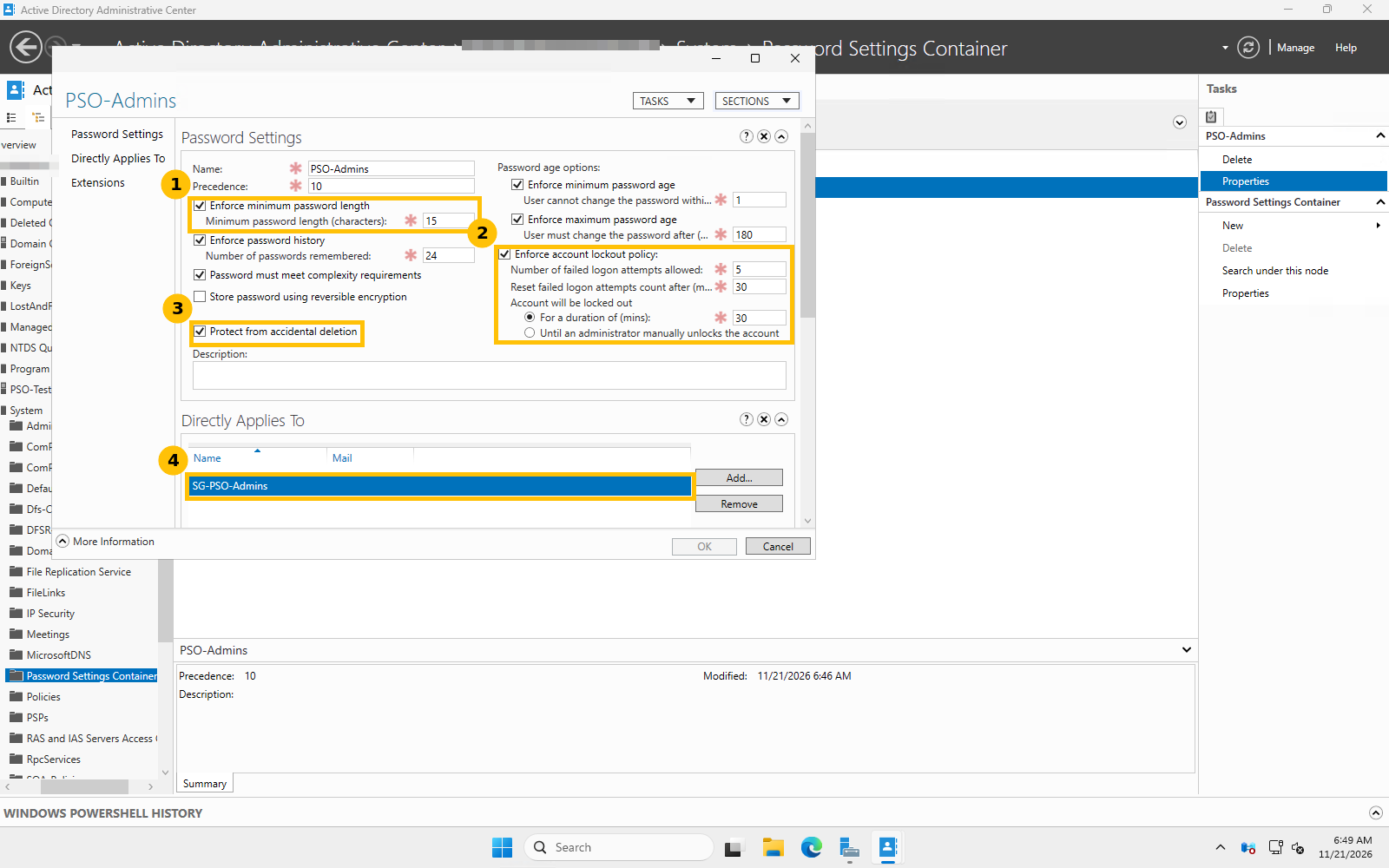
Write ProtectedFromAccidentalDeletion = $true yourself. In my first run I left it out, and the PSO created by the cmdlet came back with ProtectedFromAccidentalDeletion : False. ADAC ticks that box for you, PowerShell did not. Microsoft includes the line in its own example on Learn for the same reason.
The 180 day maximum age and the lockout values are my lab choices, not a recommendation. Use what your own security policy says, and put a short note in the PSO description so the next admin knows why it exists.
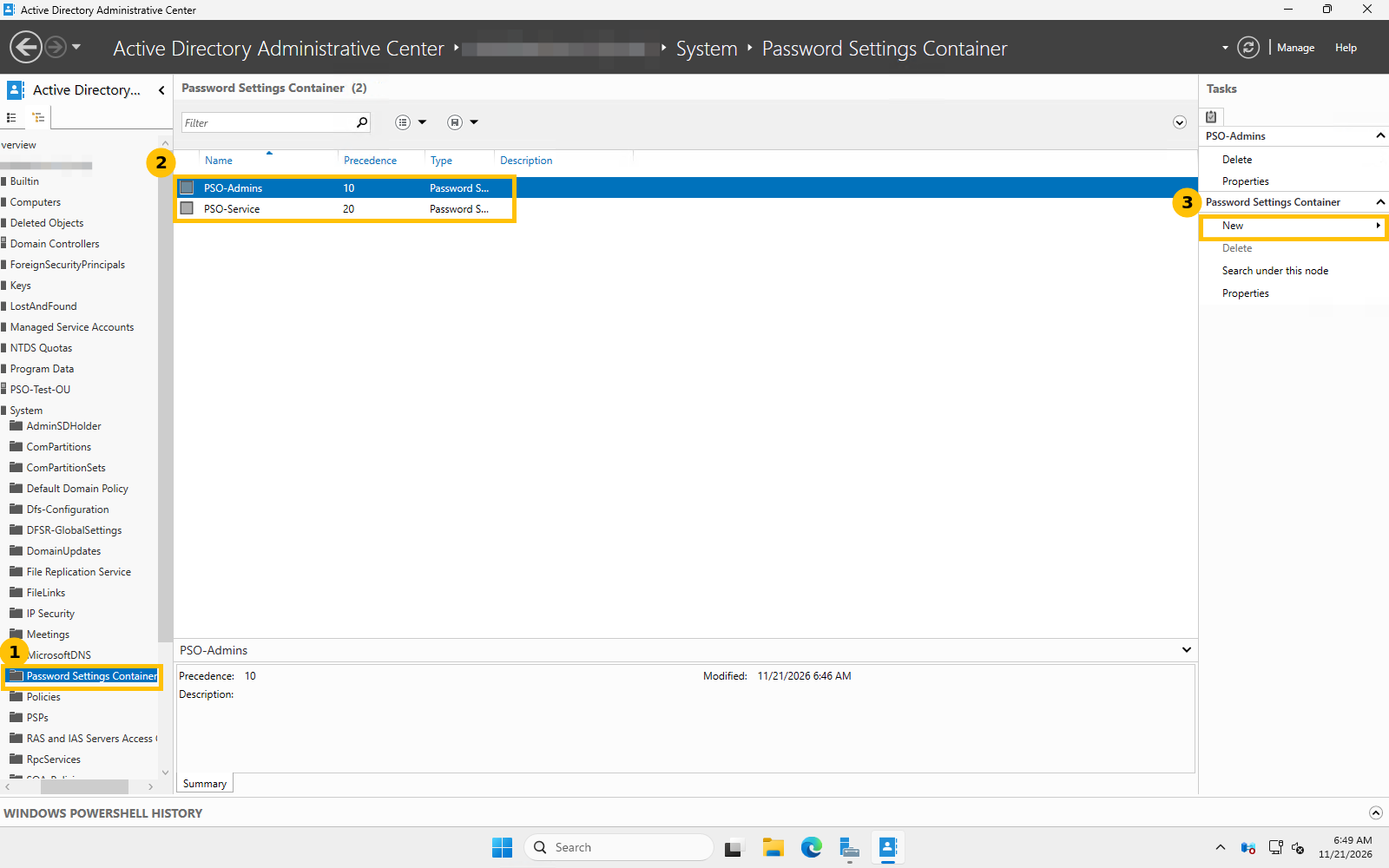
If you prefer the GUI, the same PSO lives in ADAC under the domain, System, Password Settings Container. New and Password Settings in the Tasks pane open the same form.
Step 3. Check which policy a user really gets
Never assume. Get-ADUserResultantPasswordPolicy gives you the PSO that wins for one user, and the msDS-ResultantPSO attribute on the user shows the same answer as a distinguished name. The attribute is handy in reports because you can ask for it on many users at once.
Get-ADUserResultantPasswordPolicy -Identity sara.admin |
  Format-List Name,Precedence,MinPasswordLength,MaxPasswordAge,LockoutThreshold
Get-ADUser sara.admin -Properties msDS-ResultantPSO |
  Select-Object -ExpandProperty msDS-ResultantPSO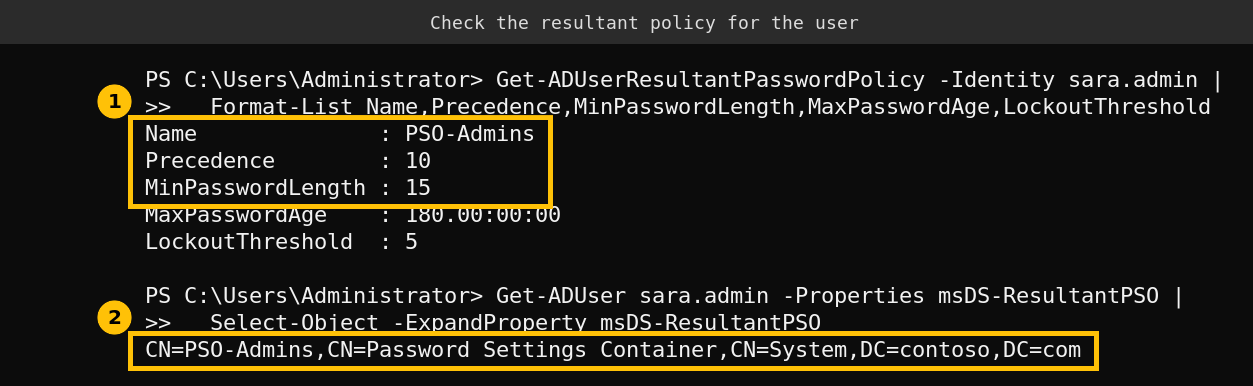
To list every account that has a PSO, ask for the attribute across the domain:
Get-ADUser -Filter * -Properties msDS-ResultantPSO |
  Where-Object msDS-ResultantPSO |
  Select-Object SamAccountName,msDS-ResultantPSO
Step 4. Prove it with a password reset
A policy you have not tested is a guess. I reset the user to an 11 character password. That passes the domain rule of 7 but not the PSO rule of 15.
Set-ADAccountPassword sara.admin -Reset `
  -NewPassword (ConvertTo-SecureString 'Short-Pass1' -AsPlainText -Force)
Set-ADAccountPassword sara.admin -Reset `
  -NewPassword (ConvertTo-SecureString 'Correct-Horse-Battery-26' -AsPlainText -Force)
Get-ADUser sara.admin -Properties PasswordLastSet | Format-List SamAccountName,PasswordLastSet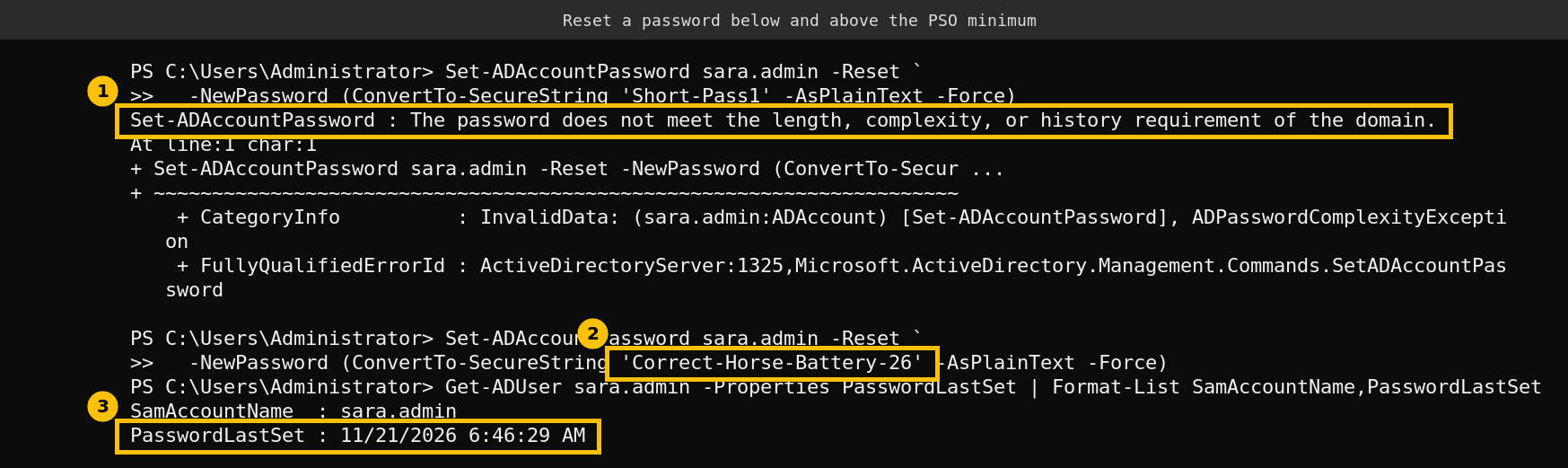
Look at the error text. It says the password does not meet the requirement of the domain, even though the domain allows 7 characters. Windows does not tell you a PSO was involved. When a helpdesk person says “the password is longer than the domain minimum and it still fails”, the first thing to run is step 3 for that user.
Users cannot see PSO settings either. Microsoft notes that by default Authenticated Users have no read permission on a PSO, so the user can see which PSO applies but not what it requires. Tell your admins the new rules in plain words before you switch it on.
Step 5. Two PSOs on one user: who wins
Sooner or later a user is in two groups with two PSOs. I created PSO-Service with precedence 20 and a 25 character minimum, linked it to SG-PSO-Service, and the same user was in both groups. Then I linked PSO-Service straight to the user as well.
New-ADFineGrainedPasswordPolicy -Name 'PSO-Service' -Precedence 20 -MinPasswordLength 25 `
  -PasswordHistoryCount 24 -ComplexityEnabled $true -MaxPasswordAge '0.00:00:00' -LockoutThreshold 0
Add-ADFineGrainedPasswordPolicySubject -Identity 'PSO-Service' -Subjects 'SG-PSO-Service'
Get-ADUserResultantPasswordPolicy -Identity sara.admin | Format-List Name,Precedence,MinPasswordLength
Add-ADFineGrainedPasswordPolicySubject -Identity 'PSO-Service' -Subjects 'sara.admin'
Get-ADUserResultantPasswordPolicy -Identity sara.admin | Format-List Name,Precedence,MinPasswordLength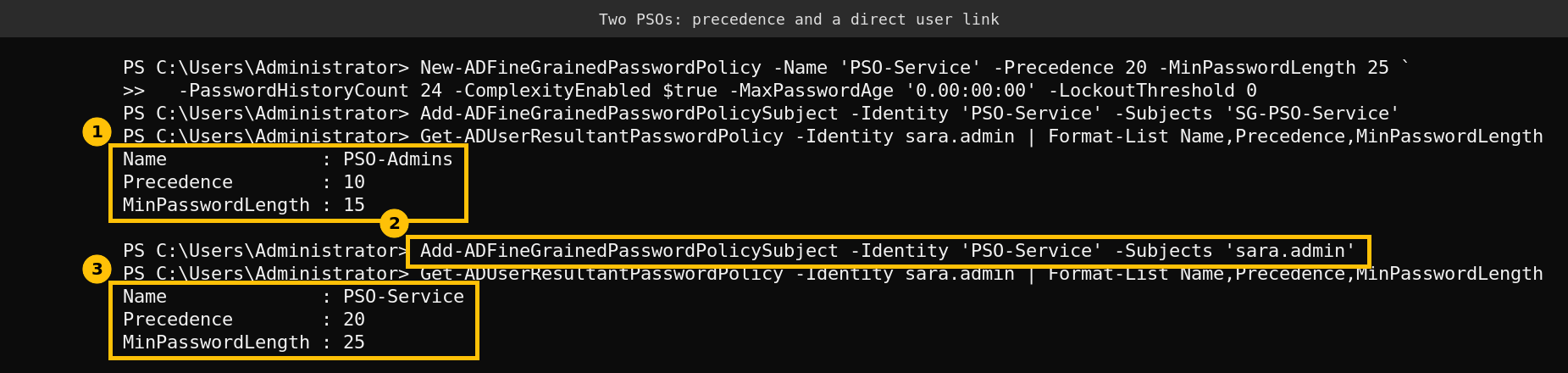
This matches the rules in Microsoft’s fine-grained password policy design notes:
- A PSO linked directly to the user wins.
- If there is none, the PSO with the lowest precedence number among the user’s global security groups wins.
- If two PSOs share the lowest number, the one with the smallest GUID wins, compared byte by byte in a way that is not the obvious text order.
- If no PSO applies, the Default Domain Policy applies.
Rule 3 is the reason to give every PSO its own precedence number. Rule 1 is the reason I avoid direct links except for a real one off exception. Settings are never merged, so the losing PSO contributes nothing, not even the settings the winner happens to be weaker on.
Step 6. Two links that do not work
Here are the two mistakes I see most often, tried on purpose. First, linking a PSO to an OU. Second, linking it to a domain local group, which is what many shops use for permissions.
Add-ADFineGrainedPasswordPolicySubject -Identity 'PSO-Service' -Subjects 'OU=PSO-Test-OU,DC=contoso,DC=com'
Add-ADFineGrainedPasswordPolicySubject -Identity 'PSO-Service' -Subjects 'DL-PSO-Test'
Get-ADGroup DL-PSO-Test -Properties Members | Format-List Name,GroupScope,Members
Get-ADUserResultantPasswordPolicy -Identity omar.test
(Get-ADUserResultantPasswordPolicy -Identity omar.test) -eq $null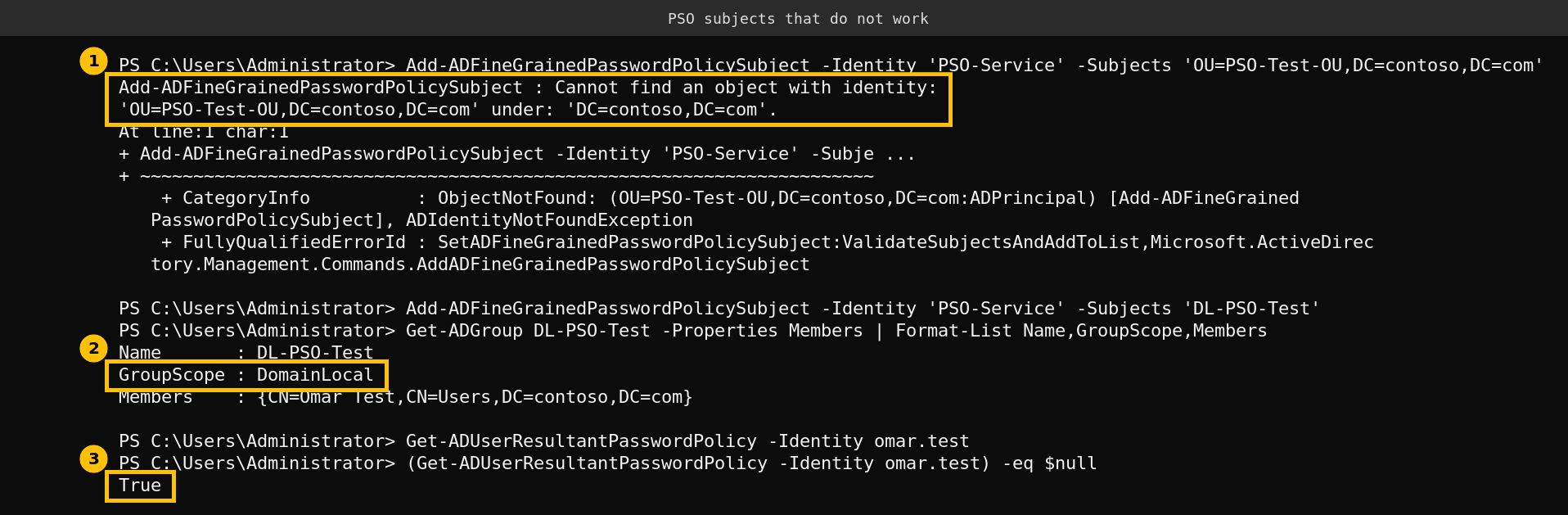
The OU case at least fails loudly. The domain local case is the dangerous one, because the link is saved, shows up in Directly Applies To, and does nothing. Microsoft says PSOs linked to anything other than users and global security groups are ignored when the resultant policy is calculated. For an OU, Microsoft’s answer is a shadow group: a global group that holds the users of that OU, kept in sync by a script or your identity tool.
Two more silent overrides from the same Microsoft page: the user flags Password never expires, Password not required and Store password using reversible encryption on the account still override the PSO. A PSO with a 180 day maximum does nothing for an admin account with Password never expires ticked. Check those flags on the members as well.
Step 7. Delete a PSO you no longer need
Because I turned on deletion protection in step 2, a plain delete fails. That is the point of the setting.
Get-ADFineGrainedPasswordPolicy -Filter * -Properties ProtectedFromAccidentalDeletion |
  Format-Table Name,Precedence,ProtectedFromAccidentalDeletion
Remove-ADFineGrainedPasswordPolicy -Identity 'PSO-Admins' -Confirm:$false
Set-ADFineGrainedPasswordPolicy -Identity 'PSO-Admins' -ProtectedFromAccidentalDeletion $false
Remove-ADFineGrainedPasswordPolicy -Identity 'PSO-Admins' -Confirm:$false
Get-ADFineGrainedPasswordPolicy -Filter * | Select-Object Name,Precedence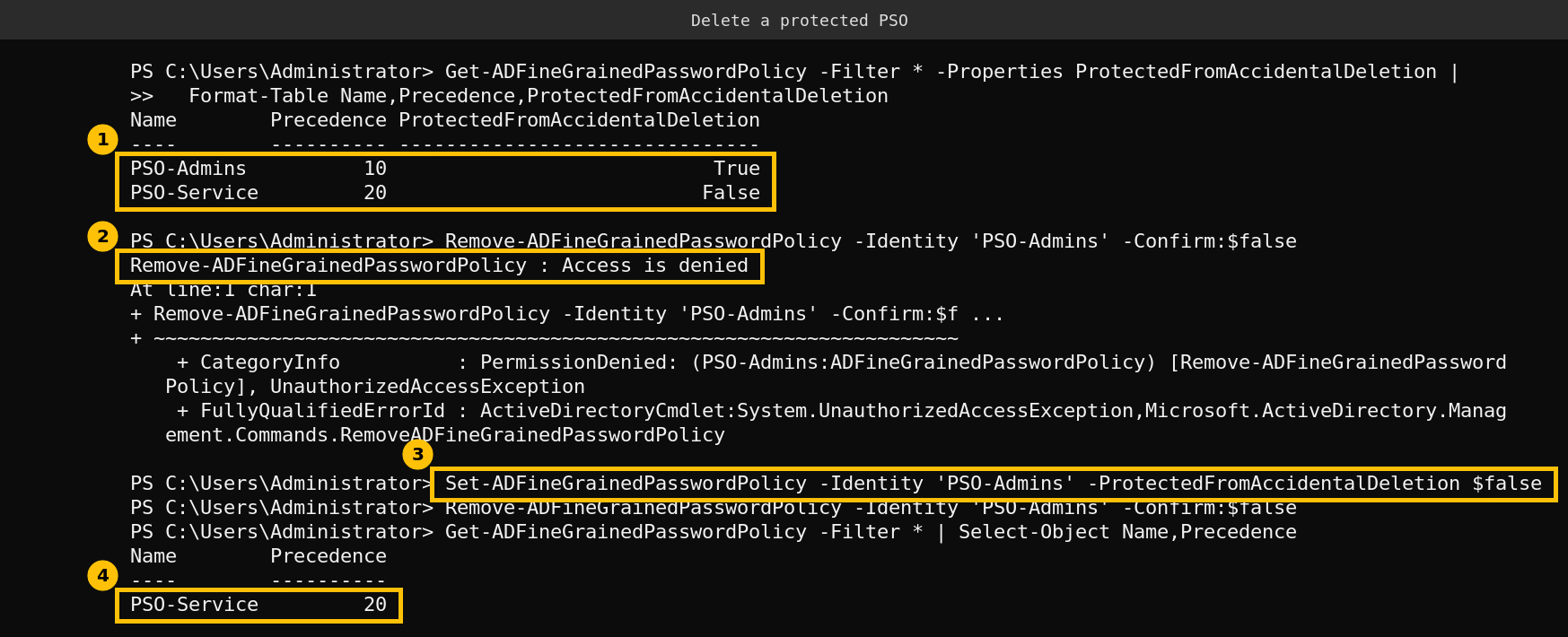
“Access is denied” here has nothing to do with your rights. Protection adds a deny ACE for Everyone on delete, which is also why you see the same error on a protected OU. The removal steps are on the Remove-ADFineGrainedPasswordPolicy page. Members then fall back to the next PSO in line, or to the Default Domain Policy.
Troubleshooting
| Symptom | Likely cause | Fix |
|---|---|---|
| Get-ADUserResultantPasswordPolicy returns nothing | No PSO applies, the Default Domain Policy is in force | Check group membership and that the group is global security |
| A user gets the wrong PSO | A direct user link, or a lower precedence number in another group | Run step 3, then list the AppliesTo of every PSO |
| Error “does not meet the length, complexity, or history requirement of the domain” with a long password | A PSO with a higher minimum applies | Check the user’s resultant PSO, not the domain policy |
| “Cannot find an object with identity” when linking | You passed an OU or a name that is not a user or group | Use a shadow global group for the OU |
| Link saved but nothing changes | Domain local, universal or distribution group | Link to a global security group |
| PSO expiry ignored | Password never expires is set on the account | Clear the flag on the user |
| Access is denied on delete | Protected from accidental deletion | Set -ProtectedFromAccidentalDeletion $false first |
Of these, I reproduced the empty result, the wrong PSO from a direct link, the length error, the OU error, the domain local link and the delete error. The Password never expires override I took from the Microsoft page and did not test today.
Where this fits
A PSO for admins is one piece of hardening, not the whole job. Pair it with a lockout threshold you can monitor, and my lockout post with event 4740 shows how to find the source when an admin gets locked out by an old saved credential. Local admin passwords on servers belong in LAPS, not in a PSO. Service accounts with long passwords are also the ones still using RC4, which my Kerberos RC4 audit post covers. And if someone deletes a PSO that was not protected, the AD Recycle Bin brings it back.
Summary
| Task | Command or place |
|---|---|
| See the domain policy | Get-ADDefaultDomainPasswordPolicy |
| Create a PSO | New-ADFineGrainedPasswordPolicy with all nine settings and ProtectedFromAccidentalDeletion |
| Apply it | Add-ADFineGrainedPasswordPolicySubject to a global security group |
| Check one user | Get-ADUserResultantPasswordPolicy, or msDS-ResultantPSO |
| GUI | ADAC, System, Password Settings Container |
| Who wins | Direct link, then lowest precedence, then smallest GUID, then the domain policy |
| Does not work on | OUs, domain local, universal and distribution groups |
What I tested: a Windows Server 2025 domain controller at the Windows2025Domain level with November 2026 updates, PowerShell and ADAC, a single domain. What I did not test: a real interactive password change by a user at Ctrl+Alt+Del, a multi domain forest, and the account flag overrides.
Sources
- Configure fine grained password policies for AD DS in Windows Server (Microsoft Learn)
- AD DS: Fine-Grained Password Policies, RSOP and precedence rules (Microsoft Learn archive)
- New-ADFineGrainedPasswordPolicy (Microsoft Learn)
- Add-ADFineGrainedPasswordPolicySubject (Microsoft Learn)
- Get-ADUserResultantPasswordPolicy (Microsoft Learn)
- Remove-ADFineGrainedPasswordPolicy (Microsoft Learn)
- Get-ADDefaultDomainPasswordPolicy (Microsoft Learn)
Service accounts are a different problem from admin passwords. Instead of giving them a long PSO password that nobody rotates, move them to a group Managed Service Account (gMSA), where the domain controller generates and changes the password for you.
Related: if you apply the OSConfig security baseline on a domain controller, it sets the domain lockout to 3 attempts and 15 minutes for every account and writes that into the Default Domain Policy. A PSO like the one above is how you give admins or service accounts different limits without changing the baseline.