October 2026 Windows Update Breaks Exchange About 22 Hours After Every Restart

If you run Exchange Server on Windows Server and installed the October 13, 2026 cumulative update, there is a failure pattern you need to know about today. About 20 to 24 hours after a restart, databases still show as mounted but nothing can reach them. OWA fails, Outlook loses the mailbox, queues grow and DAG copies stop replicating. A restart fixes it for roughly another day. Administrators first blamed the new Exchange security update, but reports now point at the Windows Server update itself, and the Exchange security update is not required for the problem to appear.
This post gives you the exact KBs, the error to search for, a read-only PowerShell check you can run on every Exchange server in a minute, and the mitigation options with their trade-offs. I did not reproduce the outage, because my Exchange lab is kept out of this site and my Windows lab is not patched to October. I say below exactly what the evidence images do and do not prove.
Quick guide: what to do in the next hour
- Find out if you are exposed. Run the check script below on each Exchange server. It looks for the four October Windows KBs, the hours since the last boot, an override of the RPC setting, and MdbOffline events.
- If the KB is installed and the server has been up for more than 18 hours, treat it as at risk now. Restart it in a safe order (one DAG member at a time, wait for Healthy copies and drained queues before the next).
- Pick a mitigation. Microsoft’s advice, as quoted by the Exchange community, is to uninstall the October Windows KB from the affected Exchange servers. The alternative is the community registry override, which needs a restart.
- Monitor. Run
Test-MapiConnectivityon a schedule so you see the failure before users do. - Keep the Exchange security update plan separate. The Exchange SU is not the cause, so do not skip it because of this issue.
What is affected
| Windows Server version | October 13, 2026 KB |
|---|---|
| Windows Server 2025 | KB5126646 |
| Windows Server 2022 | KB5126655 |
| Windows Server 2019 | KB5126651 |
| Windows Server 2016 | KB5126868 |
Other KBs show up in community threads, including the Exchange Server Subscription Edition security update KB5128895 and .NET Framework updates such as KB5128923. They are mentioned because people installed them in the same maintenance window. The Exchange team update on October 15 points at the Windows Server updates, not at those.
The symptoms to search your logs for
- Error text:
MapiExceptionMdbOffline: Unable to make connection to the server. (hr=0x80004005, ec=1142), with Event ID 1006 in the Application log. - Databases show as mounted in the Exchange admin center while clients cannot connect.
- Mail queues grow and DAG database copies stop replicating.
- Timing: 20 to 24 hours after the last restart, most often reported around 22 hours. After a restart the cycle repeats.
- Some administrators also report NETLOGON errors, memory pressure in the Mailbox Replication Service and RDP logons failing with an insufficient memory message. Those are single-source reports in a comment thread, so treat them as leads and not as confirmed symptoms.
Why it happens (community analysis, not a Microsoft statement)
One analysis, published by an Exchange MVP and extended in comments on a German Windows blog, says the October Windows Server updates added a hard limit of 512 saved search contexts in the RPC Endpoint Mapper (RpcEpMap.dll). Exchange keeps creating those contexts, and they are only released when the owning processes end. At roughly 23.7 contexts per hour on the reported server, 512 is reached after about 21.6 hours, which matches the 20 to 24 hour window. After that RPC connections fail and the store reports the databases as offline. The limit is tied by that analysis to a denial of service fix, CVE-2026-96300.
I could not find Microsoft confirming that mechanism. What Microsoft has confirmed, according to the sources below, is that the October Windows Server updates are the cause. Use the mechanism to understand the workaround, but do not quote it as official.
Check your servers: a read-only script
This script changes nothing. It reads the installed hotfixes, the boot time, the registry value that the community workaround sets, and the Application log. Run it in an elevated PowerShell on each Exchange server, or wrap it in Invoke-Command for a list of servers.
$ErrorActionPreference = 'SilentlyContinue'
$kbs = 'KB5126646','KB5126655','KB5126651','KB5126868'
$hit = @(Get-HotFix | Where-Object { $kbs -contains $_.HotFixID })
$boot = (Get-CimInstance Win32_OperatingSystem).LastBootUpTime
$hours = [math]::Round(((Get-Date) - $boot).TotalHours, 1)
$cap = (Get-ItemProperty 'HKLM:\SOFTWARE\Microsoft\Rpc').EpmapSavedContextCap
$filter = @{
  LogName   = 'Application'
  Id        = 1006
  StartTime = (Get-Date).AddDays(-3)
}
$ev = @(Get-WinEvent -FilterHashtable $filter |
        Where-Object { $_.Message -match 'MapiExceptionMdbOffline' })
"October 2026 Windows KB installed : " + $(if ($hit) { ($hit.HotFixID -join ', ') } else { 'none' })
"Hours since last boot             : $hours"
"EpmapSavedContextCap (registry)   : " + $(if ($null -ne $cap) { $cap } else { 'not set (OS default applies)' })
"MdbOffline events, last 3 days    : $($ev.Count)"
if ($hit -and $null -eq $cap) {
  if ($hours -gt 18) { 'VERDICT: AT RISK NOW. Patched, no cap override, uptime past 18 h.' }
  else { 'VERDICT: AT RISK. Patched, no cap override. Plan a restart before 20 h of uptime.' }
} elseif ($hit) { 'VERDICT: Patched with a cap override. Confirm the override survived a restart.' }
else { 'VERDICT: October Windows KB not installed, so this specific failure cannot occur here.' }
Here is the real output on my lab Windows Server 2025 machine, which is a domain controller and not an Exchange server. It has not installed the October update, so the script correctly says this failure cannot occur there.

That only proves the script runs and reads the right places. To prove the at-risk branch works, I ran the same script with the KB list replaced by a KB that is installed on the lab (KB5120708). Everything else is identical, and the verdict flips to at risk because the uptime is past 18 hours.
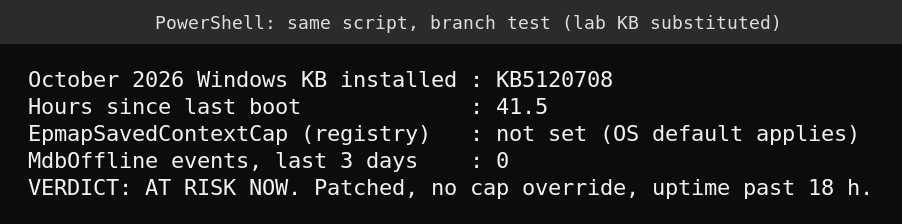
The 18 hour threshold is my own conservative margin below the reported 20 to 24 hours. It is not a Microsoft number.
Mitigation options and their trade-offs
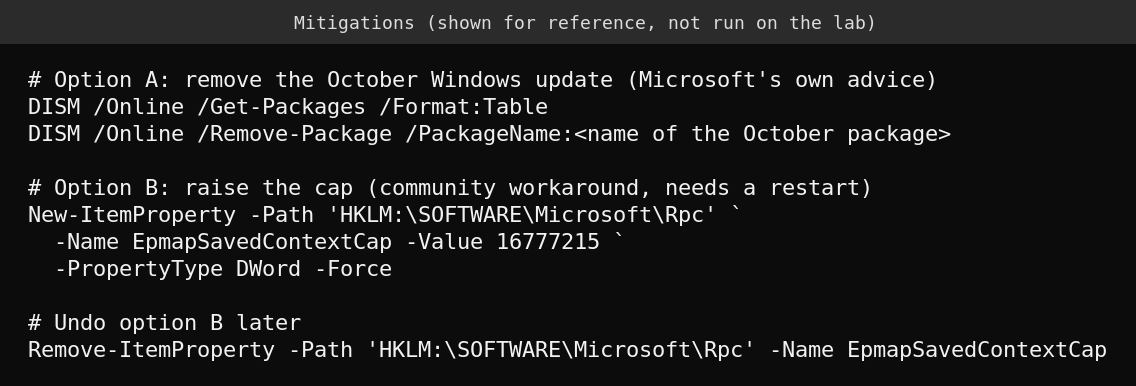
These commands are shown for reference and I did not run them on the lab, since it does not have the update.
- Option A, uninstall the October Windows KB. This is what the Exchange team recommends as a temporary step, as quoted by an Exchange community site. Be clear about the cost, you lose that month’s Windows security fixes on that server, which include a fix for an exploited zero-day (see the Patch Tuesday breakdown). Cumulative updates are often removed with DISM and not with wusa, and one source notes Microsoft has not endorsed a specific removal method, so test the removal on a non-production member first.
- Option B, raise the cap. Set
HKLM\SOFTWARE\Microsoft\Rpc\EpmapSavedContextCapas a DWord to a large value such as 16777215, then restart. The script author states that the Endpoint Mapper reads the value only at startup, so a restart is required. A way to patch the running process in memory has been described in comments, and I do not recommend it on production servers. This option keeps the security fixes but is unofficial. - Option C, scheduled restarts as a stopgap. Restarting every 12 to 20 hours prevents the outage and has been reported to work. It is operationally heavy, so use it only until A or B is in place. For a DAG, restart one member at a time and check
Get-MailboxDatabaseCopyStatusand queue length before moving on.
Whichever you choose, record it. If a fix ships, you will want to remove the registry value or reinstall the KB deliberately.
Detect the failure before users do
Schedule Test-MapiConnectivity from the Exchange Management Shell against each database every 15 minutes and alert on any failure. Add a log query for Event ID 1006 messages that contain MapiExceptionMdbOffline, which the check script already counts. If you rebuilt or extended a DAG recently, the earlier posts on building a DAG and on silent replication failures show what healthy looks like, so you can tell this problem from a network one.
What I could not verify
- I did not reproduce the outage. The evidence above covers the check script only.
- Whether a Microsoft fix or Known Issue entry exists today. The sources I found on October 16 said there was no fix yet, so check the Exchange team blog and the Windows release health page before acting.
- The 512 context mechanism and the exact registry behavior are community findings.
FAQ
Is the October Exchange security update the cause?
No, according to the reports. Exchange servers failed without the Exchange security update installed, and the Exchange team updated its release post on October 15 to point at the Windows Server updates. Keep patching Exchange on your normal schedule.
Does it affect only Exchange?
Exchange is where it is reported, because Exchange creates RPC endpoint contexts continuously. Other RPC heavy servers could in theory hit the same limit, but I found no confirmed reports, so do not assume it.
Will a restart fix it?
A restart restores service for about another 20 to 24 hours and does not remove the cause. Treat it as a stopgap.
Should I uninstall the Windows update?
It is Microsoft’s suggested temporary step for affected Exchange servers, but it removes security fixes. If you cannot accept that, the registry override or scheduled restarts are the alternatives. Test either on one DAG member first.
Sources
- Franky’s Web: Exchange Server SE problems with the October updates for Windows Server
- Born’s IT and Windows blog: Exchange Server October 2026 updates lead to outages
- Rafael Pfister: Exchange outages after the October 2026 Windows Server updates
- Microsoft Exchange Team Blog: Released October 2026 Exchange Server Security Updates
- Senserva patch tracker: KB5126646