October 2026 Patch Tuesday: One Exploited Zero-Day, a WDAC Bypass, and a Script to Check Your Servers

Microsoft shipped the October 2026 security updates on October 13. One vulnerability is already being exploited, two more were public before the patch existed, and the fix for the exploited one lands in the same cumulative update that flips the NTLMv1 default on Windows Server. Below is what changed, the exact KB and build numbers to check against, and a read-only PowerShell script I ran on a real, still-unpatched Windows Server 2025 lab server. Running it turned up something the usual advice for one of the zero-days would have gotten wrong.
The three zero-days
| CVE | Component | Status | What it does |
|---|---|---|---|
| CVE-2026-96951 | Windows Shell | Exploited in the wild | Security feature bypass of Mark of the Web, CVSS 8.8 |
| CVE-2026-108398 | .NET Framework | Publicly disclosed | Bypasses Windows Defender Application Control (WDAC), reported by James Forshaw of Google Project Zero |
| CVE-2026-92707 | MessagePack-CSharp | Publicly disclosed | Denial of service through unbounded memory allocation, CVSS 5.3 |
Counts of the full release differ between trackers because they count differently. BleepingComputer reports 1,411 flaws (not counting 348 fixed earlier in the month) and Splashtop reports 1,413. Treat both as “about 1,400” and do not quote one number as exact.
CVE-2026-96951: Mark of the Web bypass
Mark of the Web is the zone marker Windows attaches to files that came from the internet. It is what triggers SmartScreen warnings and keeps Office documents in Protected View. A bypass means a crafted file can be opened as if it were local and trusted. The user still has to open the file, so this is a phishing and download problem rather than a worm. The fix is the October cumulative update. Until it is deployed, keep SmartScreen and Protected View enforced, and patch the people who handle external email and downloads first.
CVE-2026-108398: WDAC bypass through .NET
This one only matters if you actually use WDAC as an application allowlist, typically on privileged workstations, kiosks and hardened servers. An authenticated local attacker can register crafted .NET assemblies and get code running inside a protected process, which defeats the policy. The .NET Framework update fixes it, and the cumulative-update table further down lists the KB for each version.
CVE-2026-92707: MessagePack-CSharp
MessagePack-CSharp ships inside applications as a NuGet package, so Windows Update will not fix it and your patch reports will not show it. Developers need to find it in their dependencies and update the package. From a project folder:
dotnet list package --include-transitive | findstr /i MessagePackWhat to install on Windows Server
| Server version | Cumulative update | OS build after install | Servicing stack |
|---|---|---|---|
| Windows Server 2025 | KB5126646 | 26100.33650 | KB5126645 (26100.33634) |
| Windows Server 2022 | KB5126655 | 20348.5761 | KB5126654 (20348.5739) |
Three things in these two release notes deserve a line each:
- NTLMv1 default changes. On Windows Server 2025 the update treats a missing
BlockNtlmv1SSOvalue as Enforce, which can break MS-CHAPv2 based connections. If you have not audited this yet, start with NTLMv1 Single Sign On Gets Blocked by Default in October 2026. - WSUS known issue. After KB5070881 or later on Server 2025 (KB5070884 or later on Server 2022), WSUS does not show synchronization error details. Microsoft removed that display to address CVE-2025-59287 and lists it as a known issue, not a regression you caused.
- Server 2022 mainstream support ends. This is the last mainstream support update for Windows Server 2022, with extended support through October 14, 2031. The details are in Windows Server 2022 Reaches End of Mainstream Support on October 13, 2026.
For deployment into existing Server 2025 images, Microsoft notes you should include the boot.stl file to avoid error 0xc0430001 during Secure Boot validation. The Update Catalog package for Server 2025 uses a checkpoint (KB5043080) followed by the target KB5126646.
.NET Framework KBs for the same cycle
Microsoft’s .NET Framework release notes list these. The operating system row is an offering KB, so the installed update you should see on the machine is the .NET specific one for the version already present.
| OS | .NET Framework | KB |
|---|---|---|
| Windows Server 2025 | 3.5, 4.8.1 | 5127690 |
| Windows Server 2022 | 3.5, 4.8 | 5127687 |
| Windows Server 2022 | 3.5, 4.8.1 | 5127693 |
| Windows Server 2019 | 3.5, 4.8 | 5127685 |
| Windows Server 2016 | 4.8 | 5127684 |
| Windows Server 2012 R2 | 4.8 | 5127688 |
A read-only readiness check, run on a real server
I wrote a short script that reports the build, compares it with the minimum from Microsoft’s release notes, and checks the WDAC and NTLMv1 state that this month’s fixes touch. It changes nothing on the machine. It only knows the two builds in the table above, and on any other OS it tells you to compare by hand instead of guessing.
$cv   = Get-ItemProperty 'HKLM:\SOFTWARE\Microsoft\Windows NT\CurrentVersion'
$have = [version]('{0}.{1}' -f $cv.CurrentBuild, $cv.UBR)

$target = @{
  '26100' = @{
    Min = [version]'26100.33650'
    KB  = 'KB5126646'
  }
  '20348' = @{
    Min = [version]'20348.5761'
    KB  = 'KB5126655'
  }
}

Write-Host "OS       : $($cv.ProductName)"
Write-Host "Build    : $have"
$t = $target[[string]$cv.CurrentBuild]
if ($t) {
  if ($have -ge $t.Min) {
    Write-Host "Patch    : OK, at or above $($t.Min) ($($t.KB))" -ForegroundColor Green
  } else {
    Write-Host "Patch    : MISSING, below $($t.Min). Install $($t.KB)" -ForegroundColor Red
  }
} else {
  Write-Host 'Patch    : build not in this script, compare with the release notes by hand'
}

# WDAC: count enforced policies that an admin deployed, not Microsoft's built-in ones
$dg  = Get-CimInstance -Namespace root\Microsoft\Windows\DeviceGuard -ClassName Win32_DeviceGuard -ErrorAction SilentlyContinue
$map = @{
  0 = 'Off'
  1 = 'Audit'
  2 = 'Enforced'
}
if ($dg) {
  Write-Host ("WDAC     : Win32_DeviceGuard says kernel = {0}, user-mode = {1}" -f $map[[int]$dg.CodeIntegrityPolicyEnforcementStatus], $map[[int]$dg.UsermodeCodeIntegrityPolicyEnforcementStatus])
}
if (Get-Command citool.exe -ErrorAction SilentlyContinue) {
  $pol = (citool.exe --list-policies -json | ConvertFrom-Json).Policies
  $own = @($pol | Where-Object { $_.IsEnforced -and -not $_.IsSystemPolicy })
  Write-Host ("WDAC     : {0} policies on disk, {1} enforced policies deployed by an admin" -f @($pol).Count, $own.Count)
} else {
  Write-Host 'WDAC     : CiTool not available on this OS, inspect C:\Windows\System32\CodeIntegrity by hand'
}

# NTLMv1 SSO default changes with the October update
$ntlm = (Get-ItemProperty 'HKLM:\SYSTEM\CurrentControlSet\Control\Lsa\MSV1_0' -ErrorAction SilentlyContinue).BlockNtlmv1SSO
if ($null -eq $ntlm) {
  Write-Host 'NTLMv1   : BlockNtlmv1SSO not set (the October update treats that as Enforce)'
} else {
  Write-Host "NTLMv1   : BlockNtlmv1SSO = $ntlm"
}

# Code integrity events in the last 7 days (3076 = would have blocked, 3077 = blocked)
$ev = Get-WinEvent -FilterHashtable @{
  LogName   = 'Microsoft-Windows-CodeIntegrity/Operational'
  Id        = 3076, 3077
  StartTime = (Get-Date).AddDays(-7)
} -ErrorAction SilentlyContinue
Write-Host ("CI events: {0} in the last 7 days" -f @($ev).Count)
This is the real output from a lab Windows Server 2025 domain controller that I deliberately left unpatched for this test:
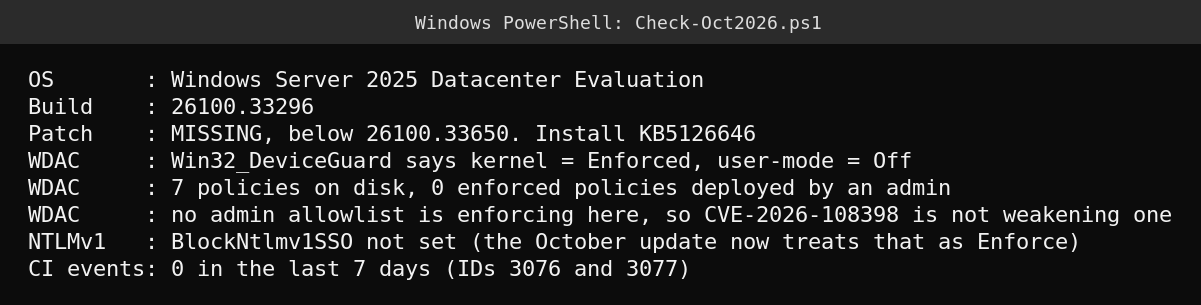
Three lines matter here.
- The patch line is red, as it should be. Build 26100.33296 is below 26100.33650, so this server is missing KB5126646.
- Win32_DeviceGuard says WDAC is Enforced, yet no allowlist is deployed. I never deployed a WDAC policy on this server.
CiToollists seven policies on disk and the only one enforced is a Microsoft system policy, titled “Microsoft Windows Cross Certificates for Code Integrity Exceptions Policy”. So the commonly suggested check of readingWin32_DeviceGuardto confirm WDAC enforcement would have shown “Enforced” on a server with no admin policy at all. I only tested this one server, so I cannot say it holds for every build, but it is enough reason to count non-system policies instead of trusting the status number. - BlockNtlmv1SSO is not set. That was harmless before October. After this update a missing value is treated as Enforce, so audit before you patch.
What I did not test
I did not install the update on the lab server, because the point of the screenshot is the “before” state, and I did not try to reproduce either bypass. The vulnerability descriptions above come from Microsoft’s own notes and the security vendors listed under Sources. Splashtop’s summary also lists critical remote code execution fixes for Exchange Server (CVE-2026-70571), Remote Desktop Gateway (CVE-2026-70187) and Active Directory (CVE-2026-70229), but I could not load those entries in the Microsoft Security Update Guide, so confirm them there before you act on a specific CVE number. BleepingComputer also reports that Microsoft warned the October update may break Smart App Control, which only affects Windows 11 clients, not servers.
Quick guide
- Run the readiness script on one server per OS version to see which builds are below the minimum.
- Audit
BlockNtlmv1SSOand anything using MS-CHAPv2 before patching Server 2025. - Deploy KB5126646 (Server 2025) or KB5126655 (Server 2022), then confirm the build number, not just that the update says installed.
- Prioritize the machines of people who open external email and downloads, because CVE-2026-96951 is already exploited.
- If you use WDAC, count enforced policies that you deployed, and patch .NET Framework with the KB for your version.
- Ask your developers to run the MessagePack dependency check, because Windows Update will not cover it.
FAQ
Which October 2026 vulnerability is being exploited?
CVE-2026-96951, a Windows Shell security feature bypass of Mark of the Web, is confirmed as exploited in the wild. CVE-2026-108398 and CVE-2026-92707 were publicly disclosed before the patch, with no exploitation reported at the time of writing.
What build should Windows Server 2025 and 2022 be on after October?
Windows Server 2025 should be at OS build 26100.33650 (KB5126646) or higher. Windows Server 2022 should be at 20348.5761 (KB5126655) or higher.
Does CVE-2026-108398 affect me if I do not use WDAC?
It bypasses a WDAC allowlist, so it matters when you run an admin-deployed policy. You should still install the .NET Framework update with the rest of the month’s fixes, and the script above tells you whether any admin-deployed policy is enforcing.
Will the October update break NTLMv1 authentication?
It can. When the BlockNtlmv1SSO registry value is not set, the Windows Server 2025 update now behaves as Enforce, and Microsoft notes this may affect MS-CHAPv2 connections. Setting the value explicitly before the update gives you control over the timing.
Sources
- Microsoft Support, October 13, 2026, KB5126646 (OS Build 26100.33650)
- Microsoft Support, October 13, 2026, KB5126655 (OS Build 20348.5761)
- Microsoft Learn, October 2026 cumulative update for .NET Framework
- BleepingComputer, Microsoft October 2026 Patch Tuesday fixes 1,411 flaws, 3 zero-days
- SOCRadar, October 2026 Patch Tuesday zero-day analysis
- Splashtop, Patch Tuesday October 2026