Windows 11 Administrator Protection Breaks Remote Desktop for Non-Admins (0xC000000D)

On October 13, 2026 Microsoft added a known issue to the Windows 11 release health page: non-admin users cannot open a Remote Desktop session to a PC that has Administrator protection turned on. The connection fails with error 0xC000000D and the message “The token that was passed to the function is invalid.” The status is Mitigated, which means a workaround exists and a real fix does not.
If you adopted the Windows security baselines, this matters more than it sounds. Microsoft notes that Administrator protection is enabled by default in the 24H2, 25H2 and 26H2 baselines unless you configured the policy differently. This post gives you the exact scope from Microsoft’s page, a read-only check that finds exposed machines, and the trade-off of the official workaround.

Quick guide
- Know the scope. Hosts are affected when they run Windows 11 24H2, 25H2, 26H1 or 26H2 with the September 22 preview update KB5124010 or anything later, have Administrator protection on, and accept Remote Desktop. Microsoft lists no Windows Server versions as affected.
- Find exposed hosts. Run the check below. The registry value
TypeOfAdminApprovalModeequal to 2 means Administrator protection is on. - Decide per host. The Microsoft workaround is to reset the “User Account Control Type Of Admin Approval Mode” policy in Intune or Group Policy, which turns Administrator protection off.
- Scope the change narrowly. Target only machines that are Remote Desktop hosts, because the setting is a real security control and you are trading it away.
- Watch the release health page and plan to turn Administrator protection back on once a fix ships.
What Microsoft says, exactly
- Symptom: non-admin users cannot establish Remote Desktop connections to remote devices that have Administrator protection enabled. Error 0xC000000D, message “The token that was passed to the function is invalid.”
- Who is affected: mainly enterprise-managed devices used as Remote Desktop hosts, regardless of how Administrator protection was enabled.
- Originating update: the September 2026 non-security preview update KB5124010 (OS build 26100.9550, released September 22) and later updates.
- Platforms: Windows 11 26H2, 26H1, 25H2 and 24H2 on the client. Server: none.
- Status: Mitigated, opened and last updated October 13, 2026. Microsoft says it is working on a fix in a future update with no date given.
I read this on the Windows 11 24H2 release health page as it stood on October 17. The same page shows that two other issues from the same update, a black screen on Azure Virtual Desktop hosts and AC-3 audio crashes, were marked resolved by the October 13 update KB5127648. The Remote Desktop issue is the one that was not.
Check one PC
Run this elevated on the PC you want to test. It reads two registry locations and changes nothing. The Administrator protection switch is the TypeOfAdminApprovalMode value under the Policies\System key, where 2 turns it on and 1 is the classic UAC behavior. Microsoft documents the policy by name, and the registry value comes from published how-to guides, so confirm it on one test PC before you rely on it fleet-wide.
$key = 'HKLM:\SOFTWARE\Microsoft\Windows\CurrentVersion\Policies\System'
$cv = Get-ItemProperty 'HKLM:\SOFTWARE\Microsoft\Windows NT\CurrentVersion'
$os = (Get-CimInstance Win32_OperatingSystem).Caption
$mode = (Get-ItemProperty $key -ErrorAction SilentlyContinue).TypeOfAdminApprovalMode
$ts = (Get-ItemProperty 'HKLM:\SYSTEM\CurrentControlSet\Control\Terminal Server').fDenyTSConnections
$rdp = ($ts -eq 0)
"Operating system        : $os"
"OS build                : $($cv.CurrentBuildNumber).$($cv.UBR)"
"TypeOfAdminApprovalMode : " + $(if ($null -ne $mode) { $mode } else { 'not set' })
"Remote Desktop enabled  : $rdp"
if ($mode -eq 2 -and $rdp) { 'VERDICT: EXPOSED. Administrator protection is on and this PC accepts RDP.' }
elseif ($mode -eq 2) { 'VERDICT: Administrator protection is on, RDP is off, so this issue does not apply.' }
else { 'VERDICT: Administrator protection is not enabled, so this issue does not apply.' }
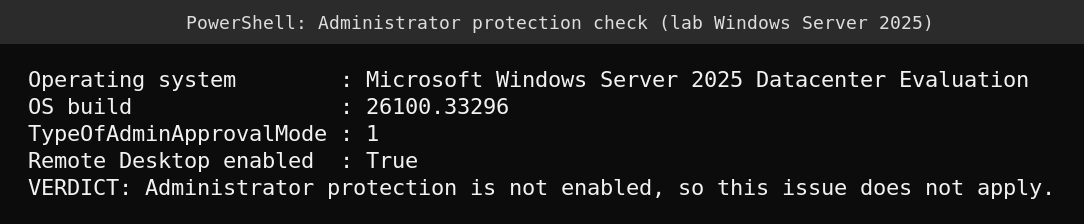
Here is the real output on my lab Windows Server 2025 machine. It reads 1, which is the classic behavior, so the script reports that the issue does not apply. That also matches Microsoft listing no server versions as affected.
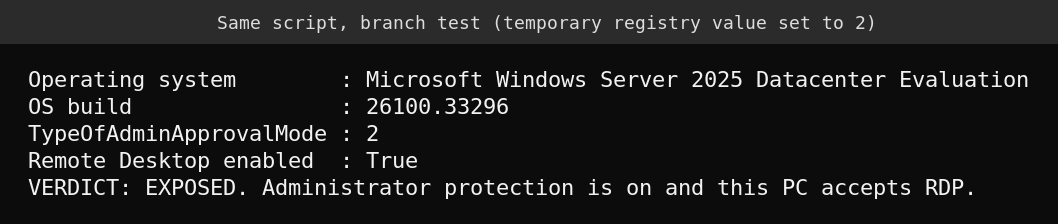
I do not have a Windows 11 test machine with Administrator protection on, so I cannot show the 0xC000000D error myself. To prove the exposed branch of the script works, I created a temporary value of 2 in a throwaway registry key, pointed the script at it, and deleted the key afterwards. The lab is a server, so the verdict text is only a test of the logic here. On a Windows 11 host the same verdict is the one that matters.
Check many PCs at once
Put your Windows 11 host names in hosts.txt and list only the machines that have both Administrator protection on and Remote Desktop enabled. Those are the ones to look at first.
$hosts = Get-Content .\hosts.txt
Invoke-Command -ComputerName $hosts -ScriptBlock {
    $key  = 'HKLM:\SOFTWARE\Microsoft\Windows\CurrentVersion\Policies\System'
    $ts   = 'HKLM:\SYSTEM\CurrentControlSet\Control\Terminal Server'
    $mode = (Get-ItemProperty $key -ErrorAction SilentlyContinue).TypeOfAdminApprovalMode
    [pscustomobject]@{
        AdminProtection = ($mode -eq 2)
        RdpEnabled      = ((Get-ItemProperty $ts).fDenyTSConnections -eq 0)
    }
} | Where-Object { $_.AdminProtection -and $_.RdpEnabled } |
    Select-Object PSComputerName, AdminProtection, RdpEnabled
The workaround and what it costs
Microsoft’s mitigation is to use your existing policy method to reset the “User Account Control Type Of Admin Approval Mode” policy in Intune or Group Policy, which temporarily turns Administrator protection off. If your devices are on the security baseline, remember that the baseline sets this policy, so a competing policy needs a clear scope and an owner, or the next baseline refresh will switch it back on.
The cost is the security benefit. Administrator protection exists so that elevation is just-in-time and tied to a separate hidden admin account, as I explained in how just-in-time elevation replaces the split-token model. Turning it off on a host puts that host back on the old UAC behavior. For a PC that people connect to over the network, that is a meaningful step back, so limit it to the Remote Desktop hosts that actually need it and document an end date.
What I could not verify
- I did not reproduce the error because I have no Windows 11 machine with Administrator protection enabled.
- The registry value is documented by third-party guides and Microsoft’s policy name, not by a Microsoft registry reference I could open. Verify it on a test PC.
- Whether a fix is shipping in the November update. Microsoft gave no date.
FAQ
Does this affect administrators connecting over Remote Desktop?
Microsoft describes the issue for non-admin users connecting to hosts with Administrator protection enabled. It does not describe administrator accounts as affected, but test with your own accounts before assuming.
Does it affect Windows Server?
Microsoft lists Server as none for this issue, and my Windows Server 2025 lab uses the classic UAC mode, which is consistent with that.
Is uninstalling the September preview update the fix?
Microsoft does not suggest that. The documented mitigation is the policy reset, and the issue also appears in later updates, so removing one update may not help.
Why did my baseline-managed PCs get Administrator protection?
Microsoft states that the Windows security baselines for 24H2, 25H2 and 26H2 enable it by default unless you configured the policy differently.
Sources
- Microsoft Learn: Windows 11, version 24H2 known issues and notifications
- BleepingComputer: Microsoft says recent Windows updates may trigger Remote Desktop failures
- Microsoft Learn: Administrator protection
- Microsoft Tech Community: Administrator protection on Windows 11
- Kapil Arya: Enable Administrator Protection on Windows 11 (registry value)