
How to Fully Remove a Let’s Encrypt Certificate (and Stop It From Renewing) on Windows Server

Let’s Encrypt certificates on Windows Server are almost always issued and renewed by an ACME client rather than manually, most commonly win-acme (wacs.exe), and removing one cleanly means removing it from both the certificate store and the client’s own renewal tracking, not just deleting the certificate itself. Skipping the second part leaves a scheduled task trying to renew a certificate you thought you’d removed.
Step 1: Identify the certificate
Get-ChildItem Cert:\LocalMachine\My |
    Where-Object Issuer -like "*O=Let's Encrypt*" |
    Select-Object Subject, Thumbprint, NotAfter, FriendlyName
Match on the organization part of the issuer, O=Let's Encrypt, not on the name of the intermediate. Let’s Encrypt changes its intermediates over time (the current list is on its Chains of Trust page), and a filter on old names like R3 or E1 misses the new ones. I checked this on 2026-11-24 from a Windows Server 2025 server against letsencrypt.org itself. Its certificate came from an intermediate called YE2, the organization match found it and the old R3 or E1 match did not:
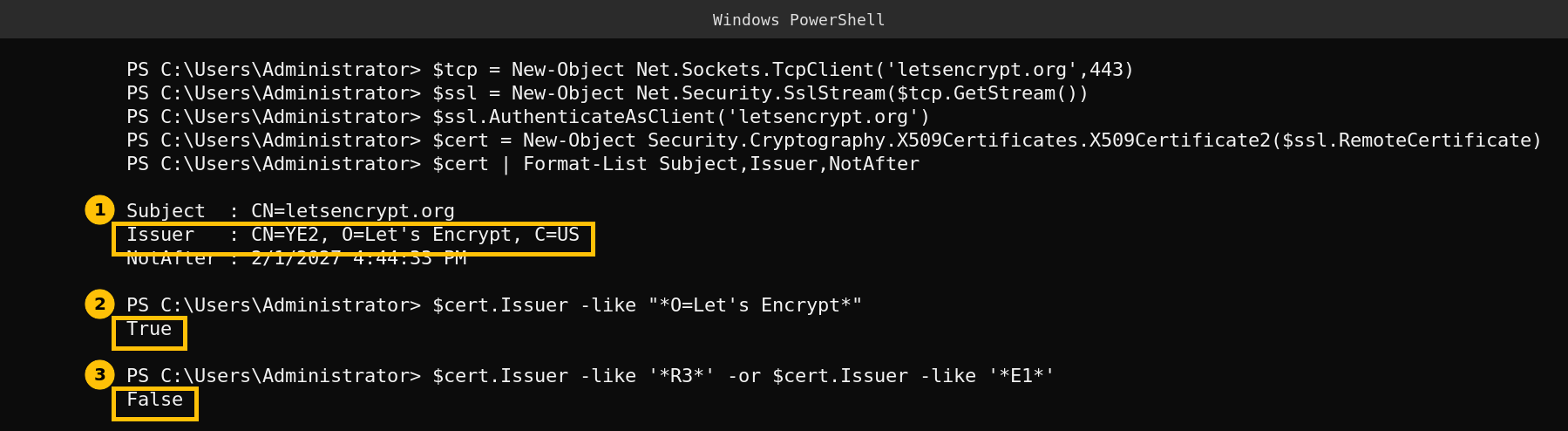
Before you remove anything, cross-check the subject, NotAfter and friendly name against what you expect. A server with several similar certificates is where people delete the wrong one. The Cert: drive is the PowerShell certificate provider, so the thumbprint is the item name.
Step 2: Remove it from the certificate store
Remove-Item -Path "Cert:\LocalMachine\My\" If the certificate is bound to an IIS site, remove or reassign that binding first (Remove-WebBinding), so the site is not left pointing at a certificate that is gone:
Get-WebBinding | Where-Object { $_.certificateHash -eq "" }
Remove-WebBinding -Name "Default Web Site" -Protocol https -Port 443
Step 3: Remove it from win-acme’s own tracking (the step people forget)
If the certificate was issued by win-acme, it also keeps its own renewal configuration independent of the certificate store. Deleting only the certificate leaves a scheduled task that will fail (or worse, silently reissue a new certificate) on its next renewal attempt:
wacs.exe --list
wacs.exe --cancel --id
Run wacs.exe --list first to find the renewal ID for the certificate you’re removing. The win-acme command line reference says --cancel works on the renewal picked with --id or --friendlyname, not on a thumbprint. The renewal management page also notes that cancelling only stops future renewals and leaves the current certificate where it is, which is why Step 2 still matters.
Step 4: Confirm the scheduled task is gone
Get-ScheduledTask | Where-Object { $_.TaskName -like "*win-acme*" -or $_.TaskName -like "*wacs*" }win-acme creates one shared scheduled task that handles renewal for all certificates it manages (automatic renewal), not one task per certificate, so this task should still exist if you have other active certificates, and should only be removed entirely if you’re decommissioning win-acme altogether.
Frequently asked questions
I deleted the certificate from the store, but a new one appeared a day later. Why?
This is exactly the “forgot to cancel the renewal in win-acme” scenario. The scheduled task ran, saw a renewal it still believed was active, and issued a fresh certificate. Always run wacs.exe --cancel for the specific renewal before or immediately after removing the certificate manually.
Is it safe to just let a Let’s Encrypt certificate expire naturally instead of removing it manually?
Generally yes for the certificate itself (an expired certificate simply stops being trusted), but the win-acme renewal task will keep attempting to renew it on schedule regardless, generating failure notifications indefinitely unless you explicitly cancel that renewal. Clean removal on both sides avoids ongoing noise in your logs and alerts.
What I tested
Tested on 2026-11-24 on a Windows Server 2025 server with Windows PowerShell 5.1: reading a live Let’s Encrypt certificate issuer and the two issuer filters shown above. Not tested here: win-acme itself, IIS bindings and the scheduled task, because the lab has no public name to validate a Let’s Encrypt certificate against. Those steps follow the win-acme and Microsoft docs linked above. If you work with certificates on Windows a lot, my posts on proving a revoked certificate is really distrusted and installing AD Certificate Services go deeper.