Windows Server 2022 Reaches End of Mainstream Support on October 13, 2026: What Actually Changes

On October 13, 2026, Windows Server 2022 reaches the end of mainstream support. The October 2026 security update is the last one released under mainstream support for this version. After that date, Windows Server 2022 moves into extended support, which runs through October 14, 2031.
This is not an end-of-life date. Your servers keep working, and you keep getting security updates for another five years. But a few things genuinely change, and most admins only find out the hard way when they go looking for a feature update or a non-security fix that no longer ships.
What actually stops
- New features stop. Windows Server 2022 will not receive any further feature updates. Whatever capability set it has on October 13, 2026 is what it has for the rest of its life.
- Non-security hotfixes stop. If you hit a bug that is not a security vulnerability, Microsoft is not going to ship a fix for it on Server 2022 going forward. You either work around it or move to a supported mainstream version.
- Design change requests stop. Any feature request or behavior change request against this version is closed.
What keeps working
- Security updates continue at no additional cost through October 14, 2031, delivered the same way as today through Windows Update, WSUS, or your patch management tooling.
- Existing support channels remain open for troubleshooting issues tied to a security fix.
If your organization already pays for Extended Security Updates on older versions like Server 2012, note that this is different. Server 2022’s extended support through 2031 is the standard lifecycle, not a paid add-on program.
Step 1: find out what you’re actually running
Before you plan anything, confirm which servers in your environment are actually on 2022 versus other versions. A quick way to check any given box:
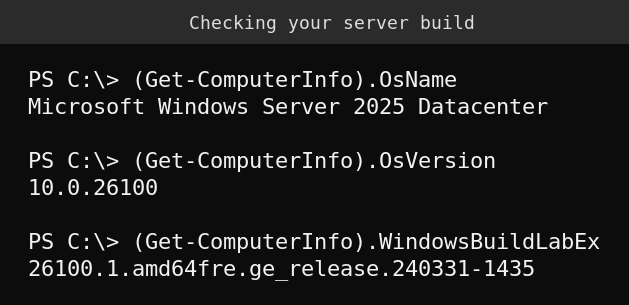
That example is from a lab server already on Windows Server 2025 (build 26100), which is Microsoft’s current recommended upgrade target. If your own output shows “Windows Server 2022” and a 20348 build number, that server is one of the ones this change actually applies to.
To check an entire domain at once rather than one server at a time, this runs against Active Directory and returns every computer object’s operating system:
Get-ADComputer -Filter {OperatingSystem -like "*Server*"} -Property OperatingSystem, OperatingSystemVersion |
  Select-Object Name, OperatingSystem, OperatingSystemVersion |
  Sort-Object OperatingSystem
Step 2: decide your upgrade path, don’t default to “do nothing”
You have five years before extended support ends, which is a long runway, but “no new features and no non-security fixes” starting now is a real constraint for anyone running anything beyond basic file/print or domain services on these boxes. Microsoft’s stated recommendation is to plan a move to Windows Server 2025, which supports an in-place upgrade from Server 2022 without a clean reinstall for most standard roles.
Treat this the same way you’d treat any OS lifecycle milestone: inventory what’s affected, prioritize anything customer-facing or compliance-relevant, and schedule upgrades around your actual maintenance windows rather than waiting until a specific feature gap forces an emergency project.
Quick guide
- Run an AD-wide inventory to find every server still on Windows Server 2022.
- Flag any of those servers running roles beyond basic file/print or AD DS, they’re the ones most likely to feel the loss of non-security fixes.
- Confirm your patch management tooling will keep delivering the monthly security-only updates after October 13, 2026.
- Start scoping an in-place upgrade to Windows Server 2025 for servers you plan to keep running past the next year or two.
- Document which servers you’re deliberately leaving on 2022 through 2031 and why, so it’s a decision, not an accident.
FAQ
Is Windows Server 2022 end of life on October 13, 2026?
No. It reaches end of mainstream support and moves into extended support, which includes security updates at no extra cost through October 14, 2031. End of life for Server 2022 is that later 2031 date.
Will my servers stop receiving security patches?
No. Security updates keep shipping through the standard channels for another five years. What stops is new features and fixes for non-security bugs.
Do I have to upgrade to Windows Server 2025 specifically?
You don’t have to upgrade at all during extended support. Microsoft’s recommendation to move to Server 2025 is about staying on a mainstream-supported version with ongoing feature and non-security updates, not a requirement tied to this date.
Does this affect Windows Server 2022 Datacenter: Azure Edition the same way?
Azure Edition has historically followed a somewhat different, more continuously updated servicing model than the standalone/Datacenter releases. If you run the Azure Edition SKU, check its specific lifecycle page rather than assuming it tracks the general Server 2022 dates exactly.