CVE-2026-45648: The NSPI RPC Flaw in Every Domain Controller, and How to Check If You Are Exposed

Microsoft disclosed CVE-2026-45648 in June 2026, a remote code execution vulnerability in Active Directory Domain Services with a CVSS score of 8.8. The root cause is a stack-based buffer overflow in the NSPI RPC interface, the protocol Outlook and other MAPI clients use to look up directory information from a domain controller. Any authenticated domain user can trigger it. No admin rights, no user interaction, no phishing click required.
That combination (low privilege bar, network-reachable, no user action) is exactly the profile that gets weaponized fast once a proof of concept lands. If you run your own domain controllers, this is worth 10 minutes of your time today.
What the vulnerability actually is
NSPI (Name Service Provider Interface) is an RPC interface exposed by the directory service on every domain controller. It exists so Outlook and other MAPI-aware clients can resolve names and addresses against the global address list without a full LDAP query. Because it accepts input from any authenticated session and runs inside the directory service process (lsass.exe), a memory corruption bug here is about as high value as it gets for an attacker already holding valid domain credentials, including a low-privilege phished account or a compromised workstation.
Microsoft’s own advisory classifies this as CWE-787 (out-of-bounds write), triggered by specially crafted input to the NSPI RPC interface. Successful exploitation gives the attacker code execution with the privileges of the directory service process, which on a domain controller means SYSTEM.
Step 1: check your patch level
Run this on each domain controller to see your most recently installed updates. This is real output from a lab domain controller (Windows Server 2025, build 26100) I keep for writing these tutorials:

This lab DC’s newest cumulative update is from mid-August, well before the fix for this class of vulnerability shipped in later cumulative updates. That is the real point of this check: Get-HotFix only tells you what has landed, it does not tell you whether you are protected. You have to cross-reference the date against Microsoft’s advisory for your specific OS build, not just confirm “something installed recently.”
Step 2: confirm the DC is otherwise healthy before you patch
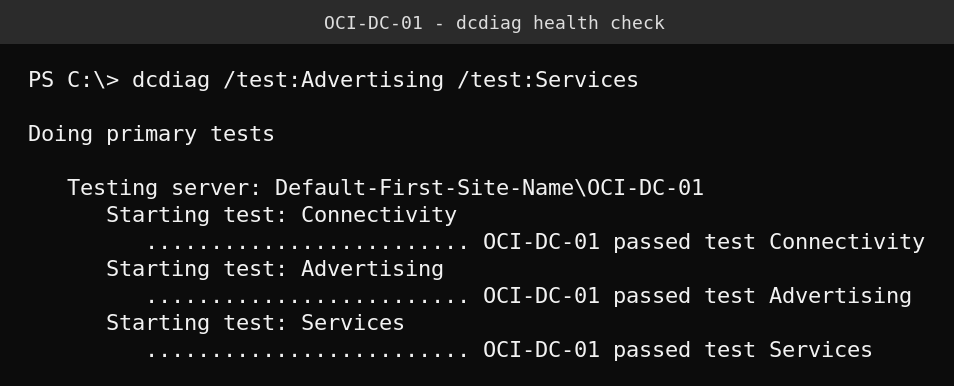
Before pushing a cumulative update to a domain controller, confirm replication, advertising, and core services are in a good state so a failed update is easier to diagnose. dcdiag is the standard tool:
Step 3: apply the current cumulative update
There is no standalone, out-of-band patch for this specific CVE. It ships as part of Microsoft’s regular cumulative Windows updates, so Windows Update, WSUS, or your patch management tool pushing the current monthly rollup is the fix. On a domain controller, apply updates to one DC at a time, confirm a clean dcdiag and successful replication with repadmin /showrepl before moving to the next, and avoid patching all of your DCs simultaneously.
Mitigations if you can’t patch immediately
- Restrict RPC endpoint mapper and dynamic RPC ports at the host firewall to only the management and application servers that genuinely need directory lookups, not the full internal network.
- Monitor lsass.exe for unexpected crashes or restarts. A domain controller’s directory service does not crash under normal conditions, and a crash coinciding with unusual RPC traffic is worth investigating immediately.
- Review who holds domain-authenticated access at all. Since this requires only an authenticated session, not elevated rights, your overall exposure is really a function of how many accounts (including service accounts and lower-privilege users) can reach your DCs over RPC.
- Enable and review RPC-related auditing where your environment supports it, so you have a trail if exploitation is attempted.
Quick guide
- Run
Get-HotFix | Sort-Object InstalledOn -Descending | Select-Object -First 5on each domain controller. - Compare the newest install date against Microsoft’s advisory for the cumulative update that addresses CVE-2026-45648 on your OS build.
- If you are behind, schedule the current cumulative update, one DC at a time.
- Run
dcdiagandrepadmin /showreplbefore and after each DC you patch. - If you can’t patch today, tighten RPC firewall rules and watch lsass.exe for crashes in the meantime.
FAQ
Do I need domain admin rights to be affected?
No. The vulnerability requires only an authenticated domain session, not any elevated privilege. A compromised standard user account or service account is enough for an attacker to attempt exploitation.
Is there a standalone patch, or do I need the full cumulative update?
Microsoft ships this fix as part of the regular monthly cumulative update for the affected OS versions. There is no separate hotfix to install in isolation.
Can I just block NSPI/RPC entirely as a permanent fix?
Not without breaking Outlook’s directory lookups and other MAPI-based address book features for any client that relies on it. Scoping RPC access to only the hosts that need it is a reasonable interim mitigation, but it is not a substitute for patching.
Does this affect Entra ID / Azure AD directly?
No, this is specific to on-premises Active Directory Domain Services and the NSPI RPC interface it exposes. Entra ID does not run this component. If you sync identities from an on-prem domain to Entra ID via Entra Connect or Cloud Sync, a compromised DC is still a serious risk to your hybrid identity trust, so patching still matters even in hybrid environments.