Is Your Ubuntu Kernel Patched Against ssh-keysign-pwn (CVE-2026-46333)? A 60-Second Changelog Check

CVE-2026-46333, nicknamed ssh-keysign-pwn, is a Linux kernel race condition that lets an unprivileged local user read files they should never see. Canonical’s write-up says the targets include /etc/shadow and the OpenSSH server host private keys. It was publicly disclosed on May 15, 2026, and Ubuntu has fixed kernels for every supported release.
The flaw needs a local account to exploit, so it matters most on shared servers, build hosts and any box where someone untrusted already has a shell. The hard part is not finding the patch. It is proving that the kernel you are running has it. Cloud images ship their own kernel flavours with their own version numbers, so the version table in the advisory does not apply to them. This post shows a check that works on any Ubuntu kernel, and I ran it on a real server.

Quick guide
- Find the running kernel with
uname -r. The installed package does not count until you reboot into it. - Compare it with the fixed versions in the table below, if you run a standard generic kernel.
- For a cloud kernel, read its changelog and look for the CVE number. The command is below.
- If you cannot patch yet, apply Canonical’s
ptrace_scopemitigation. - Reboot, then run the check again.
How the attack works, in one paragraph
Canonical describes a race condition in the kernel’s handling of ptrace() while a privileged process exits. The exploit targets privileged setuid and setgid programs and uses that race to read sensitive files, including the OpenSSH host private keys. The OpenSSH helper ssh-keysign is the program that gave the bug its nickname. I have not tested an exploit and I will not publish one.
Fixed kernel versions for Ubuntu
These are the fixed versions Canonical lists for the standard Ubuntu kernels. They do not cover the cloud flavours such as -oracle, -aws, -azure or -gcp, which have separate version numbers.
| Ubuntu release | Fixed in |
|---|---|
| 20.04 LTS | linux 5.15.0-181.191~20.04.1 (the 5.4 kernels are not affected) |
| 22.04 LTS | linux 5.15.0-181.191, and linux 6.8.0-124.124~22.04.1 |
| 24.04 LTS | linux 6.8.0-124.124, and linux 6.17.0-35.35~24.04.1 |
| 25.10 | linux 6.17.0-35.35 |
| 26.04 LTS | linux 7.0.0-22.22 |
The check that works on any kernel: read its changelog
Every Ubuntu kernel package ships the full list of fixes it contains. Search that list for the CVE number. Here is what I ran on a real server running an Oracle Cloud kernel.
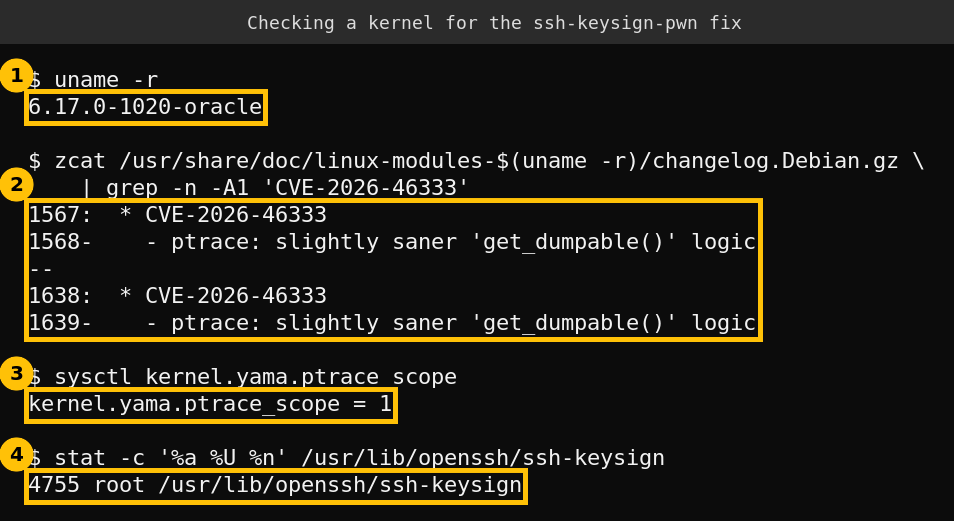
uname -r
zcat /usr/share/doc/linux-modules-$(uname -r)/changelog.Debian.gz | grep -n -A1 'CVE-2026-46333'
The running kernel is 6.17.0-1020-oracle, and its changelog names the CVE twice, each time with the fix ptrace: slightly saner ‘get_dumpable()’ logic. Reading further up, the earlier entries show the fix first arriving in the 6.17.0-1016 build and appearing again in 1017, so build 1020 includes it. The other kernel installed on the same box, 7.0.0-1013-oracle, lists the CVE in its 7.0.0-1006 entry, so it includes the fix as well.
A trap I hit: I first searched the changelog of the linux-image package and got zero matches. That package is a thin signed wrapper. The real list of fixes is in the linux-modules package, which is why the command above uses it. If your grep finds nothing, try that package before you decide you are vulnerable.
This proves the fix is in the kernel I am running. It does not prove the exploit fails, because I did not test one. It is the same evidence the distribution itself relies on.
Two things the output also shows
ptrace_scopeis 1, which is the Ubuntu default. Canonical’s mitigation sets it to 2, so the default does not by itself close this hole on an unpatched kernel.ssh-keysignis installed setuid root (mode 4755). That is normal for the OpenSSH client package and is why this binary was the showcase target. Host-based authentication is left at its default of off in this box’s client config, so nothing uses the helper, but the file is still there.
If you cannot patch yet
Canonical gives one mitigation: raise the Yama ptrace_scope to 2. At level 2 only processes with the CAP_SYS_PTRACE capability can use ptrace to attach, which stops ordinary users from debugging each other’s processes. That can break tools such as gdb and strace for non-root users, so test it on a development host first. These are Canonical’s commands.
echo kernel.yama.ptrace_scope=2 | sudo tee /etc/sysctl.d/99-CVE-2026-46333.conf
sudo sysctl -p /etc/sysctl.d/99-CVE-2026-46333.conf
Remove the file and run sudo sysctl kernel.yama.ptrace_scope=1 once you have booted into a fixed kernel, unless you want to keep the stricter setting.
Apply the fix
sudo apt update && sudo apt upgrade
sudo reboot
Installing the new kernel package is not enough. The old kernel stays loaded until you reboot, so run uname -r again afterwards and repeat the changelog check. On a system with unattended upgrades, look for /var/run/reboot-required, which tells you a reboot is still pending.
After a long exposure on a shared host
This part is my own judgement and not Canonical guidance. If a server ran an unpatched kernel for months while untrusted users had shell access, assume the host private keys and password hashes could have been read. Regenerating the SSH host keys and forcing a password change for local accounts is cheap insurance. Check your authentication logs for local accounts that should not have been logging in.
FAQ
Can someone exploit this over the network?
Not on its own. Canonical describes it as a local flaw that needs an unprivileged account on the machine. It becomes dangerous once an attacker has a foothold, such as a stolen low-privilege login.
Is apt list --upgradable enough to check?
No. It shows what is waiting to be installed, not what you are running. Always check uname -r against the fixed version or the changelog.
Does ptrace_scope=1 protect me?
Canonical recommends 2 as the mitigation, which suggests the default of 1 does not close the hole. Patch the kernel instead of relying on the setting.
My cloud kernel has a different version number. What do I compare it to?
Do not use the table. Read the changelog of your own kernel for the CVE number, as shown above, or check your cloud vendor’s security notice.