PHP 8.4.27 Fixes Two Critical Remote Code Execution Flaws (CVSS 9.2): Check Your PHP Version and Update Now

PHP 8.4.27 was released on October 22, 2026 and fixes two critical flaws, both rated CVSS 9.2. The GitHub advisories describe unauthenticated remote code execution as the web worker account, and they say it was demonstrated against PHP-FPM as well as mod_php. Every PHP release before the fixed one is affected: anything below 8.2.35, 8.3.36, 8.4.27 or 8.5.12.
My own site runs on PHP 8.4 with FPM behind nginx, and it was on 8.4.26, one release behind. This post shows how I checked, what the two flaws are, how I updated in a few minutes, and how you can do the same for a WordPress or any other PHP site.
Quick guide
- Find your PHP version. In WordPress open Tools, Site Health, Info, Server. On a server run
php -vand also ask PHP-FPM itself. - Compare it with the fixed versions: 8.2.35, 8.3.36, 8.4.27 or 8.5.12.
- Update the PHP packages and restart PHP-FPM. Do not forget the restart, an old process keeps the old code.
- Verify that the running binary reports the new version and that the site answers.
- On shared hosting choose the newest patch version in the hosting panel, or ask the host which build they run.
The two flaws
| Advisory | CVE | Rating | What it is |
|---|---|---|---|
| GHSA-w8hw-w9fx-j79w | CVE-2026-109618 | Critical, CVSS 9.2 | Remote code execution through out-of-memory corruption. When a memory allocation fails while a request is half set up, PHP exits early with longjmp and the shutdown code then works on a corrupted state. |
| GHSA-6wmf-4rv5-p3rp | CVE-2026-109619 | Critical, CVSS 9.2 | Remote code execution through stale global state. After a fatal error, an out-of-memory condition or a timeout, a long-running worker can keep pointers to freed memory, and a later request on the same worker can use them. |
Two details from the advisories are worth reading carefully. The first flaw can be triggered with requests that stay within the declared limits, using multipart bodies without a proper length, headers without a limit per part, and empty file fields. The second needs a “producer” request and a “consumer” request to reach the same worker. The advisory says that having multiple workers lowers the chance per request but does not remove it. The changelog entry for 8.4.27 lists the fix as avoiding state corruption via bailout, with high severity. I am quoting the advisory ratings of 9.2 as published, and I did not test or reproduce either flaw.
Step 1: check your version
On a server there are two versions to look at, the command line one and the one that serves your website. They can differ if you installed more than one PHP, and the web one is the one that matters. Ask PHP-FPM directly. The binary name contains the version, so on Debian and Ubuntu with the Sury packages it is php-fpm8.4.
php -v | head -1
apt-cache policy php8.4-fpm | sed -n 1,3p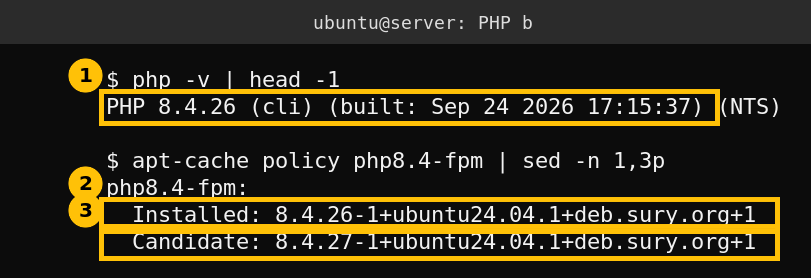
The server had 8.4.26, built on September 24, 2026. That release was itself a security release that fixed many issues, including a critical heap overflow in OpenSSL wildcard name matching (CVE-2026-91767) and an IPv6 ACL bypass in PHP-FPM (CVE-2026-91768), so staying current has paid off twice in one month. The candidate version after apt update was 8.4.27.
Step 2: update and restart
On my server PHP comes from the Ondrej Sury repository, so one command upgrades all the 8.4 packages together. Run it on a quiet moment. The package scripts restart PHP-FPM for you, and in my case the restart took about a second.
sudo apt update
sudo apt-get install -y --only-upgrade 'php8.4-*'
sudo systemctl status php8.4-fpm --no-pager | head -5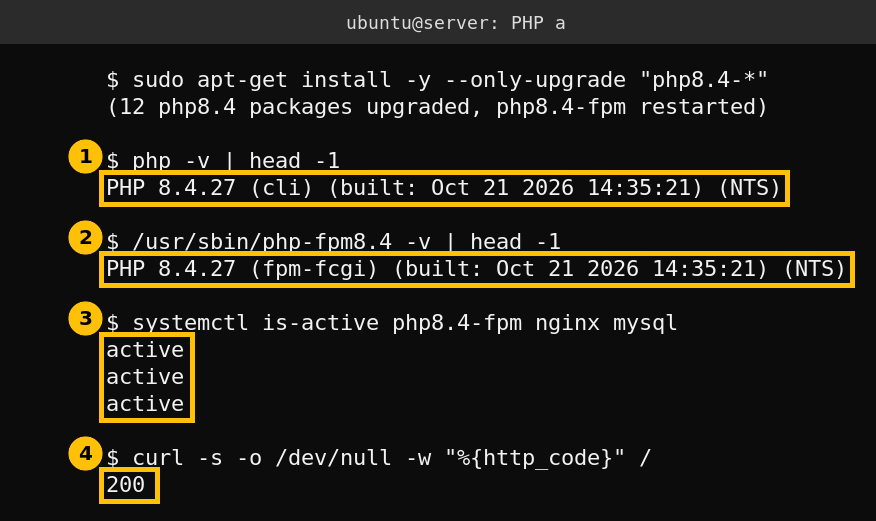
Both the command line binary and the FPM binary report 8.4.27, built on October 21. PHP-FPM, nginx and MySQL are active, and the home page answers with 200. A WordPress front page is a PHP page, so that 200 means the new PHP is serving it. I did not run a load test or try either exploit.
If you cannot update right now
- There is no configuration workaround in the advisories that I can recommend. The advisory for the first flaw points at several ways to reach memory exhaustion, so lowering limits alone is not a fix. Update.
- Reduce the exposure while you wait. Put a web application firewall or a CDN in front of the site. I use Cloudflare. It helps with unusual multipart bodies but it is not a patch.
- Check your PHP branch. Only 8.2, 8.3, 8.4 and 8.5 are named in the advisories. If you are on an older branch, you will not get these fixes from PHP itself, so plan a move to a supported version.
- Distribution packages. Ubuntu and Debian ship their own PHP builds and release their own notices. I only updated the Sury build, so check your distribution changelog for the two CVE numbers before you assume you are covered.
What else I updated while I was there
I also ran the WordPress updater. WordPress core and all active plugins were already current. Three inactive themes had updates, Astra, OceanWP and Ollie, and I updated them. An inactive theme still sits on disk and can still be reached, so unused themes are worth either updating or deleting.
Caveats
I verified the version change and that the site answers. I did not verify exploitability on my server, and I took the severity, affected versions and fixed versions from the PHP advisories and the PHP changelog as published today. One server, one PHP branch.
FAQ
Which PHP versions fix CVE-2026-109618 and CVE-2026-109619?
PHP 8.2.35, 8.3.36, 8.4.27 and 8.5.12. Releases below those on the same branches are affected.
Is PHP-FPM affected or only mod_php?
The advisories say remote code execution was demonstrated against both mod_php and PHP-FPM configurations.
How do I check my PHP version in WordPress?
Open Tools, then Site Health, then the Info tab and expand Server. It shows the PHP version your website runs, which is the one that matters.
Do I have to restart PHP-FPM after updating?
Yes. The running processes keep the old code until they restart. Package updates normally restart the service, but verify with the FPM binary version and the service start time.
Is updating enough, or must I also change settings?
The advisories name the update as the fix. I found no configuration setting in them that I could recommend as a replacement.