Ubuntu on 1 GB RAM: Stop the Hangs With zram, Swap Tuning and OOM Protection

A small cloud server with 1 GB of RAM does not fail politely. Mine started refusing SSH logins, the website stalled, and three restarts in a row did not bring it back to a usable state. When I finally looked at the kernel log, it had killed the database in the middle of the night to stay alive.
This post is what I changed to make that box stable: compressed swap in RAM with zram, a swap setting that suits it, protection so the important services are killed last, and trimming of the things that were eating memory for no reason. Every number below is real output from that server. I will also tell you what I could not prove.

Quick guide
- Read the evidence first. Look for OOM kills in the kernel log and check memory pressure.
- Add zram swap so memory pressure is absorbed by compression, not by a slow disk.
- Set the swap behaviour that suits zram.
- Protect SSH, the web server and the database so the kernel kills something else first.
- Trim background services that you do not need on a small box.
- Verify with zramctl, swapon and the pressure file.
Step 1: what actually happened
The kernel log keeps the story. These two lines are from the night the box fell over. A process asked for memory, there was none left, and the kernel chose to kill the database server to recover.

Two things stand out. The process that asked for memory (a VPN helper) was not the one that was killed. The kernel picks by how much memory a process uses, and the database was the biggest. And by the time a kill happens you are already in trouble, because the machine spends minutes thrashing first. That thrashing is what blocks SSH.
To see thrashing before it kills anything, read the pressure file. It reports the share of time tasks spent waiting for memory.
cat /proc/pressure/memory
journalctl -k | grep -i -E 'out of memory|oom-kill'
A some avg10 figure that keeps climbing above 10 or 20 means the machine is stalling. On my server it sat in the single digits when quiet and spiked during image processing and backups.
Step 2: add zram swap
zram creates a compressed block device in RAM and uses it as swap. A page that would have been written to a slow cloud disk is compressed instead and kept in memory. On a 1 GB machine that is the difference between a short slowdown and a freeze. On Ubuntu the easy way is the systemd zram generator.
sudo apt install systemd-zram-generator
sudo tee /etc/systemd/zram-generator.conf <<'EOF'
[zram0]
zram-size = 384
compression-algorithm = zstd
swap-priority = 100
EOF
sudo systemctl daemon-reload
sudo systemctl start [email protected]
I gave it 384 MB, which is a bit over a third of the RAM, with the zstd algorithm. The high priority of 100 makes the kernel fill zram first and only then touch the disk swap file, which stays at the default low priority. The generator is documented on its GitHub page and the device itself in the kernel zram documentation.
Step 3: set the swap behaviour
sudo tee /etc/sysctl.d/99-lowmem.conf <<'EOF'
vm.swappiness=60
vm.page-cluster=0
EOF
sudo sysctl --system
vm.swappiness=60 is the Ubuntu default, so I wrote it down on purpose and did not change it. The setting that really matters for zram is vm.page-cluster=0. The kernel normally reads swap in clusters of 8 pages because disks are slow at random reads. RAM has no seek time, so reading one page at a time avoids pulling in pages you do not need.
Step 4: see that it works
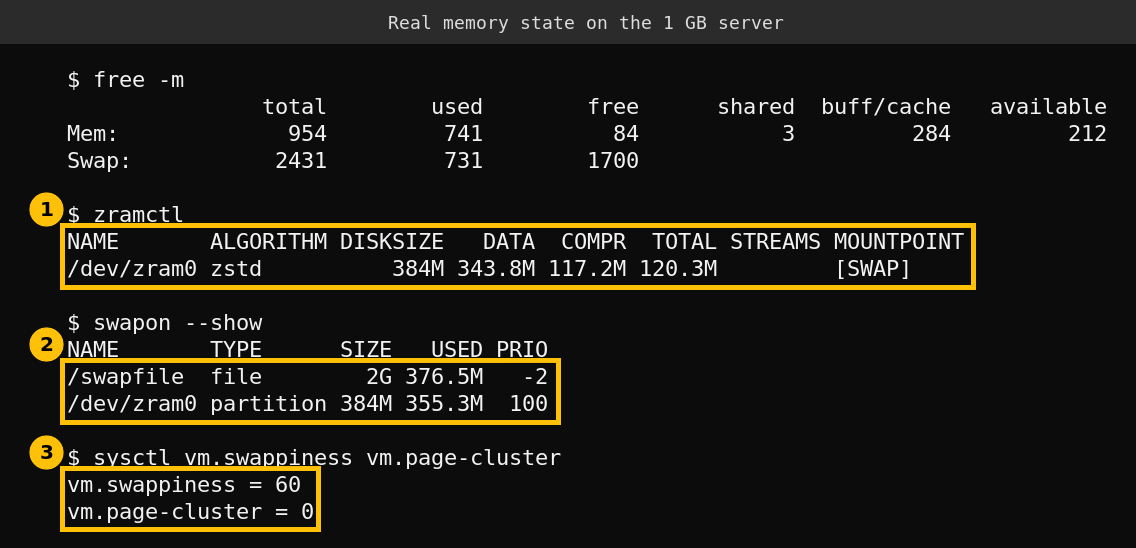
Read the first callout carefully. At that moment 343.8 MB of data had been stored in zram and it occupied only 117.2 MB of real memory. That is roughly 2.9 to 1 compression, which is why 384 MB of zram behaves like a much larger buffer. The second callout shows the order: zram is used first, the disk file only after it is full.
The numbers also show the box is still under heavy load, with 731 MB of swap in use. zram does not create memory. It makes the shortage cheaper to live with.
Step 5: make the kernel kill the right thing last
Two systemd settings change who survives. OOMScoreAdjust shifts a service in the kernel’s kill order, and a negative number makes it less likely to be chosen. MemoryLow asks the kernel to avoid reclaiming memory from that service while it stays below the value. I applied both with drop-ins for SSH, the web server and the database. This is the web server one.
sudo systemctl edit nginx
# paste these two lines, save, then:
[Service]
MemoryLow=24M
OOMScoreAdjust=-500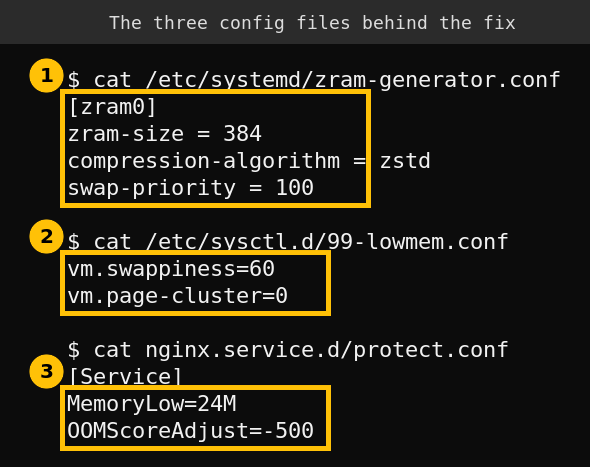
I used the same two lines with different values for each service: SSH with 16M and minus 800 so that I can always log in, nginx with 24M and minus 500, MySQL with 64M and minus 500. The settings are described in the systemd resource control and systemd exec manuals. Treat the exact numbers as a starting point for your own services, not a recipe.
Step 6: stop wasting memory
The cheapest memory is the memory you never use. These were the changes that gave back the most on this box.
- PHP-FPM on demand. Setting
pm = ondemand,pm.max_children = 3andpm.process_idle_timeout = 20sstops idle workers from sitting in RAM. - A smaller MySQL. A buffer pool of 96 MB and 16 MB temporary tables in a config file, applied at the next restart of the service.
- Services nobody needed here. I disabled the firmware updater, its timer and the disk management daemon, which have no job on a headless cloud server.
- Quieter scans. On a WordPress site, a security plugin’s full scans are a classic memory spike, so I switched it to its low resource mode and ran the cron job with a low priority.
What it gave back, and what I cannot prove
Before these changes the server showed about 190 MB of available memory in my readings that day. Afterwards it showed about 390 MB at rest. Those are single readings from one session, not a benchmark.
Here is what I cannot claim. The root cause of the original freeze was never proven. The kernel log shows the OOM kill and the thrashing, but I cannot show that zram would have prevented that exact night. The server also still runs hot during heavy work, as the 731 MB of swap above shows. The honest fix for a machine this small is more RAM or fewer things on it. These steps make the failure slower and safer, they do not remove it.
A checklist you can copy
- Check
journalctl -kfor OOM kills and read/proc/pressure/memory. - Install the zram generator and set a size around a third of RAM with zstd.
- Set
vm.page-cluster=0and keep a sensible swappiness. - Add
MemoryLowandOOMScoreAdjustdrop-ins for SSH, web and database. - Cut idle workers and unneeded services, then re-check
free -mandzramctl.
FAQ
How big should zram be on a 1 GB server?
I used 384 MB, a little over a third of RAM. Larger sizes compete with the applications for real memory, so go up slowly and watch the pressure file.
Do I still need the disk swap file?
I kept it as a second line of defence at a lower priority. zram fills first and the file only takes the overflow.
Will OOMScoreAdjust stop the OOM killer from ever killing my database?
No. It only changes the order. If memory stays exhausted, something has to die, so it is a safety margin and not a cure.
Is zram safe on production servers?
It is widely used and shipped by default on several distributions. On a server, test it and watch CPU use, since compression costs a little processor time.