NTLMv1 Credentials Are Blocked by Default Since the October 2026 Update: Audit First, Then Fix the Cause

Since the October 13, 2026 security update, Windows Server 2025 and Windows 11 (24H2, 25H2 and newer) block NTLMv1-derived credentials for single sign-on by default. Before that update the same attempts were only logged. Now they fail.
Microsoft says it plainly: if the registry value is not set, the machine uses enforce mode after the update, and it does not even create the value for you. The people who notice are not the ones running the patch. They are the users whose Wi-Fi, VPN or old application quietly stops signing in. This post shows how to check your servers, what the audit events look like, and how to fix the cause instead of switching the protection off.
Quick guide
- Find out which machines are in scope. Windows Server 2025 and Windows 11 24H2 or newer. Older systems are not covered by this change.
- Run the check below on a sample of them to read the setting and the audit events.
- Look for event 4024 (would have been blocked) and 4025 (was blocked) in the NTLM log.
- Fix the dependency. Typical causes are Wi-Fi, Ethernet and VPN profiles that use MS-CHAPv2, and old apps.
- Use the exception only as a stopgap, scoped to the machines that need it, with an end date.
What exactly changed
| Item | Detail from Microsoft |
|---|---|
| Date | The October 13, 2026 Windows security update. Before it, audit mode. After it, enforce mode. |
| Scope | Windows 11 versions 24H2, 25H2, 26H1 and 26H2, and Windows Server 2025. |
| Setting | BlockNtlmv1SSO (REG_DWORD) under HKLM\SYSTEM\CurrentControlSet\Control\Lsa\MSV1_0. 0 is audit mode, 1 is enforce mode. |
| Default | Value not set means enforce mode once the update is installed. |
| Events | 4024 is a warning for audit mode, 4025 is an error when a credential was blocked. Both are in Microsoft-Windows-NTLM/Operational. |
The Microsoft support article behind that table is linked in the sources. It is about NTLMv1-derived credentials used for single sign-on, not about every NTLM logon on your network. NTLMv2 is not what this change blocks. The wider plan to phase NTLM out is separate and still has no firm end date, as heise explained.
Step 1: read the setting and the events
This read-only script prints the patch level, the registry value and the number of audit and block events. Run it in an elevated PowerShell on a Windows Server 2025 machine or a Windows 11 PC.
$lsa = 'HKLM:\SYSTEM\CurrentControlSet\Control\Lsa'
$block = (Get-ItemProperty "$lsa\MSV1_0" -ErrorAction SilentlyContinue).BlockNtlmv1SSO
$level = (Get-ItemProperty $lsa -ErrorAction SilentlyContinue).LmCompatibilityLevel
$cv = Get-ItemProperty 'HKLM:\SOFTWARE\Microsoft\Windows NT\CurrentVersion'

$filter = @{
  LogName = 'Microsoft-Windows-NTLM/Operational'
  Id = 4024, 4025
}
$hits = @(Get-WinEvent -FilterHashtable $filter -ErrorAction SilentlyContinue)

[pscustomobject]@{
  Build = "$($cv.CurrentBuildNumber).$($cv.UBR)"
  LastPatchInstalled = (Get-HotFix | Sort-Object InstalledOn -Descending | Select-Object -First 1).InstalledOn.ToString('yyyy-MM-dd')
  BlockNtlmv1SSO = if ($null -eq $block) { 'not set (default applies)' } else { $block }
  LmCompatibilityLevel = if ($null -eq $level) { 'not set' } else { $level }
  Audit4024 = ($hits | Where-Object Id -eq 4024).Count
  Blocked4025 = ($hits | Where-Object Id -eq 4025).Count
} | Format-List
I ran it on my lab domain controller, which runs Windows Server 2025. The output below is real. It is a useful picture of the state before the update, because that machine has not installed the October patch yet.
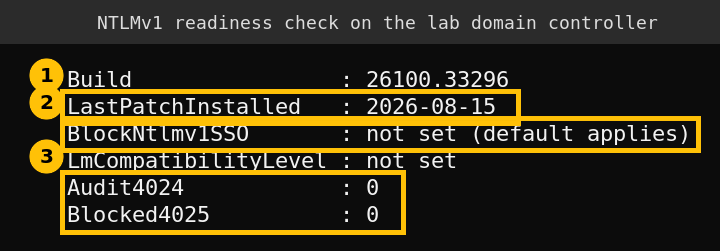
What this tells me: the machine is on build 26100.33296 and its newest hotfix is dated August 15, 2026, so the enforcement default has not arrived yet. The setting is not set, so enforce mode will apply the moment the October update installs. There are no 4024 events, which means nothing on this machine used NTLMv1-derived credentials while it was auditing. That is the good outcome you are looking for.
What I did not do. I did not install the October update on the lab and I did not generate a 4024 or 4025 event, so I cannot show you a blocked logon. I also did not change any setting on the domain controller. I only read values.
What is in the NTLM log on a normal server
That same log held 1,185 records on my lab domain controller, and none of them were 4024 or 4025. Most were other NTLM audit event IDs (4023 at 990, 4022 at 185 and 4020 at 10). The newest one I read described a remote client using NTLM to authenticate through WinRM. I did not trace which tool made it, so I will only say it is a reminder that plenty of NTLM, of the v2 kind, still runs on a healthy server. Do not confuse general NTLM use with NTLMv1-derived credentials. Only 4024 and 4025 belong to this change.
Step 2: find what depends on NTLMv1
Microsoft calls out one family above all: network access that authenticates with MS-CHAPv2, such as Wi-Fi, Ethernet and VPN profiles. MS-CHAPv2 produces credentials derived from NTLMv1, so a profile that worked for years can fail after the update. When you see a 4024 event, read its message and details first, then trace which profile or application it belongs to. I have not seen a real 4024 message, so I cannot tell you what fields it carries.
To read the events from several servers at once, wrap the same filter in Get-WinEvent -ComputerName or collect the log with Windows Event Forwarding. I only ran the local version, so test the remote version on one server first.
Step 3: fix the cause
- Move network profiles off MS-CHAPv2. Certificate-based authentication such as EAP-TLS is the usual replacement for Wi-Fi and VPN.
- Turn on Credential Guard where the hardware supports it. Microsoft strongly recommends it, and Credential Guard is its own supported route to protect these credentials. See the Credential Guard documentation.
- Replace or upgrade the old application that needs NTLMv1, or put it on Kerberos.
Step 4: the temporary exception, and its price
If something business critical breaks and you cannot fix it today, Microsoft allows setting BlockNtlmv1SSO to 0 on the affected machines. Treat that as a scoped workaround, not a fix. It puts the machine back into audit mode, which means NTLMv1-derived credentials work again and the weakness returns with them. Write down which machines carry the exception and when it ends.
reg add "HKLM\SYSTEM\CurrentControlSet\Control\Lsa\MSV1_0" /v BlockNtlmv1SSO /t REG_DWORD /d 0 /fI did not run that command in the lab. It is the documented registry value from Microsoft’s article, shown here so you can recognise it in a change request. Do not roll it out to every machine.
A rollout order that works
- Before patching: run the check on a sample of servers and PCs and look for 4024.
- At patching: keep a rollback plan for one pilot group and tell the help desk about Wi-Fi and VPN sign-in failures.
- After patching: search for 4025. Each one is a logon that Windows refused.
- Within a month: remove every exception you added.
This pairs with the older check for weak protocols in my post on finding SMBv1 and NTLMv1 on Windows servers.
FAQ
Does this block all NTLM?
No. It blocks NTLMv1-derived credentials used for single sign-on. NTLMv2 logons are not what this change targets.
Which systems get the new default?
Windows Server 2025 and Windows 11 versions 24H2, 25H2, 26H1 and 26H2, after the October 13, 2026 update.
How do I know a logon was blocked?
Look for event 4025 in the Microsoft-Windows-NTLM/Operational log. Event 4024 means it would have been blocked in audit mode.
Can I turn it off?
You can set BlockNtlmv1SSO to 0 on specific machines as a temporary workaround. Microsoft recommends fixing the dependency and enabling Credential Guard instead.