

Azure Blueprints Retires January 31, 2027: Export Now and Migrate to Template Specs and Deployment Stacks

Azure Blueprints is going away, and the first hard edge is October 31, 2026. That is 12 days from today. After that date you cannot modify a blueprint definition or create a new blueprint assignment. On January 31, 2027 the service retires completely, and anything you have not exported is deleted.
Resources your blueprints already deployed are not deleted. What disappears is the definition, the versions, the assignments and the resource locks. If you rely on blueprint locks to stop people deleting a landing zone, those protections vanish too. This post gives you the timeline, the migration path Microsoft recommends, and what happened when I tried that path for real in my lab.
Quick guide
- Inventory every blueprint definition and assignment, at subscription and at management group scope.
- Export each definition, with its artifacts, to JSON before you change anything.
- Convert the artifacts into one Bicep or ARM template using the mapping table below.
- Publish the template as a template spec.
- Deploy the template spec with a deployment stack and set the deny settings that replace blueprint locks.
- Verify, then remove the old blueprint assignment and definition.
The timeline
The January 31, 2027 date is on Microsoft Learn. The earlier milestones come from the Azure message center item AZ564806, which I read through a public mirror of Microsoft’s notices. Check your own message center for the same item before you plan around them.
| Date | What stops working |
|---|---|
| July 31, 2026 (past) | You can no longer create new blueprint definitions or versions |
| October 31, 2026 | You can no longer modify definitions or create new assignments |
| December 31, 2026 | You can no longer modify existing assignments |
| January 31, 2027 | The API stops responding, the CLI and PowerShell commands stop working, unexported blueprints are deleted and locks revert to Don’t Lock |
The practical reading is that you can still redeploy an existing assignment for a while but you cannot change it. If a landing zone needs one more policy before the end of the year, add it in the new setup, not the old one.
Step 1: inventory what you have
Blueprint definitions can live at subscription scope or at management group scope, so check both. This is the call I ran against my lab subscription as a plain REST request. It is read-only.
GET https://management.azure.com/subscriptions/{subscriptionId}/providers/Microsoft.Blueprint/blueprints?api-version=2018-11-01-preview

GET https://management.azure.com/providers/Microsoft.Management/managementGroups/{managementGroupId}/providers/Microsoft.Blueprint/blueprints?api-version=2018-11-01-preview
My lab returned an empty list, so there was nothing to migrate. That is the first callout in the image further down. The management group URL is the same pattern from the Blueprints REST reference and I did not run it.
Step 2: export and convert
Export each definition with its artifacts to JSON. Microsoft’s migration page stresses that this must happen before January 31, 2027, because after that date unexported definitions, versions and assignments are deleted. Then convert the artifacts into a single template. Microsoft’s mapping is below.
| Blueprint artifact | Bicep or ARM equivalent |
|---|---|
| Policy assignment | Microsoft.Authorization/policyAssignments |
| Role assignment | Microsoft.Authorization/roleAssignments |
| ARM template | A module, nested template or linked template |
| Resource group | Microsoft.Resources/resourceGroups |
Set targetScope in the Bicep file to the scope the blueprint was assigned to, for example subscription.
Step 3: publish a template spec and deploy it with a stack
A template spec stores the template and its versions inside Azure. A deployment stack then takes over the jobs a blueprint assignment did: lifecycle and locking. Microsoft maps the lock modes like this: denyDelete is similar to Do Not Delete, and denyWriteAndDelete is similar to Read Only. These are Microsoft’s own commands from the migration page. I could not run them, because the Azure CLI is not installed on the machine I work from, so I ran the same operations as REST calls.
az ts create \
  --name blueprint-migration \
  --version 1.0.0 \
  --resource-group myResourceGroup \
  --location westus2 \
  --template-file ./main.bicep

az stack sub create \
  --name blueprint-migration-stack \
  --location westus2 \
  --template-spec "/subscriptions/<subscriptionId>/resourceGroups/myResourceGroup/providers/Microsoft.Resources/templateSpecs/blueprint-migration/versions/1.0.0" \
  --deny-settings-mode denyDelete \
  --action-on-unmanage deleteResources
What happened when I tried it in my lab
I published a small template as a template spec and deployed it with a stack at resource group scope. The first thing I learned is that the path is not frictionless, and that is useful to know before you run it against a production landing zone.
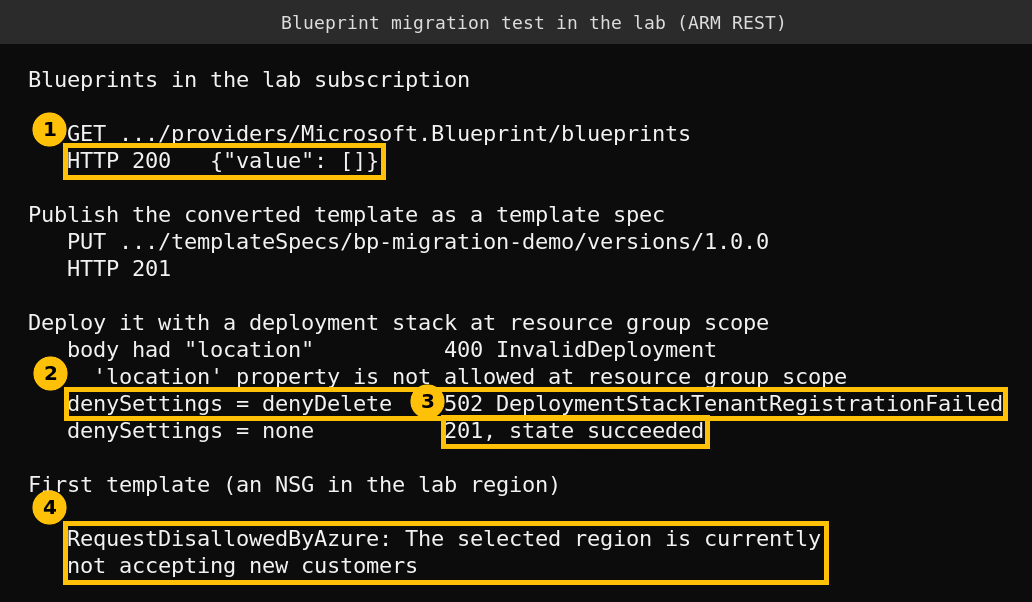
- The template spec was created without trouble. The version publish returned 201.
- A stack at resource group scope rejected a location. The error said the
locationproperty is not allowed at resource group scope. Microsoft’s example usesaz stack sub createwith a location, because that is subscription scope. Resource group stacks take no location. - Deny settings failed with a 502. With
denyDeleteand withdenyWriteAndDelete, the service returnedDeploymentStackTenantRegistrationFailedand an internal error message that suggests setting deny settings to none. I do not know why. Microsoft’s page says you need Owner or User Access Administrator on the scope to configure deny settings, and my lab identity is only a Contributor, but the error text does not say that, so treat it as a possibility and not a diagnosis. - With deny settings set to none the stack succeeded and managed the resource I gave it.
- My first template failed for an unrelated reason. A network security group in my lab region was refused with
RequestDisallowedByAzurebecause the region was not accepting new customers on that free-tier subscription. I switched to a template that does not need a region.
The takeaway is that I could not confirm that deny settings work in my lab, and that is the part that replaces blueprint locks. In your tenant, test the deny mode on a throwaway resource group with an Owner account before you decommission a single blueprint assignment. I deleted the stack, the template spec and everything it managed afterwards.
Step 4: verify, then remove the blueprint
- Confirm the stack created the resources you expect and that deny settings are applied.
- Confirm policy and role assignments are present at the target scope.
- Only then remove the original blueprint assignment and definition, after you have exported them.
If your priority is source control and pull request review, Microsoft’s page also describes keeping the converted Bicep files in a Git repository and deploying stacks straight from a pipeline. Template specs suit sharing templates inside Azure. Git suits managing them as code.
FAQ
Are the resources my blueprints created deleted on January 31, 2027?
No. The retirement notice says resources created through blueprints are not deleted. The definitions, versions and assignments are, along with the lock behaviour.
What replaces blueprint locks?
Microsoft points to deployment stack deny settings. denyDelete is similar to Do Not Delete and denyWriteAndDelete is similar to Read Only. Test them first, as my own attempt hit a registration error.
Can I still edit a blueprint after October 31, 2026?
No. From that date you cannot modify definitions or create new assignments. Existing assignments can still be modified until December 31, 2026, according to the message center timeline.
Template specs or a Git repository?
Microsoft says both give you versioning. Use template specs to share templates within Azure and Git to manage them as code with pull requests.