Entra Dynamic Groups That Use memberOf Freeze on November 3, 2026: Find Every One and Fix It

On November 3, 2026, any Microsoft Entra dynamic group that uses the memberOf rule operator stops updating. That is 15 days from today. Microsoft’s final reminder (message center item MC1488834, published October 5) says the group keeps whatever members it had on that day and never changes again.
A frozen group does not fail loudly. A leaver stays in the group, so they keep the Conditional Access policy exclusion, the licence or the Teams access that the group gave them. A new joiner never gets added. This post shows you how to find every memberOf rule in dynamic groups, dynamic administrative units and entitlement management, and what Microsoft says to do instead.
Quick guide
- Export your dynamic groups and search every rule for
memberOf. The script below does it in one pass. - Check dynamic administrative units separately. They are not in the group list.
- Check entitlement management auto-assignment policies. Microsoft says these are quarantined from November 3, not just frozen, and gives its own read-only script.
- Replace each rule with a supported operator, or convert the group to assigned membership.
- Validate the membership after the change, then pause or delete anything you no longer need.
What exactly happens on November 3
Microsoft’s Learn page for the operator says it plainly. After November 3, 2026, dynamic membership groups, dynamic administrative units and entitlement management auto-assignment policies that use memberOf “stop updating and remain in their last known state.” The entitlement management page goes one step further and says affected auto-assignment policies are quarantined, so no assignments are added or removed until you take memberOf out of the rule.
The reason Microsoft gives is a platform one. Using memberOf “can affect dynamic membership processing across a tenant, even when only a single MemberOf rule is present.” The operator was only ever a public preview, and the Learn page says a preview feature is not intended for production use. Plenty of tenants used it anyway because it solved a real problem: building one group out of the members of other groups.
| Where memberOf can appear | What happens after November 3 | What it can break |
|---|---|---|
| Dynamic membership groups | Stops updating, keeps last known members | Conditional Access targeting, group-based licensing, Teams and SharePoint access |
| Dynamic administrative units | Stops updating membership and scope | Delegated admin scope drifts from reality |
| Entitlement management auto-assignment policies | Quarantined, no assignments added or removed | Access package assignments go stale |
Step 1: find the dynamic groups that use memberOf
You need the Group.Read.All permission. This script is read-only. It lists every dynamic group, keeps the ones whose rule contains memberOf in any letter case, and writes a CSV you can hand to the owners of those groups.
Connect-MgGraph -Scopes 'Group.Read.All'

$groups = Get-MgGroup -All -Filter "groupTypes/any(c:c eq 'DynamicMembership')" `
    -Property Id, DisplayName, MembershipRule, MembershipRuleProcessingState

$hits = $groups | Where-Object { $_.MembershipRule -match '(?i)memberof' }

$hits | Select-Object DisplayName, Id, MembershipRuleProcessingState, MembershipRule |
    Export-Csv .\memberof-dynamic-groups.csv -NoTypeInformation -Encoding UTF8

"{0} dynamic groups scanned, {1} use memberOf" -f @($groups).Count, @($hits).Count
A hit looks like the sample below. The rule format, user.memberof -any (group.objectId -in […]), is the one Microsoft documents. The names are invented, because the output is a sample and not from a real tenant.
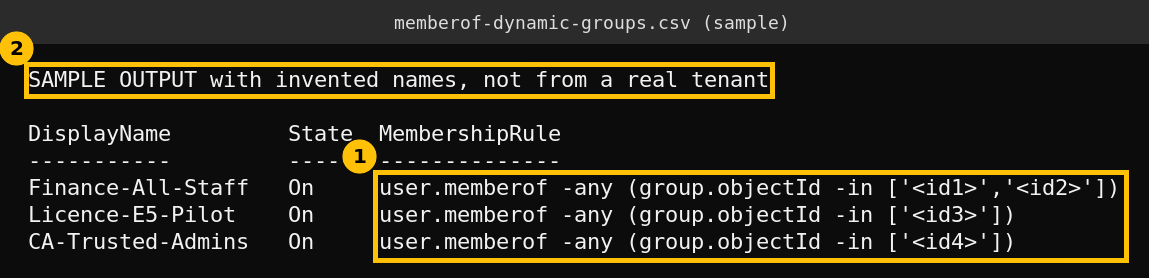
I did not run this PowerShell script. This box has no PowerShell, so I wrote it from the documented Microsoft Graph PowerShell cmdlets and the rule format on Microsoft Learn. Run it first against a test tenant or just read the output before acting on it.
The real wall I hit trying to check my own lab tenant
What I could run was the underlying Microsoft Graph call from my lab service principal. It failed, and the failure is worth knowing about because it is exactly what a scanning account will meet in a tenant that has never granted directory read access.
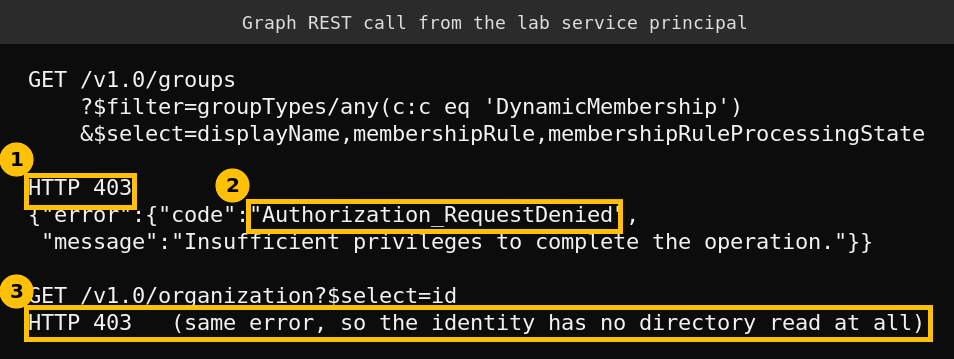
Even the simplest tenant read (/organization) returned 403. The access token for the app carried no application roles at all, so nothing in the directory was readable. The fix for a scanner is to grant the app the Group.Read.All application permission and give admin consent, or to run the script interactively as an admin using delegated permissions as shown above. I left the lab identity as it was rather than widening it for a screenshot, which means I cannot tell you whether my lab tenant has any memberOf rules. The sample above is the only scan output in this post.
Step 2: find dynamic administrative units that use memberOf
Microsoft’s page for dynamic administrative units documents MembershipType, MembershipRule and MembershipRuleProcessingState on the v1.0 administrative unit. This read-only filter uses them.
Connect-MgGraph -Scopes 'AdministrativeUnit.Read.All'

Get-MgDirectoryAdministrativeUnit -All |
    Where-Object { $_.MembershipType -eq 'Dynamic' -and $_.MembershipRule -match '(?i)memberof' } |
    Select-Object DisplayName, Id, MembershipRule
Same caveat as before. I wrote this from the documented properties and did not run it.
Step 3: find entitlement management auto-assignment policies that use memberOf
Microsoft publishes a complete read-only script for this on the entitlement management page. It walks every assignment policy, keeps the ones that have automaticRequestSettings, checks each rule for memberOf and always writes a CSV, even when nothing matches. Use it as published rather than rewriting it. It needs the EntitlementManagement.Read.All permission and an Entra ID Governance or Entra Suite licence to be meaningful.
Step 4: replace the rule
Microsoft is deliberately vague about the replacement. The Learn page says it is “continuing to develop an alternative solution” for the scenarios memberOf covered, and in the meantime tells you to either move to a supported rule operator or convert the group to assigned membership. For auto-assignment policies it adds that if no equivalent rule exists you should plan another assignment method before removing the policy, so assignments are not dropped.
Here is how I would sort the cases. This part is my own judgement, not Microsoft guidance.
- The source groups were built from one attribute such as department or country. Rebuild the rule on that attribute directly, for example
user.department -eq "Finance". Microsoft’s own page on efficient rules says-eqis the fastest operator, then-startsWithand-endsWith, and to minimise-matchand-contains. Use-infor several values. - The source groups are hand-curated lists such as a pilot group. There is no attribute to rebuild from. Convert the target to assigned membership and decide who maintains it, or sync it from the source group with a scheduled script.
- Nothing depends on it any more. Pause it, watch for complaints for a week, then delete it. Microsoft lists pausing or deleting as an option when the group is no longer needed.
Whatever you choose, validate the member list after the change. The Learn page also lists preview limits that explain odd behaviour you may already have noticed: only direct members of a source group are included, a memberOf group does not update when a child group is deleted or loses members until the rule is edited, and a tenant is capped at 500 memberOf dynamic groups.
Check the blast radius first
Before you change anything, find out what each frozen group would feed. Microsoft names four things at risk: Conditional Access targeting, group-based licensing, Teams and SharePoint access, and access package assignments. A group used as an exclusion in a Conditional Access policy is the most dangerous case, because a leaver who stays in the group keeps the exclusion. Fix those groups first.
A rollout order that works in 15 days
- Today: run the three scans and put the results in one list with an owner per group.
- This week: fix groups that feed Conditional Access or licensing.
- Next week: fix the rest and the administrative units, then re-run the scans so the CSVs come back empty.
- November 2: do a final scan. The goal is to prove there is nothing left to freeze.
FAQ
Does the group get deleted on November 3?
No. Microsoft says the group stays and keeps its last known members. The problem is that it never changes again, so access and licences drift out of date quietly.
Are groups that use other operators affected?
Not by this change. The Learn page and the entitlement management page both say only configurations using memberOf are affected.
Is there a supported replacement for memberOf?
Not yet. Microsoft says it is still developing an alternative. For now the supported routes are a rule built on user or device attributes, or assigned membership.
Does this apply to Azure Government or China clouds?
The Learn page says the memberOf preview was only available in the public cloud, so those clouds were never able to use it.
Sources
- MC1488834, Final reminder to replace MemberOf rule operator configurations by November 3, 2026
- Configure dynamic membership groups with the memberOf operator (preview), Microsoft Learn
- Configure an automatic assignment policy for an access package, Microsoft Learn
- Manage users or devices for an administrative unit with dynamic membership rules, Microsoft Learn
- Create simpler and faster rules for dynamic membership groups, Microsoft Learn