Exchange DAG Health Check and Planned Failover: 43 Seconds, Zero Logs Lost, and the Move Exchange Refused

A planned failover in an Exchange database availability group (DAG) is one of the most routine jobs an Exchange admin has, and it is also one of the easiest to get wrong under pressure. In my lab it worked first time, in about 43 seconds with zero logs lost. Then I tried a fourth move inside the same hour and Exchange refused it. That refusal is a safety feature, and knowing about it before a real maintenance window saves a bad few minutes.
This post is a working health check you can run before and after any move, a planned failover of one database from SRV01 to SRV02 and back, and the four things that failed or surprised me along the way. The names are neutral stand-ins (SRV01, SRV02, DAG01, DB01, contoso.com) and the screenshots have the real names pixelated.

Quick guide
- Check health first. Run
Get-MailboxDatabaseCopyStatusandTest-ReplicationHealthon every DAG member. Do not move anything until every check saysPassed. - Move the database with
Move-ActiveMailboxDatabaseand read the result:SucceededandNumberOfLogsLost 0. - Check health again from the new active server.
- Wait for the replay queue to reach 0 on the passive copy before you call the job finished.
- Count your moves. Active Manager refuses a fourth move within one hour unless you add
-SkipMoveSuppressionChecks.
The lab
Exchange Server Subscription Edition on two Windows Server 2025 VMs, one DAG with a copy of each database on the other server and a file share witness on a domain controller. DB01 was active on SRV01. DB02 prefers SRV02 but was mounted on SRV01 at the start of the run. Every database had a copy on the other server.
If you have not built a DAG yet, start with building an Exchange database availability group from start to finish. For a failure that looks healthy until you test it, see when DAG replication breaks silently.
A problem before any of it: Exchange services were not running after a cold start
Both VMs were started at 09:23. Thirty-five minutes later only 4 of the 27 MSExchange* services were running on SRV01. MSExchangeIS, MSExchangeRepl and MSExchangeServiceHost were Stopped even though they are set to Automatic. The System log showed the usual signature of a slow boot: event 7009, a 30,000 millisecond timeout waiting for the Microsoft Exchange Diagnostics service, plus 7000 and 7022 for unrelated services such as Windows Remote Management.
My reading is a slow disk plus many services starting at once. I did not benchmark it, so treat that as an inference. I did not change any service settings or timeouts. I started the stopped Automatic services by hand, with two passes so that services depending on others got a second chance.
foreach ($pass in 1..2) {
  Get-CimInstance Win32_Service -Filter "Name like 'MSExchange%' and StartMode='Auto' and State<>'Running'" |
    Sort-Object Name | ForEach-Object { try { Start-Service $_.Name -ErrorAction Stop } catch { $_.Exception.Message } }
}
On SRV01 this took 244 seconds in total and left 23 services running and 4 Stopped. I did not check which 4 stayed stopped. They are probably Automatic (Delayed Start) services that come up later on their own, but I did not test how long that takes. On the second server I ran the same loop and confirmed MSExchangeIS, MSExchangeRepl and MSExchangeTransport were Running.
Step 1: the health check
Run these in the Exchange Management Shell, or in a normal PowerShell on the server after adding the Exchange snap-in.
Get-DatabaseAvailabilityGroup DAG01 -Status | fl Name,Servers,WitnessServer,WitnessDirectory,PrimaryActiveManager
Get-MailboxDatabaseCopyStatus * | ft Name,Status,CopyQueueLength,ReplayQueueLength,ContentIndexState -a
Test-ReplicationHealth -Identity SRV01
Test-ReplicationHealth -Identity SRV02
Before touching anything, this is what came back:
- DAG members
SRV01andSRV02, the witness on a domain controller, and Primary Active Manager onSRV01. - Four database copies. The two active ones were
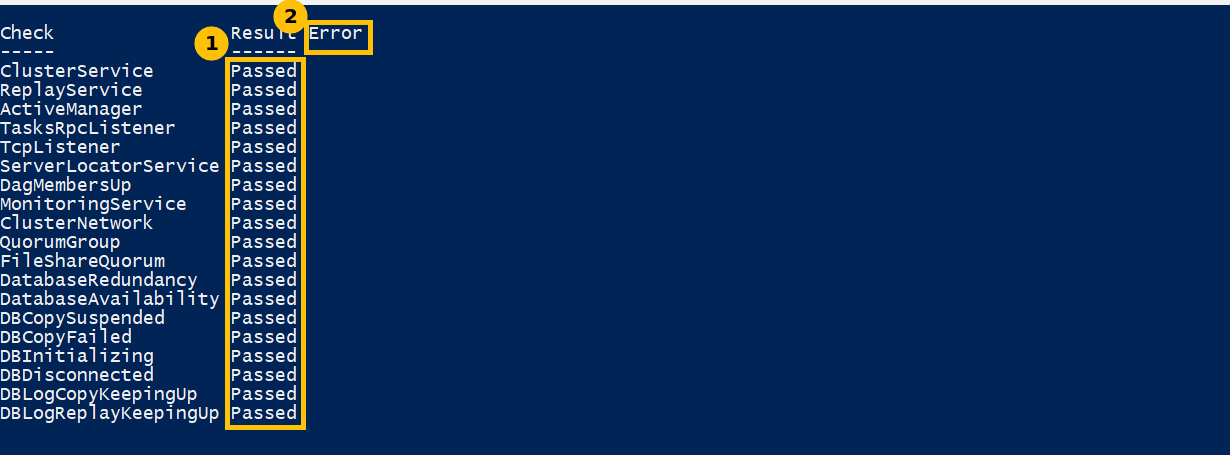
Mounted, the two passive onesHealthy, and every copy had a CopyQueueLength of 0 and a ReplayQueueLength of 0. Test-ReplicationHealthreturnedPassedfor every check on both servers: 13 checks onSRV01and 19 onSRV02.
The extra six checks on SRV02 are the database copy checks (DBCopySuspended, DBCopyFailed, DBInitializing, DBDisconnected, DBLogCopyKeepingUp and DBLogReplayKeepingUp). They run only on a server that holds passive copies, which is why SRV01, holding only active copies at that moment, shows fewer. The first call took 10.2 seconds and the second 2.9, because the first one is slow while the tools load.

Step 2: the planned failover
Move-ActiveMailboxDatabase DB01 -ActivateOnServer SRV02 -Confirm:$false |
  ft ActiveServerAtStart,ActiveServerAtEnd,Status,NumberOfLogsLost -a
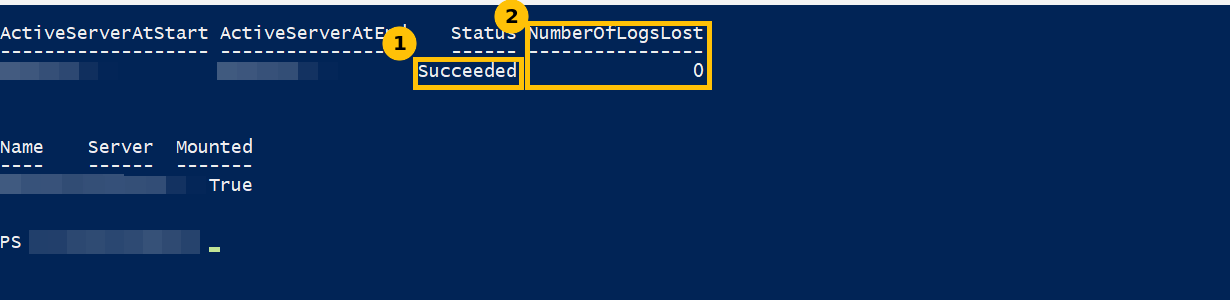
The shell run succeeded with NumberOfLogsLost 0, and Get-MailboxDatabase DB01 -Status showed the database mounted on SRV02. The same move run from a script took 42.9 seconds end to end, and the move back took 49.8 seconds, again Succeeded with 0 logs lost and the mount status Mounted at both start and end. Twenty seconds after the failover, Test-ReplicationHealth -Identity SRV02 still passed all 19 checks.
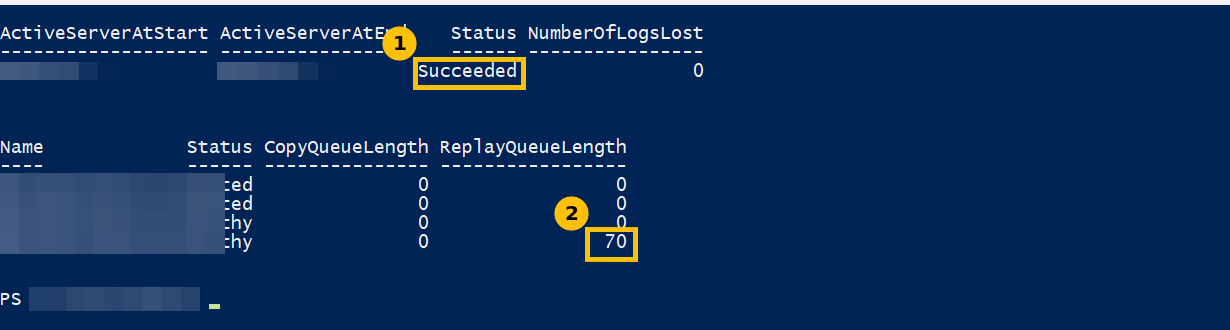
Right after a move the passive copy has to catch up. Its ReplayQueueLength was 54 after the first move back and 70 after the last one. About 13 minutes later it was 0 on both copies and both databases were active on SRV01 again, which is where they started. Do not call a failover finished until the replay queue is empty.
Four things that failed or surprised me
1. The fourth move in an hour was refused
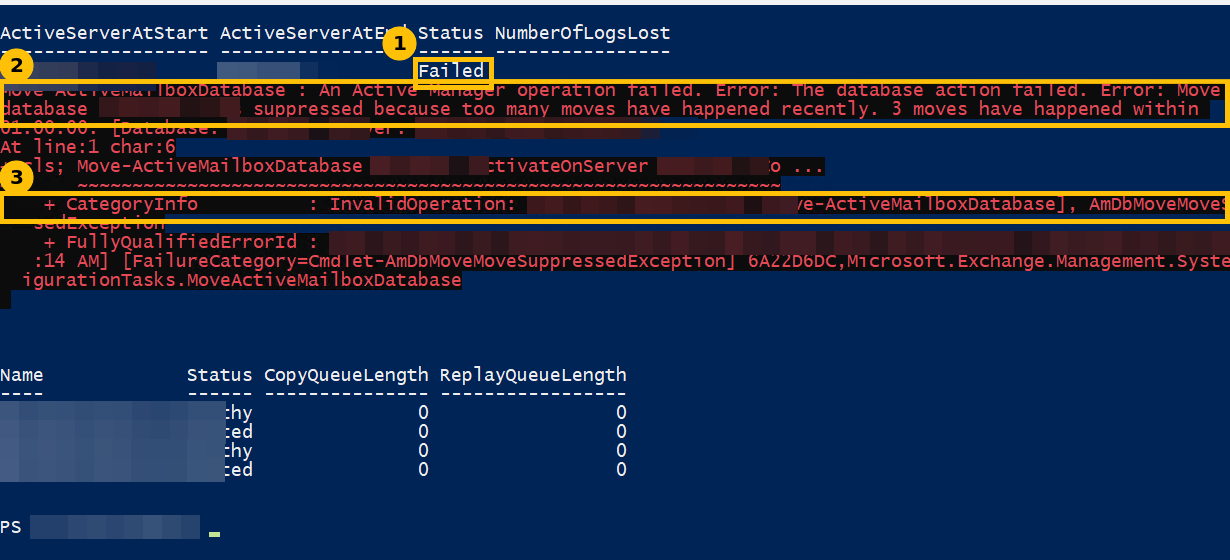
I had moved DB01 three times within an hour: out, back, and out again. The fourth move failed with this error.
Move-ActiveMailboxDatabase : An Active Manager operation failed. Error: The database action failed.
Error: Move for database 'DB01' was suppressed because too many moves have happened recently.
3 moves have happened within 01:00:00.
FullyQualifiedErrorId : ...AmDbMoveMoveSuppressedException...
This is Active Manager’s move suppression, a protection against a database flapping between servers. It is not a fault. Waiting an hour clears it. If you are sure, add -SkipMoveSuppressionChecks, which worked immediately for me. Use it only when you understand why the earlier moves happened, because the protection exists for a reason.
2. A remote session failed with ADInvalidCredentialException
My first automation ran the Exchange cmdlets through Invoke-Command with explicit credentials and Negotiate authentication. Every cmdlet returned an error saying the supplied credential was invalid. The Exchange tools read Active Directory, and a network logon cannot pass the credential on to a second hop. This is the classic double-hop problem.
What worked was running the script as a scheduled task on the Exchange server itself, under a domain admin account, writing output to a log file and a done flag, and reading the log afterwards. I did not test CredSSP or Kerberos delegation, which should also solve it.
3. My own timing wrapper hid the output
I wrapped the move in Measure-Command to time it, and the result table disappeared, because Measure-Command swallows pipeline output. The move still happened. Capture the result in a variable and use a stopwatch instead.
$sw = [Diagnostics.Stopwatch]::StartNew()
$m  = Move-ActiveMailboxDatabase DB01 -ActivateOnServer SRV01 -Confirm:$false
$sw.Stop()
$m | ft ActiveServerAtStart,ActiveServerAtEnd,Status,NumberOfLogsLost -a
"{0:n1}s" -f $sw.Elapsed.TotalSeconds
4. The Database column came back empty
In the move result table the Database column was empty in both runs on this version. The database name appears on the line below. I did not look into why.
A habit worth copying
Run Test-ReplicationHealth and Get-MailboxDatabaseCopyStatus before you move anything and again after, then wait for the replay queue to reach 0. It takes a minute and it is the difference between knowing the DAG is healthy and assuming it.
Caveats
This is one lab DAG with two servers and an idle database that has no mailbox load, so the 43 to 50 second figures are not numbers to plan around. In production the time depends on database size and activity. Nothing else was changed: no service settings and no DAG configuration. The databases were left on the server they started on. The VMs ran with 6 GB of memory each, below the 8 GB I normally give them, because the host was tight. I did not prove the cause of the slow service start.
FAQ
Why did Exchange refuse my fourth database move?
Active Manager suppresses a move when too many have happened to the same database recently. The error in my lab said 3 moves had happened within 01:00:00. Waiting an hour clears it, or you can add -SkipMoveSuppressionChecks if you understand why the earlier moves happened.
How long does a planned failover take?
In my idle two-server lab it took 42.9 seconds one way and 49.8 seconds back, with zero logs lost. A production database under load will differ, so measure your own.
Why does Test-ReplicationHealth show more checks on one server?
The six database copy checks run only on a server that holds passive copies. In my lab SRV02 showed 19 checks and SRV01 showed 13 because of that.
Is the move finished when the cmdlet says Succeeded?
Not quite. The passive copy still has to replay logs. Wait until its ReplayQueueLength is 0 before you treat the DAG as back to normal.