
September 2026 Windows Server Update and RDS Failures: What Microsoft Says and What to Check

Update, November 11: Microsoft’s Windows Server 2025 release health page now marks both the USB audio issue and the October Exchange sign-in issue as resolved by the November 10, 2026 update KB5131080. It still lists no Remote Desktop Services known issue.
I rewrote this post because the first version was too sure of itself. It gave you a registry value and a Group Policy name for a Known Issue Rollback, and when I went back to check them against Microsoft’s own pages this week I could not confirm either one. So here is the version I can stand behind: what was reported, what Microsoft actually lists today, which KB goes with which server, and how to check a server yourself before you uninstall a security update.
What admins reported
On September 10, 2026 BleepingComputer reported that the September cumulative updates were breaking Remote Desktop Services. The updates named in that article are KB5122876 for Windows Server 2019, KB5122882 for Windows Server 2022 and KB5122871 for Windows Server 2025.
- The server works normally for a few hours, then new connections hang and eventually fail.
- Existing sessions do not always disconnect or log off cleanly.
- Some admins needed a hard reset. One reader said a normal restart did not help.
- One reader on Server 2022 saw RDS work until the first logout, then services crashed and nobody could sign in.
Microsoft’s quoted answer in that article was that it is aware of the reports and is investigating. The article also passes on one admin’s guess that the Remote Desktop service deadlocks against Local Session Manager during logoff. Microsoft did not confirm that, so treat it as a guess.
What Microsoft lists today
This is the part I changed my mind about. I read the release health pages for Windows Server 2025 and Windows Server 2022 on November 4. Both were updated on November 3. Neither lists a Remote Desktop Services known issue. What they do list for September is a USB audio problem that starts with the same September updates:
- On Server 2025 the USB audio issue is marked Mitigated. It says the out-of-band update KB5129235 from September 14, 2026 fixes only the 8-channel and 3D audio part.
- On Server 2022 the same issue is Resolved. The page names KB5129237 as the September 14 out-of-band update and the October 13 security update KB5126655 as the fix for the rest.
So the KB numbers are not interchangeable. If you are on Server 2022, the out-of-band update is KB5129237, not KB5129235. I did not read the Server 2019 page, so I can’t tell you the 2019 number from Microsoft. A reader comment under the BleepingComputer article gives KB5129238, but that is a reader comment, so check the Microsoft Update Catalog for your own build.
Secondary sites such as NinjaOne describe KB5129235 as a fix for RDS instability. That may be true, but I could not find it written on a Microsoft page, so I am not going to tell you it is confirmed. If RDS is your problem, open the KB page for your build and read its fix list before you deploy anything.
There is also an October problem that gets mixed up with this one. The Server release health pages list an Exchange sign-in and mail flow issue after the October update (KB5126646 on Server 2025). That one is about the Endpoint Mapper limit and is a different bug. I wrote about it separately.
Check which update a server actually has
Before you change anything, find out what the server is running. Open PowerShell as administrator and run these two commands. They only read.
Get-ItemProperty 'HKLM:\SOFTWARE\Microsoft\Windows NT\CurrentVersion' |
    Select-Object ProductName,CurrentBuild,UBR | Format-List
Get-HotFix | Sort-Object InstalledOn -Descending |
Select-Object -First 5 HotFixID,Description,InstalledOn | Format-Table -AutoSize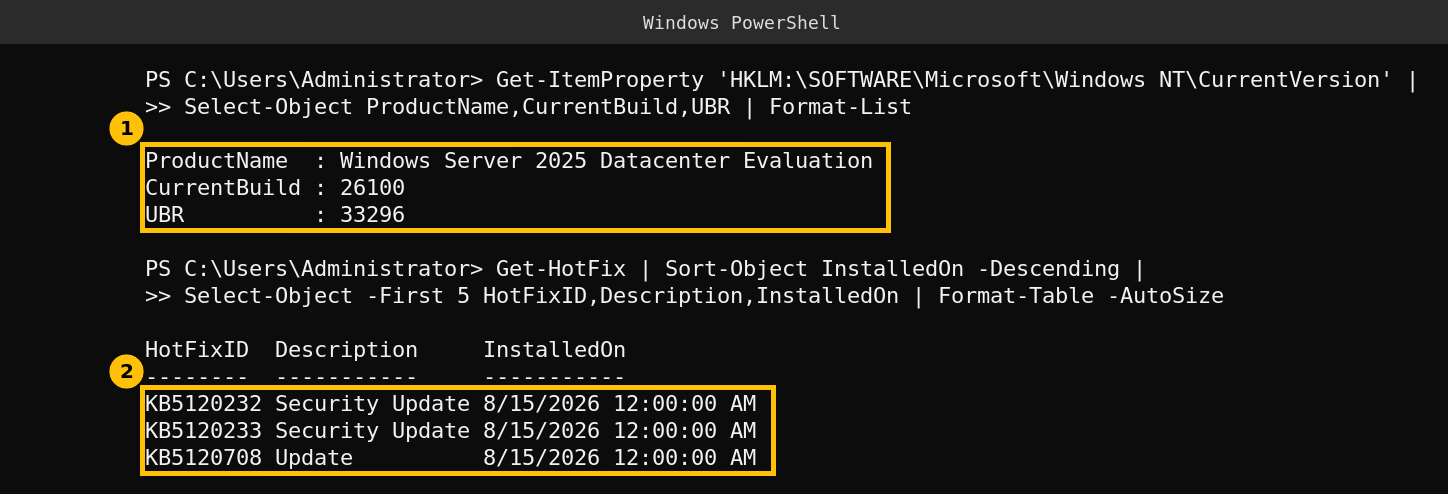
Expected result: a list of recent KBs with install dates. Compare it with the KB for your OS above. My lab server is on Windows Server 2025 and the newest update is from August 15, so it never installed the September update. I did not reproduce the RDS problem and I can’t show you a failing server. What I can show you is how to tell whether yours has the update at all.
Do the same thing from the UBR number. Each cumulative update raises it. Microsoft’s release health page lists the build that each KB produced, for example 26100.33438 for KB5122871, so a UBR at or above that number means the September update is in.
Check whether a Known Issue Rollback is already applied
A Known Issue Rollback is a real Microsoft mechanism. It turns off one change from an update through a Group Policy, without uninstalling the update, and Microsoft describes it in its Known Issue Rollback article. Microsoft publishes the policy for a specific issue, so you take the policy name and the instructions from the page that Microsoft links for that issue, not from a blog post, including this one.
Windows feature overrides live under one registry key. This command tells you whether that key exists at all on a server:
Test-Path 'HKLM:\SYSTEM\CurrentControlSet\Policies\Microsoft\FeatureManagement\Overrides'Get-Service TermService,SessionEnv,UmRdpService |
Format-Table Name,Status,StartType -AutoSize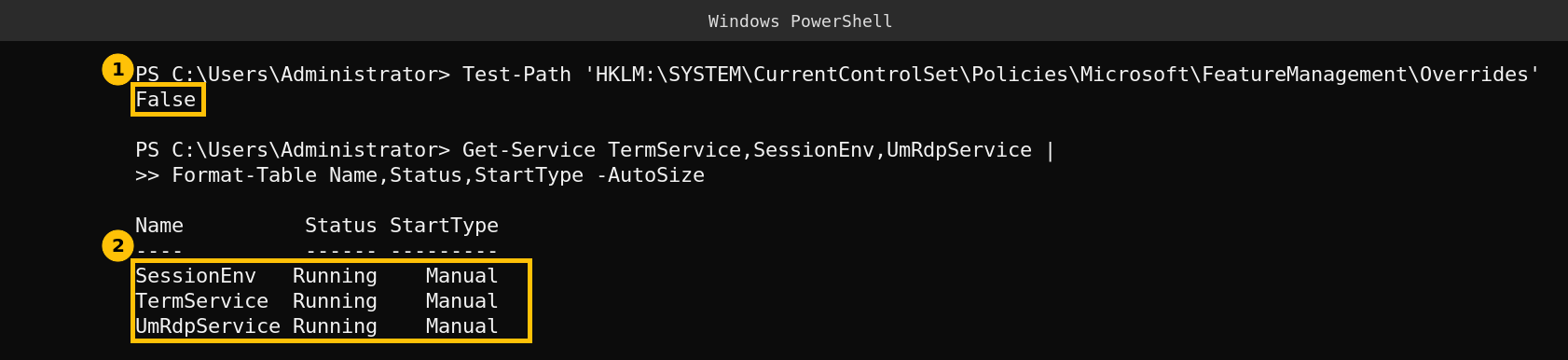
On my lab server the key does not exist, so no rollback policy is applied, and the three Remote Desktop services are running. If your server does have the key, look at what is inside it before you assume it is a Microsoft rollback. The old version of this post named one value. I can’t verify that value, so I removed it.
Decide what to do
| Situation | What I would do |
|---|---|
| RDS is broken right now and users are down | Open the KB page for your build, read the fix list, and install the newer cumulative or out-of-band update if it covers it. Use Microsoft Support for Business if you need a workaround today |
| RDS is fine, update not installed yet | Test the September and later updates on one session host first. Watch logoff behavior for a full working day, not ten minutes |
| You are thinking of uninstalling the update | Treat that as the last choice. It restores RDS for some admins but it also removes that month’s security fixes. Put the server behind a tight firewall rule first and write down the exception |
| Server 2019 | Check the Microsoft Update Catalog for your exact build. I did not confirm a 2019 fix number from Microsoft |
Warnings
Do not edit the registry under FeatureManagement on a production server because a forum post gave you a number. A wrong override is hard to spot later. Do not uninstall a cumulative update on a domain-joined RDS host without a snapshot or a tested rollback plan, and do it one server at a time.
What I did not test
I did not reproduce the failure. My lab has no RDS farm and no September update, so the screenshots above show how to read your own servers, not the bug. The facts about which KB goes with which server come from Microsoft’s release health pages, and the symptom list comes from BleepingComputer. If Microsoft later adds an RDS entry to its release health page, that page is the one to follow.
Sources
- BleepingComputer, September Windows Server updates break Remote Desktop Services (September 10, 2026)
- Microsoft Learn, Windows Server 2025 release health
- Microsoft Learn, Windows Server 2022 release health
- Microsoft Learn, Known Issue Rollback
- KB5122871, KB5122882, KB5129235, KB5129237 (Microsoft support pages)