OpenSSH Security Update USN-8928-1: Nine CVEs Fixed, Is Your Ubuntu Server Running the New Daemon?

On October 14, 2026 Ubuntu published USN-8928-1, an OpenSSH update that fixes nine CVEs in the sftp client, the sshd server, the ssh client, ssh-keygen and compression handling. On Ubuntu 24.04 LTS the fixed package is 1:9.6p1-3ubuntu13.20. On 22.04 LTS it is 1:8.9p1-3ubuntu0.18.
Installing the package is only half of the job. The SSH daemon that is already running keeps using the old code until it restarts, and on a remote server a careless restart can lock you out. This post shows how to prove, in three commands, that the package is fixed and the running daemon is new, using the real output from the server this blog runs on.
Quick guide
- Check the installed version against the fixed one for your release.
- Update with apt if it is older.
- Confirm the fix is in the changelog. It lists every CVE the package addresses.
- Check the daemon started after the package was installed. If it did not, restart it safely.
- Read the list of CVEs and see which ones your configuration even touches.
Step 1: version and changelog
Start with the version, then ask apt for the changelog of the package. The changelog is the reliable proof, because it names each CVE the build contains. Use openssh-server for the server and openssh-client for the client, since sftp and ssh are client programs.
ssh -V
dpkg-query -W openssh-server openssh-client
apt-get changelog openssh-server | grep -o "CVE-2026-[0-9]*" | sort -u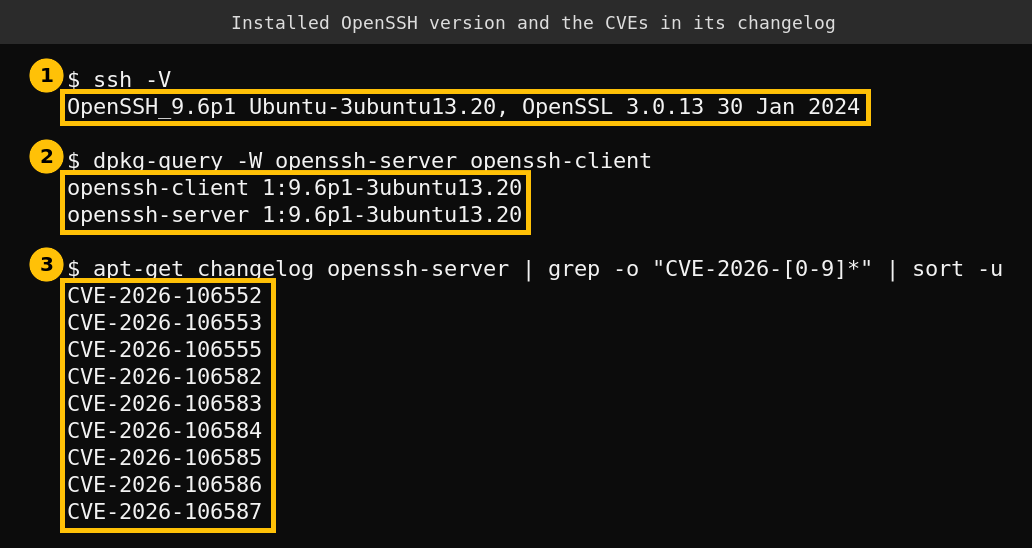
All nine identifiers from the Ubuntu notice appear in the changelog of the installed package, and the server and client packages are both at the fixed 13.20 build. That is the first half of the proof. If your version is older, update only the two packages and not the whole system if you need a narrow change.
sudo apt update
sudo apt install --only-upgrade openssh-server openssh-client
Step 2: is the running daemon the new one?
A package upgrade replaces the files on disk. The long-running sshd process that accepts connections was started earlier, and it holds the old code in memory until it is restarted. On Ubuntu the package normally restarts the service for you, but you should check and not assume. Compare the time the package was installed with the time the daemon started.
grep "upgrade openssh-server" /var/log/dpkg.log | tail -1
ps -o lstart= -p $(pgrep -o -x sshd)
pgrep -o picks the oldest matching process, which is the master daemon and not a per-connection child. If the start time is later than the install time, the daemon is new.
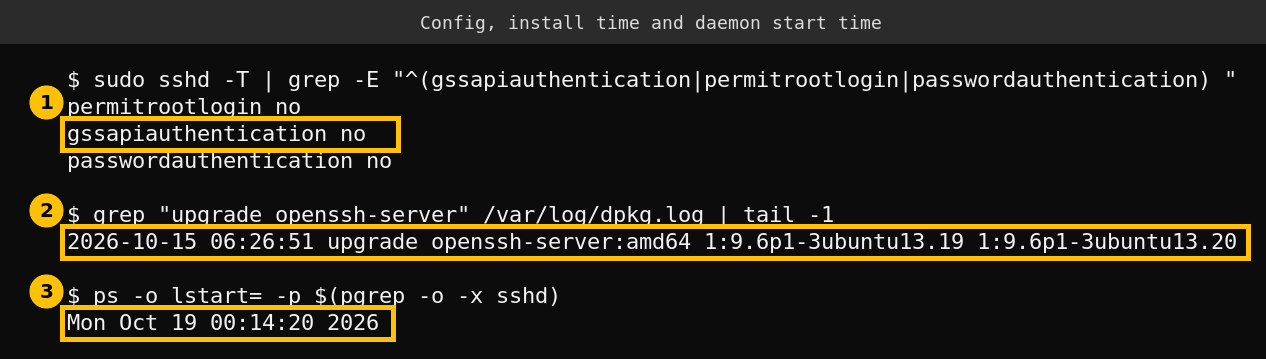
On my server the package was upgraded on October 15 at 06:26 and the daemon started on October 19 at 00:14. The daemon started after the upgrade, so it is running the fixed code. If your daemon started before the upgrade, restart it, with the precautions below.
Restart SSH without locking yourself out
- Keep a second session open before you start. Do not close it until a fresh login works.
- Test the configuration first with
sudo sshd -t. It prints nothing if the file is valid. - Then restart with
sudo systemctl restart ssh. Existing sessions normally stay connected, and new ones use the new daemon. - Open a new session from another terminal to prove you can still get in.
I did not restart SSH for this post. My daemon was already new, so there was nothing to restart.
Which of the nine CVEs matter to you
The Ubuntu notice gives one line per CVE. I cannot judge exploitability from a one-line summary and I did not test any exploit, so use this table to decide where to look in your own setup, not as a risk rating.
| CVE | What Ubuntu says | Where to look |
|---|---|---|
| CVE-2026-106552 | sftp client mishandled paths returned by the server in a recursive copy | Anyone who runs sftp recursive copies from servers they do not control |
| CVE-2026-106553 | sshd mishandled GSSAPIAuthentication state across attempts | Servers with GSSAPIAuthentication yes |
| CVE-2026-106555 | Credential exposure from failed GSSAPI authentication | Servers with GSSAPIAuthentication yes |
| CVE-2026-106582 | LZ77 dictionary coder used in compression | The Compression setting on client and server |
| CVE-2026-106583 | ssh client allowed special characters in command-line usernames | Scripts that build user@host from untrusted input |
| CVE-2026-106584 | ssh-keygen mishandled Daylight Saving Time when converting dates | Scripts that sign certificates with validity dates |
| CVE-2026-106585 | Maximum packet length not checked during decompression | The Compression setting |
| CVE-2026-106586 | sshd applied the restrict keyword wrongly to tunnel forwarding | Keys in authorized_keys that use restrict |
| CVE-2026-106587 | sshd mishandled options that accept a none value | Options in sshd_config set to none |
To check the settings that matter, print the effective server configuration and search the authorized keys for the restrict keyword. Run these on the server.
sudo sshd -T | grep -i -E "^(gssapiauthentication|compression|allowtcpforwarding) "
grep -rn "restrict" ~/.ssh/authorized_keys
On my server GSSAPI authentication is off, so the two GSSAPI CVEs do not apply to its server configuration. Password logins and root login are off too, which narrows the attack surface in general but does not replace patching. Compression is enabled, and I did not research whether the compression issues are reachable in that setup, so I patched regardless.
If you run a fleet
Check the same three facts on every host: the installed version, the CVE list in the changelog, and daemon start time against install time. A small loop over your host list with ssh host command is enough. I did not run a fleet version here. I only ran these commands on one server.
This is the same method I used for the kernel flaw in my post on checking an Ubuntu kernel against ssh-keysign-pwn. Read the changelog of the package you actually run, because a version number alone does not prove a fix.
FAQ
Which version fixes USN-8928-1 on Ubuntu 24.04?
The fixed package is 1:9.6p1-3ubuntu13.20 for both openssh-server and openssh-client. On Ubuntu 22.04 it is 1:8.9p1-3ubuntu0.18.
Do I need to reboot after the update?
No. Restarting the SSH service is enough. A reboot also does it, but only restart the service if you have a second session open.
Will restarting sshd drop my connection?
Existing sessions normally survive a restart of the service. Keep a second session open anyway and test a new login before you close the first.
Does the update matter for the client too?
Yes. The notice lists sftp and ssh client issues, so update openssh-client as well as openssh-server. On a desktop or a jump host the client is the part you run most.