
Microsoft Pulled Seven eMudhra Certificates From the Windows Trust List: Check Whether Your Windows Server Trusts Any and Whether Root Auto Update Is On

Update, October 31: I wrote above that I could not confirm a Windows Server update for this. Microsoft released out-of-band updates for Windows Server on October 26 that carry an updated trusted root payload. See the post on KB5134137, KB5134140 and KB5134123.
On October 26, 2026 Microsoft released out-of-band updates that remove trust in seven certificates tied to the compromised eMudhra certificate authority. Coverage says they are six eMudhra G3 roots and one cross-signed AAA Certificate Services certificate. The updates are KB5134133 for Windows 11 24H2, 25H2 and 26H2 and KB5134125 for Windows 10 21H2 and 22H2. Microsoft had already blocked the eight weak keys with a Disallowed certificate trust list update on October 20.
Most machines get these changes without you doing anything. The ones that do not are servers that cannot reach Microsoft’s certificate update service or that have automatic root updates switched off. That describes plenty of locked down servers. This post shows how to check both things in PowerShell, with real output from my Windows Server 2025 lab domain controller.
Quick guide
- Search both root stores for eMudhra and emSign certificates.
- Check that automatic root updates are not disabled by policy.
- Check when the server last synced the trust list.
- For offline or air gapped servers, plan to import the update from the Microsoft Update Catalog after confirming it applies to your operating system.
- Check the apps on the server that keep their own CA list, such as Java and Python.
Step 1 to 3: the checks and what my domain controller said
Get-ChildItem Cert:\LocalMachine\Root, Cert:\LocalMachine\AuthRoot |
  Where-Object { $_.Subject -match "eMudhra|emSign" } |
  Select-Object Subject
(Get-ChildItem Cert:\LocalMachine\Root).Count
(Get-ChildItem Cert:\LocalMachine\AuthRoot).CountTest-Path "HKLM:\SOFTWARE\Policy\Microsoft\SystemCertificates\AuthRoot"$k = "HKLM:\SOFTWARE\Microsoft\SystemCertificates\AuthRoot\AutoUpdate"
$b = (Get-ItemProperty $k).LastSyncTime
[DateTime]::FromFileTimeUtc([BitConverter]::ToInt64($b, 0))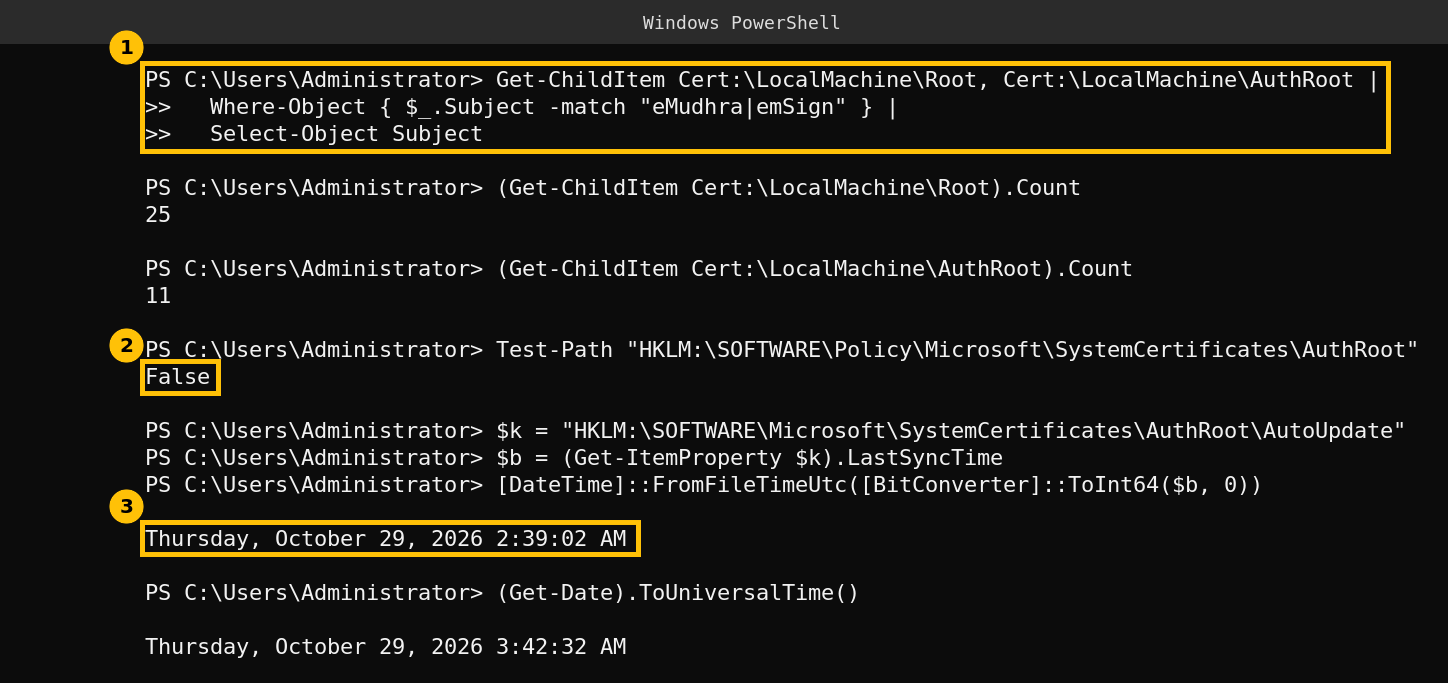
How to read the result
- No match in the first search means no eMudhra or emSign root is in this server’s stores right now. It does not prove Windows would never trust one, because Windows adds roots from Microsoft’s list on demand the first time a certificate chains to them. The AuthRoot store on my server holds 11 certificates and the Root store holds 25.
- The policy key returning False means nobody has set the
DisableRootAutoUpdatepolicy, so the server is allowed to refresh its trusted roots. If that key exists andDisableRootAutoUpdateis 1, the server depends entirely on updates you install yourself. - The last sync time on my server was 02:39 UTC on October 29, about an hour before I ran the commands, which tells me the automatic update path works from this network.
Offline servers
If the server cannot reach Microsoft, it will not pick up the new trust list by itself. The coverage I read says the October 26 updates are non-security cumulative updates that you download from the Microsoft Update Catalog, and that they are aimed at exactly those machines. One report says the trust refresh also reaches Windows Server, but I could not find a Windows Server KB number in anything I could read, so open the KB5134133 support page and check the list of products before you deploy it to a server. Read its known issues too.
Caveats
- My domain controller is a Windows Server 2025 evaluation build in a lab and it can reach Microsoft, so it shows the healthy case. I could not test an offline server.
- I did not find a Microsoft documented command that confirms the October 26 changes were applied, and the articles I read say the same. The checks above tell you the server is able to receive them, not that it has.
- Which certificates were removed, and whether they were removed or placed in the Disallowed store, is described inconsistently in the coverage. I did not rely on certificate names.
- Apps with their own CA list are separate. For the Linux side of the same incident, see my Ubuntu post.
FAQ
Which update removes trust in the eMudhra certificates?
KB5134133 for Windows 11 24H2, 25H2 and 26H2, and KB5134125 for Windows 10 21H2 and 22H2, released October 26, 2026. Check the support page for Windows Server coverage.
Does my Windows Server need to be patched by hand?
Only if it cannot reach Microsoft’s certificate update service or has automatic root updates disabled. Otherwise it should refresh its trust list on its own.
How do I tell whether automatic root updates are disabled?
Look for the DisableRootAutoUpdate value under HKLM:\SOFTWARE\Policy\Microsoft\SystemCertificates\AuthRoot. If the key does not exist, as on my server, no policy disables them.
Why does my server show no eMudhra certificates?
Windows only keeps roots it has needed. An empty result means none is in the store now and does not guarantee it never will be.
Do Java and Python on Windows follow the Windows trust store?
Not necessarily. Many keep their own list, so check each one. That is the same reason I wrote the separate Linux post.