Is SMBv1 or NTLMv1 Still Enabled on Your Windows Servers? Check in 60 Seconds

SMBv1 and NTLMv1 are two of the oldest, weakest pieces of the Windows networking stack still lurking on some servers, and both are regularly abused in real attacks (SMBv1 was the protocol behind WannaCry and NotPetya). This is a direct follow-up to our NTLMv1 hardening post, here’s exactly how to check whether either is still live on your Windows servers, with real output from a live, already-hardened Windows Server 2025 box.
Why these two specifically
- SMBv1 is the file-sharing protocol version from the 1990s. It has no meaningful protection against man-in-the-middle attacks and was the delivery mechanism for EternalBlue-based ransomware. Windows Server has shipped with it disabled by default for years, but upgraded-in-place servers and old file shares sometimes still have it on.
- NTLMv1 is a legacy challenge-response authentication protocol with known cryptographic weaknesses, it’s vulnerable to relay and offline cracking attacks that NTLMv2 and Kerberos don’t share. The
LmCompatibilityLevelregistry setting controls whether a server will accept it at all.
Quick guide: check both right now
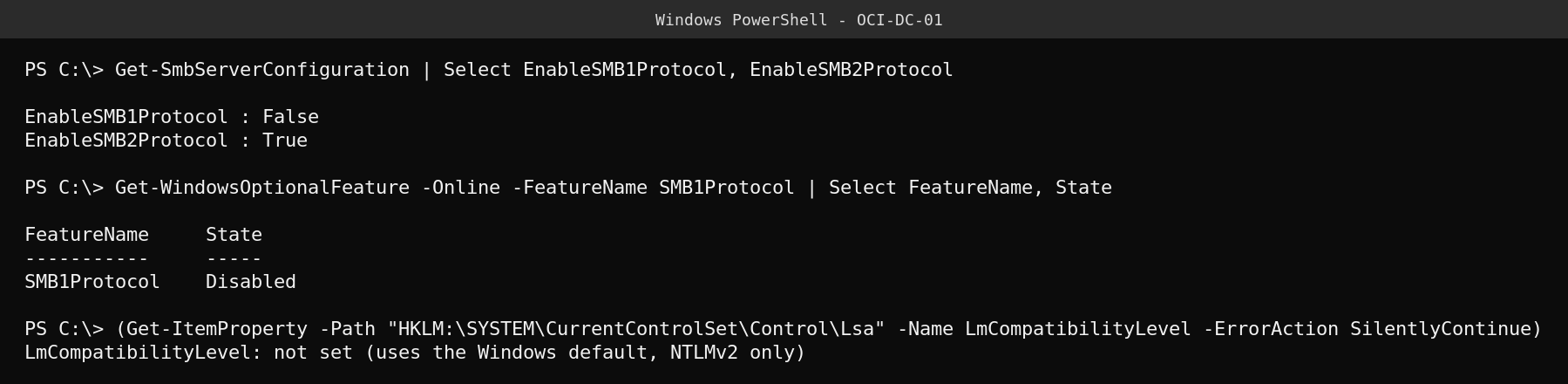
On this server, EnableSMB1Protocol is False and the Windows optional feature itself shows Disabled, SMBv1 is fully off, not just disabled at the server-configuration level but removed as an installable feature. LmCompatibilityLevel isn’t explicitly set, which means it falls back to the Windows default of level 3, send NTLMv2 response only, refuse LM, the safe default on any current Windows Server release.
Run these three commands on your own servers:
Get-SmbServerConfiguration | Select-Object EnableSMB1Protocol, EnableSMB2Protocol
Get-WindowsOptionalFeature -Online -FeatureName SMB1Protocol | Select-Object FeatureName, State
Get-ItemProperty -Path "HKLM:\SYSTEM\CurrentControlSet\Control\Lsa" -Name LmCompatibilityLevel -ErrorAction SilentlyContinue
If SMBv1 is still on
- Identify what’s actually still using it first, check
Get-SmbConnectionand your file share audit logs for SMBv1 clients before you kill it blind. - Disable it:
Disable-WindowsOptionalFeature -Online -FeatureName SMB1Protocol -NoRestart, then reboot at a planned maintenance window. - Re-run the check above to confirm it’s gone.
If NTLMv1 is still allowed
- Set the registry value to enforce NTLMv2 only:
Set-ItemProperty -Path "HKLM:\SYSTEM\CurrentControlSet\Control\Lsa" -Name LmCompatibilityLevel -Value 5(level 5 means send NTLMv2 response only, refuse LM and NTLM, the strictest setting). - This is best rolled out via Group Policy across a domain rather than per-server registry edits, so it stays consistent and survives a future rebuild.
- Test authentication against any legacy applications or network devices after the change, some very old third-party hardware still genuinely needs NTLMv1 and will break, know that before you flip the switch domain-wide.
FAQ
Does disabling SMBv1 break anything modern? Almost never. Windows, modern NAS devices, and current third-party software have used SMBv2/3 for years. The real risk is old scanners, printers, or embedded devices that were never updated.
What’s the difference between NTLMv1 and NTLMv2 in practice? NTLMv2 uses a stronger challenge-response scheme with better resistance to relay and offline cracking attacks, NTLMv1’s weaker hashing makes captured handshakes crackable in a realistic timeframe with modern hardware.
Is Kerberos still better than both? Yes, whenever Kerberos is available (domain-joined machines talking to domain resources) it should be preferred over NTLM entirely, NTLM is a fallback for cases Kerberos can’t cover, like some workgroup or legacy scenarios.
Related: our earlier post on hardening NTLM authentication covers the broader Group Policy rollout in more depth.