September 2025 Exchange Server Hotfix Updates: Features, Fixes, and Installation Guide

On September 8, 2025, Microsoft released new Hotfix Updates (HUs) for Microsoft Exchange Server. These updates primarily include fixes for non-security issues and introduce necessary features for hybrid environments specifically continuing support for the dedicated Exchange hybrid app functionality. Because Exchange servicing is cumulative, these fixes and features will also be included in future updates for Exchange Server SE.
Supported Exchange Server Versions
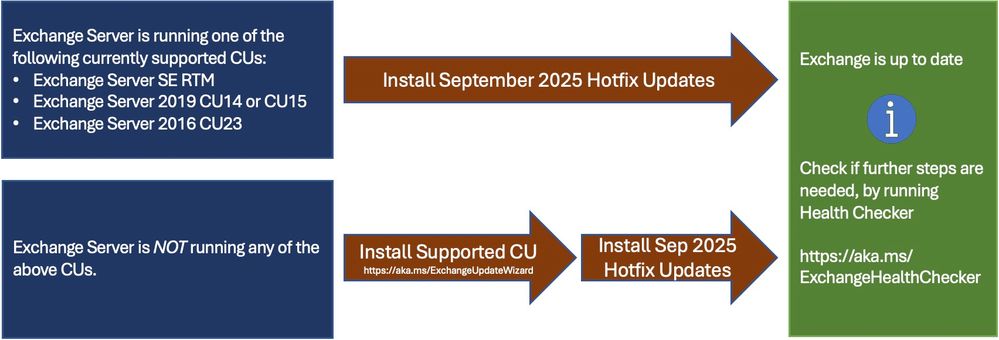
The September 2025 HU (which includes KB5066373 for Exchange SE) is available for the following specific builds of Exchange Server:
If your organization is not running one of these specific Cumulative Update (CU) versions, you must upgrade your Exchange servers to a supported CU before applying this patch
Issues Fixed in This Update
- Online archiving fails for on-premises users in hybrid environments: This update resolves a known bug where on-premises users were unable to access or utilize their online archives when operating through the dedicated Hybrid App.
- Online archiving fails for on-premises users in hybrid environment
Step-by-Step Installation Guide
To ensure a smooth deployment of the September 2025 Hotfix Update, follow these professional best practices:
- Inventory your servers: Run the Exchange Server Health Checker script across your environment to determine exactly which servers are behind on updates.
- Verify your CU level: Ensure your servers are running Exchange SE RTM, 2019 CU14/CU15, or 2016 CU23. If not, perform a CU upgrade first using the Exchange Update Wizard.
- Prepare the environment: Put the target Exchange server into Maintenance Mode to safely drain active connections and mail queues without dropping traffic.
- Install the update: Download the applicable update from the Microsoft Update Catalog or deploy it via Windows Update. Always run the installation payload from an elevated command prompt.
- Reboot and verify: Restart the server, take it out of Maintenance Mode, and re-run the Health Checker script to confirm the successful installation and the new build number.
Frequently Asked Questions
We installed the last Security Update (SU). Should we install this later Hotfix Update (HU)?
Exchange Server HUs are optional updates. However, it is highly recommended to install them, as they introduce features and critical functional fixes (like the hybrid archiving resolution) that your organization will likely benefit from.
We did not yet install the earlier Security Update. Do we have to install the last available SU first before installing the later HU?
No, all Exchange updates (both HUs and SUs) are cumulative. This means the September 2025 HU contains all the security patches and changes from previously released, older SUs. If you missed the older SU, you can install this newer HU directly and safely skip the older one.
Our Exchange servers update automatically through Windows / Microsoft Update. Will our servers automatically install the HU update?
HUs typically appear as optional updates for your servers. The update will be available on the Microsoft Update Catalog and Windows Update, and its automated installation will depend strictly on your organization’s specific Windows Update deployment policies.
Will the new features and fixes released in the HU also be rolled into future updates, or must we install this specific HU to get them?
Because updates are cumulative, the contents of this HU will automatically be included in subsequent updates for Exchange Server.
Can Hotfix Updates be uninstalled if the need arises?
Yes. Just like Security Updates (SUs), Hotfix Updates (HUs) can be safely uninstalled from your server through the Windows Control Panel if you encounter unexpected issues.