CVE-2026-70229: Critical Active Directory Domain Services RCE Fixed in October 2026, Is Your Domain Controller Below the Fixed Build?

Microsoft’s October 13, 2026 security update fixes CVE-2026-70229, a remote code execution flaw in Active Directory Domain Services. Tenable lists it as Critical with a CVSS score of 8.1, and says an attacker could exploit it “by sending a crafted packet to the vulnerable AD DS service.” Microsoft rates exploitation as “more likely.”
If you run domain controllers, the useful question is simple: is each one on a build that contains the fix? This post shows a short PowerShell check, what it printed on my lab domain controller (it failed the check), and what I could and could not confirm about this CVE. I also covered the rest of the month in my October Patch Tuesday post. This one is only about the domain controller flaw.

Quick guide
- Read the build of each domain controller from the registry (major build plus the UBR revision number).
- Compare it with the fixed build for that Windows Server version. For Windows Server 2025 the October build is 26100.33650.
- Install the October 2026 cumulative update on every domain controller, then read the build again.
- Keep the check. It works for any cumulative update once you know the target build.
What is confirmed and what is not
| Fact | What the sources say |
|---|---|
| Product and type | Windows Active Directory Domain Services, remote code execution (Tenable, Forkast). |
| Severity | CVSS 3.1 base score 8.1, vector AV:N/AC:H/PR:N/UI:N, so network reachable, high attack complexity, no privileges and no user interaction (Forkast quoting Microsoft’s record). A 9.8 figure circulates in secondary summaries and is not Microsoft’s number. |
| Exploitation | Microsoft label “Exploitation More Likely.” The Forkast write-up says it was not publicly disclosed and not observed in exploitation when it was filed on October 14. Microsoft’s record also says exploitation depends on specific network configurations and timing. |
| Affected | Windows Server 2012 through 2025 including Server Core, and Windows 10 and 11 clients (Forkast). |
| Workaround | None listed. The only remedy named is installing the October 2026 security update (Forkast). |
Two limits on my side. I could not open this CVE in the Microsoft Security Update Guide, so the score and the product list come from Tenable and Forkast. And Microsoft’s own KB5126646 page does not mention CVE-2026-70229 at all, so the link between this CVE and that KB comes from the Forkast list of fixing KB numbers, which includes KB5126646.
Which build is the fixed one
| Windows Server | October 13, 2026 update | Build after install | Checked on |
|---|---|---|---|
| 2025 | KB5126646 | 26100.33650 | Microsoft KB page title |
| 2022 | KB5126655 | 20348.5761 | Microsoft KB page title |
| 2019 | KB5126651 | not checked | KB number from my October Patch Tuesday post |
| 2016 | KB5126868 | not checked | KB number from my October Patch Tuesday post |
For 2019 and 2016 look up the build in the KB article before you use the check, because I did not verify it. Microsoft’s KB5126655 page gives the 2022 build.
Step 1: check the build on a domain controller
Open PowerShell on the domain controller and type these commands. The first shows the product, the build and the UBR (the update revision). The second shows the newest installed updates. The last four lines compare the build with the October 2026 build for Windows Server 2025:
Get-ItemProperty "HKLM:\SOFTWARE\Microsoft\Windows NT\CurrentVersion" |
  Select-Object ProductName, CurrentBuild, UBR
Get-HotFix | Sort-Object InstalledOn -Descending |
Select-Object -First 3 HotFixID, InstalledOn$fixed = [version]"10.0.26100.33650"
$cv = Get-ItemProperty "HKLM:\SOFTWARE\Microsoft\Windows NT\CurrentVersion"
$now = [version]("10.0.{0}.{1}" -f $cv.CurrentBuild, $cv.UBR)
if ($now -lt $fixed) { "BELOW the October 2026 build: $now is older than $fixed" } else { "OK: $now" }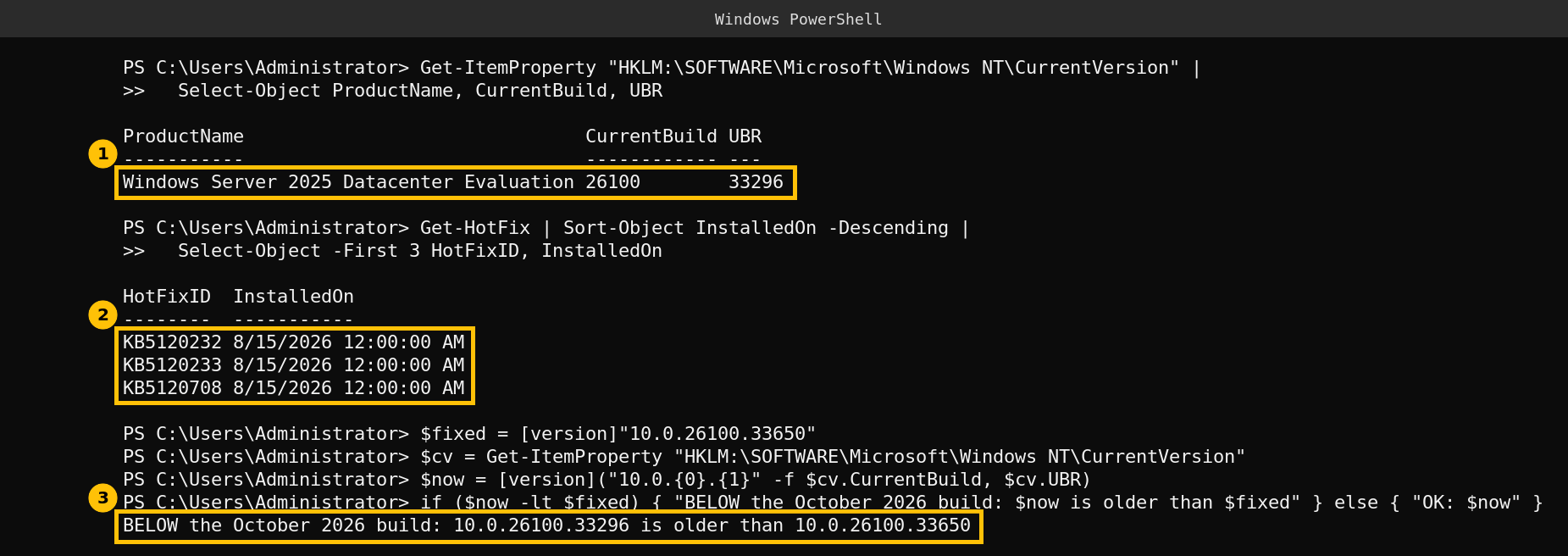
My lab domain controller runs Windows Server 2025 build 26100.33296. The newest updates were installed on August 15, and the comparison printed BELOW the October 2026 build. That is the result you want to catch in your own environment. It only says this machine’s build is older than the build Microsoft lists for the fix. It does not show the flaw is exploitable on it, and I did not try to exploit anything. I also did not install the update on this lab domain controller for this post.
Step 2: check every domain controller at once
If you have several domain controllers, this loop reads the same value from each one. I could not run it for this post. My lab has a single domain controller, and its remote management listens on a non-default HTTPS port, so a plain Invoke-Command to it failed. Treat the loop as untested and try it on one server first:
Get-ADDomainController -Filter * | ForEach-Object {
    Invoke-Command -ComputerName $_.HostName -ScriptBlock {
        $c = Get-ItemProperty "HKLM:\SOFTWARE\Microsoft\Windows NT\CurrentVersion"
        [pscustomobject]@{
            Server = $env:COMPUTERNAME
            Build  = "10.0.{0}.{1}" -f $c.CurrentBuild, $c.UBR
        }
    }
}
Step 3: patch, then read the build again
Microsoft lists no workaround, only the update. Install the October 2026 cumulative update on each domain controller one at a time, so authentication stays available, then run the build check again. Microsoft’s KB page does not state a restart requirement, so plan one as you would for any cumulative update.
One thing to know before you roll it out. The same October update has an acknowledged problem on Exchange servers, and Microsoft lists it as mitigated. I wrote it up in October 2026 Windows Update Breaks Exchange About 22 Hours After Every Restart. Domain controllers are not Exchange servers, but if you patch both in the same window, read that post first.
Caveats
The severity and product details come from two secondary sources and Microsoft’s KB titles, not from the Security Update Guide entry. The 2025 and 2022 build numbers are from Microsoft’s KB page titles, the 2019 and 2016 builds are not verified. The comparison script was run on one Windows Server 2025 machine only, and the all-controllers loop was not run.
FAQ
What is CVE-2026-70229?
A remote code execution flaw in Active Directory Domain Services, fixed in the October 13, 2026 Microsoft security update. Tenable lists it as Critical with a CVSS score of 8.1.
Does an attacker need credentials?
The CVSS vector in Microsoft’s record, as quoted by Forkast, says no privileges and no user interaction are required, with high attack complexity.
Is it being exploited?
Microsoft rates it Exploitation More Likely. The Forkast write-up from October 14 says it had not been publicly disclosed or observed in exploitation. I did not check the CISA catalog directly, so check it yourself.
Which build fixes it on Windows Server 2025?
Build 26100.33650, delivered by KB5126646 on October 13, 2026. For Windows Server 2022 the update is KB5126655 and the build is 20348.5761.
How do I check my domain controller?
Read CurrentBuild and UBR from HKLM:\SOFTWARE\Microsoft\Windows NT\CurrentVersion and compare the full build with the number above.
Sources
- Microsoft’s October 2026 Patch Tuesday addresses 1,407 CVEs, Tenable
- CVE-2026-70229 write-up, Forkast, October 14, 2026
- October 13, 2026, KB5126646 (OS Build 26100.33650), Microsoft Support
- October 13, 2026, KB5126655 (OS Build 20348.5761), Microsoft Support
- Windows Server 2025 known issues and notifications, Microsoft Learn