Entra Connect Sync Deadline Moves to April 7, 2027 and Version 2.5.79.0 Loses Support October 23: Are You on Connect Sync or Cloud Sync

If a server of yours syncs Active Directory to Microsoft Entra ID, two dates just changed. Microsoft moved the Entra Connect Sync hardening deadline to April 7, 2027. And in the same version table, Entra Connect Sync 2.5.79.0 loses support on October 23, 2026, which is the day this post was published.
Before you plan anything you need one fact: is the server running Entra Connect Sync or Entra Cloud Sync? The deadline applies only to the first one. This post gives you three short PowerShell commands, the real output from my lab domain controller, the version and deadline facts straight from Microsoft’s pages, and the order of work if you do run Connect Sync.
Quick guide
- Run the check below on each sync server to see whether it is Connect Sync or Cloud Sync.
- If it is Cloud Sync, the Connect Sync deadline does not apply to that server.
- If it is Connect Sync, read its version and compare it with the support table.
- Upgrade to 2.6.84.0 or later, and configure application-based authentication, before April 7, 2027.
What Microsoft says
Microsoft’s hardening article explains that Microsoft deployed a first-party application for the Active Directory to Entra ID sync. It appears as a service principal named “Microsoft Entra AD Synchronization Service” with the application ID 6bf85cfa-ac8a-4be5-b5de-425a0d0dc016, visible under Enterprise applications in the Entra admin center. The deadline sentence is: “customers must upgrade to Microsoft Entra Connect version 2.6.84.0 or later and configure application-based authentication by April 7, 2027.”
The consequence is blunt. If you are below the minimum version when the service change takes effect, “all synchronization services in Microsoft Entra Connect Sync will fail,” and they stay failed from April 7, 2027 until you upgrade. The installer for 2.6.84.0 is only available in the Entra admin center, and the prerequisites include .NET Framework 4.7.2 and TLS 1.2.
The date itself moved. An IT-Connect summary says the earlier deadline was September 30, 2026, and the new one is April 7, 2027. I could only confirm the new date on Microsoft’s page, so treat the old date as reported by IT-Connect and not as something I verified.
Which versions are still supported
From the version history table as it read when I checked:
| Version | Support ends | Notes |
|---|---|---|
| 2.5.76.0 | September 1, 2026 | Already out of support |
| 2.5.79.0 | October 23, 2026 | Out of support after this date |
| 2.6.3.0 | July 7, 2027 | Below the 2.6.84.0 minimum for the April 2027 change |
| 2.6.84.0 | September 16, 2027 | The minimum version for the change |
| 2.6.91.0 | September 23, 2027 | Use this or later when installing with an existing ADSync database |
| 2.6.92.0 | Not listed | Newest version, released September 23, 2026 |
Two details from the same page are worth knowing. Version 2.6.79.0 was recalled because of an issue found after release, so if you installed it, Microsoft says to uninstall it and install the latest version. And installing or upgrading to 2.6.84.0 with an existing ADSync database can fail with error 0xE0474352, which is why Microsoft says to use 2.6.91.0 or later in that case.
Step 1: which sync client is this server running
Entra Connect Sync installs a service called ADSync. Entra Cloud Sync installs the provisioning agent, whose service is AADConnectProvisioningAgent. Open PowerShell on the server and type these commands, one at a time:
Get-Service ADSync, AADConnectProvisioningAgent -ErrorAction SilentlyContinueGet-Service ADSyncGet-ItemProperty HKLM:\Software\Microsoft\Windows\CurrentVersion\Uninstall\* |
Where-Object { $_.DisplayName -like "*Provisioning Agent*" } |
Select-Object DisplayName, DisplayVersionThe first command lists whichever of the two services exist. The second asks for ADSync alone, so a missing Connect Sync shows a plain error. The third reads the installed Cloud Sync agent version from the uninstall list.
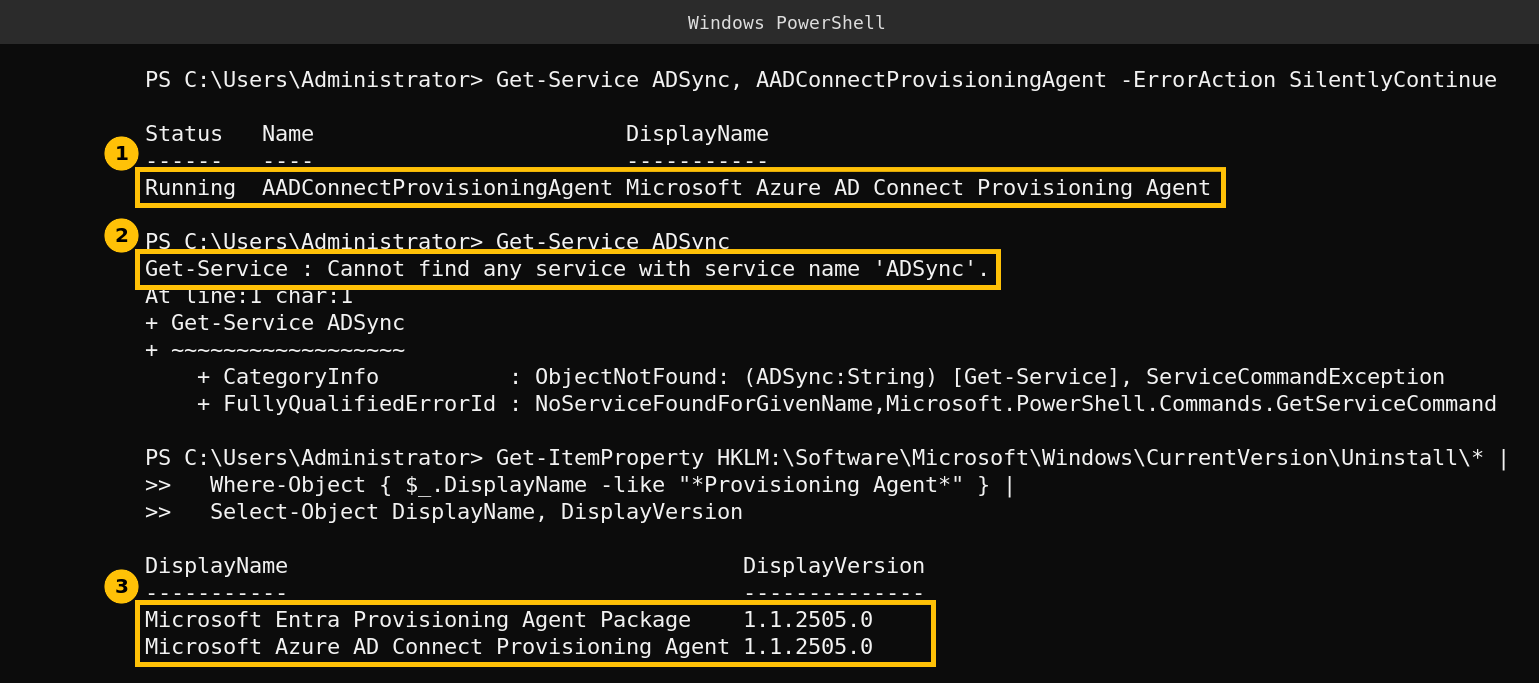
My lab domain controller runs Entra Cloud Sync. The ADSync service is not installed, the provisioning agent service is running, and the agent package is version 1.1.2505.0. For this server the April 7, 2027 Connect Sync deadline does not apply. That is a result I can show, and it is also the reason this post is a how-to-check and not a “here is my upgrade” story.
If ADSync is present, read its version with this command. I could not run it, because I have no Connect Sync server, and the path is the standard install location, so confirm it on yours:
(Get-Item "$env:ProgramFiles\Microsoft Azure AD Sync\Bin\miiserver.exe").VersionInfo.ProductVersionIf your version is below 2.6.84.0, compare it with the table above. The screenshot was captured by sending the same commands to the domain controller remotely. The error position lines (At line:1 char:1) are laid out as an interactive console prints them.
Step 2: if you do run Connect Sync
- Take a backup of the sync configuration with the export feature, and note the current version.
- Upgrade to the newest version, which is 2.6.92.0 at the time of writing. Check that the server meets .NET Framework 4.7.2 and TLS 1.2.
- Switch to application-based authentication in the wizard. Reports I read say an upgrade alone does not switch existing servers over, so check it explicitly. Microsoft describes the steps in Migrate Entra Connect authentication to an application.
- Confirm the service principal “Microsoft Entra AD Synchronization Service” exists under Enterprise applications.
- Consider Cloud Sync if you are eligible. Microsoft recommends it and gives a supported-scenarios comparison.
If you have the automatic upgrade feature enabled, Microsoft says it can upgrade supported servers for you, and it needs version 2.3.20.0 or later to work. Do not rely on it for a server you have not looked at in a year.
One more date from the same news
The IT-Connect summary also reports that self-service password reset enforcement starts on November 7, 2026, with a gradual rollout through mid-November. After that, SSPR reportedly stops accepting phone and email attributes from the directory unless they are registered as authentication methods. I did not verify this on a Microsoft page, so check your own tenant’s registration coverage in the Entra admin center before you rely on it.
Caveats
I verified the deadline, minimum version, service principal and support table on Microsoft’s pages. The SSPR date and the old September deadline come from one secondary source. My only sync server is a Cloud Sync lab, so the Connect Sync steps are described from Microsoft’s documentation and were not run by me.
FAQ
What is the new Entra Connect Sync deadline?
Microsoft says to upgrade to version 2.6.84.0 or later and configure application-based authentication by April 7, 2027.
What happens if I miss it?
Microsoft says all synchronization services in Entra Connect Sync will fail from April 7, 2027 until you upgrade.
Does the deadline affect Entra Cloud Sync?
The hardening article is about Entra Connect Sync. A Cloud Sync agent is a separate product. On my lab server the ADSync service is not installed and the Cloud Sync agent is running.
When does Entra Connect Sync 2.5.79.0 lose support?
The version history table lists October 23, 2026.
How do I tell which sync client I run?
Check for the ADSync service, which is Connect Sync, and the AADConnectProvisioningAgent service, which is Cloud Sync.