

Azure Functions In-Process Model Support Ends November 10, 2026: Find Every Function App Still Using It

If you run C# Azure Functions, one date matters before the end of the year. Microsoft’s migration guide opens with this notice: support for the in-process model ends on November 10, 2026. Apps that still use it need to move to the isolated worker model.
The hard part is not the migration steps, which Microsoft documents well. The hard part is knowing which of your function apps are still in-process, because nothing on the Azure portal home page shows it. This post gives you the detection script from Microsoft, a Resource Graph query to list every function app you own, the migration order that avoids an outage, and what my own empty lab subscription did and did not prove.
Quick guide
- List every function app across your subscriptions with Azure Resource Graph.
- Find the in-process ones. An app whose runtime is
dotnetis in-process, an app whose runtime isdotnet-isolatedis already migrated. - Migrate the project to the isolated worker model and choose .NET 10 or .NET Framework 4.8 as the target.
- Deploy through a staging slot and swap, so the production app never sits in a half-migrated state.
What Microsoft says
The migration guide on Microsoft Learn states: “Support for the in-process model ends on November 10, 2026.” The guide assumes you are on version 4.x of the Functions runtime, and it points apps on 1.x, 2.x or 3.x to the host version upgrade guides first. For the target it says to use .NET 10 if your app and its dependencies can run on modern .NET, and .NET Framework 4.8 if they need Framework-only libraries.
I did not find a sentence saying that in-process apps stop running on that date. “Support ends” normally means no more fixes and no help from Microsoft, so plan for it as a security and supportability deadline and not as a switch-off date. Check the retirement notice for any later change. This also lines up with the .NET 8 and .NET 9 support end on the same day, which I covered in Find every .NET runtime and app in 5 minutes.
Step 1: list every function app with Resource Graph
Azure Resource Graph queries resources across all subscriptions you can read. Function apps are web sites whose kind contains functionapp:
resources
| where type =~ 'microsoft.web/sites'
| where kind contains 'functionapp'
| project name, kind, resourceGroup, subscriptionId, location
Paste it into Resource Graph Explorer in the portal. You can also send it from any terminal with curl. Save the request body in a file called q1.json, with your own subscription ID:
{"subscriptions": ["<subscription-id>"], "query": "resources | where type =~ 'microsoft.web/sites' | where kind contains 'functionapp' | project name, kind, resourceGroup, location"}$TOKEN is an Azure Resource Manager bearer token. I used a service principal token for my lab. If you use the Azure CLI, az account get-access-token --resource https://management.azure.com --query accessToken -o tsv prints one. I only projected the name, kind, resource group and location. I did not check whether the runtime setting is available in Resource Graph, so Step 2 reads it from each app.
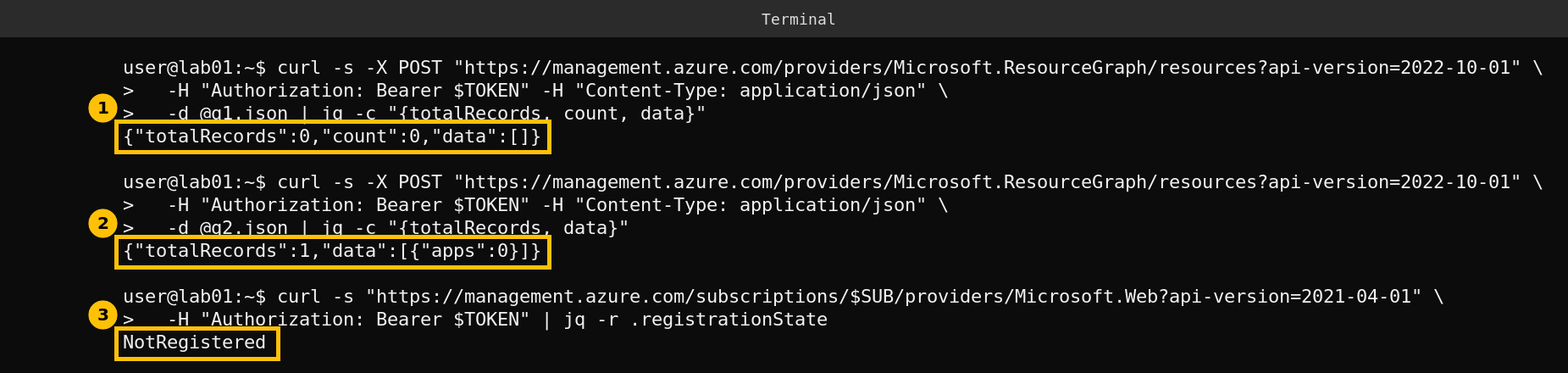
The function app query returned zero records, the count of all web sites is zero, and the Microsoft.Web provider is NotRegistered on this subscription. My lab has never hosted a web app or a function app, so this proves the query is accepted and nothing more. I could not create a test function app to prove the detection on a real match, because the lab’s service principal cannot register providers.
Step 2: find the in-process apps
Microsoft’s migration guide gives this Azure PowerShell script. It lists the function apps in the current subscription whose runtime is dotnet, which is the in-process model:
$FunctionApps = Get-AzFunctionApp

$AppInfo = @{}

foreach ($App in $FunctionApps)
{
     if ($App.Runtime -eq 'dotnet')
     {
          $AppInfo.Add($App.Name, $App.Runtime)
     }
}

$AppInfo
To cover several subscriptions, run Set-AzContext -Subscription "<id>" first for each one. The same fact is stored in the app setting FUNCTIONS_WORKER_RUNTIME, where dotnet means in-process and dotnet-isolated means migrated. I did not run this script, because my lab has no function app, so treat it as Microsoft’s script and not as something I tested.
Step 3: migrate the project
Microsoft’s guide lists the code changes in detail. The ones that catch people out are these:
| Change | What to do |
|---|---|
| Project file | Switch the project SDK to Azure.Functions.Sdk/1.0.0 and the target framework to net10.0 or net48. Replace the Microsoft.NET.Sdk.Functions package with the Worker packages. |
| Startup | Add a Program.cs with a HostBuilder. It replaces the class with the FunctionsStartup attribute. |
| Function attribute | Rename FunctionName to Function. |
| Logging | Stop taking ILogger as a method parameter. Get ILogger<T> from dependency injection in the constructor. |
| Bindings | Replace the Microsoft.Azure.WebJobs.* packages with the matching Microsoft.Azure.Functions.Worker.Extensions.* packages. Input bindings usually gain Input in the name, output bindings gain Output. |
| HTTP streams | With ASP.NET Core integration, replace synchronous reads and writes on request and response streams with asynchronous ones, or you can hit “Synchronous operations are disallowed”. |
| JSON | The isolated model uses System.Text.Json by default. Newtonsoft attributes such as JsonProperty are ignored without an error, so check the types your functions bind to. |
Step 4: deploy without a half-migrated production app
Two things must change together: the app setting FUNCTIONS_WORKER_RUNTIME must become dotnet-isolated, and the migrated code must be published. Each change restarts the app, and between them the deployed code and the configured runtime disagree, which Microsoft says causes the runtime and payload mismatch error AZFD0013.
Microsoft recommends doing this in a staging slot. Set the runtime setting on the staging slot (not as a slot setting), publish the migrated project there, confirm the errors stopped and the app works, then swap. A swap applies both changes in one step, so production never sees the mismatch.
Caveats
This post follows Microsoft’s documentation as of the guide date it shows (September 2026). The Resource Graph query was run for real but found nothing, and the detection and migration steps were not run against a live function app. If your app uses Durable Functions, Kafka, RabbitMQ or other extensions, read the per-extension rows in Microsoft’s package table before you start.
FAQ
When does the Azure Functions in-process model end?
Microsoft’s migration guide says support for the in-process model ends on November 10, 2026.
How do I know if my function app is in-process?
Its runtime is dotnet. Isolated apps show dotnet-isolated. You can read it with Get-AzFunctionApp or from the FUNCTIONS_WORKER_RUNTIME app setting.
Which .NET version should I migrate to?
Microsoft says to target .NET 10 if your app and dependencies can run on modern .NET, or .NET Framework 4.8 if they depend on Framework-only libraries.
Will my app stop working on November 10?
Microsoft says support ends. I did not find a statement that apps stop running that day, but you should expect no fixes after it.
How do I avoid downtime during the migration?
Use a staging slot. Change FUNCTIONS_WORKER_RUNTIME to dotnet-isolated and publish the migrated code on the slot, test it, then swap.