

.NET 8 and .NET 9 Lose Support on November 10, 2026: Find Every Runtime and App in 5 Minutes

On November 10, 2026, which is Patch Tuesday, both .NET 8 and .NET 9 reach end of support. That is 24 days from today. Microsoft’s own announcement is clear about what it means: applications built on those versions keep running, but they stop receiving security fixes, servicing updates and technical support. A final update may ship that day if there is a known critical issue.
The hard part is not the date. It is finding every place a .NET 8 or 9 runtime lives on your servers and which apps depend on it. This post gives you a read-only PowerShell inventory for Windows servers that lists installed runtimes and the framework-dependent apps that need them, with the status of each, plus the retargeting steps from Microsoft. I tested the script on a real Windows Server 2025 machine and on a throwaway sample tree, and I say below what each test proves.
Quick guide
- Inventory runtimes on every server with the script below. Anything marked ENDS 2026-11-10 is a .NET 8 or .NET 9 runtime.
- Inventory apps. The same script reads each app’s
runtimeconfig.jsonto see which framework version it asks for. Point the app folder list at your IIS and service locations. - Check containers and pipelines. Any image or build step that pins
:8.0or:9.0needs a new tag. - Retarget. Change
TargetFrameworktonet10.0, build, run your tests, and use the .NET Upgrade Assistant for help. - Remove old runtimes last. Delete .NET 8 and 9 only after every app has moved, because apps bound to them will fail to start.
What ends, and what does not
- .NET 8 (LTS), released November 14, 2023. Support ends November 10, 2026.
- .NET 9 (STS), released November 12, 2024. It now gets 24 months of support instead of 18, which lands on the same day as .NET 8.
- .NET 10 (LTS), released November 11, 2025. Supported through November 2028. This is Microsoft’s recommended target.
- Visual Studio: a future Visual Studio 2022 servicing update will mark .NET 8 and 9 components as unsupported and offer a remove out of support components option.
- .NET Framework 4.8 is a separate product on the Windows lifecycle and is not part of this change.
Two other clocks run out the same day according to one lifecycle tracker. PowerShell 7.4 and 7.5 end because they sit on .NET 8 and 9, which I covered in the PowerShell 7.6 LTS checklist. The tracker also lists Windows 11 23H2 Enterprise and Education reaching end of servicing that day.
Inventory script (read-only)
Run it elevated on each Windows server, or wrap it in Invoke-Command. It looks in the default dotnet install folders and in the app folders you list at the top. Edit $appRoots for where your apps actually live.
$dotnetRoots = @("$env:ProgramFiles\dotnet", "${env:ProgramFiles(x86)}\dotnet")
$appRoots    = @('C:\inetpub', 'C:\Apps')

function Get-DotNetStatus([string]$ver) {
    $major = ([version]($ver -replace '-.*$')).Major
    if     ($major -ge 10)     { 'supported (.NET 10 LTS runs to Nov 2028)' }
    elseif ($major -in 8, 9)   { 'ENDS 2026-11-10' }
    else                       { 'already out of support' }
}

$runtimes = foreach ($root in $dotnetRoots) {
    Get-ChildItem "$root\shared\*\*" -Directory -ErrorAction SilentlyContinue | ForEach-Object {
        [pscustomobject]@{ Framework = $_.Parent.Name
                           Version   = $_.Name
                           Status    = Get-DotNetStatus $_.Name }
    }
}

$apps = foreach ($root in $appRoots) {
    Get-ChildItem $root -Recurse -Filter *.runtimeconfig.json -ErrorAction SilentlyContinue | ForEach-Object {
        $opt = (Get-Content $_.FullName -Raw | ConvertFrom-Json).runtimeOptions
        foreach ($fw in @($opt.framework) + @($opt.frameworks)) {
            if ($fw) {
                [pscustomobject]@{ App       = $_.Name
                                   Framework = $fw.name
                                   Version   = $fw.version
                                   Status    = Get-DotNetStatus $fw.version }
            }
        }
    }
}

'--- Installed runtimes'
if ($runtimes) { $runtimes | Format-Table -AutoSize | Out-String -Width 200 } else { 'none found' }
'--- Framework-dependent apps'
if ($apps) { $apps | Format-Table -AutoSize | Out-String -Width 200 } else { 'none found' }
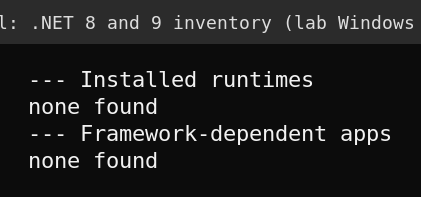
On my lab Windows Server 2025 machine the real result is empty, which is correct. That machine runs no .NET 8 or 9 apps and has no modern .NET runtime installed in the default folders, so the script reports none found. That proves the script runs cleanly on a machine with nothing to find and does not invent results.
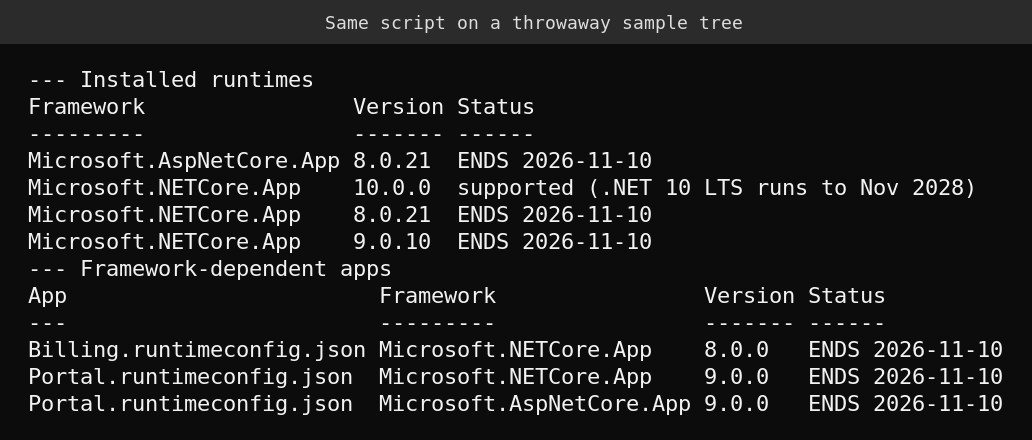
To prove it finds things, I built a throwaway sample tree with runtimes 8.0.21, 9.0.10 and 10.0.0 and two fake apps, one asking for .NET 8 and one asking for .NET 9 with ASP.NET Core as a second framework. I pointed the script at that tree, then deleted it. The versions are made up, so this shows the logic, not what a real server looks like.
What the script does not see
- Self-contained apps. They carry their own runtime and have no framework entry to match, so rebuild them against .NET 10 and publish again. Find them by looking for a
coreclr.dllnext to the app executable. - Apps outside the folders you list. Check your IIS site physical paths and the service executable paths and add them to the list.
- Containers. Images are not on the host filesystem. Search your Dockerfiles and image lists for
dotnet/aspnet:8.0,dotnet/runtime:9.0and similar tags. I did not run a container check here, so verify it in your own environment.
Retarget the app
Microsoft’s guidance is to set the TargetFramework property in the project file to net10.0, then update the development and hosting environments to match. For ASP.NET Core there is a dedicated 9 to 10 migration guide, and there is a .NET 10 breaking changes list. Read the breaking changes before you flip the property in production, since an LTS to LTS jump from 8 skips a version of changes.
What I could not verify
- I did not find .NET 8 or 9 on any real server, because my lab has none. The inventory logic is proven on a sample tree only.
- Whether Microsoft ships a final update on November 10. The announcement says it may.
- Third party extended support for .NET 8 and 9. One tracker says Microsoft offers none, and I did not check vendors.
FAQ
Will my .NET 8 or .NET 9 apps stop working on November 10?
No. Microsoft states that apps built on those versions continue to run. They just stop getting security fixes, so any new vulnerability stays open.
Do I have to go to .NET 10?
Microsoft recommends .NET 10 because it is the LTS release supported through November 2028. Moving to .NET 8 or 9 elsewhere makes no sense since they end the same day.
Is .NET Framework 4.8 affected?
No. .NET Framework is a separate product that follows the Windows lifecycle, not the modern .NET support policy.
Should I uninstall the old runtimes now?
Not until every app that needs them has moved. Removing a runtime that an app is bound to makes the app fail to start. Inventory first, retarget, test, then remove.
Sources
- Microsoft .NET Blog: .NET 8 and .NET 9 end of support
- InfoWorld: End of support looms for .NET 8 and .NET 9
- endoflife.ai: November 10, 2026, four support clocks run out on one Patch Tuesday
- Microsoft Learn: .NET Upgrade Assistant overview
- Microsoft Learn: Migrate from ASP.NET Core 9 to 10
- Microsoft Learn: Breaking changes in .NET 10