Your Ubuntu Server Has 3 Newer Kernels Installed That It Is Not Running: Check What the Next Reboot Boots

Ubuntu installs a new kernel next to the old one and does not switch to it until you reboot. That part is well known. What is less obvious is which kernel the next reboot will pick, and whether your server will tell you that it is running something other than the newest installed kernel. On my Ubuntu 24.04 server the answer was surprising: four kernels are installed, the newest is not the one running, and the usual reboot flag file does not exist.
This post shows the three checks that expose it, with real output, and the one GRUB setting that decides what a reboot will do. It is written for any Ubuntu server where an unplanned reboot (a power cycle, a hang, a cloud maintenance event) would otherwise be a gamble.

Quick guide
- Compare the running kernel with the installed ones using
uname -randdpkg-query. - Do not rely on the reboot flag. Check whether
/var/run/reboot-requiredexists, and treat a missing file as “unknown”, not as “fine”. - Read the GRUB default.
GRUB_DEFAULT=savedmeans the saved entry wins, any other value means the menu order decides. - Decide on purpose and either pin the kernel you trust or schedule a reboot into the new one when you can watch it.
Step 1: running kernel versus installed kernels
The running kernel is what uname -r prints. The installed kernels are the linux-image- packages with a version number in the name. The pattern in the command below skips the meta package linux-image-oracle (Ubuntu names it after the cloud flavour, yours may be linux-image-generic or linux-image-aws) so you see only real kernels.
uname -r
dpkg-query -W -f '${Package}  ${Version}\n' 'linux-image-[0-9]*'
ls /var/run/reboot-required
apt-mark showhold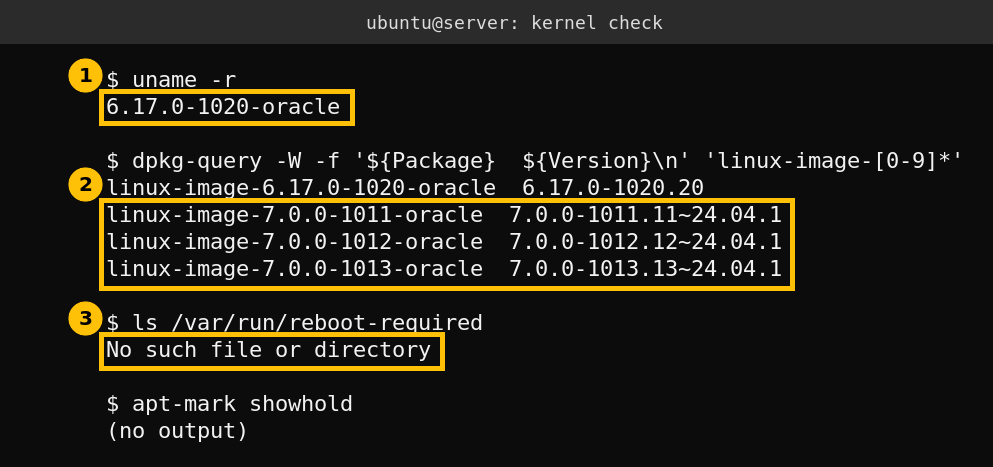
The server runs 6.17.0-1020-oracle. Three kernels from the 7.0 series are installed beside it, 1011, 1012 and 1013. Nothing is on hold in apt, and /var/run/reboot-required does not exist. I did not look into why the flag is absent. What matters is the lesson: the flag file is written by package scripts, so its absence does not prove that you are on the newest kernel. Ask the system directly.
Here is a short script that does the comparison for you. sort -V sorts version numbers correctly, so 7.0 ranks above 6.17.
running=$(uname -r)
newest=$(dpkg-query -W -f '${Package}\n' 'linux-image-[0-9]*' | sed 's/^linux-image-//' | sort -V | tail -1)
echo "running:          $running"
echo "newest installed: $newest"
[ "$running" = "$newest" ] && echo "match" || echo "DIFFERENT"
running:          6.17.0-1020-oracle
newest installed: 7.0.0-1013-oracle
DIFFERENT
The second block is what it printed on my server. Run it from cron or your monitoring agent if you want a daily answer, and alert on DIFFERENT only on servers where that is not intended.
Step 2: what would the next reboot boot?
This is the part that decides whether the difference is a harmless detail or a trap. GRUB reads the GRUB_DEFAULT setting. The GNU GRUB manual describes saved as using the entry stored in the GRUB environment block, which you set with grub-set-default. With the stock value 0 GRUB boots the first menu entry, and on Ubuntu the newest kernel is listed first. That second point is my understanding of how Ubuntu builds the menu, I did not test it on a spare machine.
grep -E "^GRUB_DEFAULT" /etc/default/grub
sudo grub-editenv list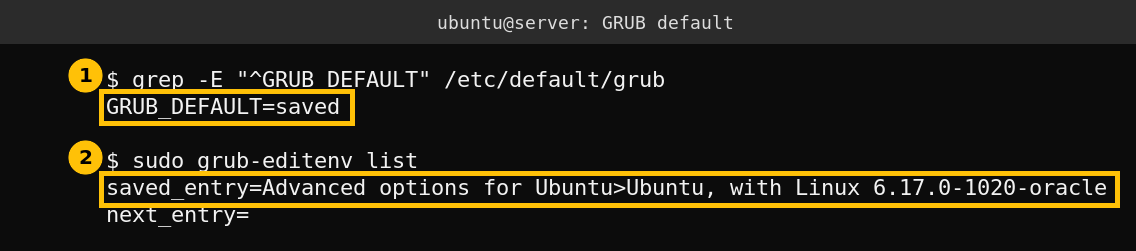
My server has GRUB_DEFAULT=saved and the saved entry is the 6.17 kernel. So a reboot boots 6.17, even though 7.0 is installed. That is deliberate on this machine, and the next section explains why.
Why I pinned the older kernel
On October 18 I booted 7.0.0-1013-oracle once, using grub-reboot, which sets a one-time next entry without changing the saved default. The machine ran for about 38 minutes and then reset, and it came back on the saved 6.17 kernel. I do not know the cause. It could be the kernel, memory pressure on a 1 GB machine, or something else, and I have not proven which. What I can say is that the pinned default turned a failed experiment into an automatic fallback instead of a machine that stays down.
That is the useful pattern. Test a new kernel with a one-time boot, keep the known-good one as the saved default. If the new kernel hangs, a power cycle returns you to the good one.
sudo grub-reboot "Advanced options for Ubuntu>Ubuntu, with Linux 7.0.0-1013-oracle"
sudo reboot
Those two commands are the one-time boot I used. The menu string must match your own entries exactly, so list them first with grep -E "menuentry |submenu " /boot/grub/grub.cfg. To make a kernel the permanent default use sudo grub-set-default with the same string, and I did not change the default today.
Housekeeping and risks
- Disk space. My
/bootholds four kernels in 158 MB of 881 MB, so there is room. On smaller boot partitions old kernels are what makesaptfail, andsudo apt autoremoveremoves the ones you no longer need. - Security patches. A newer installed kernel does not protect you until it is running. If the newest kernel carries a security fix, a pinned older kernel leaves you exposed. Pin on purpose, and read the notices for the kernel you actually run.
- Never leave it implicit. If you do not know what
GRUB_DEFAULTis on a remote server, find out before the next reboot, not after.
I covered the same idea for a specific kernel flaw in my post on checking an Ubuntu kernel against ssh-keysign-pwn: read the changelog of the kernel you really run.
Caveats
One Ubuntu 24.04 server on an Oracle cloud kernel flavour. The package names differ on other flavours. I did not change any boot setting during this check, I only read them.
FAQ
Does Ubuntu boot the newest kernel after a reboot?
It depends on GRUB_DEFAULT. With the stock value the first menu entry is used and the newest kernel is normally listed first. With GRUB_DEFAULT=saved the entry saved with grub-set-default is used.
Does a missing /var/run/reboot-required mean I run the newest kernel?
No. On my server the file was absent while three newer kernels were installed. Compare uname -r with the installed linux-image packages instead.
How do I test a new kernel safely on a remote server?
Use grub-reboot for a one-time boot into the new kernel and keep the old kernel as the saved default. If the new one hangs, a power cycle returns to the saved kernel. Keep console access ready.
Is it safe to stay on an older kernel?
Only if you track its security notices. A newer kernel that is installed but not running does not protect you.