Revoked Certificate Still Trusted? Issue, Revoke, Publish the CRL and Prove the Client Sees It

Revoking a certificate sounds like one action. It is really three, and you can do the first two perfectly while a client keeps trusting the certificate. You mark the certificate revoked in the certification authority (CA) database, you publish a new certificate revocation list (CRL), and then a client has to actually fetch that list. If any link is slow, the certificate still looks good.
In my lab I issued a certificate, revoked it, published a new CRL and then checked it from a clean client. The client saw the revocation at once. The CA itself kept saying “passed” for a short while after I had revoked and published, which is exactly the kind of result that makes people think revocation is broken. This post walks the whole path with real output and screenshots, including the traps I hit.
Names are neutral stand-ins: the issuing CA is CA01 (CA name Contoso-Issuing-CA), the offline root is ROOT01, the web server that hosts the CRL and CA certificate is WEB01 (at pki.contoso.com), the domain is contoso.com, and the test certificate is for demo01.contoso.com. The screenshots have names, URLs and accounts pixelated in place. This is a lab CA on Windows Server 2025 and the certificate is a throwaway test.
Quick guide
- Issue the test certificate with
certreqfrom a request file. - Revoke it in the Certification Authority console with a reason code.
- Publish a new CRL. Revoking alone only writes to the CA database.
- Check from a clean client with
certutil -verify -urlfetchand look forCRYPT_E_REVOKED. - Do not trust a machine that already validated the certificate. It can keep saying “good” from cache.
If you have not built the CA yet, start with installing and configuring Active Directory Certificate Services.
Step 1: issue the certificate
Run this on the CA as a domain admin who is allowed to enroll on the template. The template is a two-year web server template called WebServer-TLS. First the request file, req.inf.
[NewRequest]
Subject = "CN=demo01.contoso.com"
KeyLength = 2048
KeySpec = 1
Exportable = FALSE
MachineKeySet = TRUE
RequestType = PKCS10
[Extensions]
2.5.29.17 = "{text}"
_continue_ = "dns=demo01.contoso.com"
certreq -new req.inf req.csr
certreq -submit -config "ca01.contoso.com\Contoso-Issuing-CA" -attrib "CertificateTemplate:WebServer-TLS" req.csr demo01.cer
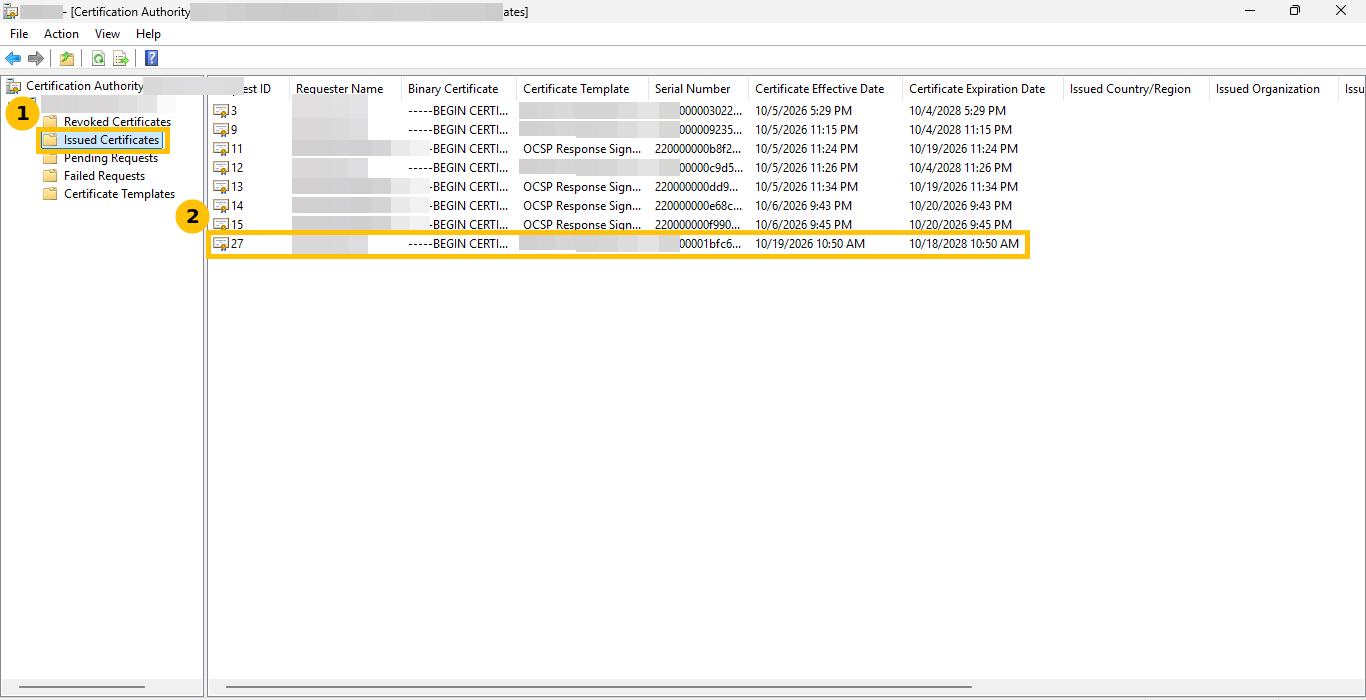
certreq -accept demo01.cerThe request went from submitted to issued in 8 seconds (10:59:56 to 11:00:04), with RequestId 27 and Certificate retrieved(Issued). The certificate is valid from 10:50, about ten minutes before I issued it. I take that to be the CA’s clock skew allowance, but I did not read the setting.
The certificate lists an HTTP CRL Distribution Point first and an LDAP one second, and its Authority Information Access lists the CA certificate and an OCSP URL. Before revoking anything I ran certutil -verify -urlfetch demo01.cer, and it ended with Leaf certificate revocation check passed. That is the baseline.
Step 2: revoke it in the console
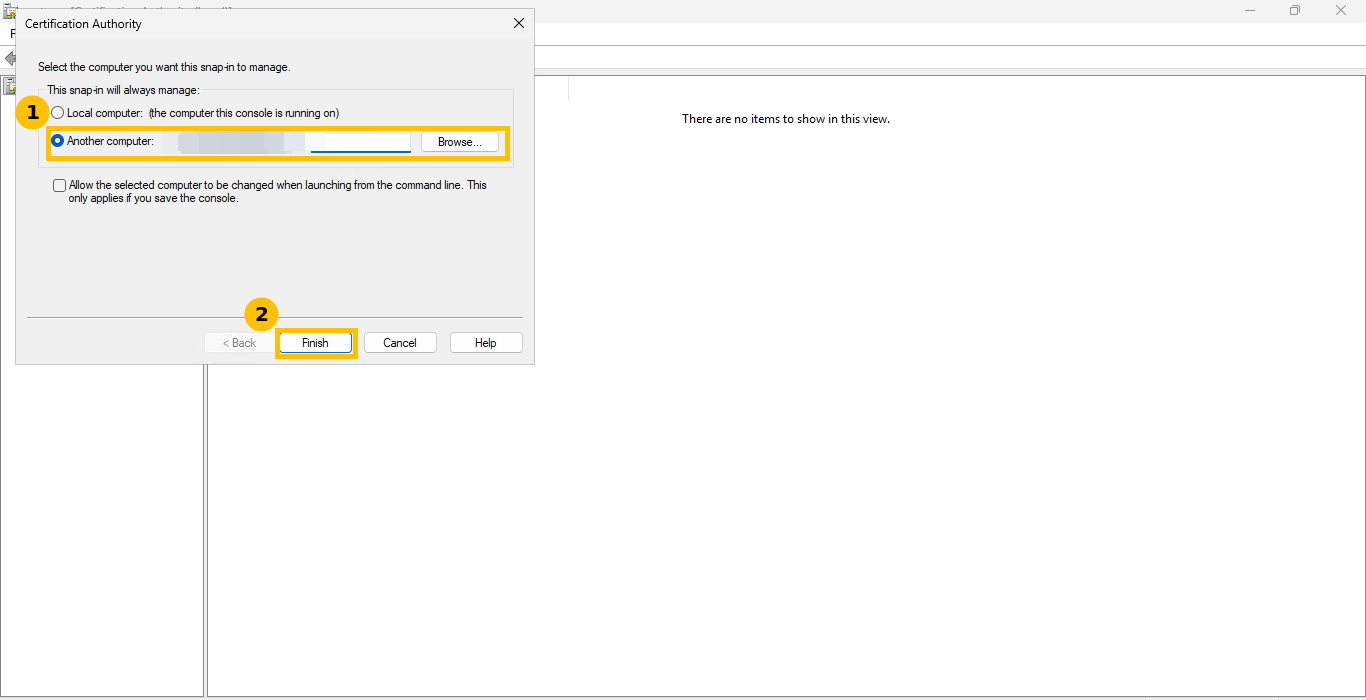
My CA server has remote desktop closed, so I opened the Certification Authority console on a domain controller and pointed it at the CA. Right-click the root node, choose Retarget Certification Authority, pick Another computer, type the CA name and click Finish.
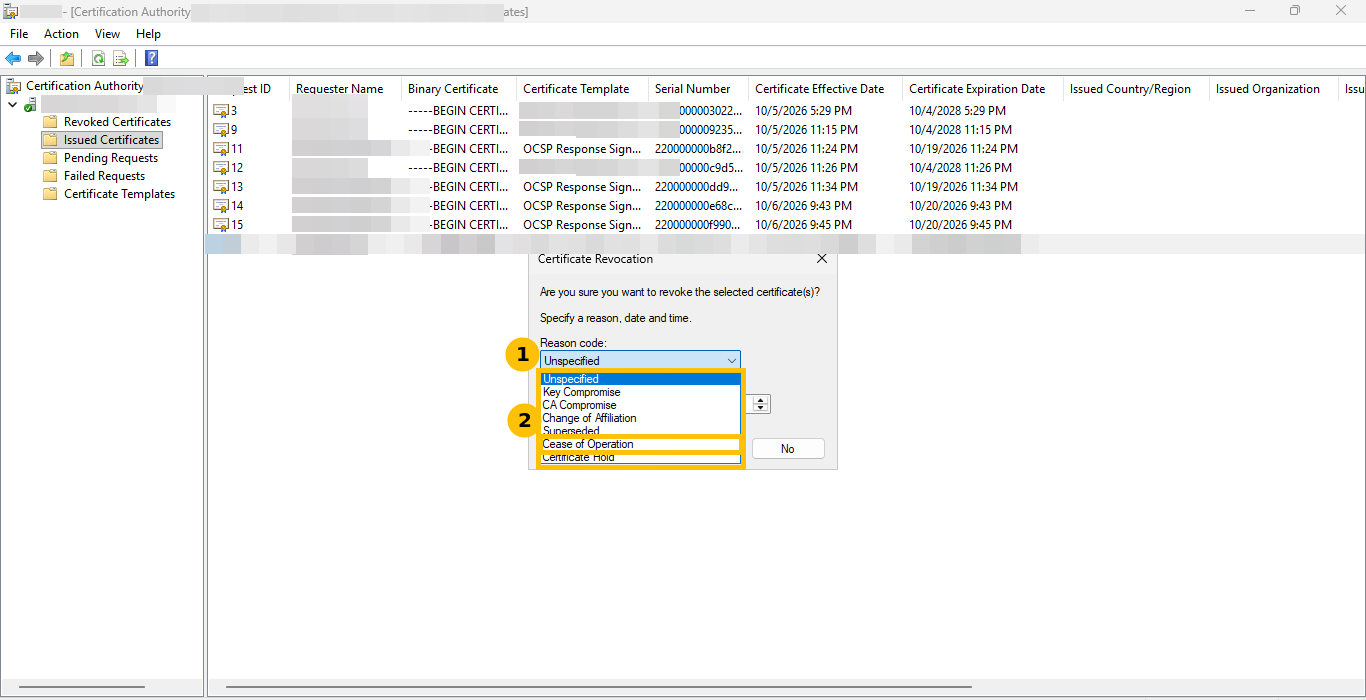
Issued Certificates shows request 27 as the newest row.
Right-click it and choose All Tasks then Revoke Certificate.
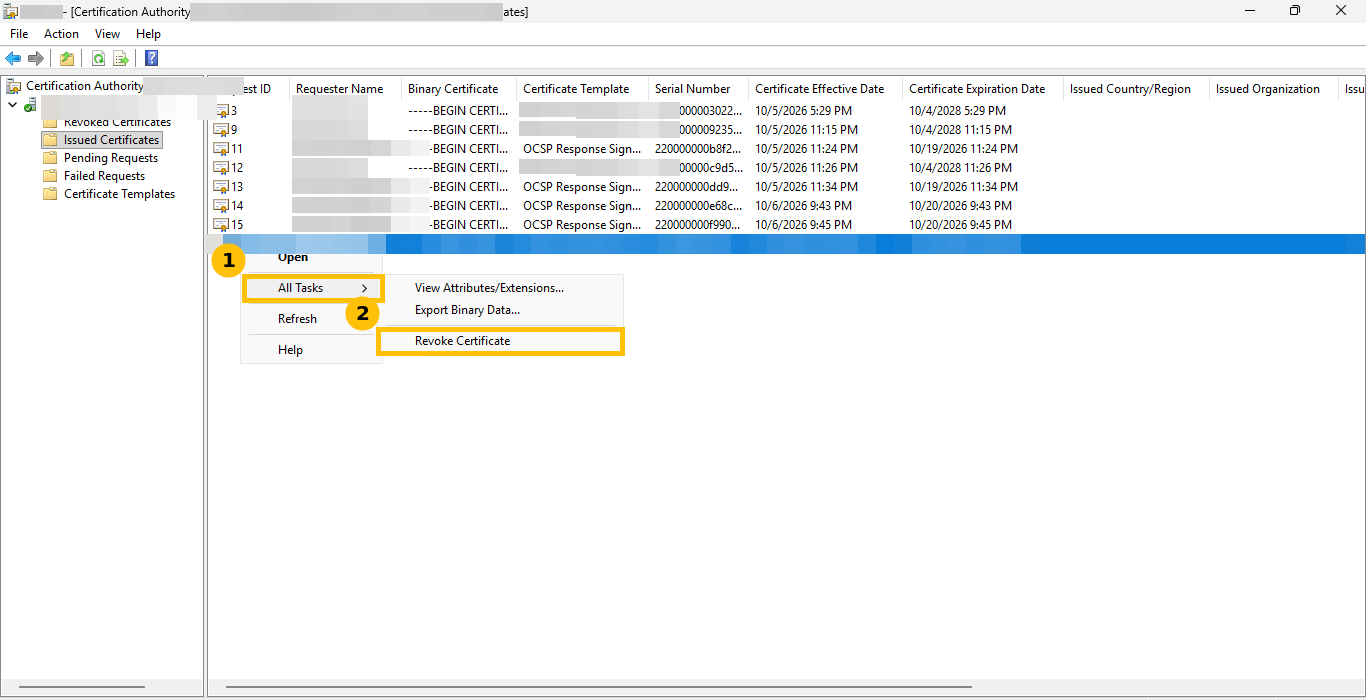
The dialog asks for a reason code and a date and time. The choices are Unspecified, Key Compromise, CA Compromise, Change of Affiliation, Superseded, Cease of Operation and Certificate Hold. I picked Cease of Operation and clicked Yes at 11:07:03.
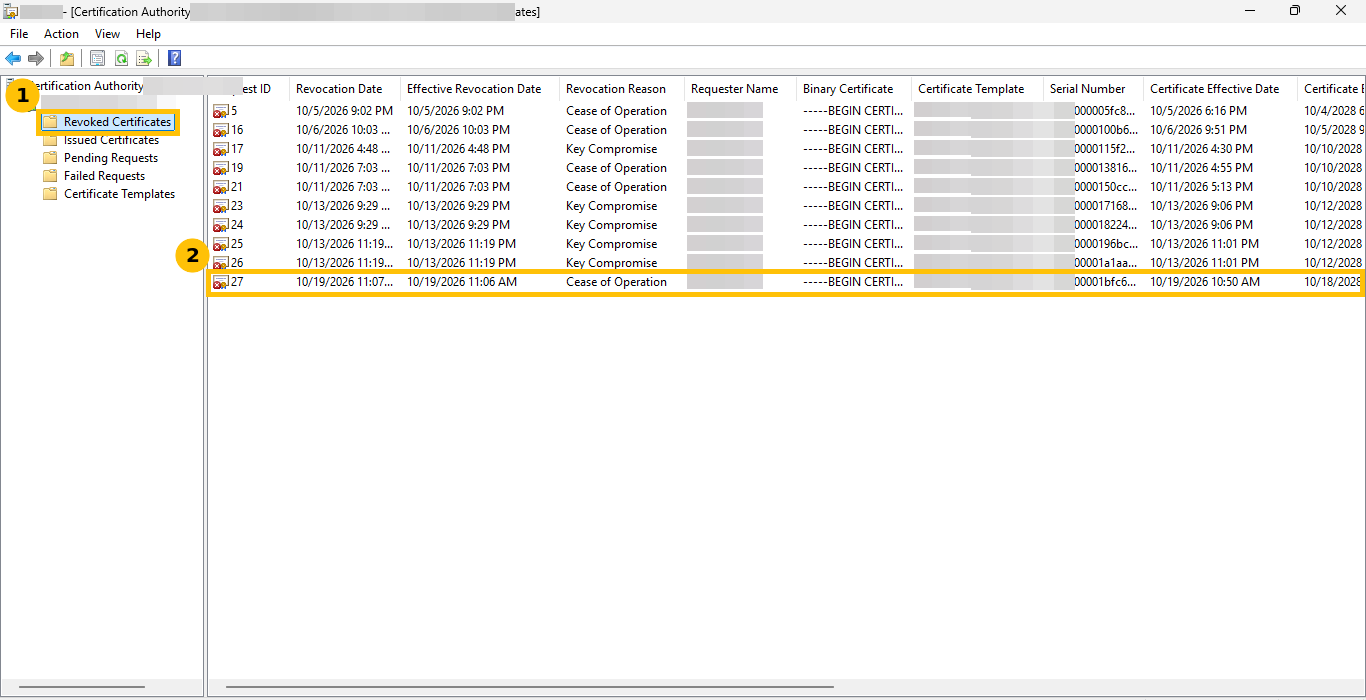
The certificate leaves Issued Certificates and appears in Revoked Certificates with its revocation date and reason.
Trap 1: role separation says no
Before I used the console I tried the same revoke from the command line as the same admin, and it was refused.
certutil -config "ca01.contoso.com\Contoso-Issuing-CA" -revoke <serial> 1
ICertAdmin::RevokeCertificate: The operation is denied. The user has multiple roles assigned
and the certification authority is configured to enforce role separation. 0x80094008 (CERTSRV_E_ROLECONFLICT)
That is role separation doing its job. One account that is both CA Administrator and Certificate Manager is refused. The proper fix is two accounts, one for each role.
For honesty about the evidence, my lab test was not run the proper way. I turned role separation off for about three minutes (11:05:19 to 11:08:34) so I could finish the test on one account, then turned it back on and read the value back, which was 1. That is a security setting on a CA, so I am telling you what happened, not suggesting you do it. Do not weaken it on a real CA. Use two accounts.
Step 3: publish a new CRL
Revoking only writes to the CA’s database. Clients read the CRL, which is a signed file. In the console, right-click Revoked Certificates, choose All Tasks then Publish. The dialog warns you in plain words.
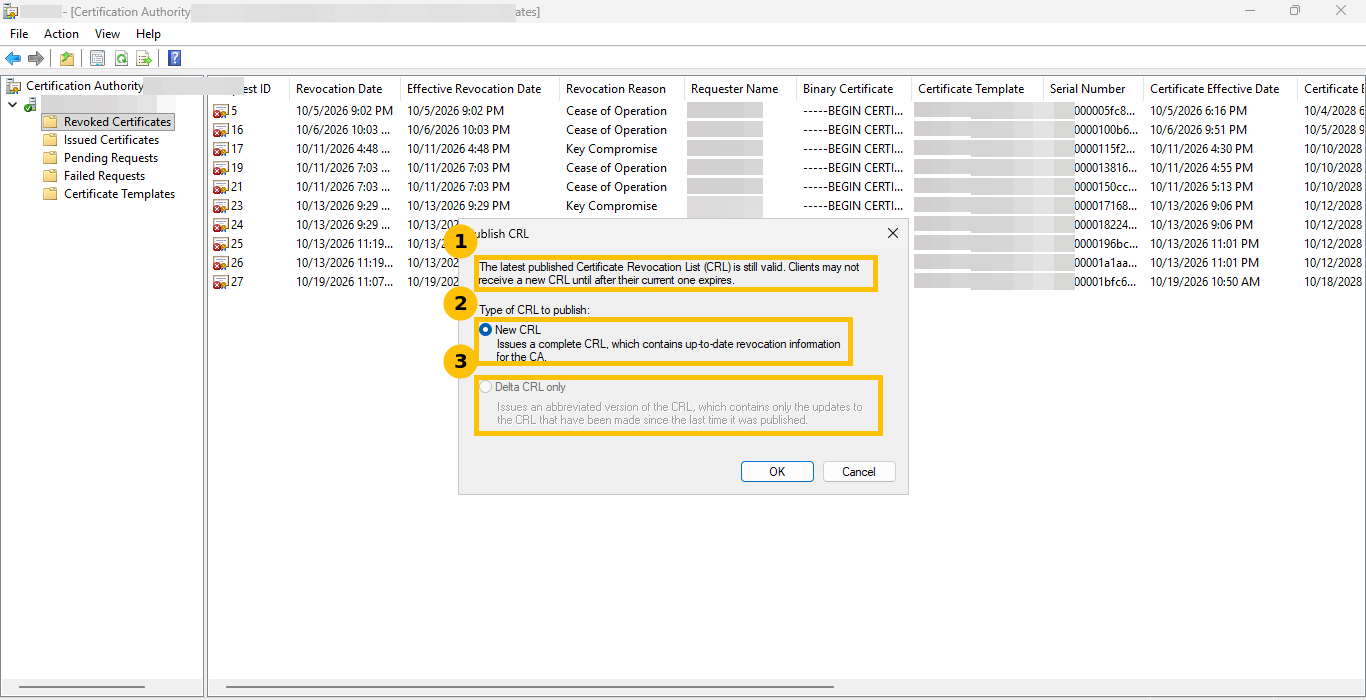
Trap 2: the dialog says “Clients may not receive a new CRL until after their current one expires.” A client that already holds a valid CRL has no reason to fetch another one until that one expires. Publishing is not the same as every client knowing. Here the next update was six days away.
I chose New CRL at 11:08:03. The file on the web server was rewritten at exactly that time and is 1,287 bytes. I fetched it over HTTP and parsed it with certutil -dump. The CRL number is 12 (it was 0f before I revoked), it has 10 entries, and the test serial is in it with a revocation date of 10/19/2026 11:06 AM. Two details worth knowing:
- The CRL says ThisUpdate 10:58 although I published at 11:08. The backdating looks like the same clock skew allowance as for certificates. I did not check it.
- The CRL number went up by three, from 0f to 12, although I published once by hand. I did not find the other two. The CA service restarts in between are my suspects because I restarted it twice, but that is a guess.
Step 4: check from a clean client
On a client that had never checked this certificate, a domain controller in my lab, copy the .cer file over. A quick dump shows the serial number, the expiry and the three URLs the client will use.
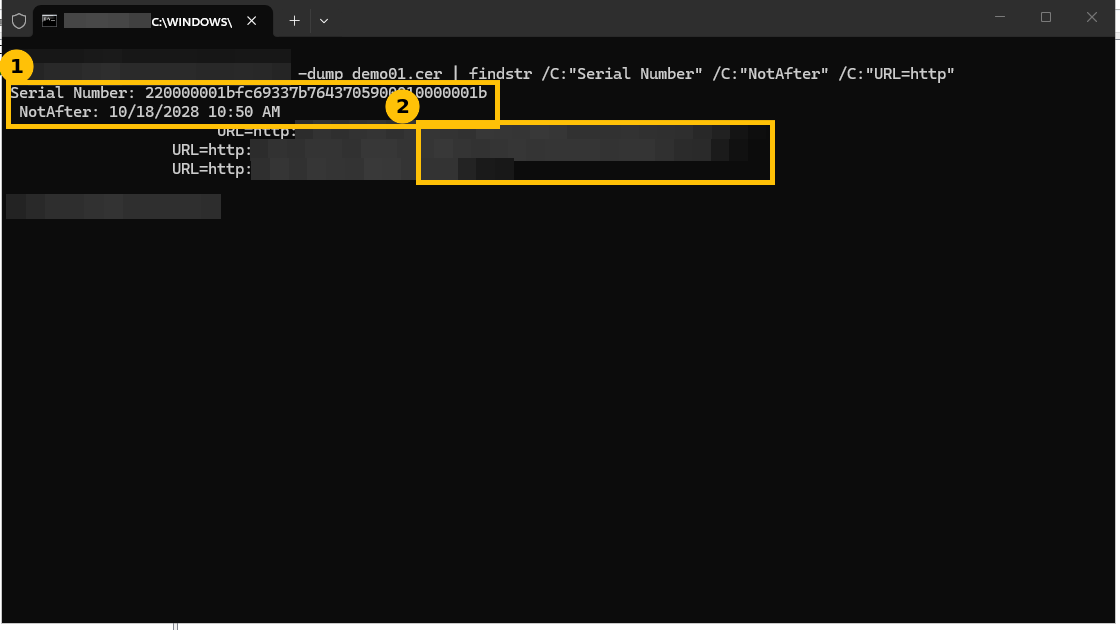
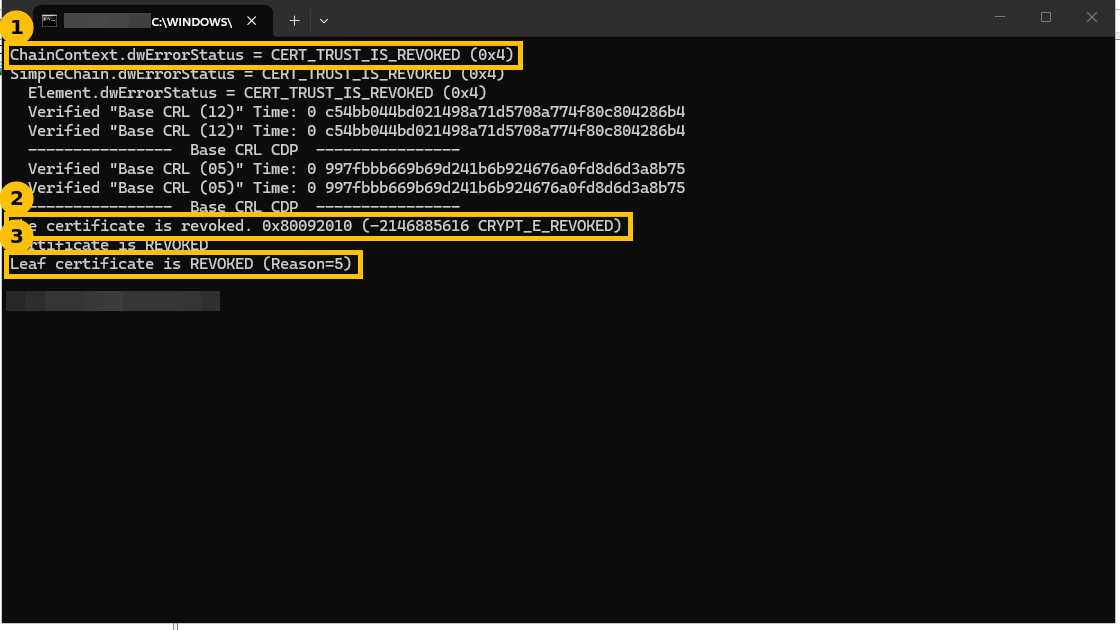
certutil -verify -urlfetch demo01.cerThe result is what you want to see. The chain status is CERT_TRUST_IS_REVOKED (0x4), the message is The certificate is revoked. 0x80092010 (CRYPT_E_REVOKED), and the last line says Leaf certificate is REVOKED (Reason=5). Reason 5 is Cease of Operation. The issuing CA’s Base CRL (12) and the root’s Base CRL (05) were both verified.
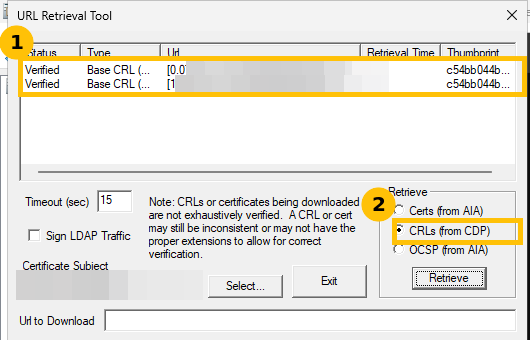
The URL Retrieval Tool (certutil -URL demo01.cer) shows the same story from the other side. With CRLs (from CDP) selected, both the HTTP and the LDAP URL report Verified with the same thumbprint.
Trap 3: the CA itself said the certificate was still good
On the CA, right after publishing, the same certutil -verify -urlfetch still said Leaf certificate revocation check passed at 11:08:52, although the CRL it listed as verified was already number 12 and I could see the serial inside that CRL. After I reset the chain cache and ran it again a second later, it reported CERT_TRUST_IS_REVOKED.
certutil -setreg chain\ChainCacheResyncFiletime @nowI also ran certutil -urlcache * delete, which printed “This function is not supported on this system,” so I cannot tell you which of the two actions made the difference. I did not find out what had been cached, whether a CRL, an OCSP answer or the chain result. The practical lesson is that a machine that has already validated a certificate can keep saying “good” for a while after you revoke it. The clean client saw the revocation on its first try, so always test from one that has never seen the certificate.
Trap 4: OCSP said Expired
The certificate’s Authority Information Access includes an OCSP URL. The URL Retrieval Tool reported the OCSP answer as Expired.
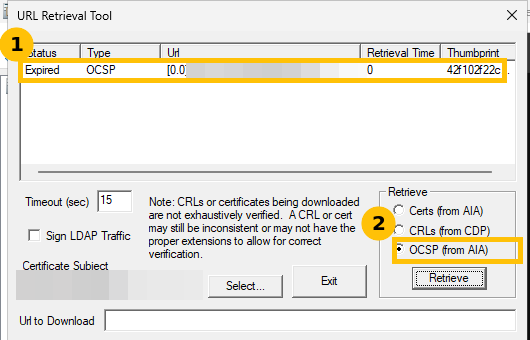
Revocation was still caught because the client also checks the CRL, so the OCSP leg was not what protected me. I did not investigate the responder. If you publish an OCSP URL, check that leg on its own and do not rely on the CRL fallback to hide a broken responder.
Cleanup
I deleted the test certificate’s private key from the CA machine’s store, removed my work folder and my scheduled tasks, and left the revoked certificate in the CA database, because revoked certificates cannot be deleted. The ChainCacheResyncFiletime registry value I set on the CA server for the test was not removed. Nothing else on the CA was changed.
Caveats
One lab CA, one test certificate and a quiet system, so the times are not a benchmark. Role separation was off for about three minutes, as described above. I did not test a delta CRL, an OCSP-only client or a browser.
FAQ
Why does a revoked certificate still look valid on some machines?
Revocation is only a database change until a new CRL is published, and clients only fetch a new one when their current CRL expires or their cache is refreshed. The Publish CRL dialog warns you about exactly this.
What does CRYPT_E_REVOKED (0x80092010) mean?
It means the certificate chain validated and the revocation check found the certificate on the CRL. In my test it came with the line Leaf certificate is REVOKED (Reason=5), where reason 5 is Cease of Operation.
What does CERTSRV_E_ROLECONFLICT (0x80094008) mean?
The CA enforces role separation and the account you used holds more than one CA role, so the operation is denied. The proper fix is to use separate accounts for the CA Administrator and Certificate Manager roles.
How do I test revocation properly?
Run certutil -verify -urlfetch on a client that has never checked the certificate. A machine that already validated it can answer from cache.