Installing ROS 2 Jazzy and Running Your First Node

ROS 2, the Robot Operating System, is the software backbone behind most modern robotics projects, from research arms to warehouse robots, and getting a first node talking to another node is the real “hello world” of robotics development. This walkthrough installs ROS 2 Jazzy Jalisco, the current long term support release, on a real Ubuntu box and proves two nodes are actually communicating.
Quick guide
- Confirm your Ubuntu version matches the ROS 2 release you want. ROS 2 Jazzy Jalisco targets Ubuntu 24.04 (Noble) specifically.
- Add the ROS 2 apt repository using the official ros-apt-source package from the ros-infrastructure GitHub releases, then run
sudo apt-get update. - Install the base packages with
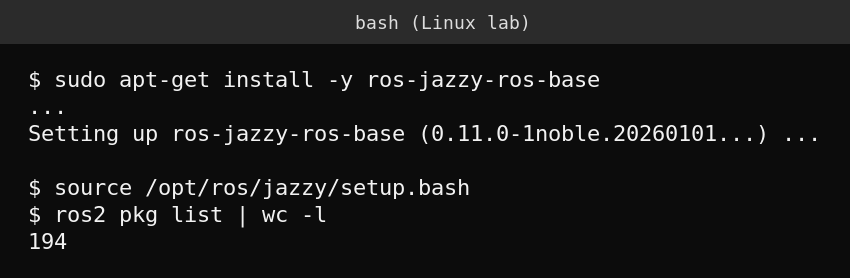
sudo apt-get install ros-jazzy-ros-base. This gives you the core tools without the full desktop simulation and visualization stack. - Load the ROS 2 environment into your shell with
source /opt/ros/jazzy/setup.bash. This needs to run in every new terminal you use ROS 2 from. - Install the demo nodes package with
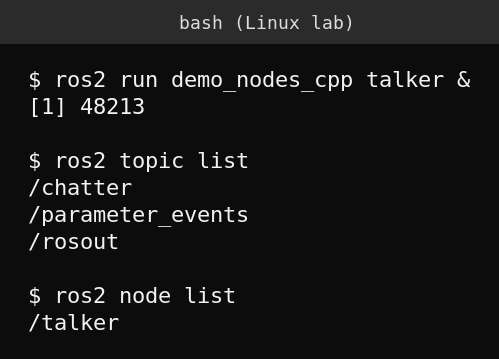
sudo apt-get install ros-jazzy-demo-nodes-cpp, then run a built in publisher withros2 run demo_nodes_cpp talker. - In the same or another terminal, confirm it is actually broadcasting with
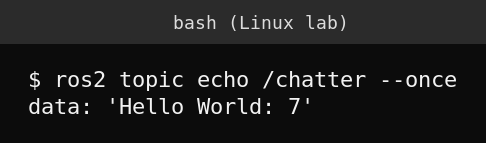
ros2 topic listandros2 topic echo /chatter --once.
What ROS 2 actually is
ROS 2 is not an operating system despite the name, it is a middleware framework that gives independent programs (called nodes) a standard way to discover each other and exchange data, using topics for continuous streams of data, services for request and response calls, and actions for long running tasks with feedback. A real robot typically runs dozens of nodes at once, one reading a camera, one handling motor control, one doing path planning, all communicating over ROS 2 topics without needing to know about each other directly. Jazzy Jalisco, released in mid 2026, is the current long term support release, supported through the standard ROS 2 LTS lifecycle.
Proving two nodes actually talk to each other
Starting a single node and seeing no errors is not the same as proving communication works. The talker demo node publishes an incrementing “Hello World” message on the /chatter topic every second, and checking that topic independently with ros2 topic echo confirms data is genuinely flowing between separate processes, not just that one process started without crashing.
What actually goes wrong
The single most common first day mistake is forgetting to source the setup script in every new terminal, ROS 2 commands simply are not found, or worse, two terminals end up with different environments loaded and nodes that should see each other do not. The second common issue is multiple ROS 2 installations or a stray environment variable from a previous session causing nodes to join the wrong domain and become invisible to each other, checking echo $ROS_DOMAIN_ID is worth doing when nodes that should talk to each other silently do not.
FAQ
Do I need the full ROS 2 desktop install to get started?
No. ros-base gives you the core communication and command line tools. The desktop variant additionally installs RViz, simulation tools and other GUI applications, useful later but not required for your first working node.
Can two computers on the same network run ROS 2 nodes that talk to each other?
Yes, ROS 2’s default DDS based discovery works across a local network automatically, provided both machines share the same ROS_DOMAIN_ID and the network allows the multicast traffic DDS discovery relies on.
What is the difference between ROS 1 and ROS 2?
ROS 2 was built from the ground up with a decentralized DDS based communication layer instead of ROS 1’s single master node, real time support, and better security, and it is the actively developed version going forward, since ROS 1 has reached its final release.
Sources
Official ROS 2 documentation and installation guide at docs.ros.org for the Jazzy Jalisco distribution.