Could Not Find Any Available Domain Controller: A Real Exchange Site-Link Failure

This is a real failure, deliberately reproduced to document it properly, not staged after the fact. A new Active Directory site gets created, with its own subnet, for a disaster-recovery location. Exchange on a server in that new site starts logging topology discovery failures and its services refuse to start. The root cause turns out to be something easy to miss during a site rollout: a site existing in AD is not the same thing as a site being reachable by Exchange. Names, domain, and IPs are redacted throughout and replaced with neutral placeholders where the narrative needs them.
Step 1: the error as it actually appears
First sign of trouble: Exchange services on the server in the new site fail to start, visible as a long run of “Waiting for service… to start” warnings in PowerShell. Behind that, the real diagnostic signal is sitting in the Application event log:
Invoke-Command -ComputerName SRV-DR01 -ScriptBlock {
  Get-WinEvent -FilterHashtable @{LogName="Application";Id=2142;StartTime=(Get-Date).AddMinutes(-5)} |
    select -First 3 | ft TimeCreated,Id,ProviderName,@{n="Message";e={($_.Message -split "`n")[0..2] -join " "}} -Wrap -a
}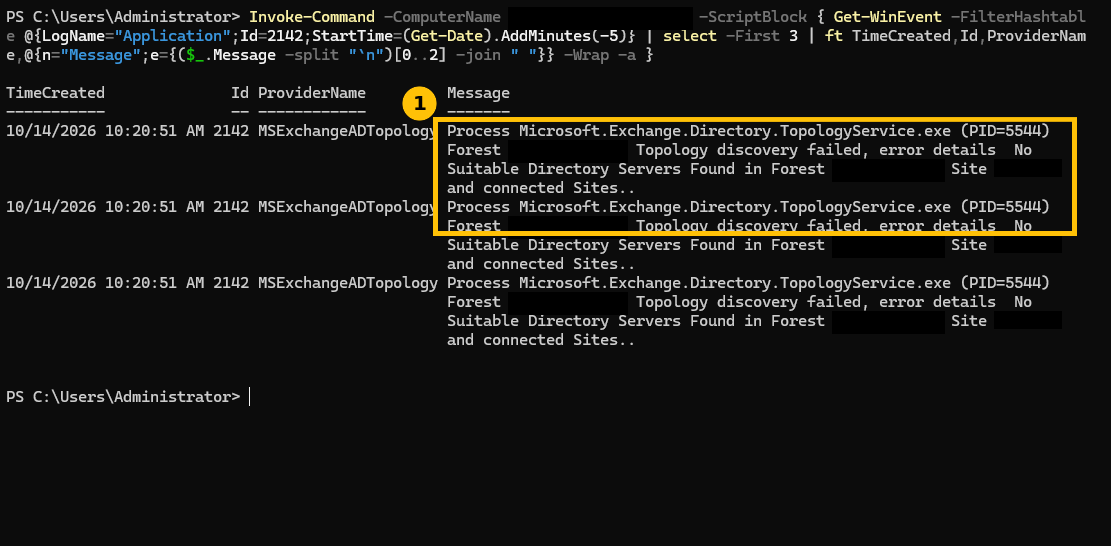
Event ID 2142, source MSExchangeADTopology: “Topology discovery failed, error details No Suitable Directory Servers Found in Forest [forest] Site [site] and connected Sites.” That specific phrase, “and connected Sites,” is the clue. Exchange isn’t just failing to find a domain controller in the local site, it’s also failed to find one in any site that’s actually considered connected to it.
Step 2: diagnosis, check what “connected” actually means here
AD site connectivity isn’t implicit just because sites and subnets exist, it’s defined by site links. Checking what’s actually configured:
Get-ADReplicationSite -Filter * | ft Name -a
Get-ADReplicationSiteLink -Filter * | ft Name,@{n="Sites";e={($_.SitesIncluded | %{($_ -split ",")[0] -replace "CN="}) -join ", "}} -a
Get-ADDomainController -Filter * | ft Name,Site -a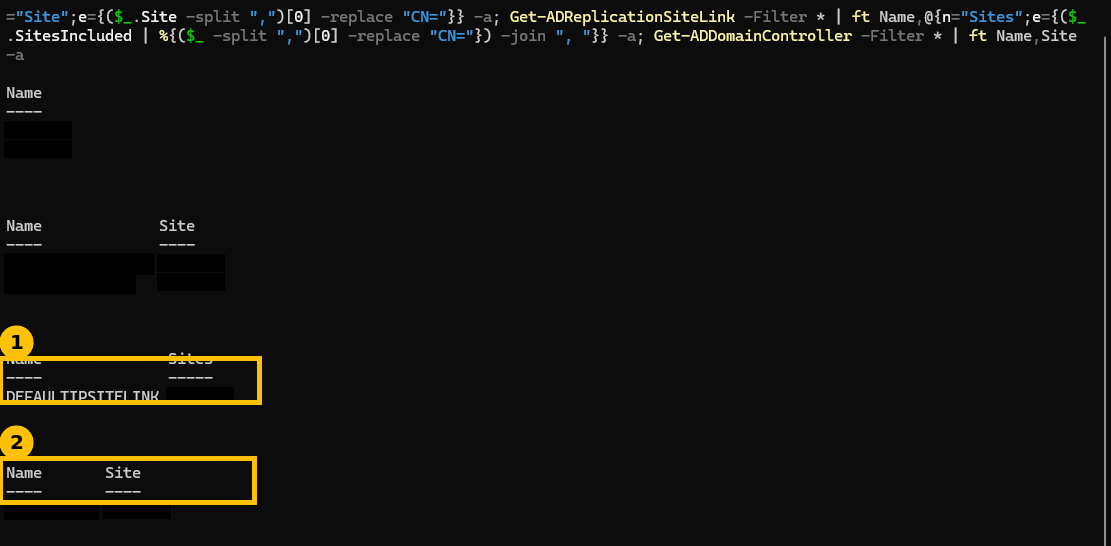
The actual problem: the new site exists, the new subnet exists, but DEFAULTIPSITELINK, the only site link in this forest, only had the original primary site in it. The new site was never added to any site link at all. And the only domain controller in the whole environment sits in that original site, not the new one. So from the new site’s perspective, there is genuinely no reachable domain controller, not a misconfiguration on the DR server itself, a gap in the site topology one level up.
This is also a real design weakness worth calling out plainly: a disaster-recovery site with no domain controller of its own means every bit of AD-dependent service discovery in that site depends entirely on reaching the primary site’s DC across whatever link connects them. If that link is the exact thing that’s down during a real disaster, the DR site can’t do directory lookups at all. A proper DR design usually puts at least one DC physically in the DR site. That’s a bigger conversation than this specific fix, but it’s the honest context behind why this failure happened in the first place.
Step 3: the fix, add the site to a site link
New-ADReplicationSiteLink -Name "Primary-DR-Link" -SitesIncluded PrimarySite,DRSite `
  -Cost 100 -ReplicationFrequencyInMinutes 15 -InterSiteTransportProtocol IP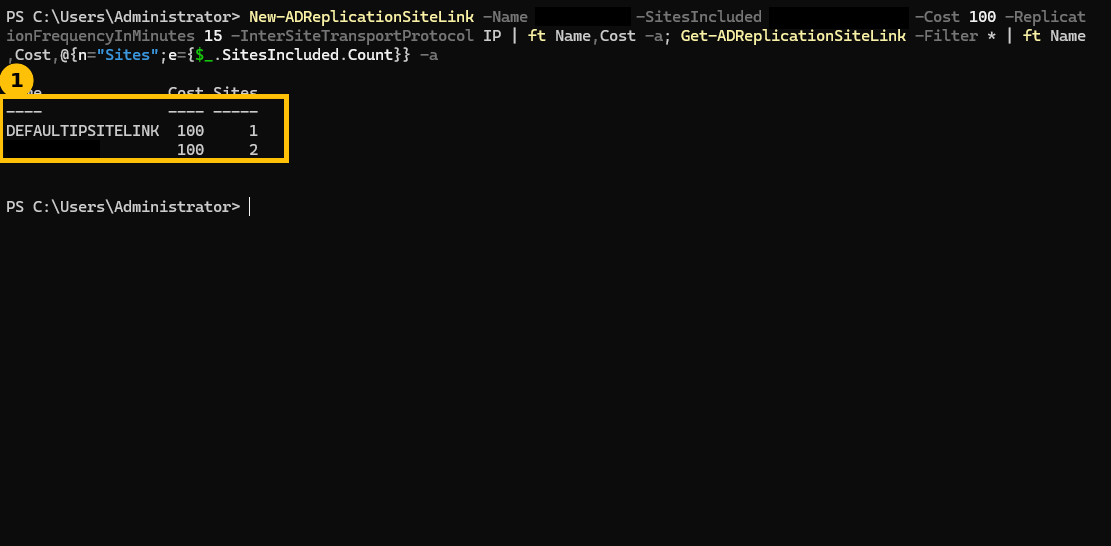
A deliberate choice here: rather than adding the new site into the existing DEFAULTIPSITELINK, this creates a dedicated link between the two specific sites, with its own cost and replication interval. For a DR site specifically, you generally want explicit control over replication cost and frequency separate from however your primary sites are linked to each other, lumping a DR site into a generic default link makes that harder to tune later.
Step 4: confirm it’s actually resolved, honestly
Site link replication doesn’t make the new topology visible to Exchange instantly, this took a couple of minutes and two topology-service restarts to actually clear, not a one-shot fix:
Invoke-Command -ComputerName SRV-DR01 -ScriptBlock {
  Restart-Service MSExchangeADTopology -Force -WarningAction SilentlyContinue
  Get-Service MSExchange* | ?{$_.StartType -eq "Automatic" -and $_.Status -ne "Running"} | Start-Service -WarningAction SilentlyContinue -EA SilentlyContinue
  Start-Sleep 120
  $e = Get-WinEvent -FilterHashtable @{LogName="Application";Level=2;StartTime=(Get-Date).AddSeconds(-90)} -EA SilentlyContinue
  "Errors in the last 90s: " + @($e).Count
  "Exchange services not running: " + (@(Get-Service MSExchange* | ?{$_.StartType -eq "Automatic" -and $_.Status -ne "Running"}).Count)
}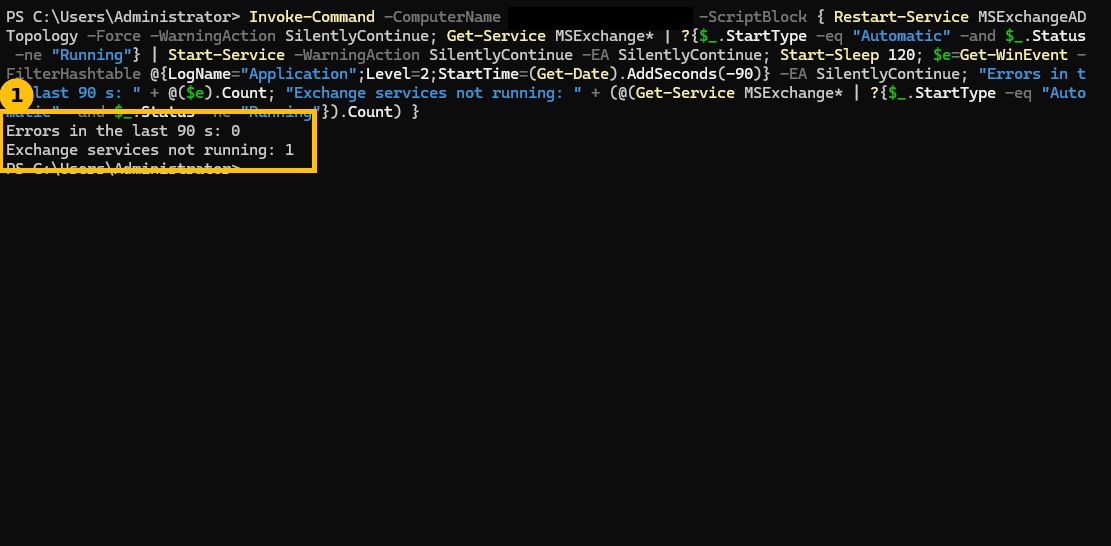
Errors in the last 90s: 0, the topology failure is genuinely gone. The “Exchange services not running: 1” line is worth being honest about rather than hiding, that one remaining service was MSExchangeEdgeSync, which is normally stopped by design on a Mailbox-only server role and has nothing to do with this issue, confirmed separately rather than assumed away. Don’t let an unrelated, expected service state make you think a fix didn’t fully work, check what the specific service actually is before reading anything into it.
Quick guide
- Event ID 2142 from MSExchangeADTopology with “No Suitable Directory Servers Found… and connected Sites” means Exchange can’t reach a DC in its own site or any site linked to it.
- Check
Get-ADReplicationSiteLinkto see which sites are actually linked together, a site existing is not the same as a site being connected. - Check
Get-ADDomainControllerto confirm whether the local site even has a DC of its own. - Create a site link (dedicated or added to an existing one) connecting the isolated site.
- Restart the topology service and give it real time, don’t expect an instant fix, and verify the actual Application log error count rather than assuming it’s resolved.
FAQ
Why didn’t Exchange just use the DC in the other site automatically?
Exchange’s topology discovery respects AD site boundaries and site link cost specifically so it prefers low-latency, well-connected domain controllers. Without any site link between the two sites, there’s no defined path for Exchange to even consider that DC reachable, “connected Sites” in the error message means sites AD itself considers linked, not just physically reachable over the network.
Should every AD site have its own domain controller?
Not necessarily for every site, but for a site hosting services that depend on AD for basic operation, Exchange being the clear example here, having a local DC avoids exactly this class of problem and removes a single inter-site link as a point of failure for directory lookups. For a true disaster-recovery site specifically, a local DC is standard practice, not optional.
Why did the fix take a couple of minutes and two service restarts?
Site link changes need to propagate through AD replication and be picked up by Exchange’s own topology caching, which doesn’t refresh instantly on every service. Restarting the topology service forces it to re-discover the environment rather than waiting for its normal refresh interval, but even then, give it real time rather than assuming a restart alone means immediate resolution.
Is MSExchangeEdgeSync not running actually a problem?
Not here specifically, it’s an edge transport synchronization service that’s expected to be stopped on a server that isn’t running the Edge Transport role, which describes a typical Mailbox-only server. Seeing it listed as “not running” alongside a real fix verification is worth double-checking exactly which service it is before treating it as a sign something’s still broken.