
Windows Server 2022 Hotpatch Needs a Restart in November and December 2026 (MC1527979): Count Your Real Restarts and Check What Is Pending Before Patch Tuesday

If you run Windows Server 2022 with hotpatching, you got used to security updates that do not need a restart. Microsoft says that pauses for two months. In Message Center item MC1527979, published October 27, 2026, the November and December 2026 security updates for hotpatch enrolled Windows Server 2022 devices will be standard updates, not hotpatches, so each one needs a restart. The next Patch Tuesdays are November 10 and December 8.
Windows Server 2025 is not affected. The same notice says hotpatch updates for Windows Server 2025 and Windows 11 remain scheduled for November and December. Nothing needs to be reconfigured, because the notice says devices stay enrolled in hotpatching.
Quick guide
- List your hotpatch enrolled Windows Server 2022 machines. They are the ones where restarts were rare this year. In Azure, open the VM, then Operations, then Updates, to see the patch status.
- Put two restart windows on the calendar: the week of November 10 and the week of December 8. Tell application owners now.
- Check what is already waiting for a restart and how long each server has been up, with the commands below.
- Restart in a safe order for clustered or replicated roles. For Exchange, that means one DAG member at a time. See my post on the October Exchange and Windows update problem.
- Do not plan on January being quiet. The notice lists January 2027 as a planned baseline month that also needs a restart. The next hotpatch is expected in February.
What Microsoft said
| Month | Windows Server 2022 with hotpatch | Windows Server 2025 with hotpatch |
|---|---|---|
| November 2026 | Standard update, restart required | Hotpatch, no restart |
| December 2026 | Standard update, restart required | Hotpatch, no restart |
| January 2027 | Planned baseline, restart required | Not stated in the notice |
| February 2027 | Next hotpatch expected | Not stated in the notice |
The reason given is that some security improvements change components that cannot be updated without a restart. Servers that do not use hotpatch see no change, because their standard monthly updates already need a restart.
How many restarts does hotpatching really save?
Microsoft’s hotpatch article describes a year with four planned baselines and eight hotpatch months. The Windows Server hotpatch calendar (page dated October 28, 2026) shows 2026 has been different. Counting its rows:
| 2026 | Hotpatch months | Baseline months that need a restart |
|---|---|---|
| Windows Server 2022 | February, March, May, August (4) | January, April, June, July, September, October, plus November and December (8) |
| Windows Server 2025 | February, March, May, August (4 so far) | January, April, June, July, September, October (6 so far) |
So a Windows Server 2022 machine will have restarted for updates in eight of twelve months this year, and Windows Server 2025 in six of the first ten. Do not size your change windows on the four per year you may have been told when hotpatch launched. Count your own servers, as shown next.
Check your own servers
Get-ItemProperty 'HKLM:\SOFTWARE\Microsoft\Windows NT\CurrentVersion' |
    Select-Object ProductName,EditionID,CurrentBuild,UBR | Format-List
Test-Path 'HKLM:\SOFTWARE\Microsoft\Windows\CurrentVersion\WindowsUpdate\Auto Update\RebootRequired',
'HKLM:\SOFTWARE\Microsoft\Windows\CurrentVersion\Component Based Servicing\RebootPending'Get-WinEvent -ProviderName 'EventLog' | Where-Object Id -eq 6005 |
Group-Object { $_.TimeCreated.ToString('yyyy-MM') } |
Sort-Object Name | Format-Table Name,Count -AutoSize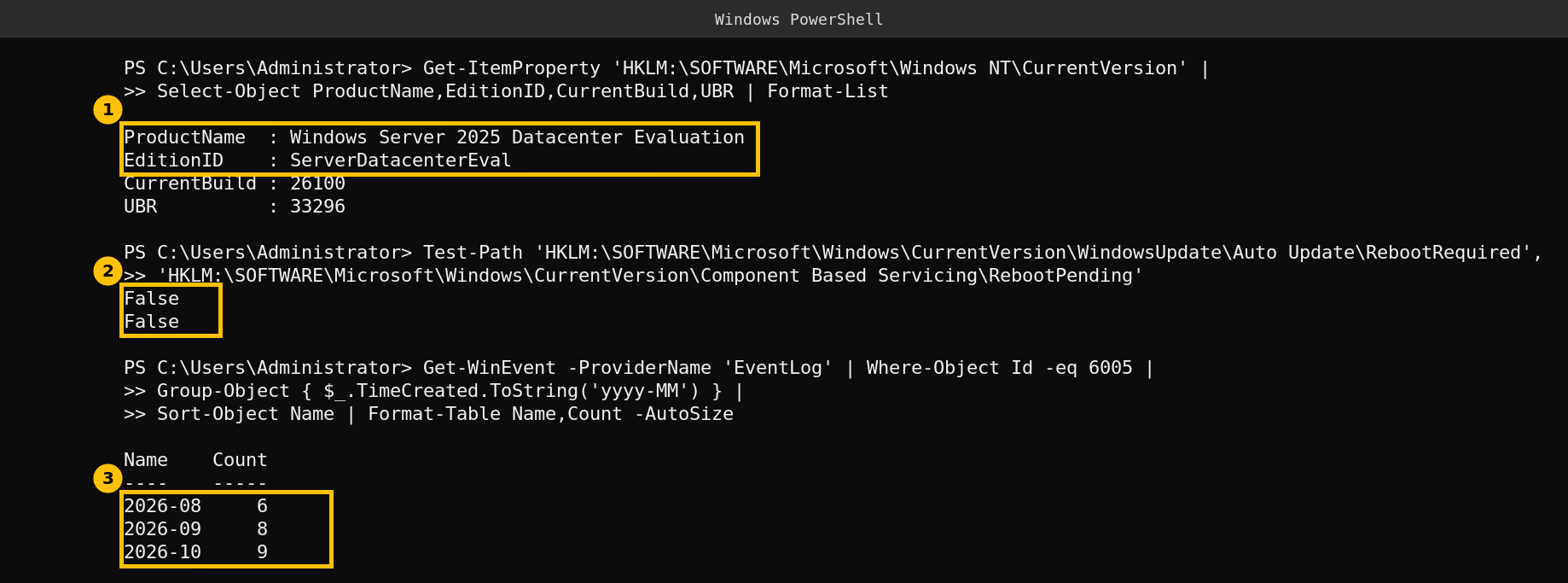
What each command tells you:
- Edition and build. My lab is a Datacenter Evaluation edition at build 26100.33296, so it is not a hotpatch machine and this notice does not apply to it. On a hotpatch enrolled server you should see the Azure Edition in the product name. Use the build to see which monthly update you are on.
- Pending restart markers. Both are
Falsehere, so Windows is not waiting for a restart. These two keys are the common markers, but they are not the only way a restart can be pending. - Boots per month. Event 6005 is logged by the Event Log service at every start, so it counts boots. My lab shows 6, 8 and 9 for August to October. Those are lab housekeeping restarts and not update restarts, so please do not read them as patching. On your servers, compare the monthly count with the calendar above to see how many restarts hotpatching really saved you.
What I did not verify
- I did not have a hotpatch enrolled Windows Server 2022 machine, so I could not show an update installing or the restart prompt.
- I read MC1527979 through a public mirror of the Message Center, so confirm the wording in your own Message Center.
- The calendar rows for November and December 2026 have no build number or KB yet, because the updates are not released at the time of writing.
FAQ
Which servers does MC1527979 affect?
Windows Server 2022 devices enrolled in hotpatching. The notice does not name editions. Windows Server 2025 and Windows 11 hotpatch updates remain scheduled for November and December.
Do I need to change anything to stay enrolled in hotpatch?
No. The notice says no extra configuration is required and devices stay enrolled. You only need to plan the restarts.
When is the next restart free month for Windows Server 2022?
The notice lists January 2027 as a planned baseline month that needs a restart, and says the next hotpatch is expected in February 2027.
Does hotpatch cover everything?
No. Microsoft says it covers Windows security updates. Non security updates, .NET updates and non Windows updates such as drivers and firmware still need a restart or an update during hotpatch months.
How do I see the installed updates on a server?
Run Get-HotFix in PowerShell or open the update history in Settings. In Azure, the VM Updates page shows the patch status and recent updates.