
Entra Self-Service Password Reset Stops Accepting Directory Phone Numbers and Emails in November: Act by November 6 and Check Who Has Not Registered a Method (MC1325414)

Microsoft Entra self-service password reset (SSPR) is about to stop accepting a phone number or email that only exists in the directory. Message Center item MC1325414 says SSPR will accept only explicitly registered authentication methods. A user whose only contact detail is a mobile phone, business phone or alternate email copied into the directory will not be able to complete a password reset until they register a method. The notice lists the act by date as November 6, 2026.
The dates in the notice do not line up, and I want to be upfront about that. The rollout schedule says enforcement starts November 7, 2026, while the title and the action section say November 9, 2026. General availability is given as early to mid November 2026, moved back from early and mid September. I could not reconcile these, so plan for the earliest one, November 6. The notice says the registration campaign began on October 5, 2026.
What I did and did not do. I did not sign in to an Entra tenant for this post, so there are no portal screenshots. The facts about the change come from the Message Center item and Microsoft Learn. The one thing I could check with real output is the on-premises side, which is below.
Quick guide
- Check registration coverage. In the Entra admin center go to Authentication methods and open User registration details. The notice asks you to confirm every user, including admins, has at least one registered method that meets your SSPR policy.
- Turn on the registration campaign so users are prompted automatically. Path on Microsoft Learn: Entra ID, Authentication methods, Registration campaign, Edit.
- Find users who rely on directory phone numbers. In a hybrid setup the mobile and telephone attributes in Active Directory are the usual source, so query them, as shown below.
- Plan a fallback. Helpdesk assisted registration for people who cannot self register, for example someone locked out before the change.
- Tell your helpdesk and your users. Point users to My Security Info to register.
What changes, exactly
- Before: SSPR could use directory sourced contact info, the
mobilePhone,businessPhoneandotherMailsattributes, without the user registering it. - After: those attributes are not valid for verification unless the user registers them as a method.
- Who: all users including administrators in tenants with SSPR enabled, in the public cloud and the US Government clouds.
- Scale: the notice says about 86 percent of SSPR verifications already use registered methods, so the people at risk are the remaining 14 percent.
- Failure mode: a user with no registered method cannot finish a password reset. They are prompted to register or told to contact an administrator.
The campaign settings that matter
Microsoft Learn on the registration campaign describes three states: Microsoft managed, Enabled and Disabled. In Microsoft managed Microsoft picks the method and settings and you choose who is included. In Enabled you pick the method, the snooze days and the users. A few details from that page that help in practice:
- A campaign targets one method at a time, either a passkey (FIDO2) or Microsoft Authenticator, not both.
- Under Microsoft managed, the Authenticator nudge goes to users who do MFA by SMS or voice call, are enabled for push notifications and do not have push set up. The user is nudged after sign in, not during a silent token refresh.
- To make skipping harder, in the Enabled state set Days allowed to snooze to 0 and Limited number of snoozes to Enabled. Users can still snooze three times, then registration is required.
- A user is not nudged if a Conditional Access policy blocks the Register security information page, or if a terms of use screen or a custom control appears during sign in. Check that your policies are not blocking the nudge. My post on MFA and SSPR registration with Conditional Access is a good place to start.
Step 3: who has a directory phone number? (on premises)
Get-ADUser -Filter * -Properties mobile,telephoneNumber,mail |
    Select-Object SamAccountName,mobile,telephoneNumber,mail | Format-Table -AutoSize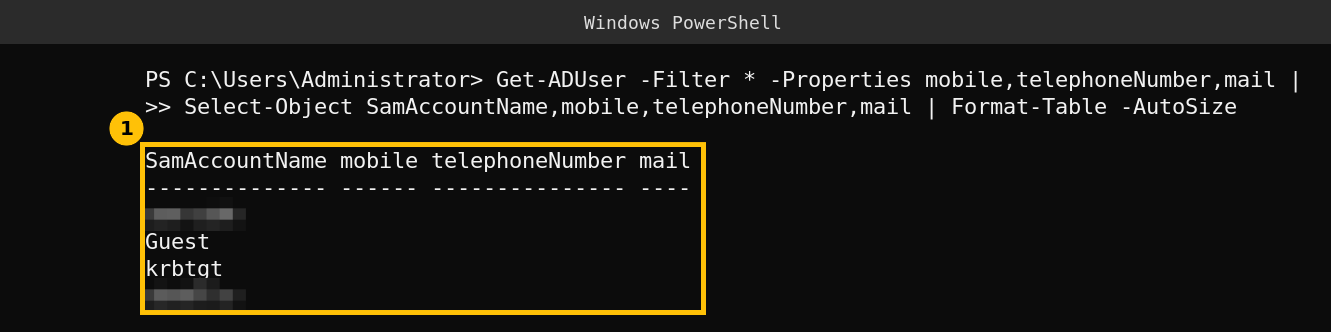
In my lab domain none of the four accounts has a mobile number, a telephone number or an email address, so nobody here depends on a directory phone number. In a real company this list is the one to read. Anyone who has a value in mobile or telephoneNumber and has never registered a method in Entra is a candidate for a failed reset. Whether those attributes reach mobilePhone and businessPhone in the cloud depends on your sync rules, so check yours. This query does not tell you who has registered a method, only who has a number that SSPR may have been using.
If you want to go further than coverage reports, the SSPR and passkey posts on this site cover the moving parts: enabling SSPR, the SMS and voice MFA retirement and setting up a passkey. There is also the memberOf dynamic group change on November 3, which lands the same week.
Caveats
- I read the Message Center item through a public mirror of it, so confirm the dates in your own Message Center.
- The three dates in the notice disagree with each other. I used the earliest.
- I did not test SSPR in a tenant, so I cannot show what the failed reset screen looks like.
- The 86 percent figure is Microsoft’s, from the notice.
FAQ
When does Entra SSPR start requiring registered authentication methods?
The Message Center item MC1325414 gives November 7 in its rollout schedule and November 9 in its title, with an act by date of November 6, 2026. Plan for the earliest.
Which contact details stop working for password reset?
Directory sourced mobile phone, business phone and alternate email, that is mobilePhone, businessPhone and otherMails, unless the user registers them as a method.
Does this apply to admins?
Yes. The notice says it applies to all users including administrators in tenants with SSPR enabled.
How do I check who is affected?
Use User registration details under Authentication methods in the Entra admin center, and in a hybrid setup query the mobile and telephoneNumber attributes in Active Directory as shown above.
Can I make users register a method?
Run a registration campaign. In the Enabled state you can set the snooze days to 0 and limit the snoozes, so users must register after three skips.