
Microsoft Released Out-of-Band Updates for Windows Server on October 26 (KB5134137, KB5134140, KB5134123): Check Whether Your Server Needs the Trusted Root Payload, and Read the Official Exchange Known Issue

On October 26, 2026 Microsoft released out-of-band updates for Windows Server that most admins will never see in Windows Update. KB5134137 is for Windows Server 2025 (build 26100.33674) and KB5134140 is for Windows Server 2022 (build 20348.5773). A third page, KB5134123, covers Windows Server 2016 (build 14393.9615). Both pages I read say the same thing: the package includes an updated trusted root certificate payload, meant for devices that cannot reach Microsoft’s certificate update service or have automatic updates of the trust list switched off.
That matters right after the eMudhra incident. In my earlier post on the Windows trust list I wrote that I could not confirm a Windows Server update for it. These three pages are the Server side of that story. This post covers what they say, how to see whether a server has one, and a second thing buried in the same pages: Microsoft now documents the Exchange sign in failure as an official known issue.
Quick guide
- Find your build with the registry command in step 1. Compare it with 26100.33674 for Server 2025, 20348.5773 for Server 2022 or 14393.9615 for Server 2016.
- Check whether the KB is installed with
Get-HotFix. - Decide if you need it. Servers that reach Microsoft’s certificate update service normally get trust list changes on their own. The out-of-band package is aimed at servers that cannot or have that update turned off.
- Get it from the Microsoft Update Catalog. Both pages list the Catalog as the only available channel. Windows Update, Windows Update for Business and WSUS show it as not available.
- Install the servicing stack update first and read the install notes on your edition’s page before you start.
- If the server hosts Exchange, read the known issue section below before you roll out any October update.
What the pages say
| Windows Server 2025 | Windows Server 2022 | |
|---|---|---|
| Update | KB5134137 | KB5134140 |
| Build | 26100.33674 | 20348.5773 |
| Type | Non-security, out-of-band, cumulative | Non-security, out-of-band, cumulative |
| Includes fixes from | KB5126646 (October 13, 2026) | KB5126655 (October 13, 2026) |
| Servicing stack update | KB5126645 (build 26100.33634) | KB5126654 (build 20348.5739) |
- Trust list payload: both pages describe an updated trusted root certificate payload and link to Microsoft’s write up, Microsoft’s response to compromised eMudhra certificate authority keys. The pages themselves do not list which certificates were removed, so I am not going to claim a specific list from them.
- How to get it: the Microsoft Update Catalog only. The Server 2025 page says to download the checkpoint package KB5043080 together with KB5134137 and install the checkpoint first, either one file at a time with
wusaor both together with DISM. - Server 2022 prerequisites: an update released on or after July 8, 2025 and the latest servicing stack update. If you build install media, the page says to include the
boot.stlfile or media may fail to boot with error 0xc0430001.
I read the Server 2025 and Server 2022 pages in full. I only saw the Server 2016 page title and build in a search listing, so check that page yourself before relying on it. I did not find a Server 2019 package in my search results, so check the Update Catalog for it.
Step 1 and 2: what a lab server shows
Get-ItemProperty 'HKLM:\SOFTWARE\Microsoft\Windows NT\CurrentVersion' |
    Select-Object CurrentBuild,UBR
Get-HotFix | Where-Object HotFixID -eq 'KB5134137'Get-HotFix | Sort-Object InstalledOn -Descending |
Select-Object -First 3 HotFixID,Description,InstalledOn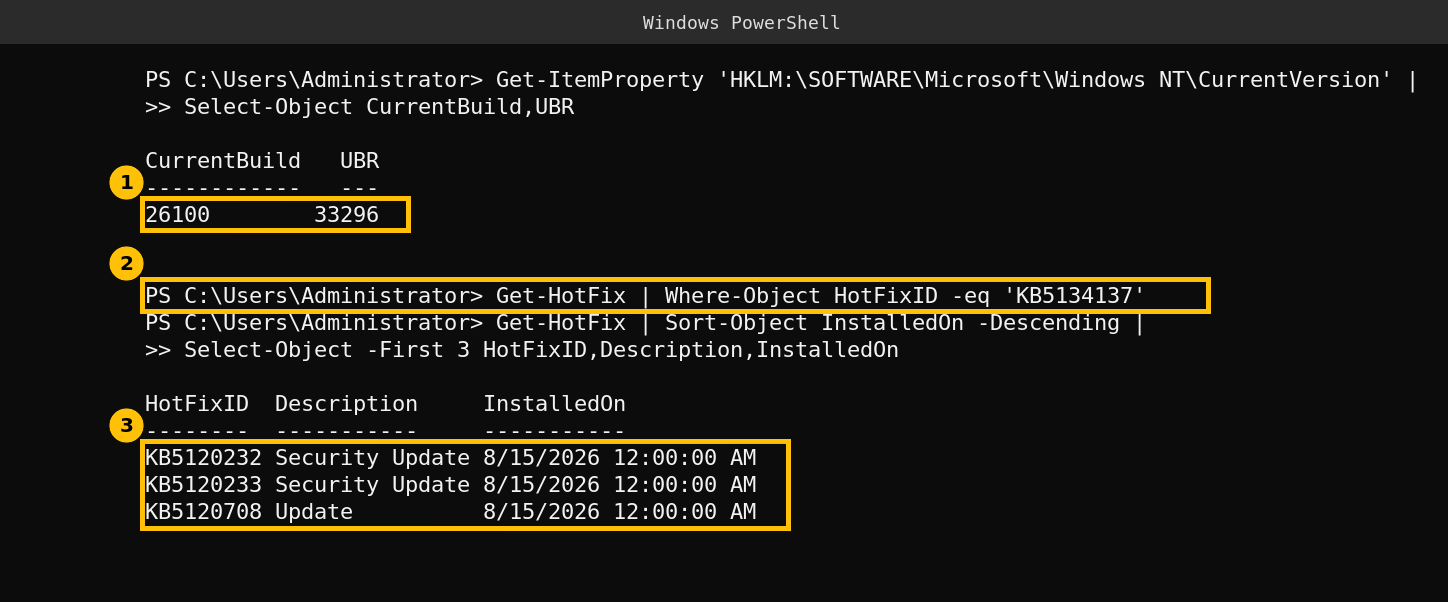
My lab domain controller is on build 26100.33296. The KB check prints nothing, which is how Get-HotFix answers when the update is not installed. Its newest updates date from August 15, 2026, so it is also missing the October 13 updates, and that is simply how this lab server is. It shows what a server that is behind looks like. I did not install the out-of-band package on it, so I have no after output to show.
If your build number is lower than the one on the KB page, you do not have that cumulative update. A higher number means a later update already includes it, since these packages are cumulative.
The Exchange known issue is now official
Both pages also carry a known issue for on premises Exchange. Microsoft says users might be unable to sign in to Outlook on the web or send mail, with some servers logging MapiExceptionMdbOffline as Event ID 1006 and mail queues growing. The cause given is that the October 2026 update introduced a default limit on the memory Endpoint Mapper uses, a default of 512 simultaneous Endpoint Lookup calls, which can be too low under heavy load. Microsoft says installing the October Exchange security updates is not required for the problem to happen, lists a registry change as a temporary mitigation and says it is investigating.
I covered the community analysis of this in my post on Exchange breaking about 22 hours after a restart. The new part is that Microsoft now states the 512 limit itself. I did not run Exchange for this post, so I did not test the registry change.
Caveats
- I did not install any of the three updates, so I cannot show what changes on a server after it is applied.
- The pages do not say which certificates the payload removes. The eMudhra link is Microsoft’s own, but I have not seen a Microsoft list of which Server certificates change.
- The Server 2016 details come from a search listing only.
FAQ
Which Windows Server updates were released on October 26, 2026?
KB5134137 for Windows Server 2025, KB5134140 for Windows Server 2022 and KB5134123 for Windows Server 2016, as listed on Microsoft’s support pages. They are non-security, out-of-band cumulative updates.
Why would I not see them in Windows Update or WSUS?
The pages say the Microsoft Update Catalog is the available channel and show the other channels as not available.
Do I need it if my server can reach Microsoft’s certificate update service?
The pages target servers that cannot reach it or have automatic trust list updates off. A server that updates its trust list normally gets the changes that way, but check yours as shown in my earlier Windows trust list post.
What is the 512 limit in the Exchange known issue?
Microsoft says the October 2026 update added a default limit of 512 simultaneous Endpoint Lookup calls to Endpoint Mapper. Under heavy load that can be too low and Exchange stops connecting to its databases.