October 2026 Exchange Server Security Updates (KB5128895): The Last Ones for Exchange 2016 and 2019, and Two Flaws Rated More Likely to Be Exploited

Microsoft released the October 2026 Exchange Server security updates on October 13. They fix six vulnerabilities, including CVE-2026-70571, a remote code execution flaw, and CVE-2026-70279, a spoofing flaw with a CVSS score of 9.3. And for Exchange 2016 and 2019 this is the end of the line. Franky’s Web quotes Microsoft: “October 2026 will be the last month in which new updates are released for these two versions.”
This post gives you the build and KB for each Exchange version, the six CVEs as Microsoft lists them, a short way to read your own build, and the things that make this month different from the September update. I also ran the two version commands on two Exchange servers I keep for testing, which are still on the build before this update. The output is below, with the server names changed.
Quick guide
- Read your build with
Get-ExchangeServerandExsetup.exein the Exchange Management Shell. - Match it to the table below to find the October 2026 package for your version.
- Install the update and run the Exchange Server Health Checker, as Microsoft’s KB page tells you to.
- If you run Exchange 2016 or 2019, decide now about Subscription Edition, because there will be no more security updates after this one.
Which package for which version
| Exchange version | KB | Build |
|---|---|---|
| Subscription Edition RTM (SU11) | KB5128895 | 15.2.2562.56 |
| 2019 CU15 | KB5128896 | 15.2.1748.55 |
| 2019 CU14 | KB5128897 | 15.2.1544.50 |
| 2016 CU23 | KB5128898 | 15.1.2507.77 |
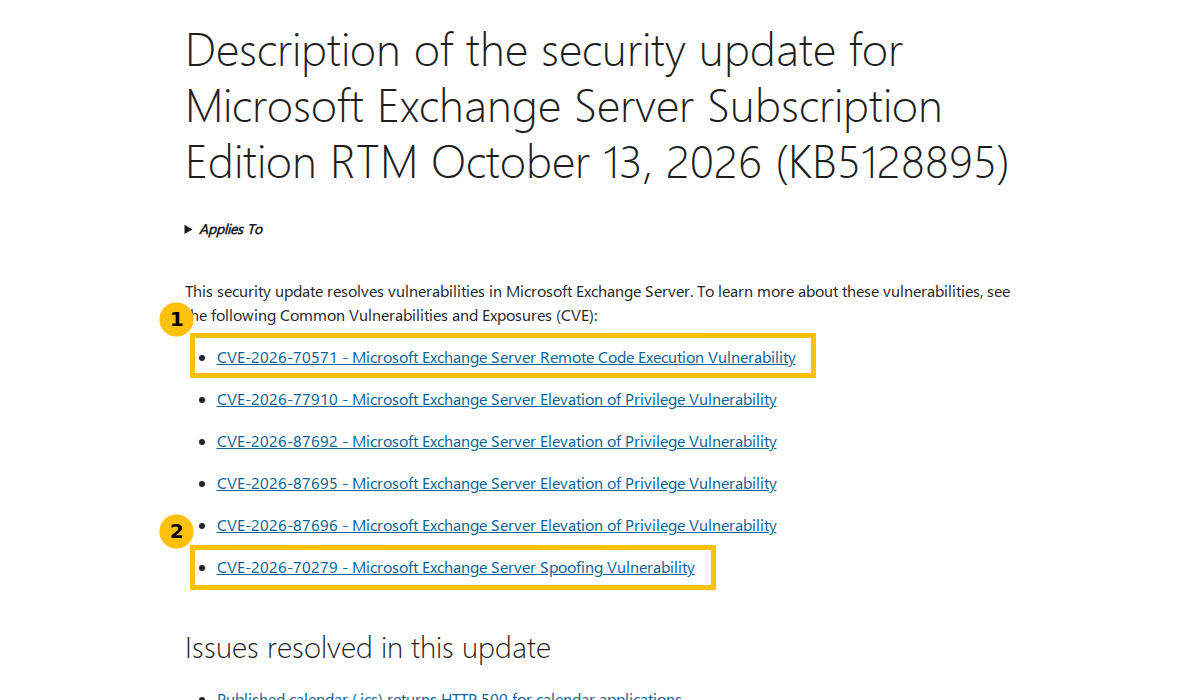
Only the Subscription Edition row is confirmed on a Microsoft page: the KB5128895 article names the update and the six CVEs. It lists no build number. The build numbers and the other three KB numbers come from Franky’s Web, so confirm them against Microsoft’s download page before you rely on them. The 2016 and 2019 updates are available only to customers enrolled in the extended security update program.
The six vulnerabilities
| CVE | Type | CVSS | Notes |
|---|---|---|---|
| CVE-2026-70571 | Remote code execution | 8.1 | Stack based buffer overflow from a specially crafted email, no user interaction, but Microsoft calls the attack highly complex. Exploitation More Likely. |
| CVE-2026-70279 | Spoofing | 9.3 | Cross site scripting through a malicious link. If an administrator clicks it, the attacker can act with the administrator’s privileges. Exploitation More Likely. |
| CVE-2026-77910 | Elevation of privilege | 8.8 | A low privilege user can manipulate a shared Exchange Control Panel cache to install a malicious add-in in another user’s mailbox. |
| CVE-2026-87692 | Elevation of privilege | 7.8 | Local escalation to SYSTEM through deserialization of untrusted data. Per MSRC, Exchange 2019 CU15 is not affected. |
| CVE-2026-87695 | Elevation of privilege | 7.8 | Local escalation to SYSTEM. |
| CVE-2026-87696 | Elevation of privilege | 7.5 | Same Control Panel cache attack path as CVE-2026-77910, through faulty signature verification. |
The titles and CVE numbers are from Microsoft’s KB page. The scores and descriptions are from Franky’s Web, and Tenable confirms 8.1 and 9.3 for the first two. The Franky’s Web summary says none of these is known to be exploited and none was public beforehand. The update also includes the fix from the September update version 2.
Step 1: read your own build
In the Exchange Management Shell on each server, these two commands show the product build. Franky’s Web recommends the second for the full number:
Get-ExchangeServer | Format-List Name, Edition, AdminDisplayVersionGet-Command Exsetup.exe | ForEach-Object { $_.FileVersionInfo } | Select-Object ProductVersion, FileVersionThis is what I got on my two test servers, one organization, copied from the Exchange Management Shell. Server names are changed to EXCH01 and EXCH02 and nothing else is edited:
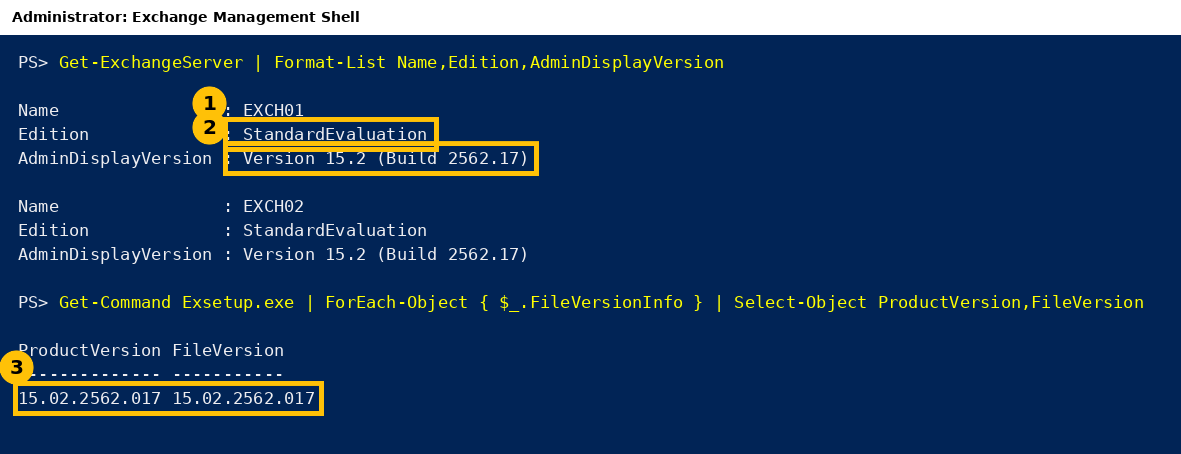
Both servers report build 15.2.2562.17, and the Exsetup file version 15.02.2562.017 says the same. Compared with the Subscription Edition build 15.2.2562.56 in the table above, they are on an earlier build, so they do not have this update yet. The StandardEvaluation edition means these are on an evaluation licence, so treat the 2562.56 number as Franky’s Web reports it. I did not install the update on them.
Compare your own output with the build column above. For many servers, Microsoft points to the Exchange Server Health Checker, which also reports whether an update is missing.
What is different this month
- It is the last one for 2016 and 2019. From November, updates are released only for Subscription Edition. Franky’s Web adds that Microsoft will stop mentioning 2016 and 2019 in its security announcements, so a CVE that lists only Subscription Edition does not mean the older versions are safe. I covered the extended security update rules in Exchange 2016 and 2019 Security Updates End With ESU in October 2026.
- The Windows October update has an Exchange problem. Microsoft lists it as mitigated on October 16: users might be unable to sign in to Outlook on the web or send mail. Microsoft says installing the Exchange security update is not required for the issue to occur. Details and the workaround are in October 2026 Windows Update Breaks Exchange About 22 Hours After Every Restart.
- One forum report in the Franky’s Web comments describes a mailbox access failure after installing KB5128895. It is anecdotal and I could not confirm it.
Caveats
I ran only the two read-only version commands on my test Exchange servers and installed nothing. The KB and CVE list is from Microsoft’s page, which I loaded. Build numbers, scores, the quote about the end of updates and the extended security update details come from Franky’s Web and Tenable. Check them against Microsoft’s Security Update Guide and download pages.
FAQ
Is October 2026 really the last security update for Exchange 2016 and 2019?
Franky’s Web quotes Microsoft as saying October 2026 is the last month in which new updates are released for these versions. They have been out of support since October 14, 2025.
Which update do I install on Subscription Edition?
KB5128895, the October 13, 2026 security update, called SU11. It replaces the September 8, 2026 update KB5121608.
Which CVEs are most urgent?
Microsoft rates CVE-2026-70571 (remote code execution) and CVE-2026-70279 (spoofing, CVSS 9.3) as Exploitation More Likely. Franky’s Web says none of the six is known to be exploited.
How do I check my Exchange build?
Run Get-ExchangeServer | Format-List Name, Edition, AdminDisplayVersion in the Exchange Management Shell, and compare it with the build table.
Does the Windows October update affect Exchange?
Yes. Microsoft lists an issue after KB5126646 and KB5126655 where OWA sign-in or mail delivery can fail, with a registry workaround, marked mitigated on October 16.
Sources
- Description of the security update for Microsoft Exchange Server Subscription Edition RTM October 13, 2026 (KB5128895), Microsoft Support
- New security updates for Exchange Server (October 2026), Franky’s Web
- Microsoft’s October 2026 Patch Tuesday, Tenable
- Windows Server 2025 known issues and notifications, Microsoft Learn