DAG Replication Breaks Silently: A Real Firewall Rule, Real RPC Ports, Real Fix

This is a real, deliberately reproduced failure, a firewall rule allowing traffic between DAG members gets removed, and the resulting symptom is genuinely confusing: the DAG’s own listener port is fine, replication health checks mostly pass, but one specific check fails and a database copy sits in ServiceDown. The actual cause lives one layer deeper, in Exchange’s use of dynamic RPC ports that a narrow, well-intentioned firewall rule simply didn’t account for. Names, domain, and IPs are redacted and replaced with neutral placeholders, the ports, rule logic, and command output are real.
Step 1: the symptom, and why it’s genuinely confusing
Get-MailboxDatabaseCopyStatus * | ft Name,Status -a
Test-ReplicationHealth | ft Check,Result -a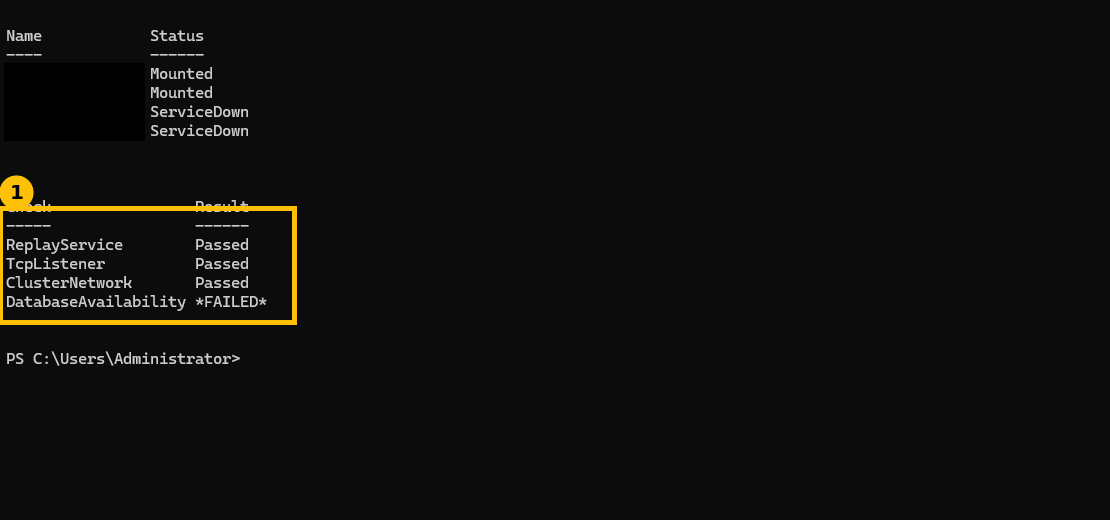
Here’s the part that makes this a genuinely tricky one to diagnose: TcpListener passes. The DAG’s cluster networking and its main listener are fine. If your instinct is “the DAG port must be blocked,” that instinct is wrong here, and chasing it wastes time. DatabaseAvailability specifically fails, which points at something happening during an actual data operation between the two servers, not at the DAG’s basic cluster connectivity.
The full error text behind this (too long to fit cleanly in a terminal screenshot, quoted here instead): "The RPC to retrieve the status of database copy ... failed ... Error 0x71a (The remote procedure call was cancelled) from RpccGetCopyStatusEx4". An RPC call being cancelled, not refused outright, not timing out cleanly, is itself a hint that something in the middle is actively tearing the connection down rather than the destination simply being unreachable.
Step 2: the real evidence, in the firewall log, not on the Exchange servers
At this point the DAG members themselves have told their whole story, the next layer of evidence is on the firewall, an OPNsense instance between the two servers. Firewall > Log Files > Live View, filtered to the traffic between the two DAG members:
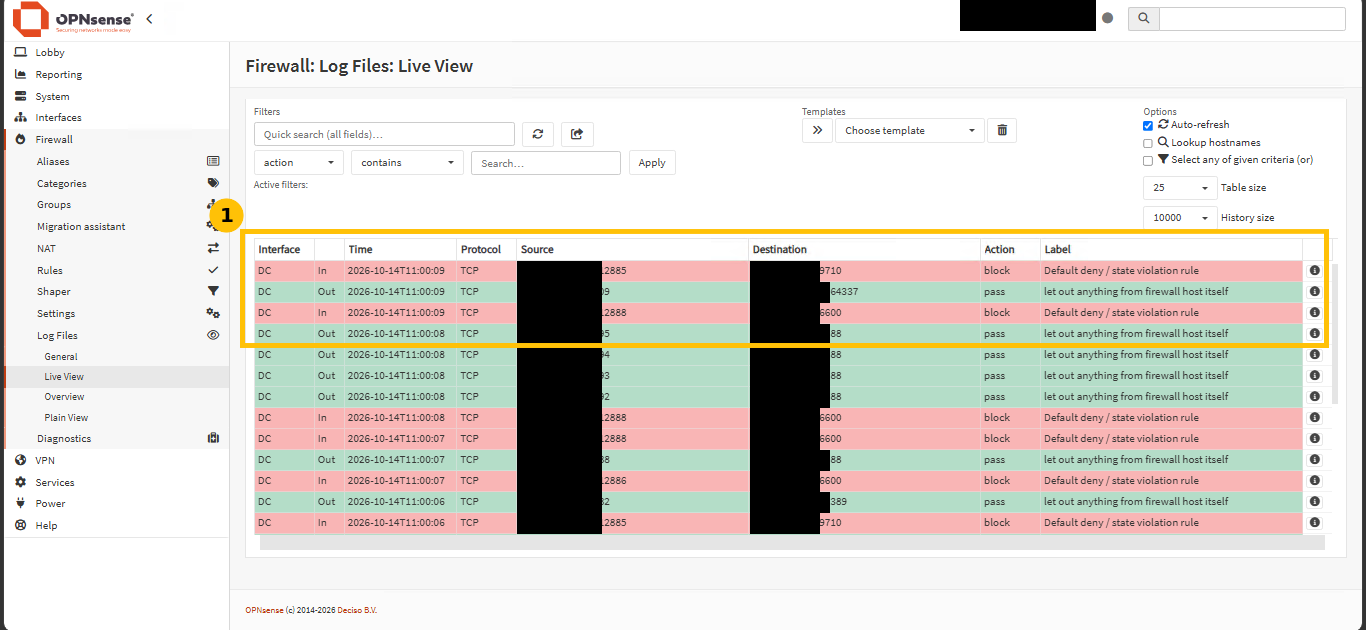
Repeated block entries, “Default deny / state violation rule,” between the two DAG members, on ports 9710 and 6600. Those aren’t well-known Exchange ports, they’re dynamic RPC ports Exchange negotiates at runtime for specific operations, including exactly the kind of database copy status call that was failing. The DAG’s main listener port was never the problem, these dynamic ports were.
The honest root cause: an incomplete allow-list, not a missing rule
Worth being specific about what actually went wrong here, because it’s a genuinely common mistake. The original firewall rule allowing DAG traffic was not simply missing, it existed, but it only covered the well-known ports: 389 (LDAP), 445 (SMB), 135 (RPC endpoint mapper), the standard high dynamic port range 49152-65535, and the DAG’s own listener port. Exchange, in practice, also uses RPC ports below 49152 for some operations, this specific failure landed on ports 9710 and 6600, both below that range and outside the original rule entirely.
The first symptom of that incomplete rule, before this clean reproduction, wasn’t even a clear error. It was just slow or hanging admin commands against the DAG, the kind of vague performance complaint that’s genuinely hard to connect to a firewall rule without actually going and looking at the firewall’s own logs.
Step 3: the fix, allow all traffic between DAG members
Rather than trying to enumerate every specific dynamic RPC port Exchange might use (a moving target, and a losing game to chase port by port), the standard, Microsoft-recommended approach for DAG members is simpler: allow all traffic between the DAG member IPs directly, in both directions, and let normal network segmentation handle everything else:
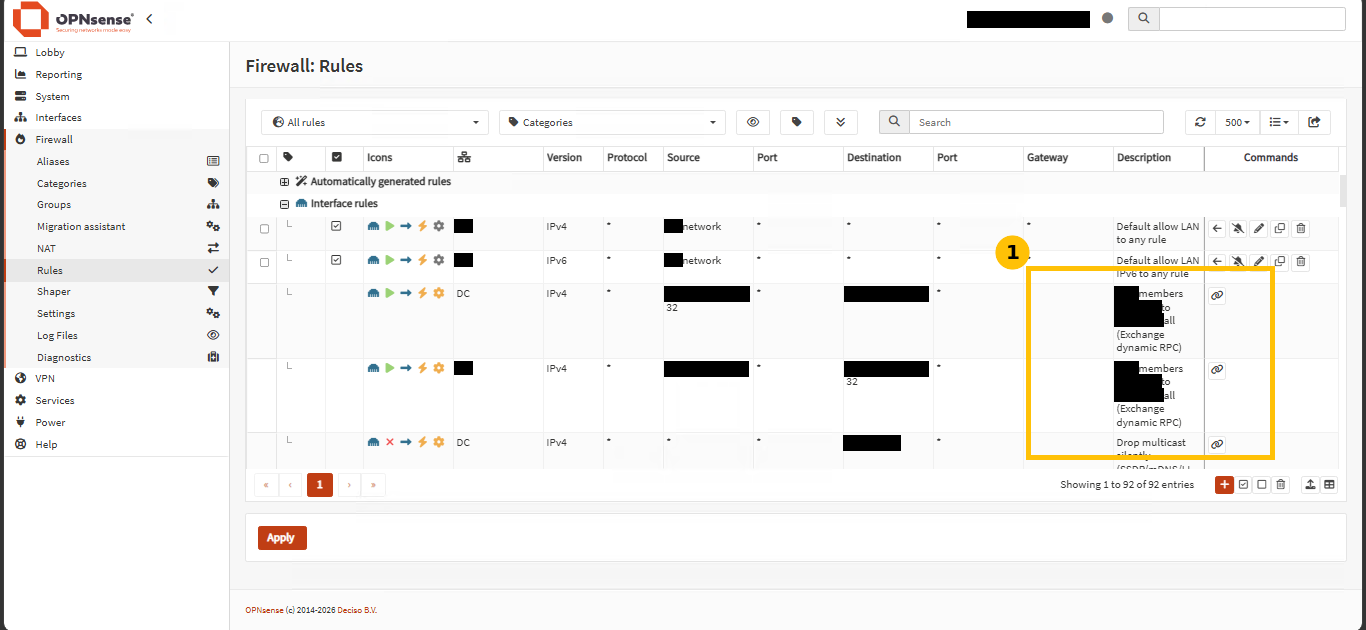
Two rules, one for each direction, allowing all traffic specifically between the two DAG member addresses, not a blanket rule for the whole network. There’s also a separate rule visible here silently dropping multicast traffic (SSDP/mDNS), unrelated to the DAG issue itself but genuinely useful, it removes a steady stream of log noise that would otherwise make the real block events harder to spot in a busy live log.
Step 4: confirm it’s actually fixed
Get-MailboxDatabaseCopyStatus * | ft Name,Status,CopyQueueLength,ReplayQueueLength -a
Test-ReplicationHealth | ft Check,Result -a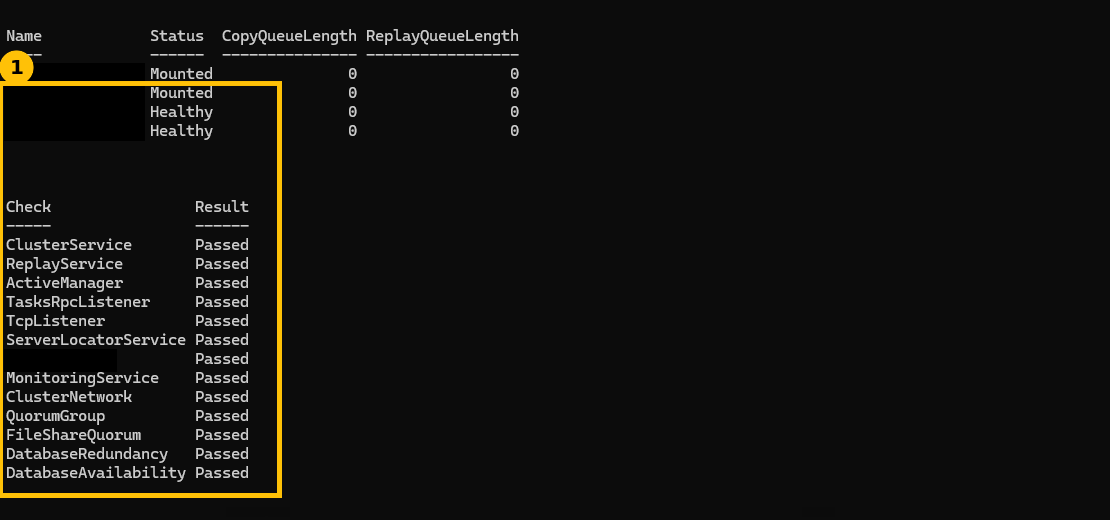
All 12 replication health checks passed, including DatabaseAvailability, the one that was failing. Both copies are Mounted or Healthy with queues at zero. That’s the real, complete confirmation, not just “the error stopped,” every check genuinely passing.
A real detour worth knowing about: the firewall banned its own admin
One honest complication while capturing this: midway through, the firewall’s own intrusion-prevention component (CrowdSec) banned the administrator’s own management workstation as a suspected port scanner, specifically because the repeated blocked connection attempts from the DAG troubleshooting looked, from the firewall’s perspective, like a scanning pattern. That ban locked the admin out of the firewall’s own web interface. The fix was removing that specific ban and adding the internal management network ranges to a CrowdSec allow-list so legitimate internal troubleshooting traffic doesn’t trip the same automated defense again. Worth knowing before you hit it cold: an intrusion-prevention system watching the same firewall you’re troubleshooting can, in a real environment, end up blocking you too.
Quick guide
- If
TcpListenerpasses butDatabaseAvailabilityfails inTest-ReplicationHealth, don’t assume the DAG’s main port is the problem, it isn’t. - Check the firewall’s own live log for block events between the DAG members specifically, not just a generic connectivity test.
- If you find blocks on ports outside your expected range, your rule is almost certainly scoped too narrowly to specific well-known ports.
- Fix it by allowing all traffic directly between the DAG member addresses, not by chasing individual dynamic ports.
- Verify with a full
Test-ReplicationHealthpass, not just that the original symptom disappeared.
FAQ
Why does Exchange use ports outside the normal 49152-65535 dynamic range?
Exchange’s RPC-based operations can use endpoint ports assigned by the RPC endpoint mapper that don’t always fall strictly within the OS default dynamic port range, especially depending on what other services and port reservations exist on the server. This is exactly why Microsoft’s own guidance for DAG members is to allow all traffic between them rather than enumerate specific ports, trying to track the exact set reliably is genuinely impractical.
Is “allow all traffic between DAG members” a real security risk?
It’s a deliberately scoped exception, specifically between the known DAG member addresses, not a general network opening. Treat it the same way you’d treat any trusted cluster-internal communication path, segmented from the rest of the network by the surrounding firewall rules, with the open traffic limited strictly to the hosts that are actually DAG members.
Why did the problem first show up as “slow commands” instead of a clear error?
Some RPC operations retry or fail over to alternate paths before giving up entirely, which can manifest as delay rather than an immediate, obvious failure. The clean, clear error shown in this post came from a deliberate, controlled reproduction, a real-world first occurrence is often messier and less immediately diagnosable, which is exactly why checking firewall logs directly, rather than guessing from symptoms alone, matters.
What’s the multicast drop rule for, is it related to this fix?
No, it’s unrelated to the DAG issue itself, it silently drops SSDP/mDNS multicast traffic that would otherwise generate constant log entries and make genuine, relevant block events harder to spot while reviewing the live log. A reasonable, practical addition while already working in the firewall, not part of the actual fix.