Azure CLI and PowerShell for Daily Admin: Sign In With a Service Principal, Manage Resource Groups

Signing into Azure interactively every time you need to check a resource or run a script doesn’t scale, and it’s not what any real automation should be doing anyway. A service principal (an app-only identity, authenticated with a client secret or certificate instead of a username and password) is how scripts, scheduled jobs, and CI/CD pipelines are actually meant to talk to Azure. This is a real walkthrough, signed in as a real service principal against a real Azure subscription, including what happens when that service principal tries to do something it isn’t allowed to do.
Why a service principal instead of your own login
- No MFA prompt blocking an unattended script or scheduled task.
- Scoped permissions that are explicit and auditable, a service principal has exactly the roles you assigned it, not whatever access your personal admin account happens to carry.
- A credential you can rotate or revoke independently of your own account, without affecting your ability to sign in anywhere else.
Step 1: create the app registration and a client secret
In the Entra admin center, under App registrations, create a new registration (this becomes both your Entra app object and the service principal’s identity), then under Certificates & secrets, add a client secret. Microsoft only ever shows you a new secret’s value once, at creation, copy it immediately, there is no way to retrieve it again afterward, only to create a new one if you lose it.
Step 2: assign it a role, scoped as narrowly as you actually need
In the Azure portal, go to the resource group (or subscription, if it genuinely needs that breadth) you want the service principal to manage, open Access control (IAM), and add a role assignment. Resist the urge to grant Owner or Contributor at the subscription level by default, scope it to exactly the resource group the automation needs. The service principal used for this post has Contributor on a single resource group and Reader on the subscription, nothing broader, and that boundary shows up directly in the real output below.
Step 3: sign in from PowerShell with no interactive prompt
$appId = "<your app (client) ID>"
$tenantId = "<your tenant ID>"
$secpw = ConvertTo-SecureString "<your client secret>" -AsPlainText -Force
$cred = New-Object System.Management.Automation.PSCredential($appId, $secpw)
Connect-AzAccount -ServicePrincipal -Credential $cred -Tenant $tenantId
Real result, no MFA prompt, no browser popup, nothing to approve on a phone, just a token issued directly:
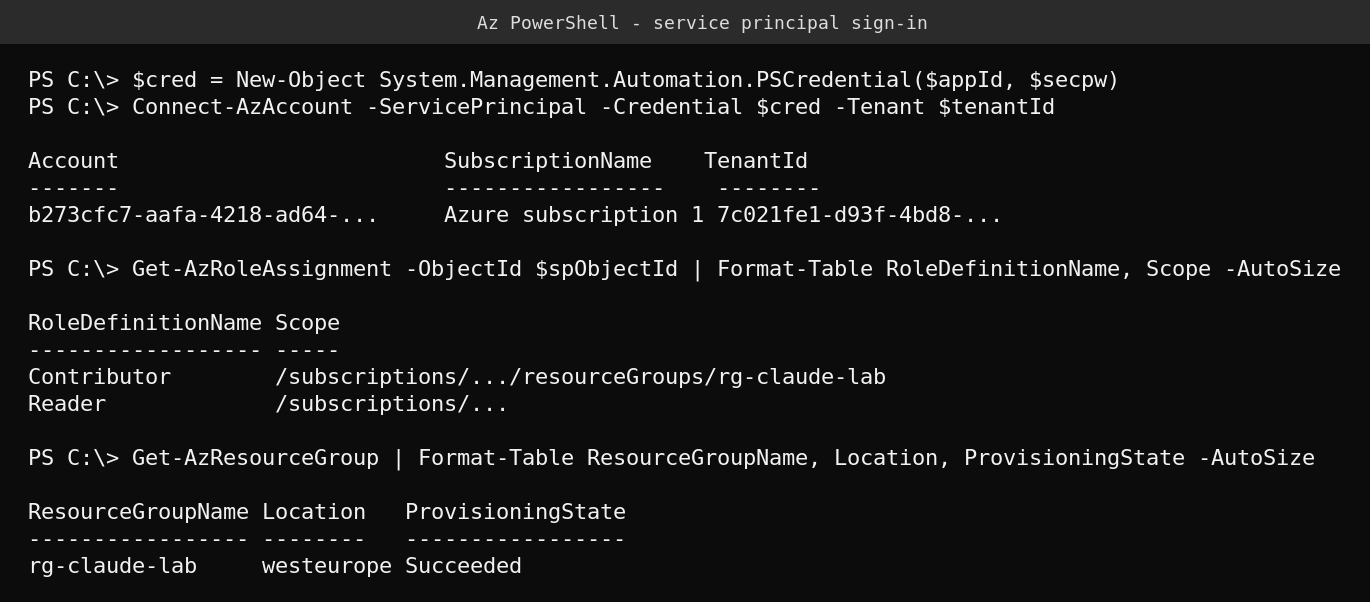
Get-AzRoleAssignment confirms exactly what was granted in Step 2, Contributor scoped to the one resource group, Reader at the subscription. That’s worth checking right after setup, not assuming, since it’s the actual enforced boundary, not just what you intended to configure.
Step 4: daily admin commands for resource groups
# List every resource group this identity can see
Get-AzResourceGroup | Format-Table ResourceGroupName, Location, ProvisioningState -AutoSize

# List every resource inside a specific group
Get-AzResource -ResourceGroupName rg-claude-lab | Format-Table Name, ResourceType, Location -AutoSize

# Tag a resource group (useful for cost tracking and ownership)
$rgId = "/subscriptions/$subId/resourceGroups/rg-claude-lab"
Update-AzTag -ResourceId $rgId -Tag @{"owner"="platform-team"} -Operation Merge

# Delete every resource inside a group without deleting the group itself (use carefully)
Get-AzResource -ResourceGroupName rg-claude-lab | Remove-AzResource -Force
Step 5: what happens when the scope isn’t broad enough
This is the part most cheat sheets skip, what a least-privilege service principal actually looks like when it hits a wall. Trying to create a brand-new resource group requires write access at the subscription level, which this identity deliberately doesn’t have (only Reader there). Real attempt, real denial:
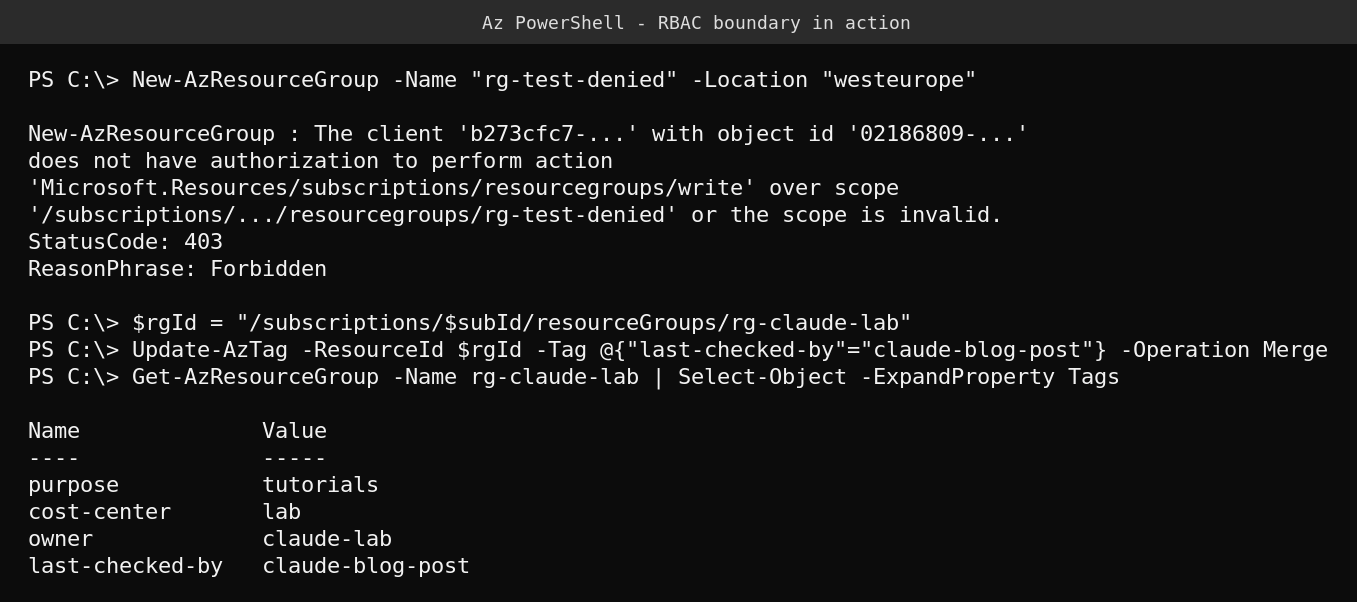
The error is specific and genuinely useful for troubleshooting: it names the exact action denied (Microsoft.Resources/subscriptions/resourcegroups/write) and the exact scope it was attempted against. That’s the real shape of an Azure RBAC authorization error, learn to read it rather than just treating “it failed” as a dead end. Immediately below it, the tag update against the resource group the identity does have Contributor on succeeds cleanly, same identity, different scope, different result.
If you need broader access for a specific task
Don’t widen the service principal’s standing permissions to solve a one-off need. Either grant a time-boxed elevated role for the specific task and remove it afterward, or have someone with the right access perform that one step manually (creating a new resource group, registering a new resource provider) and hand the result back to the automation. A service principal that can do everything your personal account can do has quietly erased the entire point of using one.
Quick guide
- Create an app registration and a client secret in the Entra admin center, copy the secret immediately.
- Assign it a role scoped to the narrowest resource group or subscription it genuinely needs, not broader.
- Sign in with
Connect-AzAccount -ServicePrincipal, no interactive prompt, no MFA. - Verify the actual enforced permissions with
Get-AzRoleAssignment, don’t assume the portal configuration matches what you intended. - When a command fails with a 403, read the specific action and scope in the error, it tells you exactly what role is missing and where.
FAQ
Is a client secret safe to use for automation?
It’s the standard approach, but it’s a shared secret, treat it like a password: store it in a secrets manager or a protected file, never commit it to source control, rotate it periodically, and set an expiration rather than “never expires.” For higher-assurance scenarios, a certificate credential or a managed identity (where available, for Azure-hosted automation) avoids a long-lived shared secret entirely.
What’s the difference between the app registration and the service principal?
The app registration is the global definition of the application in Entra ID. The service principal is the local identity object in your specific tenant that actually gets granted roles and performs actions. For a single-tenant app like this, creating the app registration automatically creates its service principal, but they’re conceptually distinct, and role assignments and permission checks reference the service principal’s object ID, not the application ID.
Why Reader at the subscription level instead of nothing at all?
Reader at the subscription lets the identity enumerate what resource groups exist (useful for scripts that need to discover or validate targets) without granting any ability to change anything outside its Contributor scope. It’s a reasonable middle ground between “can see nothing beyond its own resource group” and “can modify the whole subscription.”
Should I use the Az PowerShell module or the az CLI?
Both authenticate the same way and can do the same things, pick whichever fits your existing scripting environment. PowerShell’s Az module integrates naturally if you’re already scripting in PowerShell (as in this post, running directly on a Windows Server management box). The az CLI is often a lighter, faster install on Linux/macOS or in a container-based CI pipeline.