Auditing SSH Brute-Force Attempts on Linux: journalctl, lastb, and auth.log

If your Linux server has SSH reachable from the internet, something is probing it. Figuring out how often, from where, and whether any attempt actually got close to succeeding is a basic health check every admin should be able to run in under a minute. Below is the full methodology, run against a real internet-facing box rather than a staged example, with the real result.
Three places to look, and why they disagree
journalctl, /var/log/auth.log, and lastb all record login activity, but from different angles, and a thorough audit checks more than one because each catches something the others miss.
- journalctl -u ssh (or
sshdon some distros) reads straight from systemd’s journal, including the sshd service’s own messages like rejected connections and protocol-level failures. - /var/log/auth.log (Debian/Ubuntu) or /var/log/secure (RHEL/CentOS/Fedora) is the traditional syslog-based authentication log, and it’s what most log aggregation and SIEM tooling expects to ingest.
- lastb reads the binary
btmpfile, which specifically records failed login attempts that got as far as presenting a login prompt, useful for spotting password-guessing against accounts that do accept password auth.
Step 1: confirm what authentication methods are actually allowed
Before reading logs, check your own sshd configuration. This single setting determines what kind of failed-attempt evidence you should even expect to find:
grep -riE "PasswordAuthentication|PermitRootLogin" /etc/ssh/sshd_config /etc/ssh/sshd_config.d/*.confStep 2: run the actual audit
This is real output from a genuinely internet-facing production box, a 1GB Oracle Cloud Always-Free instance with SSH port 22 open to the entire internet:
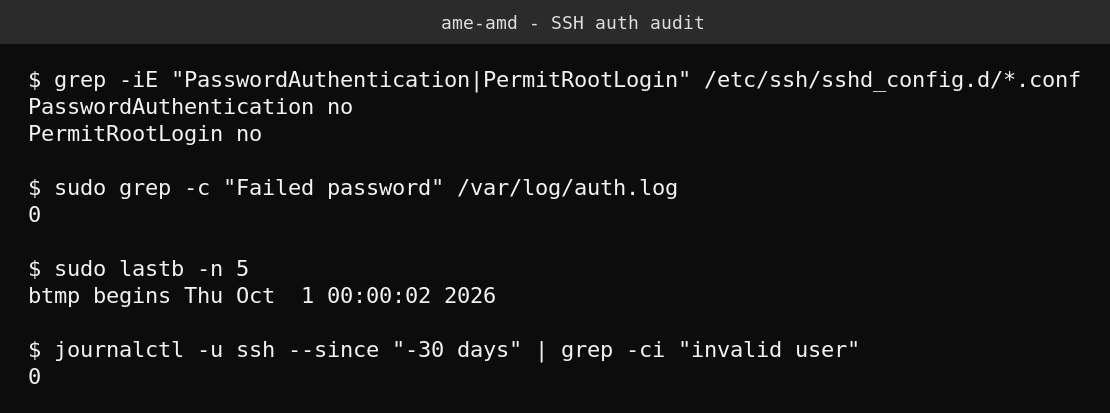
Zero across the board is the real result, and it’s worth explaining why rather than just taking it at face value. This box has PasswordAuthentication no set, meaning SSH never even offers a password prompt to a connecting client. Automated brute-force bots that try password guessing get rejected at the protocol negotiation stage, before anything resembling a “failed login” is ever logged. A box with password auth enabled would show a very different picture here, typically dozens to hundreds of failed attempts per day from scanning bots, even with no actual breach.
That distinction matters because a clean lastb/auth.log result does not by itself mean “nobody is scanning this server.” It means “nobody has gotten far enough to generate a failed-password log entry,” which on a key-only box is expected and is itself evidence the configuration is doing its job.
Step 3: if you do see failed attempts, pull the detail
On a box that does allow password authentication, or where lastb/auth.log shows real entries, these pull the specifics worth reviewing, source IP, username tried, and timing:
# Who's trying to log in as what, and from where
grep "Failed password" /var/log/auth.log | awk '{print $(NF-3), $(NF-5)}' | sort | uniq -c | sort -rn

# Same thing from journalctl if auth.log has already rotated out
journalctl -u ssh --since "-7 days" | grep "Failed password"

# Count of attempts per source IP
grep "Failed password" /var/log/auth.log | grep -oE "from [0-9.]+" | sort | uniq -c | sort -rn | head -20
A handful of attempts spread across many different source IPs trying common usernames like root, admin, or test is routine internet background noise. A large number of attempts from a single IP, or attempts specifically targeting a real username that exists on your system, is worth a closer look and possibly a firewall block.
Quick guide
- Check whether
PasswordAuthenticationis enabled, it changes what “normal” looks like in your logs. - Run
lastb -n 20for a fast look at failed login attempts. - Grep
auth.log(orjournalctl -u ssh) for “Failed password” and “Invalid user” entries. - Aggregate by source IP to spot anything concentrated rather than scattered background noise.
- If you allow password auth at all and see real abuse, switch to key-only auth, it’s the single biggest reduction in this attack surface.
FAQ
Why does my log show nothing even though port 22 is open to the internet?
If PasswordAuthentication is set to no, bots attempting password guesses get rejected before a failed-login event is logged. This is expected and is a sign the configuration is working, not a sign nothing is happening at the network level.
What’s the difference between auth.log and the btmp file lastb reads?
auth.log is a text-based syslog stream covering all PAM-related authentication events on the system, not just SSH. btmp is a dedicated binary log specifically for failed login attempts, read through lastb, and persists independently of syslog rotation settings.
Should I install fail2ban even with key-only auth?
It adds limited value when password auth is already disabled, since there’s little for it to rate-limit, but it’s still useful for noisy logs and for environments where password auth might be temporarily re-enabled for a specific task. If you do allow password auth at all, fail2ban or an equivalent is worth running.
Is logging zero failed attempts a guarantee the box hasn’t been compromised some other way?
No. This audit specifically covers SSH authentication attempts. A compromise through a web application, an exposed service, or a stolen SSH key wouldn’t necessarily show up here at all, so treat this as one layer of a broader security review, not the whole picture.