Exchange 2016 and 2019 Security Updates End With ESU in October 2026: What to Check This Month

If you still run Exchange Server 2016 or 2019 on premises, Microsoft’s own September 2026 update notes contain a date you need on your calendar. Security updates for these versions are only available to customers enrolled in the Period 2 Extended Security Update program, and that program runs until the end of October 2026. This article explains what that means and what to do in the weeks that remain.
Quick guide
- On each Exchange server open Exchange Management Shell and run
Get-ExchangeServer | Format-List Name,Edition,AdminDisplayVersion. This tells you exactly which version and build you run. - Decide if you are enrolled in the Period 2 ESU. Check with whoever manages your Microsoft licensing. If you did not buy it, you are not receiving the updates released since May 2026.
- If you are enrolled, install the September 2026 security update for your version and read the known issue below.
- If you are not enrolled, start your move to Exchange Server Subscription Edition (SE) now and treat the servers as unpatched until then.
- Reduce exposure while you wait. Do not publish Exchange to the internet more than needed, and keep it behind a reverse proxy or your existing edge protections.
- Write down a migration date and owner. The end of October date is close.
What Microsoft’s update notes actually say
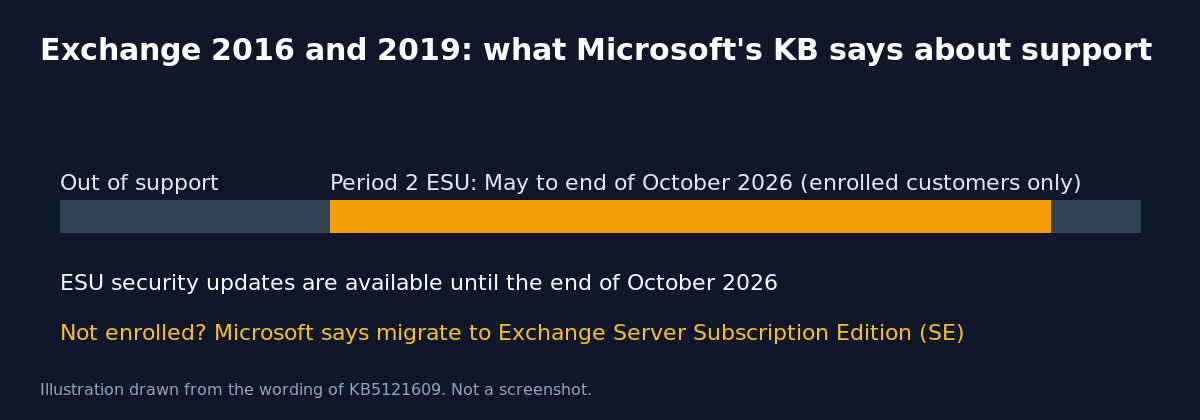
The support article for the Exchange Server 2019 CU15 security update dated September 8, 2026 (KB5121609) says that Exchange Server 2016 and 2019 have reached end of support. It states that organizations enrolled in the Period 2 Extended Security Update program are eligible to receive released security updates until the end of October 2026. It also says that to keep receiving the latest security updates, organizations that are not enrolled should migrate to Exchange Server Subscription Edition. Enrolled customers who need help getting the updates are pointed to a Microsoft mailbox named in the article.
The same KB lists eight CVEs fixed by the update: CVE-2026-55007, CVE-2026-69355, CVE-2026-69356, CVE-2026-69361, CVE-2026-69375, CVE-2026-69378, CVE-2026-69382 and CVE-2026-69641. The Subscription Edition update for the same month is a separate KB, and this site already covers it in another article.
Known issue and one fix in KB5121609
- Known issue: published calendar (.ics) links return HTTP 500 for calendar applications. If you publish calendars to external subscribers, test this after patching and watch for complaints.
- Issue resolved: wrapper messages appearing in shared mailboxes in hybrid environments after the June 2026 security update.
After installing any Exchange update, Microsoft recommends running the Exchange Server Health Checker to verify that the installation is successful and to see whether extra actions are needed.
What actually goes wrong at the deadline
Nothing stops working on the first of November. Mail keeps flowing. The problem is that any new Exchange vulnerability found afterwards will not get a fix for 2016 or 2019 through the normal channel, while attackers keep targeting on premises Exchange because it is exposed and valuable. The two realistic risks are an unpatched server that ends up exploited, and a rushed migration done in a panic weeks later.
Choosing a path
- Upgrade to Exchange SE: the direct answer from Microsoft for customers who want to keep an on premises server. Check Microsoft’s current documentation for the supported upgrade path from your exact build, since requirements depend on the version and cumulative update you run.
- Move mailboxes to Exchange Online: removes the patching burden entirely. Hybrid setups need a supported Exchange server for management, so plan that too.
- Buy time with ESU: only useful if you can still enroll and only until the end of October.
FAQ
Are Exchange 2016 and 2019 still supported?
Microsoft’s own KB says they have reached end of support. Only customers enrolled in the Period 2 ESU program receive security updates until the end of October 2026.
Can I extend the deadline?
Microsoft’s KB names the end of October 2026 for the Period 2 program and does not describe a later one. Confirm with your Microsoft representative before relying on any other date.
Is the .ics issue serious?
It affects published calendar links used by external calendar applications. It is a known issue for this update, so test before rolling it out widely.
Sources
Microsoft Support, “Description of the security update for Microsoft Exchange Server 2019 CU15: September 8, 2026 (KB5121609)”.