

Microsoft Publisher Access Ends October 1, 2026: Convert Your Files This Week

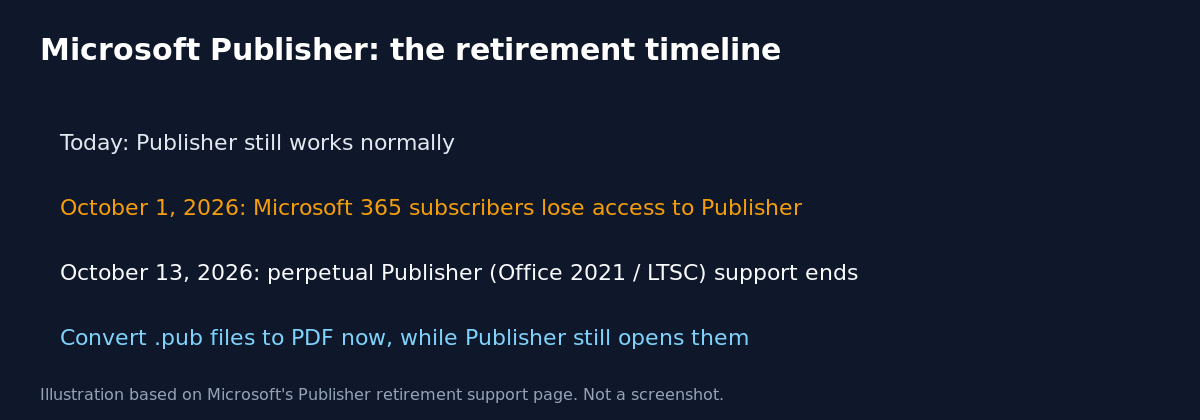
Microsoft Publisher is retiring on a real, near deadline. Support’s own page for this change says Microsoft 365 subscribers will not be able to access Publisher after October 1, 2026, and support for the perpetual version ends October 13, 2026 alongside Office 2021 and Office LTSC 2021. If your organization still has .pub files anywhere, this week is the time to act.
Quick guide
- Search your file shares and OneDrive for the extension
.pubto find out how many Publisher files still exist. - Before October 1, 2026, open each file in Publisher and go to File, Save as, choose PDF as the type, and save.
- For files you still need to edit later, convert the PDF to Word instead (open the PDF in Word, which converts it automatically), or use a third party Publisher converter.
- For many files at once, download Microsoft’s sample PowerShell script from its Publisher retirement support page and run it, for example
Convert-PubFileToPDF.ps1 -Filter "C:\Documents\*.pub" -Recurseagainst a folder. - Publisher must still be installed and licensed on the machine that runs the script, since it drives Publisher in the background to do the export.
- After October 1, 2026, Microsoft 365 subscribers will not be able to open Publisher at all, so any conversion has to happen before that date.
What Microsoft’s support page actually says
Microsoft frames Publisher’s retirement as a consolidation, saying the layout and desktop publishing features are already available in other Microsoft 365 apps such as Word and PowerPoint, plus templates at Microsoft Create. The page gives two separate end dates depending on how Publisher was licensed:
- Microsoft 365 subscription Publisher: access ends October 1, 2026.
- Perpetual Publisher (Office 2021, Office LTSC 2021, Consumer Office 2021): support ends October 13, 2026, the same date those Office versions reach end of support.
Its stated recommendation is blunt: convert your existing files to another format before October 1, 2026, because after that date you will no longer be able to open or edit them in Publisher at all.
Converting files, in order of how much editing you need
Just need to view it later
Convert to PDF. This is the path Microsoft leads with, and it is the fastest, since PDF preserves the original layout exactly.
Need to keep editing text
Convert Publisher to PDF, then open that PDF in Word, which converts it to an editable Word document automatically. Microsoft’s own documentation notes the result is optimized for text editing, so layout heavy files with lots of graphics may look different from the original.
Need the original design fidelity
A third party Publisher to another format converter may preserve layout better than the PDF to Word route, but Microsoft explicitly does not support or vouch for these tools, so treat the output as something to verify, not trust blindly.
Bulk conversion with PowerShell
For more than a handful of files, Microsoft publishes a sample script, Convert-PubFileToPDF.ps1, on the same support page. It requires a working, licensed copy of Publisher installed on the machine that runs it, since the script automates Publisher itself to perform each export. According to Microsoft’s documentation the script keeps going if it hits an error on one file, and reports which files converted successfully and which failed, rather than stopping the whole batch. Typical usage patterns from Microsoft’s own examples:
# Convert one file
.\Convert-PubFileToPDF.ps1 -Filter "C:\Documents\MyFile.pub"

# Convert every .pub file in a folder and its subfolders
.\Convert-PubFileToPDF.ps1 -Filter "C:\Documents\*.pub" -Recurse
Download and read the script before running it against production file shares, and test it against a small folder first.
What actually goes wrong
The realistic failure here is not a technical one. It is a marketing folder, an HR team or a facilities department that has a handful of old newsletters, flyers or forms saved as .pub files and does not know this deadline exists. Nobody notices until someone needs to edit last year’s event flyer in November and Publisher will not even open. A five minute file share search this week avoids a scramble later, and it costs nothing to run before the deadline even if you find zero files.
FAQ
Can I still open old .pub files after October 1, 2026?
Microsoft 365 subscribers will not be able to access Publisher after that date, so plan to convert anything you need before then. The perpetual version keeps working a bit longer, until October 13, 2026.
Is there a Microsoft 365 replacement for Publisher?
Microsoft points to Word and PowerPoint for the layout tasks Publisher was used for, plus a template library at Microsoft Create, rather than naming one direct one to one replacement.
Do I need Publisher installed to run the conversion script?
Yes. Microsoft’s sample script automates a real, licensed copy of Publisher on the machine to perform each conversion, it does not read .pub files independently.
Sources
Microsoft Support, “Microsoft Publisher will no longer be supported after October 2026.”