Entra Connect Sync vs Cloud Sync: Picking a Topology and Authentication Method Before the 2026 Cutover

This is part two of our Microsoft Entra hybrid identity series. Part one covered creating AD users and troubleshooting logon failures. This post covers the single biggest decision you’ll make when connecting an on-premises Active Directory to Microsoft Entra ID: which sync engine, and which authentication method, to use.
Update: our lab domain controller is back online and we were able to pull real screenshots from a live Microsoft Entra admin center, replacing the generated illustrations this post launched with. The tenant shown below genuinely has Entra Connect Sync enabled with Password Hash Sync, and a separate Cloud Sync configuration sitting disabled alongside it, exactly the kind of side-by-side state this post talks you through choosing between.
Entra Connect Sync vs Entra Cloud Sync
Microsoft now ships two different tools to keep on-premises AD objects in sync with Entra ID, and they are not interchangeable for every environment.
- Microsoft Entra Connect Sync: the original, full-featured sync engine. Installed on a Windows Server you manage, supports complex attribute mappings, custom sync rules, and advanced scenarios like certain hybrid-join configurations and pass-through authentication at scale. It also requires ongoing patching of that server and the Connect Sync service itself.
- Microsoft Entra Cloud Sync: Microsoft’s current recommended direction. It uses lightweight provisioning agents instead of a full server install, supports multiple agents out of the box for high availability, and is managed mostly from the Entra admin center rather than a local console. It’s simpler to deploy and maintain, but as of today it doesn’t cover every advanced Connect Sync scenario.
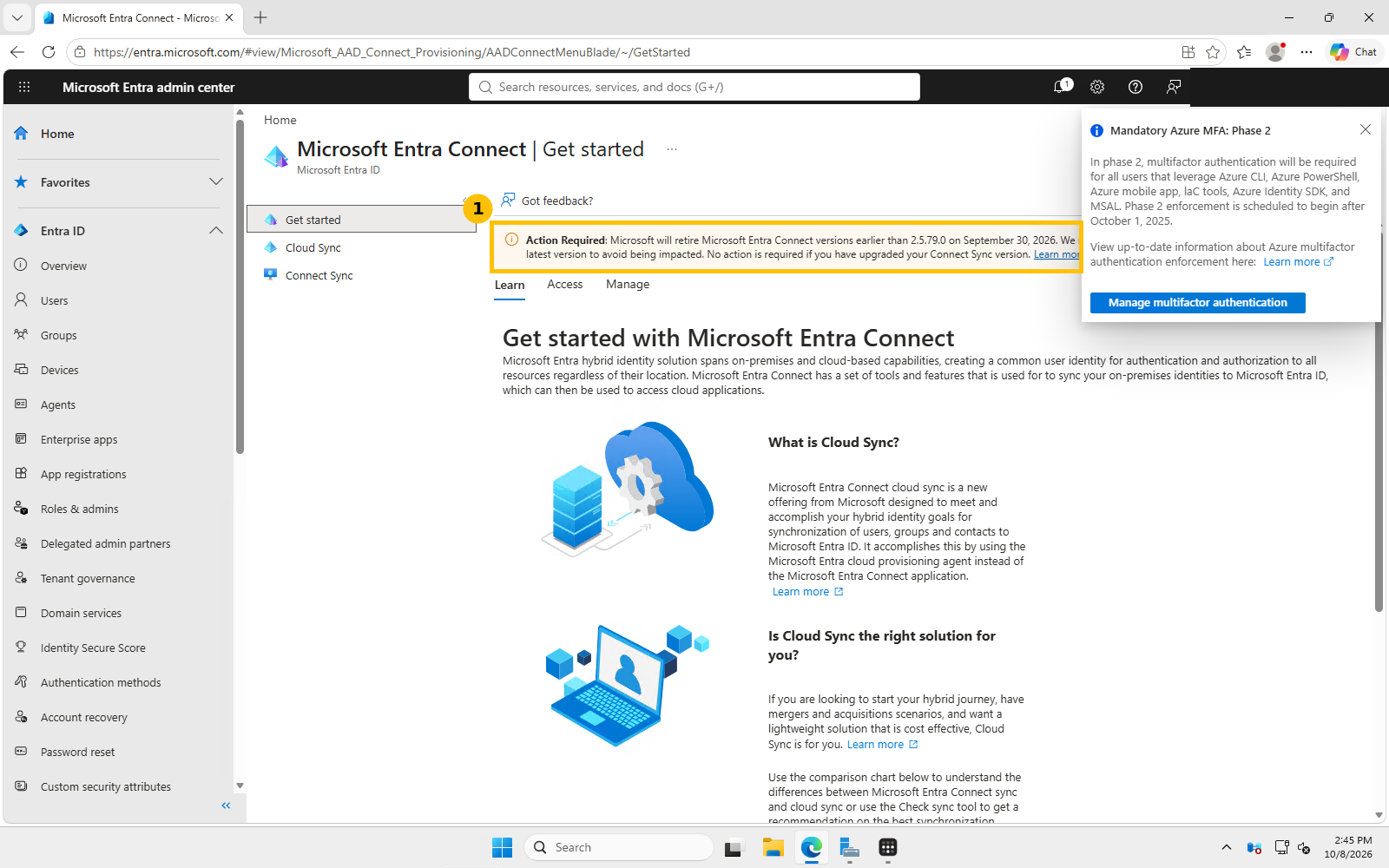
This is the real “Get started” page in the Entra admin center (Entra ID > Entra Connect). The banner at the top is Microsoft’s own retirement notice, word for word the same deadline covered below.
Important deadline: organizations still running Entra Connect Sync need to be on version 2.5.79.0 or later, Microsoft has set September 30, 2026 as the cutoff after which older Connect Sync versions stop synchronizing. If you haven’t checked your Connect server’s version recently, do it today.
Quick guide: which one should you pick
- Starting fresh, or a straightforward single-forest environment: choose Cloud Sync. It’s Microsoft’s recommended path going forward and you avoid a future migration off Connect Sync.
- Already on Connect Sync with advanced customization (complex attribute/sync-rule filtering, certain hybrid-join scenarios, pass-through authentication at scale): stay on Connect Sync for now, but make sure it’s upgraded to 2.5.79.0 or later before the cutoff.
- Running both today: you can’t run Connect Sync and Cloud Sync syncing the exact same objects to the same tenant at once, pick one as the system of record for a given set of objects.
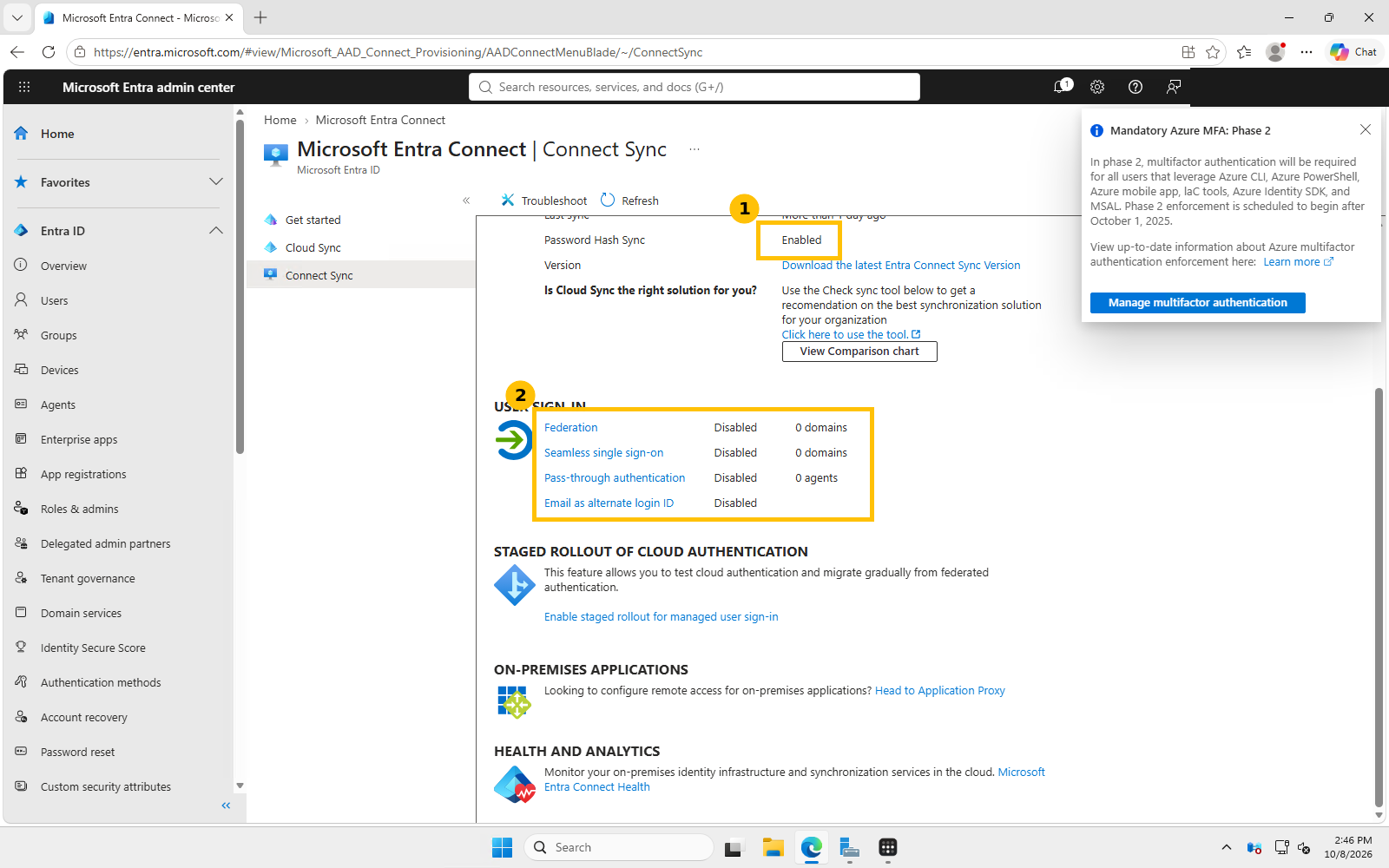
This is our lab tenant’s actual Connect Sync panel. Sync status is Enabled with Password Hash Sync as the active authentication path, and Federation, Seamless SSO, and Pass-through authentication all show Disabled with 0 domains or agents configured, confirming PHS is genuinely the only sign-in method live here, not just the example we’re about to recommend below.
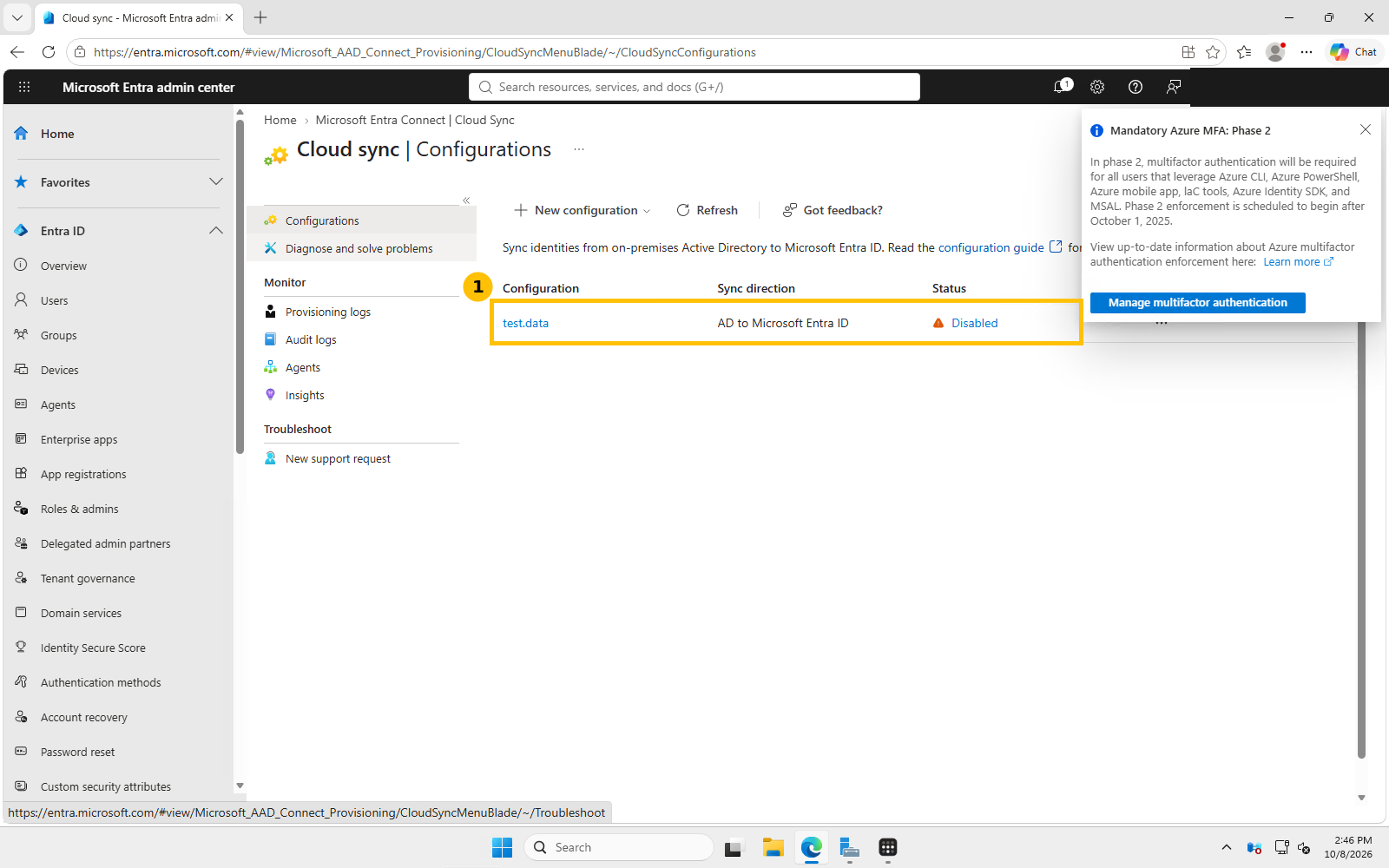
And this is the same tenant’s Cloud Sync panel, a leftover test.data configuration syncing AD to Entra ID, currently Disabled. Both engines can exist side by side like this, but per the rule above, only one should actually be active for a given set of objects at a time.
Choosing an authentication method
Whichever sync engine you use, you still separately choose how user sign-ins are actually authenticated:
- Password Hash Synchronization (PHS): a hash of the user’s on-premises password hash is synced to Entra ID, and sign-in is validated in the cloud. Simplest to deploy, no extra on-premises components required for the sign-in path itself, and it’s the only authentication option available when you use the Express installation of Entra Connect.
- Pass-Through Authentication (PTA): sign-in requests are validated against your actual on-premises AD in real time via lightweight connector agents, the password hash itself never leaves your network. Good fit if your security policy requires authentication decisions to stay on-premises.
- Federation (AD FS or a third-party provider): Entra ID redirects authentication entirely to your own federation servers. Most complex to run and secure (see our separate post on the AD FS privilege escalation CVE if you go this route), but gives you the most control over the authentication flow itself.
For most small and mid-sized environments without a specific regulatory requirement, PHS is the simplest and most resilient starting point, it has no on-premises dependency for sign-in itself, so an outage on your network doesn’t block cloud sign-ins. It’s also, as the real screenshot above shows, the path our own lab tenant actually runs.
FAQ
Can I switch from Connect Sync to Cloud Sync later without starting over? Yes, Microsoft documents a staged cutover path, but plan it deliberately rather than toggling both on for the same objects simultaneously.
Does Cloud Sync support password hash sync? Yes, PHS works with both sync engines, the sync engine and the authentication method are separate decisions.
What happens if I miss the September 30, 2026 Connect Sync version cutoff? Synchronization stops working on unsupported versions, meaning new and changed on-premises objects stop reflecting in Entra ID until you upgrade.
Sources: Microsoft Learn, “Topologies for Microsoft Entra Connect”; Microsoft Learn, “Implement password hash synchronization with Microsoft Entra Connect Sync.”