

Azure GPv1 Storage Accounts Are Being Auto-Migrated and Custom Resource Providers Retire October 31: Find Yours With Resource Graph

Two Azure retirements land within three weeks of each other. General purpose v1 (GPv1) and legacy Blob storage accounts reached their final retirement date on October 13, 2026, and Microsoft says every remaining account will be moved to general purpose v2 for you. Custom Resource Providers retire on October 31, 2026. Both are easy to forget because nothing in your daily work mentions them.
The useful question is not “what is the date”, it is “do I even have one”. Azure Resource Graph answers that for a whole subscription in one query each. This post gives you both queries, the real result from my lab subscription, and what to do if a row comes back.

Quick guide
- Run the two Resource Graph queries across all your subscriptions.
- For each GPv1 or legacy Blob account, estimate the cost change and upgrade it yourself, choosing the access tier.
- For each Custom Resource Provider, move the logic to a deployment script, a Bicep extension or an Azure Function.
- Check the Microsoft.Storage and Microsoft.CustomProviders registration on subscriptions you do not use daily.
What Microsoft says
For storage, the upgrade article states that general purpose v1 accounts retire on October 13, 2026, with new account creation blocked in the first quarter of 2026. Accounts that are not migrated are moved to GPv2 automatically, which might result in higher billing costs, and a decision not to migrate is treated as consent. The retirement notice names legacy Blob storage accounts as well (GPv1 overview, legacy Blob overview). Suggested targets are GPv2, or BlockBlobStorage and FileStorage for specialised workloads.
For Custom Resource Providers, the Azure Message Center notice (I read it through a public mirror, AZ513892) gives October 31, 2026 as the retirement date. It says creates, updates, patches and actions on custom resources are blocked from July 31, 2026, while reads and deletes keep working until the end. The notice text I read also mentions a scream test dated October 27, 2025, which looks like it belongs to the original announcement, so check the Azure portal Service Health page for the current wording before you rely on any one date. The suggested replacements are deployment scripts, Bicep extensions and Azure Functions.
Step 1: find them with Resource Graph
Azure Resource Graph queries resources across subscriptions in Kusto syntax. These are the two queries I ran. The first matches storage accounts whose kind is the old Storage (GPv1) or BlobStorage (legacy Blob). The second matches Custom Resource Providers.
resources
| where type =~ 'microsoft.storage/storageaccounts'
| where kind in~ ('Storage', 'BlobStorage')
| project name, kind, sku = sku.name, resourceGroup, subscriptionId, location
resources
| where type =~ 'microsoft.customproviders/resourceproviders'
| project name, resourceGroup, subscriptionId, locationPaste them into Resource Graph Explorer in the portal, or send them to the REST endpoint POST https://management.azure.com/providers/Microsoft.ResourceGraph/resources?api-version=2022-10-01 with a body of {"subscriptions": [...], "query": "..."}. I used the REST endpoint with a service principal.
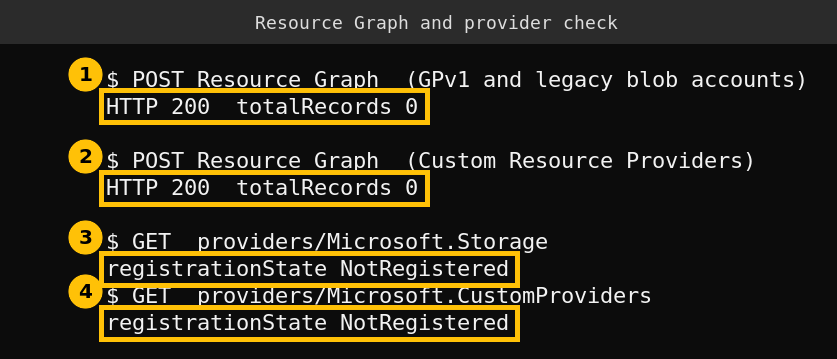
Both queries returned HTTP 200 and zero records. I want to be straightforward about what that proves. My lab subscription is nearly empty, and a third query that counted resources by type also returned nothing. So this shows that the queries are valid and that the endpoint works. It does not show that the queries find a GPv1 account, because I had none to find.
A real error: you can no longer create a GPv1 account to test with
I tried to create a GPv1 account to have something to find. The request failed before it got to the account kind.
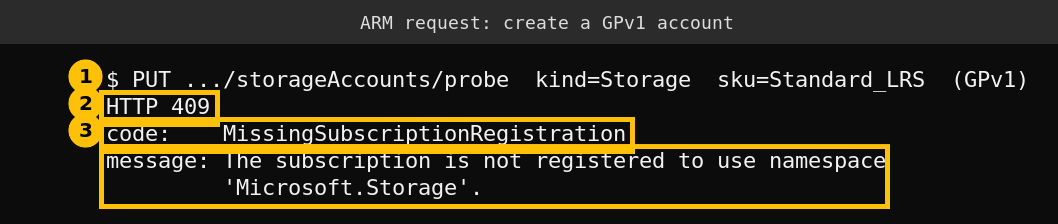
The cause is mundane. The Microsoft.Storage provider is not registered on my subscription, and the service principal I use only has rights on one resource group, so I did not register it. The same table shows Microsoft.CustomProviders as NotRegistered. That tells you something useful for your own audit: a subscription where a provider is NotRegistered cannot hold those resources, so you can skip it. I did not get as far as testing whether Azure rejects a new GPv1 account, which the notice says is blocked.
Step 2: upgrade GPv1 yourself, and choose the tier
Per the Microsoft article the upgrade is a Resource Manager operation that changes the account type. There is no downtime or data loss, it is free, and you cannot go back to GPv1 or legacy Blob. The default tier after upgrade is Hot, and you can choose Hot or Cool. The commands below are copied from that article. I could not run them, because I have no GPv1 account.
az storage account update -g <resource-group> -n <storage-account> --set kind=StorageV2 --access-tier=<Hot/Cool>Set-AzStorageAccount -ResourceGroupName <resource-group> -Name <storage-account> -UpgradeToStorageV2 -AccessTier <Hot/Cool>The reason to do it yourself is cost control. The article warns that GPv2 can have higher transaction costs, especially for workloads with many reads and writes, while the per-gigabyte price is lower. Look at your transaction metrics in Azure Monitor first and use the pricing calculator, then pick the tier. If you wait, Microsoft migrates the account for you with the default settings, and you learn the cost from the bill.
Step 3: replace a Custom Resource Provider
A Custom Resource Provider is a way to put your own endpoint behind Azure Resource Manager, so that your own resource types appear in templates. Per the notice, the replacements depend on what you used it for.
| What the provider did | Replace with |
|---|---|
| Trigger one endpoint during a deployment, with no resource to manage afterwards | Deployment scripts |
| The same, in a Bicep based deployment | Bicep extensions |
| Call several endpoints or services | Azure Functions |
If the query lists one, find out which templates reference it before you delete anything. Search your template repositories for Microsoft.CustomProviders, because deleting the provider breaks every deployment that still points at it.
Caveats
This is a lab with no GPv1 account and no Custom Resource Provider, so the detection queries are proven valid and not proven on a real match. The upgrade commands and the replacement mapping come from Microsoft documentation and I did not run them. The Custom Resource Provider dates come from a Message Center notice read through a mirror, and the notice text has an internal date oddity, so confirm the dates in your own Service Health page.
FAQ
When do GPv1 storage accounts retire?
Microsoft gives October 13, 2026 as the final retirement date. New GPv1 account creation was blocked from the first quarter of 2026.
What happens if I do nothing?
Microsoft says it will migrate remaining GPv1 accounts to GPv2 for you, which might raise the bill, and treats not migrating as consent.
Can I switch a GPv2 account back to GPv1?
No. The Microsoft article says an upgraded account cannot be downgraded.
When do Custom Resource Providers retire?
The Message Center notice gives October 31, 2026, with creates and updates blocked from July 31, 2026 and reads and deletes still working until then.
How do I list them across all subscriptions?
Use Azure Resource Graph. Two KQL queries, one for storage account kinds Storage and BlobStorage and one for microsoft.customproviders/resourceproviders, cover every subscription you can read.
Sources
- Upgrade to a general-purpose v2 storage account, Microsoft Learn
- GPv1 storage account retirement overview, Microsoft Learn
- Legacy Blob storage account retirement overview, Microsoft Learn
- Message Center AZ513892, Custom Resource Provider retirement (public mirror)
- Message Center AZ496964, GPv1 and legacy Blob retirement (public mirror)
- Azure Resource Graph overview, Microsoft Learn