Exchange Online -Credential Is Retired From December 2026: Find Every Script and Move to App-Only or Managed Identity

Microsoft is removing the -Credential parameter from Connect-ExchangeOnline and Connect-IPPSSession. The change ships in Exchange Online PowerShell module versions released from December 2026. Any script that passes a username and password through -Credential will stop working the day someone updates the module. That includes scheduled tasks, runbooks and the quick script a colleague wrote three years ago.
The server-side switch-off of the underlying sign-in flow is a separate step. Microsoft says it will announce that later and in advance. So this is a client-side break first: nothing changes in your tenant on its own, but the moment Update-Module ExchangeOnlineManagement pulls a December build, the parameter is gone.

Quick guide
- Find the callers with the read-only scanner below. It looks for every
Connect-ExchangeOnlineandConnect-IPPSSessionline and marks the ones using-Credential. - Pick the replacement for each one. Interactive admin work uses normal modern sign-in with MFA. Unattended jobs outside Azure use app-only authentication with a certificate. Jobs inside Azure use a managed identity.
- Pin the module on servers that run old scripts until you finish migrating, so an automatic update does not break them early.
- Test every replacement before you remove the old line, including the roles you grant to the app.
What Microsoft says (message center MC1248389)
- The parameter is removed from the Connect-ExchangeOnline and Connect-IPPSSession cmdlets in module versions released beginning December 2026. The July 2026 update moved the date from an earlier plan of July.
- The affected scripts are those that use the
-Credentialparameter. If you do not use it, no action is needed. - A separate server-side retirement of the underlying authentication flow is planned for later and will be announced in advance.
- Microsoft names three replacements: modern authentication with MFA for interactive use, app-only certificate authentication for automation outside Azure, and managed identities for automation inside Azure.
Scan your scripts (read-only)
Edit $roots to point at wherever your automation lives. The scan only reads files.
$roots = @('C:\Scripts', 'C:\Automation')
$files = foreach ($root in $roots) {
    if (Test-Path $root) {
        Get-ChildItem $root -Recurse -File -Include *.ps1, *.psm1 -ErrorAction SilentlyContinue
    }
}
$connect = 'Connect-(ExchangeOnline|IPPSSession)'
$results = foreach ($f in $files) {
    foreach ($l in (Select-String -Path $f.FullName -Pattern $connect)) {
        $verdict = if ($l.Line -match '-Credential\b') { 'USES -Credential' }
                   elseif ($l.Line -match '@\w+' -or $l.Line.TrimEnd().EndsWith('`')) { 'CHECK (splat or continued line)' }
                   else { 'no -Credential on this line' }
        [pscustomobject]@{ File = $f.Name; Line = $l.LineNumber; Verdict = $verdict }
    }
}
Write-Output ("Scripts scanned: {0}" -f @($files).Count)
if ($results) { $results | Format-Table -AutoSize | Out-String -Width 200 } else { 'No Connect-ExchangeOnline or Connect-IPPSSession calls found' }
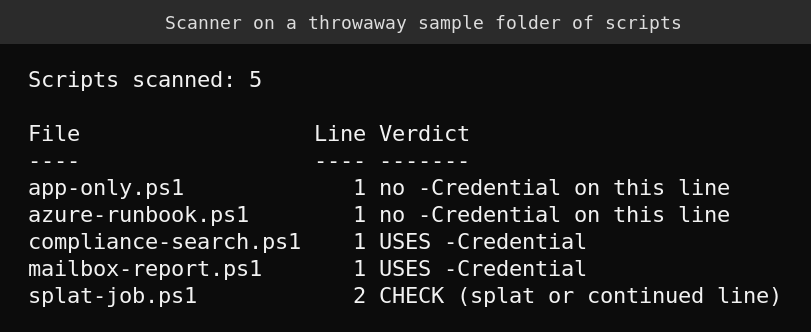
I tested it on a throwaway folder with five scripts: two with -Credential, one using a splatted hashtable, one app-only and one managed identity. The result below is correct for all five, including the honest CHECK verdict on the splat. A splat like @params hides the parameter names, so the scanner cannot tell you what is inside and asks you to look. On my own lab server there were no scripts in those folders, so the real scan returned zero files. That proves nothing about your estate.
What the installed module shows today
I installed ExchangeOnlineManagement 3.10.1 on a Windows Server 2025 lab machine and listed the authentication parameters of Connect-ExchangeOnline. -Credential is still there, next to the options you will migrate to.
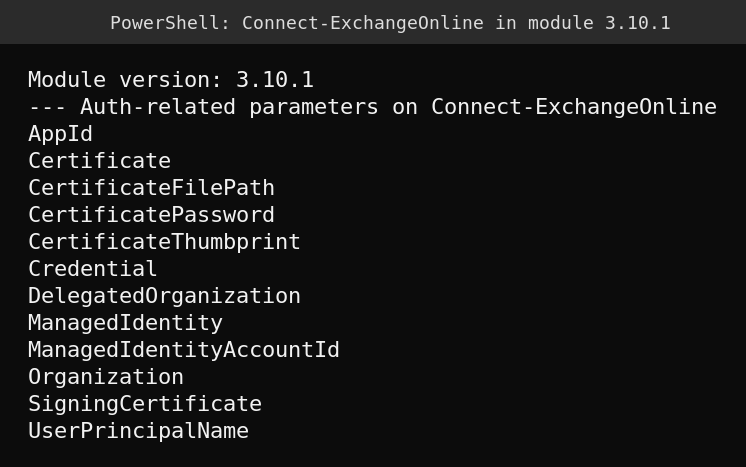
The cmdlet help in this version does not carry any retirement warning, so scripts will not tell you ahead of time. You have to look for the parameter yourself.
The three replacements
| Scenario | Replace -Credential with | Connect line |
|---|---|---|
| Admin at a keyboard | Modern sign-in with MFA | Connect-ExchangeOnline -UserPrincipalName [email protected] |
| Unattended job outside Azure | App-only with a certificate | Connect-ExchangeOnline -AppId <app-id> -CertificateThumbprint <thumbprint> -Organization contoso.onmicrosoft.com |
| Azure Automation, Functions or a VM | Managed identity | Connect-ExchangeOnline -ManagedIdentity -Organization contoso.onmicrosoft.com |
For Security & Compliance PowerShell use Connect-IPPSSession with the same pattern.
Setting up app-only authentication
This follows Microsoft’s app-only documentation. I did not run these steps in a live tenant, so test them in yours.
- Register a single-tenant application in Microsoft Entra ID.
- Add the Exchange.ManageAsApp application permission. For Connect-ExchangeOnline it comes from the Office 365 Exchange Online API. For Connect-IPPSSession it comes from Microsoft Exchange Online Protection. Grant tenant-wide admin consent.
- Create a certificate and upload the public part to the app. Microsoft states that Cryptography Next Generation (CNG) certificates are not supported for this method. Use a certificate from a CSP key provider, and note that modern Windows creates CNG certificates by default.
- Give the app permission by assigning a Microsoft Entra role. Supported roles include Exchange Administrator, Exchange Recipient Administrator, Global Reader, Security Reader, Security Administrator, Compliance Administrator and Helpdesk Administrator, depending on the PowerShell environment. Microsoft recommends least privilege and says custom role groups let you restrict commands and scope.
- Connect with the thumbprint line from the table.
Two limits to know. App-only authentication stays unsupported for Microsoft Purview eDiscovery cmdlets such as New-ComplianceSearch and New-CaseHoldPolicy. Microsoft documents a workaround using module 3.10.1 or later with -EnableSearchOnlySession, and says it does not make that configuration supported. Also, a few group cmdlets are not supported app-only, so check Microsoft’s page for your cmdlets before you commit.
What I could not verify
- I could not test a live connection. My attempt with a made-up account failed with a Windows logon session error (WAM), so I am not using it as evidence either way.
- I do not have the December module build, so I cannot show how the removal behaves in practice. The date comes from Microsoft’s message center post, which has already moved once.
- The scanner reads text. It cannot see a credential passed through a variable splat, a dot-sourced helper function or a script stored outside the folders you give it.
FAQ
Is the -Credential parameter removed right now?
No. In module 3.10.1 it is still present, as the parameter listing above shows. Microsoft says it will be removed in module versions released beginning December 2026.
Will my existing scripts break if I never update the module?
Not because of this change. The removal happens in new module versions. Microsoft separately plans to retire the underlying sign-in flow on the server side later and says it will announce that in advance. Staying on an old module is a stopgap, not a plan.
Which option should I choose for a scheduled task on a Windows server?
App-only authentication with a certificate, because a scheduled task is automation outside Azure. If the job already runs in Azure Automation, a managed identity avoids certificates altogether.
Does this also affect Connect-IPPSSession?
Yes. The message center post names both Connect-ExchangeOnline and Connect-IPPSSession.
Sources
- Microsoft 365 Message Center MC1248389: Retirement of -Credential parameter when connecting to Exchange Online PowerShell
- Microsoft Learn: App-only authentication for unattended scripts in Exchange Online PowerShell
Related on this site: auditing forwarding and inbox rules with PowerShell, managing shared mailboxes and the EWS block that started on October 1, 2026.