Entra PIM Iteration 2 APIs Stop Working on October 28, 2026: Find Every Script Still Calling Them

On October 28, 2026, Microsoft turns off the second iteration of the Privileged Identity Management (PIM) API. That is 10 days from today. Microsoft’s retirement notice says any application or script that calls the Iteration 2 (beta) endpoints will fail after that date. The portal docs use a slightly different wording, that the endpoint “will stop returning data.” Either way, a report, a runbook or a SIEM connector that reads PIM assignments through the old API will break or go quiet.
The old endpoint lives under /beta/privilegedAccess, with the aadRoles and azureResources segments. This post shows you how to find every caller, what each one should move to, and the real wall I hit when I tried the replacement in my own lab tenant.

Quick guide
- Scan your code with the read-only script below. It flags any file that calls
privilegedAccess/aadRoles,azureResourcesoraadGroups. - Check your logs. If Graph activity logs go to Log Analytics, run the KQL query below to find callers that are not in your repositories.
- Map each call to its Iteration 3 equivalent using the table.
- Test in a licensed tenant. The Iteration 3 calls I tried returned a licence error in my unlicensed lab, so you need Entra ID P2 or Entra ID Governance to test them.
- Retest your reports for empty output, not just errors, because the docs say the old endpoint stops returning data.
The four iterations in one minute
Microsoft’s own PIM API history page is the source for this. The iterations are not a straight line of versions.
| Iteration | Endpoint | Status |
|---|---|---|
| 1 | /beta/privilegedRoles, Entra roles only | Retired in June 2021 |
| 2 | /beta/privilegedAccess with /aadRoles and /azureResources | Deprecated, stops returning data on October 28, 2026 |
| 3 | Entra roles and groups in Microsoft Graph, Azure resources in Azure Resource Manager | Current and final. Generally available |
What each old call should become
| What you manage | Iteration 2 (retiring) | Iteration 3 (use this) |
|---|---|---|
| Entra role assignments and eligibilities | /beta/privilegedAccess/aadRoles | Microsoft Graph roleAssignmentScheduleRequests and roleEligibilityScheduleRequests under roleManagement/directory, plus the read-only schedule and instance objects |
| Entra role settings (MFA, approval, max duration) | Role settings under the old endpoint | Microsoft Graph roleManagementPolicies and roleManagementPolicyAssignments |
| Azure resource roles | /beta/privilegedAccess/azureResources | Azure Resource Manager role eligibility and assignment schedule APIs. In PowerShell, Get-AzRoleEligibilitySchedule and Get-AzRoleAssignmentScheduleInstance |
| PIM for Groups | Beta group segment, if you used it | Microsoft Graph v1.0 under identityGovernance/privilegedAccess/group |
Iteration 3 also adds support for app-only permissions and new features such as approval and email notification configuration, according to the same Microsoft page. The exact Graph paths above come from Microsoft’s v1.0 reference page for the PIM APIs. I did not run the Entra role and group calls myself, so test each one before you rely on it.
Scan your scripts and repos (read-only)
Run this on any machine that holds your automation. Edit $roots to point at your script folders and checked out repositories. The pattern uses a negative lookbehind so the valid v1.0 group endpoint under identityGovernance/privilegedAccess is not flagged.
$roots = @('C:\Scripts', 'C:\Automation')
$oldApi = '(?<!identityGovernance/)privilegedAccess/(aadRoles|azureResources|aadGroups)'
$files = foreach ($root in $roots) {
    if (Test-Path $root) {
        Get-ChildItem $root -Recurse -File -Include *.ps1, *.psm1, *.py, *.js, *.ts, *.cs, *.json, *.yml, *.yaml, *.sh, *.txt -ErrorAction SilentlyContinue
    }
}
$hits = $files | Select-String -Pattern $oldApi | ForEach-Object {
    [pscustomobject]@{
        File  = $_.Path
        Line  = $_.LineNumber
        Match = $_.Matches[0].Value
    }
}
Write-Output ("Files scanned: {0}" -f @($files).Count)
if ($hits) { $hits | Format-Table -AutoSize | Out-String -Width 200 } else { 'No calls to the retiring PIM endpoints found' }
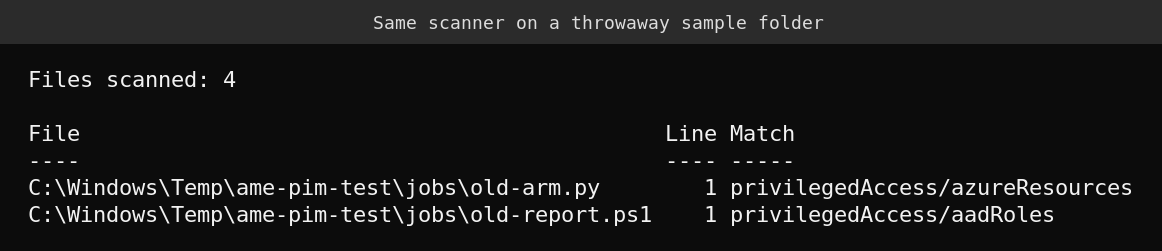
I ran it on a throwaway sample folder with four files: two that call the old endpoints, one that already uses the v1.0 role schedules and one that uses the v1.0 group endpoint. It flagged exactly the two old ones. I then deleted the folder. On my real lab server the scan found nothing because I keep no automation in those folders, so that result proves nothing about your environment.
Find callers that are not in your repositories
Scripts hide in Azure Automation runbooks, Logic Apps, Power Automate flows, vendor tools and a colleague’s laptop. If you send Microsoft Graph activity logs to a Log Analytics workspace, this query lists who is still calling the old path.
MicrosoftGraphActivityLogs
| where TimeGenerated > ago(30d)
| where RequestUri has "/beta/privilegedAccess/"
| summarize Calls = count(), LastSeen = max(TimeGenerated) by AppId, RequestMethod
| order by Calls desc
I could not run this query. My lab has no Log Analytics workspace and Graph activity logging is not switched on, so treat the table and column names as taken from the schema Microsoft documents, and adjust if your workspace differs. Another hint is to review app registrations that were granted the PrivilegedAccess.* Graph permissions, since the old API needs them.
A real wall: the replacement needs a licence
To prove the Iteration 3 side works from PowerShell, I signed in to my lab with a service principal that has Reader on the subscription and called the Azure Resource Manager schedule cmdlet. Both Get-AzRoleEligibilitySchedule and Get-AzRoleAssignmentScheduleInstance failed with the same message.

The error is AadPremiumLicenseRequired: the tenant needs Microsoft Entra ID P2 or Microsoft Entra ID Governance. My lab tenant has neither. That is a useful warning for your migration. If your production tenant is licensed you are fine, but a dev or test tenant without the licence cannot exercise these calls, so plan to test in a tenant that has it.
What I could not verify
- I did not call the old Iteration 2 endpoint, so I cannot say whether it returns an error or an empty result after October 28. Microsoft’s two documents use different wording.
- I did not run the Graph calls for Entra roles and groups. The paths come from Microsoft’s reference.
- The KQL query was not run because my lab has no workspace.
- The scanner matches text patterns. It will miss an endpoint built from string pieces at run time, and it cannot see inside compiled apps.
FAQ
Is Privileged Identity Management itself being retired?
No. Only the Iteration 2 beta API surface is retiring. Microsoft says Iteration 3 is the final and current API, and that it is also moving the PIM portal UI to Iteration 3.
Will the Entra admin center PIM blade stop working on October 28?
Microsoft’s retirement notice is about applications and scripts that call the old endpoints. The docs say the UI is being migrated to Iteration 3, but I found no statement that the portal depends on the date.
Which Microsoft Graph version should I use for the new calls?
The v1.0 endpoint. Microsoft lists PIM for Entra roles and PIM for Groups as generally available there. The roleAssignmentApprovals APIs are available only in beta, and PIM security alerts are still in preview, according to Microsoft’s documentation.
Can I just keep using the old API a bit longer?
No. Microsoft set October 28, 2026 as the date after which the calls fail or stop returning data, and it advised stopping new development on the old API.
Sources
- Microsoft 365 Message Center MC1181281: PIM Iteration 2 (beta) API retirement
- Microsoft Learn: API concepts in Privileged Identity Management
- Microsoft Graph: Manage Microsoft Entra role assignments using the PIM APIs
- Microsoft Learn: PIM for Azure resource roles API
Related on this site: signing in to Azure with a service principal, which is how I ran the lab call above.