Installing k3s and Deploying Your First Kubernetes Workload

Kubernetes has a reputation for needing a whole cluster of expensive servers before you can try it. k3s, Rancher’s lightweight Kubernetes distribution, packs a full working cluster into a single binary that installs on one small Linux box in a couple of minutes. This walkthrough installs it for real, deploys a container, and proves it actually serves traffic.
Quick guide
- On a Linux machine, install k3s. The official one line install is
curl -sfL https://get.k3s.io | sh -, and it sets up a systemd service automatically. - Confirm the cluster is up with
sudo k3s kubectl get nodes. A single node showing Ready means you have a working, if small, Kubernetes cluster. - Deploy your first container with
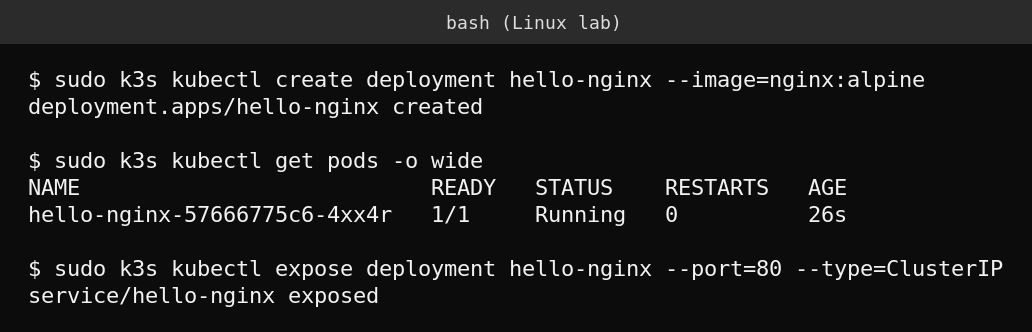
sudo k3s kubectl create deployment hello-nginx --image=nginx:alpine. - Check it started with
sudo k3s kubectl get pods, waiting for the STATUS column to show Running. - Expose it inside the cluster with
sudo k3s kubectl expose deployment hello-nginx --port=80 --type=ClusterIP. - Prove it actually serves traffic by running a throwaway pod that fetches the page:
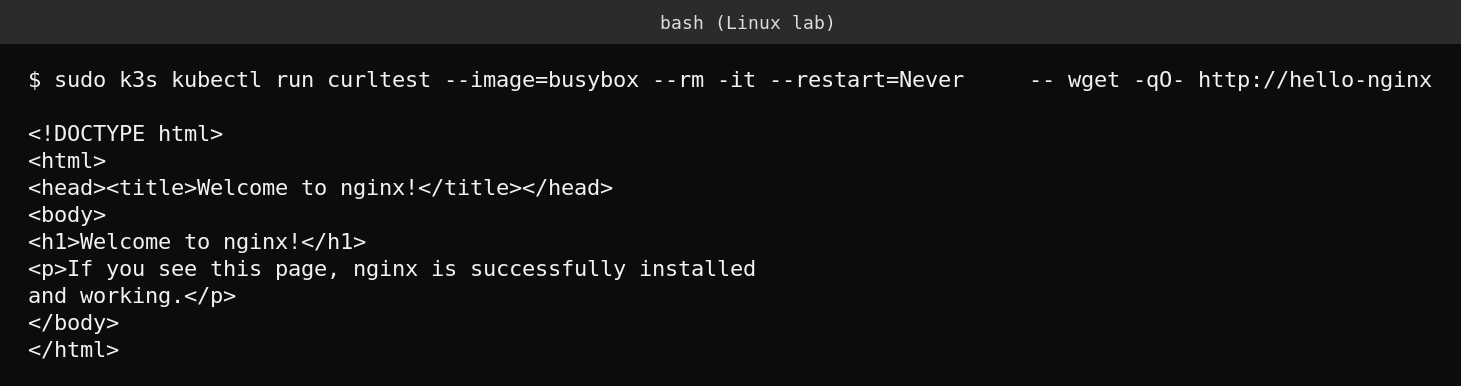
sudo k3s kubectl run curltest --image=busybox --rm -it --restart=Never -- wget -qO- http://hello-nginx.

What k3s actually is
k3s is a certified Kubernetes distribution built by Rancher (part of SUSE) that strips the packaging down to a single binary under 100 MB, with sane defaults and a much lighter resource footprint than a full upstream Kubernetes install. It bundles containerd as the container runtime, and by default a lightweight built in load balancer and ingress controller, though this walkthrough disabled the bundled Traefik ingress and service load balancer to keep the demo focused on plain kubectl commands. It runs comfortably on a single small VM or even a Raspberry Pi, which is exactly why it has become the default choice for home labs, edge deployments and anyone who wants to learn real Kubernetes without provisioning a multi node cluster first.
Deploying and exposing a real workload
A Deployment in Kubernetes describes the desired state, here one replica of the nginx web server, and the cluster’s control plane continuously works to make reality match that description. A Service gives that Deployment a stable internal address, since individual pod IPs change every time a pod restarts or reschedules. Exposing the deployment with kubectl expose is what makes it reachable by a consistent name from anywhere else in the cluster, rather than only from wherever the pod happens to be running at that moment.
Proving it actually works
Getting a pod to Running status is not the same as proving it serves real traffic. Running a second, disposable pod that fetches the page over the internal service address is the honest test, it exercises DNS resolution inside the cluster, the service’s virtual IP, and the actual nginx response, all in one command.
What actually goes wrong
The most common first mistake with k3s and Kubernetes generally is confusing “the pod exists” with “the pod works.” A pod stuck in ContainerCreating or CrashLoopBackOff still shows up in kubectl get pods, and it is easy to declare victory too early. Always wait for READY to show 1/1 and STATUS to show Running, and when something does not come up, kubectl describe pod podname and kubectl logs podname are the two commands that explain why, in that order.
FAQ
Is k3s suitable for production, or only learning?
Both. k3s is a CNCF certified Kubernetes distribution used in real production edge and IoT deployments, not just a toy for tutorials, though a single node cluster like this one has no high availability.
How do I remove k3s if I want to start over?
The install script places an uninstall script at /usr/local/bin/k3s-uninstall.sh (or a killall script if installed manually), which cleanly removes the service and its data.
Do I need Docker installed separately?
No. k3s bundles containerd as its container runtime, so it runs and pulls images without a separate Docker installation.
Sources
Official k3s documentation and GitHub releases at k3s.io and github.com/k3s-io/k3s.