Check Active Directory Replication Health With repadmin and dcdiag

Active Directory replication keeps every domain controller in sync. When it quietly breaks, nothing crashes right away, but group memberships, password changes and GPO updates stop reaching some of your DCs, and the gap grows until logons or trusts fail in confusing ways. Two built in tools, repadmin and dcdiag, tell you the health of replication in under a minute.
Quick guide
- On any domain controller, open PowerShell as an administrator.
- Run
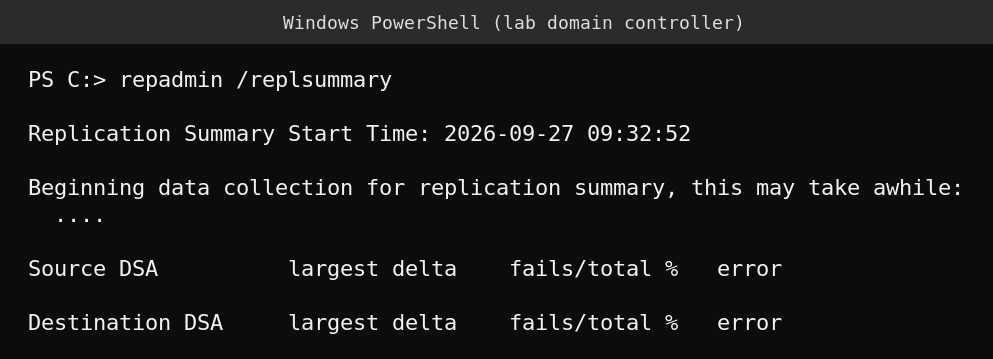
repadmin /replsummary. It prints one line per DC with the largest delta since last replication and a fail count. Anything other than 0 fails is worth investigating. - Run
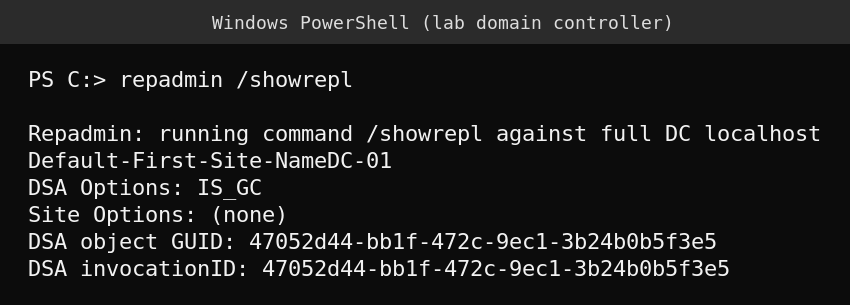
repadmin /showreplon a specific DC to see each replication partner, the last attempt time, and whether it succeeded. - Run
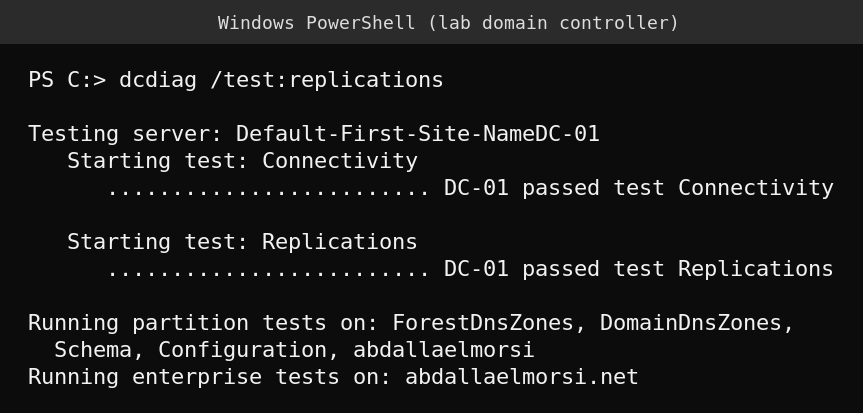
dcdiag /test:replications. It runs a live replication check and prints a plain “passed” or “failed” per DC. - If you see a fail count, look up its error number (examples below) before you start changing anything.
- Fix the root cause, usually DNS, connectivity or time skew, then re-run
repadmin /replsummaryto confirm the fail count returns to zero.
Reading repadmin /replsummary
The summary lists every DC twice, once as a Source DSA and once as a Destination DSA, with two numbers next to each: the largest delta (how long since the most recent successful replication with any partner) and fails/total (how many of the recent replication attempts failed). A healthy environment shows a delta of a few hours at most and 0 fails/total for every DC. A large delta on one DC usually means it cannot reach its partners, and a nonzero fail count points at a specific link worth checking with /showrepl.
Reading repadmin /showrepl
This command targets one DC and lists its inbound replication partners, one block per partner, with the naming context, the last attempt time, and whether that attempt succeeded. In a lab or a very small environment with only one domain controller, the DSA Options and DSA invocationID lines still print, but there is no partner block, because there is nothing to replicate with. In a multi DC environment, look for “Last attempt” showing a recent time and no error text under each partner.
Reading dcdiag /test:replications
Where repadmin reports what already happened, dcdiag actively tests replication right now, plus basic connectivity to the DC, and prints a clear pass or fail per server, followed by tests against each directory partition (schema, configuration, domain and any application partitions) and the forest overall. A clean run shows “passed test Connectivity” and “passed test Replications” for every DC tested.
Common replication error numbers
- 8453, Replication access was denied: the DC’s computer account is missing the permission to replicate directory changes, often after a permissions change or a broken trust between DCs.
- 1722, The RPC server is unavailable: usually a network path, firewall or DNS problem stopping the DCs from reaching each other over RPC.
- 1908, Could not find the domain controller for this domain: commonly a DNS resolution failure, or the destination DC cannot contact a key distribution center, which also points back to DNS or time sync.
Most replication errors trace back to one of three causes: broken DNS between sites, a blocked network path, or clock drift beyond the Kerberos tolerance (5 minutes by default). Check those three before anything more specific.
What actually goes wrong
Replication failures rarely announce themselves. A branch office DC can sit disconnected for days, silently serving stale group memberships and old passwords, until someone notices a user was disabled a week ago but can still log on at that site. Scheduling a daily repadmin /replsummary check, or wiring it into monitoring, catches this before it becomes a support ticket.
FAQ
Why is my replsummary table empty?
An empty table with no rows and no errors is normal on a domain with a single domain controller, since there are no partners to replicate with. With two or more DCs you should see one row per DC.
What counts as a healthy replication delta?
A delta of a few hours or less is typical for a healthy site connected by a fast link. Sites connected over a slower or less reliable WAN link may show a larger scheduled delta by design, check your site link replication schedule before assuming a problem.
Does dcdiag replace repadmin?
They complement each other. dcdiag gives a quick pass or fail health check across DCs, and repadmin gives the detail, per partner status and error codes, needed to actually diagnose a failure it finds.
Sources
Microsoft Learn documentation for repadmin and the replication error articles for events 8453, 1722 and 1908.