
The Last Windows Secure Boot Certificate From 2011 Expired on October 19: Check Whether Your Windows Server Has the 2023 Certificates, and Why the Registry and the Firmware Can Disagree

The last of the three Secure Boot certificates from 2011 that Microsoft listed expired on October 19, 2026. It is the Microsoft Windows Production PCA 2011, the certificate that signs the Windows boot loader. Two others expired earlier, the Microsoft Corporation KEK CA 2011 on June 24 and the Microsoft UEFI CA 2011 on June 27. The replacements are already published, and the question for a server admin now is simple: does your server have them?
The first thing to know is what did not happen. Microsoft’s page on the expiration says devices that lack the 2023 certificates keep starting and running normally and keep installing standard Windows updates. What they lose is the ability to receive new security protections for the early boot process. That is a slow problem, not an outage, which is exactly why it gets forgotten. I checked my Windows Server 2025 lab domain controller and found something odd, which I explain below.
Quick guide
- Check Secure Boot is on with
Confirm-SecureBootUEFI. If your server is not UEFI, none of this applies. - Look inside the firmware DB for
Windows UEFI CA 2023. This is the real answer, because it reads the certificate store in the firmware. - Look inside the KEK for
KEK 2K CA 2023. The KEK signs future updates to the DB, so it matters too. - Read the Windows status in the registry and the TPM-WMI events, but treat them as a second opinion, as the lab section shows.
- If the 2023 certificates are missing, install the latest updates and your server maker’s firmware, then use the steps in Microsoft’s KB 5068202 on one server first.
Microsoft’s dates
| Expiring certificate | Expires | Replacement | Stored in |
|---|---|---|---|
| Microsoft Corporation KEK CA 2011 | June 24, 2026 | Microsoft Corporation KEK 2K CA 2023 | KEK |
| Microsoft UEFI CA 2011 | June 27, 2026 | Microsoft UEFI CA 2023 and Microsoft Option ROM UEFI CA 2023 | DB |
| Microsoft Windows Production PCA 2011 | October 19, 2026 | Windows UEFI CA 2023 | DB |
The same page lists Windows Server 2012 (ESU), 2012 R2 (ESU), 2016, 2019, 2022 and 2025 as affected. The registry keys I use below come from KB 5068202, which says they are included in updates released on or after November 11, 2025.
Step 1 to 3: read the certificates in the firmware
Confirm-SecureBootUEFI$db = [System.Text.Encoding]::ASCII.GetString((Get-SecureBootUEFI db).bytes)
$db -match 'Windows UEFI CA 2023'
$db -match 'Windows Production PCA 2011'$kek = [System.Text.Encoding]::ASCII.GetString((Get-SecureBootUEFI kek).bytes)
$kek -match 'KEK 2K CA 2023'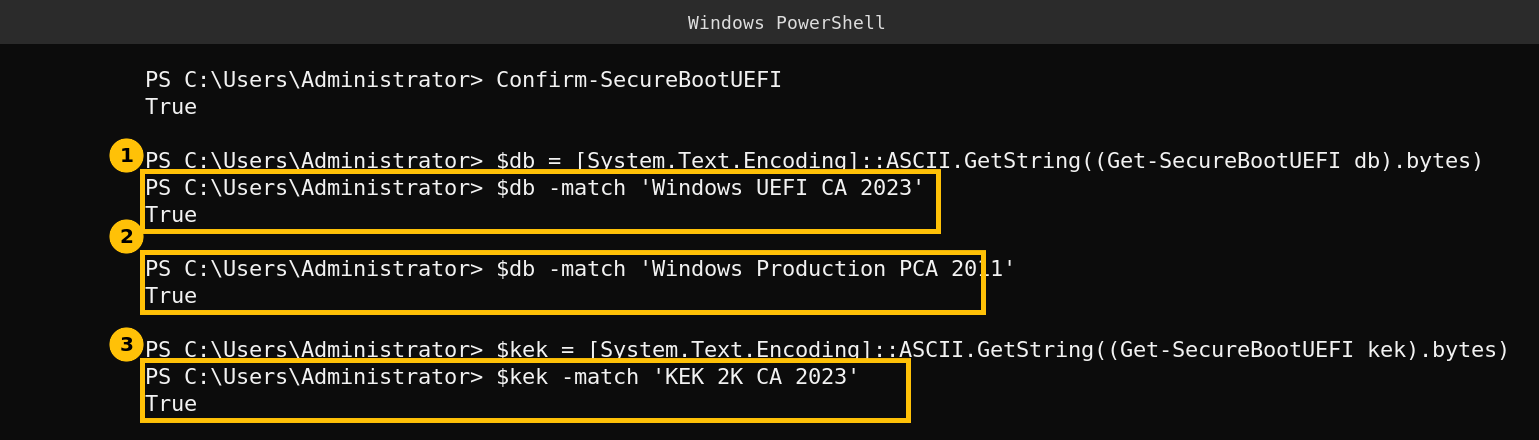
On my lab server all four answers are True. Secure Boot is on, the DB holds both the new Windows UEFI CA 2023 and the old Windows Production PCA 2011, and the KEK holds the 2023 key. Keeping the old certificate next to the new one is the expected state during the transition. The -match check is a text search of the raw variable, so it tells you the certificate name is present but does not validate the certificate.
Step 4 and 5: what Windows says, and where it disagrees
Get-ItemProperty 'HKLM:\SYSTEM\CurrentControlSet\Control\SecureBoot\Servicing' |
    Format-List UEFICA2023Status,WindowsUEFICA2023Capable
Get-WinEvent -ProviderName 'Microsoft-Windows-TPM-WMI' |
Group-Object Id | Format-Table Name,Count -AutoSize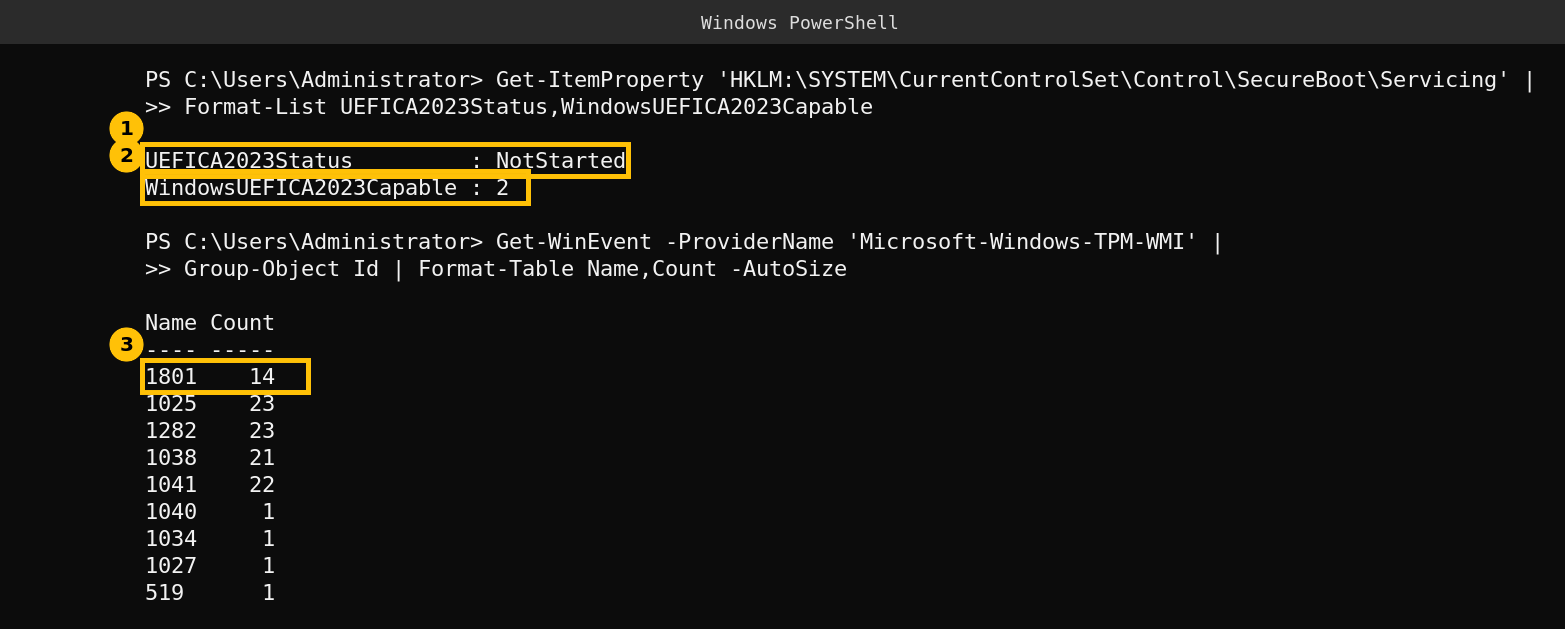
This is the part that surprised me. The firmware already has the 2023 certificates, but the status string says NotStarted. Per KB 5068202 that string can be NotStarted, InProgress or Updated. The other value, WindowsUEFICA2023Capable, is 2, which the KB describes as the 2023 certificate being in the DB and the system booting from the 2023 signed boot manager. The KB also marks that value as for reference only and says to use UEFICA2023Status for status. Two Windows signals disagree, and the firmware DB sits with the second one.
The event log adds a third opinion. Event 1801 from the TPM-WMI source has been logged 14 times, and there is no event 1808. A Microsoft Q&A answer (learn.microsoft.com answers, not official documentation) describes 1808 as the sign that the certificates were applied and 1801 as certificates updated but not yet applied to the firmware. Here is what my 1801 says:
$e = Get-WinEvent -ProviderName 'Microsoft-Windows-TPM-WMI' |
Where-Object Id -eq 1801 | Select-Object -First 1$e.Message.Substring(0,100)$e.Message -split "`n" | Select-String 'BucketConfidenceLevel'
The message says the certificates have been updated but not applied, and the confidence level reads No Data Observed – Action Required. I trimmed the message to its first 100 characters so it fits, which is why it ends mid word.
My reading, not a confirmed cause: this domain controller is a virtual machine on QEMU, and the event text names the firmware as the Proxmox build of EDK II. I believe the virtual firmware ships with the 2023 certificates already in place, so Windows’ own servicing never had work to do and keeps reporting NotStarted. I did not check how the certificates got into this VM’s variable store. What I can say with evidence is that the status string and the event say one thing while the firmware says another, so read the DB first. If your servers are virtual, the fix may live in the hypervisor, and my post on vCenter and the Secure Boot certificates covers the VMware side.
If your server does not have the 2023 certificates
KB 5068202 documents an enterprise trigger. Set AvailableUpdates to 0x5944, start the scheduled task \Microsoft\Windows\PI\Secure-Boot-Update (it runs every 12 hours by default), and reboot when the value reaches 0x4100. My lab server has that task and it shows as Ready. I did not run the trigger, because the lab domain controller already has the certificates and I do not change it for a post. Test it on one non critical server first, and make sure you have your BitLocker recovery keys before you touch boot components.
Some servers also need a firmware update from the manufacturer before Windows can write the new certificates. Do not turn Secure Boot off to avoid the problem.
Caveats
- This is one virtual machine. A physical server from Dell, HPE or Lenovo can look different, and I have not tested one.
- I did not apply any certificate update, so I cannot show a before and after.
- The meaning of event 1801 and 1808 comes from a Microsoft Q&A answer, not from a documentation page.
- I read the Microsoft expiration page and KB 5068202 through a page reader, so check the live pages for wording changes.
FAQ
Will my Windows Server stop booting because the Secure Boot certificate expired?
No. Microsoft says devices without the 2023 certificates keep starting and keep receiving standard Windows updates. What they cannot get is new early boot protections.
Which certificate expired on October 19, 2026?
Microsoft Windows Production PCA 2011, the certificate that signs the Windows boot loader. Its replacement is Windows UEFI CA 2023, stored in the DB.
How do I check whether my server has the new certificates?
Read the firmware DB and KEK with Get-SecureBootUEFI as shown above and look for Windows UEFI CA 2023 and KEK 2K CA 2023. Do not rely only on the registry status or event IDs.
What does event 1801 mean?
A Microsoft Q&A answer describes it as certificates updated but not yet applied to the firmware. On my lab server it was logged 14 times while the firmware already held the 2023 certificates, so confirm with the DB.
Is it safe to turn Secure Boot off instead?
I would not. Turning it off removes the protection the certificates exist to support. Update the certificates and the firmware instead.